


 Video Converter Ultimate
 Skærmoptager
 Video reparation
Sådan konverteres MTS til MKV hurtigt gratis
Kort sagt er MTS‑filen et standard filformat i MPEG Transport System, som understøtter 720p‑ og 1080i‑videoer. Dog kan outputfilstørrelsen i dette format være enorm. Derfor bør du konvertere den til et filformat, der er bredt understøttet og har en mindre filstørrelse, såsom MKV‑formatet. I denne artikel præsenterer vi de bedste måder til at konvertere MTS til MKV gratis.

Del 1. 2 Bedste gratis onlineværktøjer, der konverterer MTS til MKV
FVC gratis videokonverter online
I dag foretrækker folk at bruge en online konverter frem for at installere et softwareprogram. FVC Free Online Video Converter er en online konverter, der giver dig mulighed for at konvertere filer som MTS til MKV, MP4, WMV, AVI, FLV og mere. På trods af at det er en gratis online konverter, går det ikke på kompromis med kvaliteten af din fil under konverteringen. Desuden har den funktioner, hvor du kan redigere opløsningen samt video‑ eller lydbitrate.
Her er trinene til, hvordan du konverterer din fil MTS til MKV ved hjælp af dette gratis onlineværktøj:
Trin 1. For at bruge denne konverter skal du klikke på dette link for at blive ført videre til deres webside.
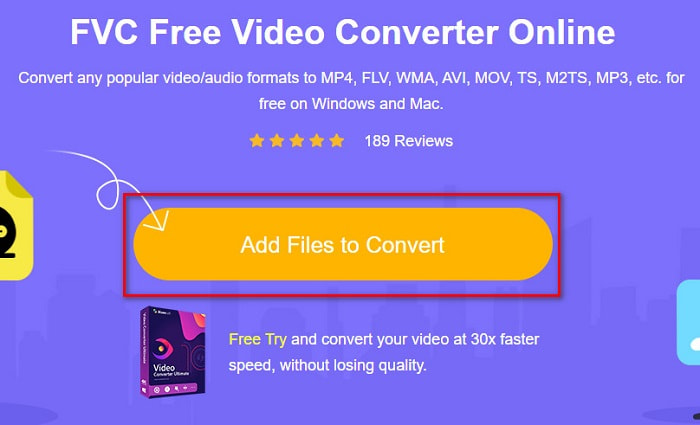
Trin 2. Det næste trin er at klikke på knappen Add Files to Convert for at downloade launcheren. Når launcheren er downloadet, vises dine computerfiler; vælg derefter din MTS-fil for at uploade den.
Trin 3. Når du har valgt din MTS‑fil, skal du klikke på MKV-filen nederst i softwarens grænseflade.
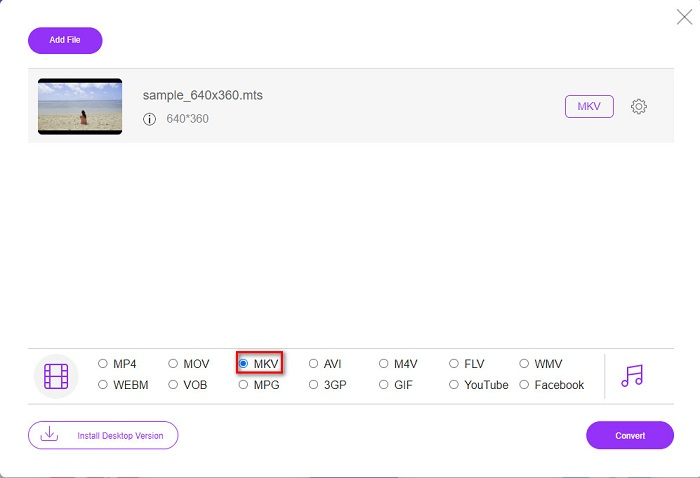
Trin 4. Til sidst skal du klikke på knappen Convert for at konvertere din MTS‑fil til en MKV‑fil. Vent derefter, til din fil er konverteret.
Ved at følge disse enkle trin kan du konvertere MTS til MKV gratis og online.
AnyConv
En anden online konverter, du kan bruge til at konvertere filer uden at miste kvalitet, er AnyConv File Converter. Denne konverter understøtter også adskillige filformater, herunder MTS til MKV, AVI, MP4, MOV, MPEG osv. Den har dog kun begrænsede funktioner. Du kan ikke redigere eller ændre opløsningen på din fil. Den er også webbaseret; derfor kan du opleve langsom konvertering. Ikke desto mindre bliver den brugt af mange på grund af sin bekvemmelighed.
Trin til, hvordan du bruger AnyConv File Converter:
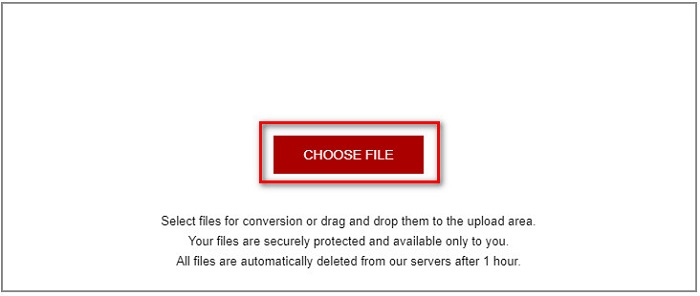
Trin 1. Søg efter AnyConv File Converter i din browser. Når du er kommet ind på deres websted, skal du klikke på knappen Choose Files for at vælge din MTS‑fil i dine computerfiler.
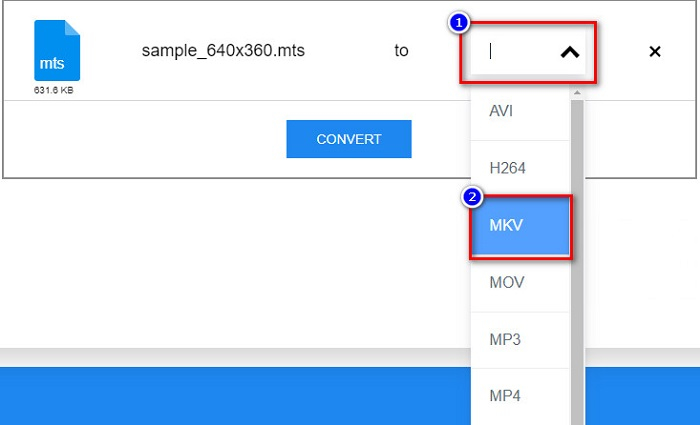
Trin 2. Når du har valgt din MTS‑fil, skal du klikke på drop-down-knappen og vælge filformatet MKV.
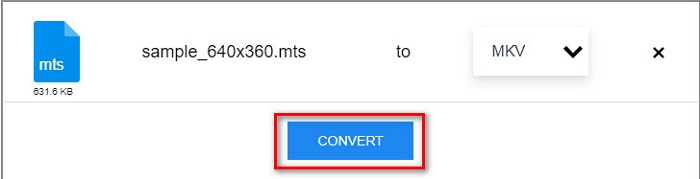
Trin 3. Til sidst skal du klikke på knappen Convert for at starte din konvertering fra MTS til MKV.
Del 2. Konverter MTS til MKV på Windows 10/11 uden tab
Hvis du leder efter en konverter til din Windows 10/11, er FVC Video Converter Ultimate det bedste værktøj for dig. Det understøtter forskellige filformater og kan konvertere MTS til MKV, MP4, WebM, VOB, MPG, AVI og mange flere. Derudover har denne konverter en funktion, hvor du kan oprette GIF'er og endda lave en 3D-video. Du kan også konvertere MTS til MKV hurtigt og ubesværet uden at miste kvaliteten af din fil.

FVC Video Converter Ultimate
5.689.200+ downloads- Du kan batchkonvertere dine filer med denne konverter.
- Giver dig mulighed for at konvertere forskellige filformater som MTS, MKV, MP4, WMV osv.
- Har en funktion, der lader dig få en ultrahurtig konvertering.
Gratis download til Windows 7 eller nyere Sikker download
Gratis download til MacOS 10.7 eller nyere Sikker download
Her er, hvordan du kan bruge FVC Video Converter Ultimate med disse enkle trin:
Trin 1. Download først appen ved at klikke på knappen Download nedenfor til Windows. Kør derefter softwareprogrammet for at fortsætte til næste trin.
Gratis download til Windows 7 eller nyere Sikker download
Gratis download til MacOS 10.7 eller nyere Sikker download
Trin 2. Når du har åbnet konverteren, skal du klikke på knappen Add Files, eller du kan trække og slippe din fil til +-ikonet for at uploade din MTS‑fil. Derefter bliver din fil tilføjet til listen.
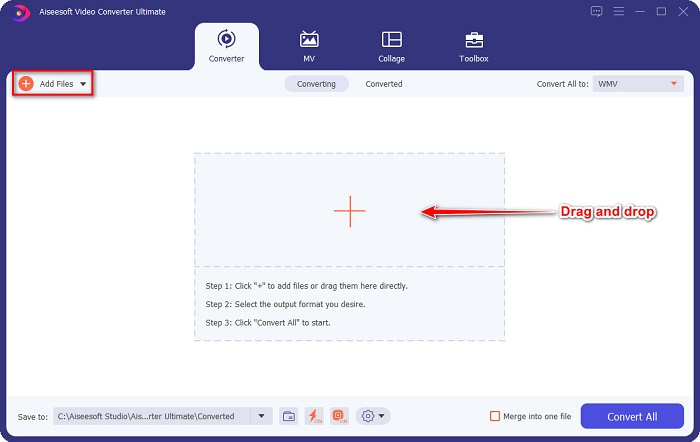
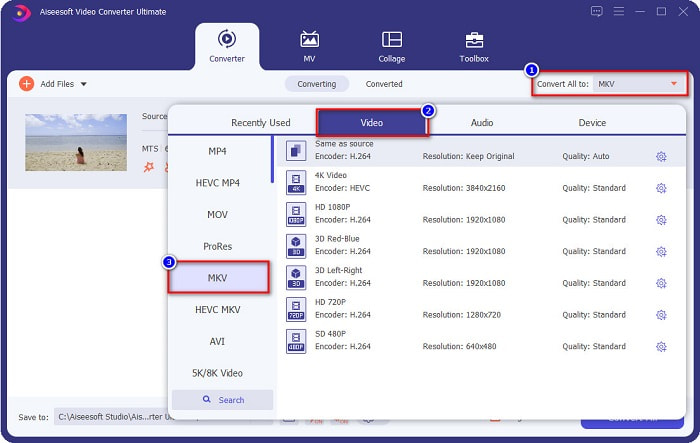
Trin 3. For at vælge det filformat, du vil konvertere din MTS‑fil til, skal du klikke på knappen Convert All to og vælge MKV-filen.
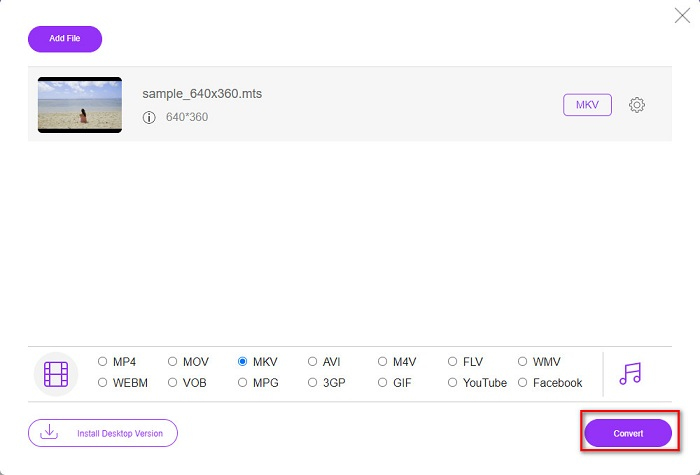
Trin 4. For at afslutte skal du klikke på knappen Convert All for at begynde at konvertere din MTS‑fil til en MKV‑fil. Og voila! På blot få sekunder er din konverterede fil klar.
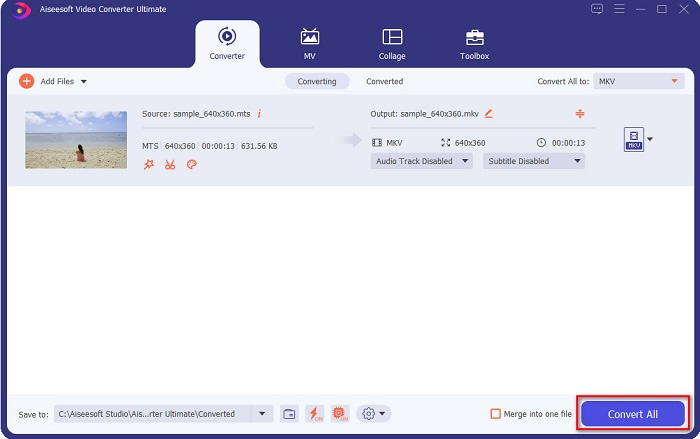
Ved at følge disse enkle trin kan du konvertere MTS til MKV så hurtigt som 1-2-3!
Del 3. Hvorfor konvertere MTS-fil til MKV-filformat
MTS-fil, kort for MPEG Transport System, er et standardfilformat, der hovedsageligt bruges af SONY og Panasonic HD-videokameraer. Det er en fil, der bruger MPEG4/H.264 videokomprimering. Desuden understøtter den 720p og 1080i videoer, som andre filformater ikke understøtter. Da Panasonic og Sony har udviklet denne fil, bruger den en avanceret lydkodningsfil relateret til AVCHD-filformatet. På den anden side er MKV-fil eller Matroska et standardfilformat, der understøtter mange lyd- og video-codecs. Det bruges normalt til at gemme korte videoklip og film.
Desuden understøtter den også undertekstspor. Det er grunden til, at mange fan-subbende mennesker bruger dette filformat. Så hvorfor konvertere MTS til MKV? Simpelthen fordi filstørrelsen på MKV er mindre end MTS-filformatet indeholder.
Del 4. Sammenligningsskema om online- og offlinekonvertere
| FUNKTIONER | FVC gratis online konverter | AnyConv File Converter | FVC Video Converter Ultimate |
| Konverteringshastighed | Normal | Normal | Meget hurtig |
| Filformater til konvertering | MKV, MP4, MTS, MPG, MOV, AVI, WMV, FLV og andre filformater | MTS, MKV, AVI, MOV, MP4, MPEG og andre formater | Understøtter over 1000 filformater |
| Redigeringsfunktioner | – | – |  |
| Batchkonvertering | – | – | |
| Internetforbindelse | Havde brug for | Havde brug for | Ikke brug for |
Del 5. Ofte stillede spørgsmål om konvertering af MTS til MKV
Kan du sænke filstørrelsen på en MTS-fil?
Ja. Du kan komprimere filstørrelsen på en MTS‑fil ved at bruge et komprimeringsværktøj, der er tilgængeligt online og offline, såsom Free Video Compressor.
Hvor kan du afspille MKV-filformater?
Du kan afspille MKV‑filer i Windows Media Player, VLC Media Player, DivX Player, MX Player og flere andre. Du kan også bruge mediacodecs til at enkode og dekode mediefiler. Eller du kan konvertere din MKV‑fil til MP4‑filformat, som er et meget udbredt format.
Kan du konvertere MTS til MKV i håndbremse?
Ja. Denne konverter giver dig også mulighed for at konvertere din MTS-fil til MKV-filformat. Det understøtter dog ikke flere filer og kan ikke kombinere dem til én.
Konklusion
Der findes mange online og offline konvertere på markedet i dag. Og de konvertere, vi har listet ovenfor, er blandt de filkonvertere, som bruges af mange og har vist sig at være fantastiske at bruge. Desuden har disse konvertere forskellige funktioner og kapaciteter, når det gælder om at konvertere MTS til MKV gratis online. Men hvis du er på udkig efter en praktisk og effektiv konverter, anbefaler vi at bruge FVC Video Converter Ultimate. Denne lynhurtige konverter vil ikke skuffe dine forventninger. Så hvis du er klar til at konvertere filer, så download den nu!
-
 [Gratis og online] 6 måder at konvertere MTS til MP4 i høj kvalitet
 Ved ikke, hvordan man konverterer MTS-fil til MP4? I denne vejledning finder du 6 gratis og nemme måder at ændre MTS-format til MP4 på Windows eller Mac uden kvalitetstab.
-
 Sådan konverteres MTS til WMV uden at miste kvaliteten
 Kæmper du med at se dit yndlingsprogram, fordi din medieafspiller ikke understøtter MTS-videoformatet? Prøv at konvertere det til WMV med disse nye og bedste konvertere til stede i denne artikel.
-
 Sådan konverteres MTS til MP3 uden kvalitetstab (AVCHD til MP3)
 Har du brug for at udtrække MP3-lyd fra MTS-filen, men ved ikke hvordan? Hvad er den bedste MTS til MP3-konverter? Dette indlæg deler 2 nemme måder at hjælpe dig med at konvertere MTS / M2TS til MP3 med høj lydkvalitet.
