


 Video Converter Ultimate
 Skærmoptager
 Video reparation
Sådan konverteres AMV til FLV på troværdige og pålidelige måder
For dem, der ikke kender det, står AMV for Anime Music Video. Filtypen .amv bruger komprimerede videofiler. Bærbare medieafspillere fremstillet i Kina er dem, der oftest bruger AMV‑filer. Videoer i lav opløsning passer til medieafspillerens skærm, så videofilen kan vises korrekt under afspilning. Adobe Systems laver derimod filformatet FLV (Flash Video File), som indeholder et kort header‑afsnit, sammenflettede lyd‑, video‑ og metadata‑pakker samt lyd‑ og videodata, der gemmes i SWF‑filer. Videostreams kan indlejres som Flash Video i Adobes programmer og Flash‑plugins. Nu hvor du har fået en kort introduktion til disse to formater, kan du gøre dig klar til at dykke ned i konverteringsværktøjerne. Du bør overveje at konvertere AMV til FLV.

Del 1. Den mest fremragende konverter til brug ved konvertering af AMV til FLV
Video Converter Ultimate er et professionelt program, der kan håndtere din videokonvertering. Det understøtter nem, tabsfri FLV‑til‑MOV‑konvertering på både Windows‑ og Mac‑computere og kan fås gratis. Derudover kan værktøjet konvertere mellem mere end 100 forskellige formater, inklusive high‑definition‑filer. Der følger også en komplet videoredigeringsdel med, som giver dig mulighed for at beskære, trimme, klippe, tilføje vandmærker og bruge specialeffekter. Ud over videokonvertering understøtter Video Converter Ultimate videodownload, videotransfer og andre funktioner. For at lære at bruge softwaren skal du sætte dig ind i vejledningen i dette afsnit.
Trin 1: For at få adgang til softwaren skal du først downloade den til din computer. Det gør du ved at klikke på knappen Free Download, som du finder nederst i dette trin. Som du kan se, har du to valgmuligheder, når du downloader softwaren: Windows eller Mac. Installer softwaren på din computer efter download, og start derefter programmet.
Gratis download til Windows 7 eller nyere Sikker download
Gratis download til MacOS 10.7 eller nyere Sikker download
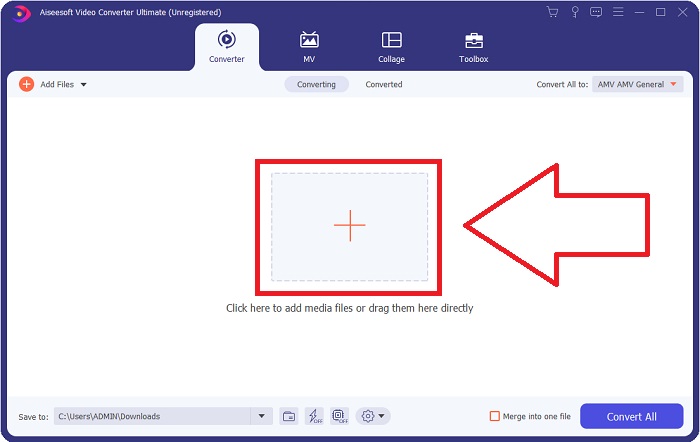
Trin 2: Du vil se et vindue dukke op, når du starter softwaren. Converter-grænsefladen vises på skærmen sammen med upload‑området. Klik på +-knappen, eller træk videofiler direkte fra dit skrivebord for at fortsætte.
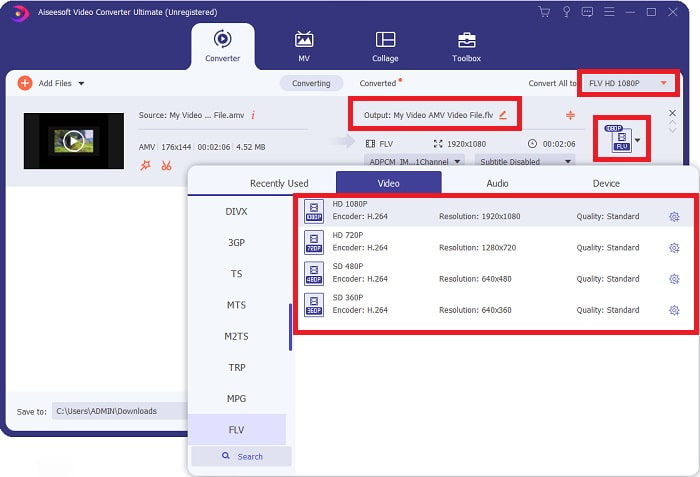
Trin 3: For at konvertere AMV‑videoformatet til FLV skal du, efter at have uploadet en fil i softwaren, gå til området for valg af format og vælge FLV‑formatet. Du kan derefter også frit vælge enhver videokvalitet.
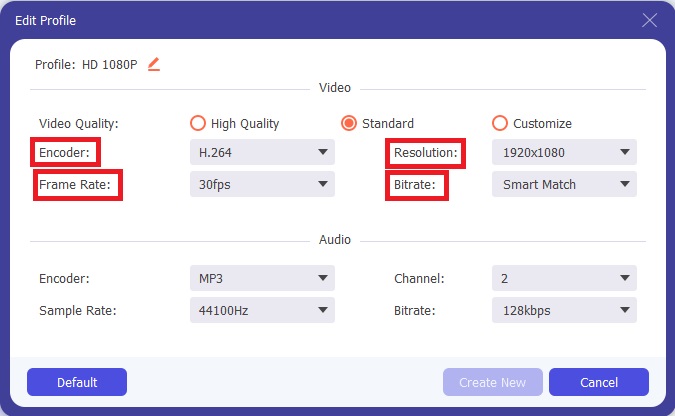
Trin 4: Hvis du har brug for at tilpasse eller oprette en ny videokvalitet efter dine egne ønsker, kan du klikke på tandhjulsikonet ved siden af valget af videokvaliteter.
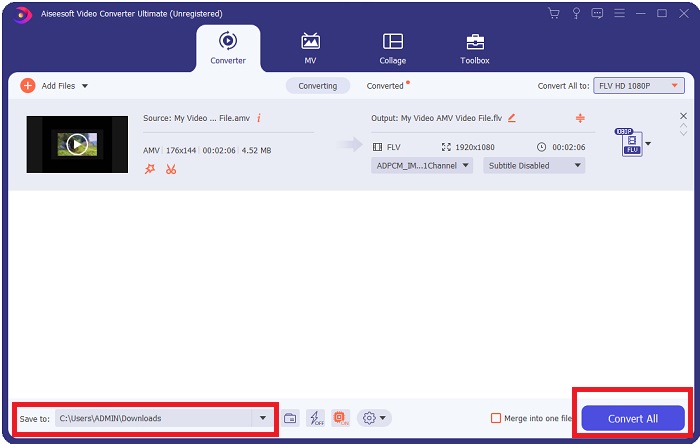
Trin 5: Du er næsten færdig! Når du har fastlagt alle de specifikationer og justeringer, du ønsker, kan du vælge placeringen af din konverterede fil ved at klikke på mappeikonet ved siden af feltet Save to i nederste hjørne af vinduet. Nu kan du konvertere din videofil ved at klikke på knappen Convert All.
Del 2. Onlineværktøj til at overveje at bruge til at konvertere AMV til FLV
Det er nemt at bruge onlinekonvertere, fordi de ikke kræver, at der downloades eller installeres nogen software. Free Video Converter Online er et godt eksempel på et program, der hurtigt og nemt kan konvertere AMV til FLV. Du kan konvertere en lang række lyd‑ og videoformater med dette program, og det er helt gratis at bruge. Du kan uploade to filer til konvertering, og når processen er afsluttet, bliver den konverterede fil automatisk gemt på din harddisk. Her får du alle de trin, du skal kende for at bruge dette fremragende onlineværktøj.
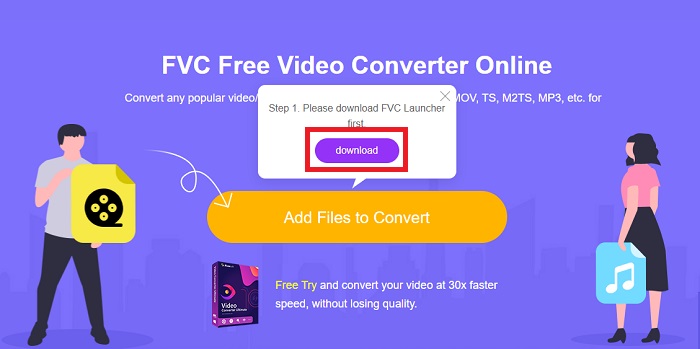
Trin 1: Klik på dette link for at få adgang til onlineværktøjets hovedside. Når du er videre, kan du starte en konvertering ved at klikke på Add Files to Convert. Downloadknappen vises derefter i øverste hjørne af skærmen. Når launcheren er færdig med at installere, kan du begynde at uploade en fil fra din computer til dette værktøj.
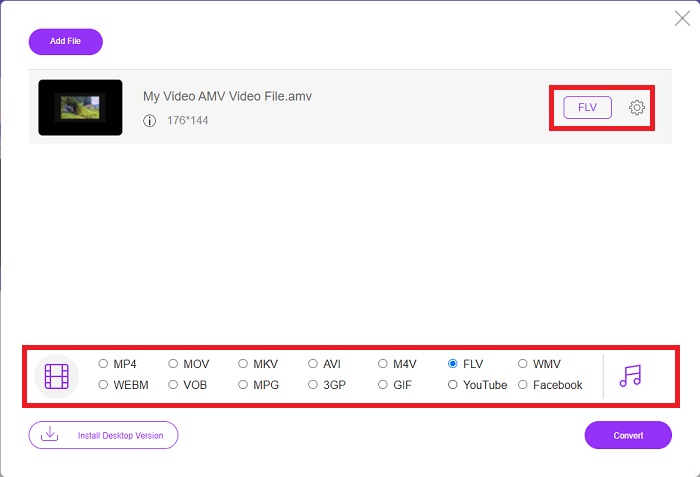
Trin 2: Nu hvor din importerede fil er klar, skal du klikke på FLV‑videoformatet nedenfor. Ligesom i softwaren kan du også justere alle specifikationerne for din udgående video ved at klikke på tandhjulsikonet.
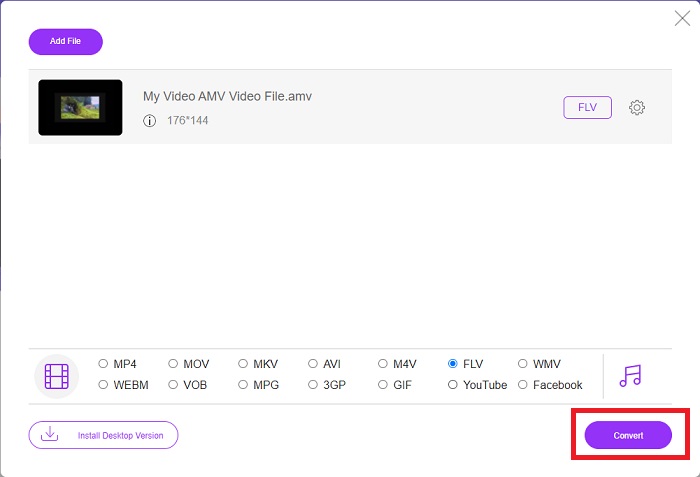
Trin 3: Til sidst skal du klikke på knappen Convert for at ændre dine AMV‑filer til FLV‑format.
Relateret:
Del 3. Udvidet viden om AMV & FLV
AMV optimerer lavt alsidige medieafspillere med langsomme CPU'er og små skærme, som S1 MP3-afspilleren. Video-codec'et er Motion JPEG med faste kvantiseringstabeller. Audio-codec'et er IMA ADPCM, hvor de første 8 bytes af hver ramme er kilden (16 bits), indekset (16 bits) og mængden af krypterede 16-bit samples (32 bits). Afkodning af overhead for disse forenklede codecs er ubetydelig. Videokomprimeringen er lav (4 pixels/byte vs. over 10 pixels/byte for MPEG-2), men filstørrelserne er små på grund af den reducerede opløsning (96x96 højere end eller lig med 208x176) og fps (10, 12, eller 16 billeder/s). En 30-minutters video komprimeret til 128x96 pixels og 12 frames/s vil være 80 MB.
Men en videofil med extension.flv, som du kan bruge filtypen FLV, hvis du vil streame video eller lyd fra Adobe Flash Player eller Adobe Air over internettet. I lang tid var Flash Video standardvideoformatet for næsten alle onlinevideoer, inklusive dem på websteder som YouTube, Hulu og utallige andre. Af denne grund bruger streamingtjenester og softwareudviklere ikke længere Adobes proprietære Flash-format. Med al denne sammenligning angivet, er her lidt hjælp til dig, denne artikel gav dig et sammenligningsdiagram:
| Fil udvidelse | AMV | FLV |
| Filnavn | Anime musikvideo | Flash video fil |
| Udviklet af | Jim Kaposztas | Adobe System Incorporated |
| Fordele | ◆ AMV er en af de mest populære fan-lavede anime-musikvideoer til dato. ◆ Filstørrelsen er lille. | Adobe Flash til dynamiske og interaktive websider kan være en kæmpe fordel. Selvom dette er en simpel proces, kan resultaterne være betydelige. Flash var også engang et populært valg til simple videospil. |
| Ulemper | ◆ Inkompatibel med de fleste medieafspillere og enheder; lav kvalitet. | FLVs fald i popularitet har været en ulempe. Oprettelse af FLV-indhold kan være tidskrævende og dyrt. Manglen på understøttelse af Flash på iOS-enheder begrænser i høj grad dets evne til at tiltrække nye brugere. |
| Programmer, der understøtter filen | ◆ VLC Media Player ◆ iOrgsoft AMV Converter | ◆ RealPlayer ◆ Apple QuickTime Player ◆ VLC Media Player ◆ MPlayer |
Del 4. Ofte stillede spørgsmål om AMV til FLV-konvertering
Hvad er formålet med en AMV?
Synkronisering og enhed i en AMV kan opnå forskellige videoredigeringsstile. Det er muligt at opnå rå redigering med simpel ind- og udzooming af 'effekter' og enkle overgangsovergange. Blandt de mange eksempler er følgende.
Hvordan laves AMV'er?
For at en AMV skal få succes, skal den bruge en sang, der er tæt knyttet til emnet og næsten perfekt beskriver det. Enhver, der læser dette, kan svare ved at sige: 'Wow, det er fantastisk! Denne sang er hans, hendes temasang. På grund af dette har du valgt et godt stykke.
Er FLV bedre kvalitet?
FLV-formatet og MP4 er i stand til at gemme højkvalitets video og lyd digital kodning. Kvaliteten af FLV-filer er et spørgsmål om debat, men fordele og ulemper ved FLV kan diskutere filformatet. Højere kompressionsforhold i MP4 resulterer i mindre kvalitetstab.
Konklusion
For at konkludere, vil du vide vigtigheden af at vælge den bedste konverter til at konvertere AMV til FLV. Andre vil producere videoer i lav kvalitet og ude af synkronisering, efter at videoen er blevet konverteret. Men de to konvertere, som denne artikel anbefaler, er den førsteklasses konverter, som du ikke behøver at bekymre dig om den kvalitet, den vil give.
-
 Bedste metode til brug ved konvertering af AMV til AVI [Godkendt]
 Har du svært ved at konvertere din AMV-format videofil til AVI? Her er nogle tips forudsat, som du kun kan finde i denne artikel.
-
 3 nyeste AMV-konvertere tilgængelige til at konvertere AMV til MOV-format [2022]
 Ved du ikke, hvordan du konverterer dine AMV-filer til MOV-format? Så taler denne artikel om de 3 AMV til MOV-konvertere, du kan bruge online eller offline.
-
 4 verificerede metoder til at konvertere TS til FLV på Desktop / Online
 Du kan ikke åbne TS på din computer eller mobil som standard. Den eneste måde at se videofilerne på er at konvertere TS til FLV eller andre formater med vores konkrete guide.
