


 Video Converter Ultimate
 Skærmoptager
 Video reparation
2 anbefalede konvertere bruges til at ændre F4V til FLV med selvstudier
Adobe Flash Player understøtter F4V og FLV som beholdere til afspilningsmedier, der streamer indhold fra internettet. Selvom formatet er udviklet af Adobe, er disse to alligevel forskellige på mange områder. For eksempel er de data, der kodes i FLV, ikke de samme som i F4V, fordi FLV har lighed med SWF. Hvis du desuden vil konvertere F4V til FLV og have en encoder, der minder om SWF, så læs denne artikel for at få mere at vide.

Del 1. 2 af Most Pick Converter til at konvertere F4V til FLV
1. valg. FVC Video Converter Ultimate
FVC Video Converter Ultimate er den stærkt anbefalede F4V til FLV-konverter, du kan downloade på din Windows eller Mac. Dette værktøj har den hurtigste og mest pålidelige konverteringsproces, du nogensinde vil opleve, og det tilfredsstiller allerede millioner af brugere. Ydermere er konvertering af formater ikke det eneste stærke kort ved dette værktøj. Gæt hvad? Du kan også redigere her, såsom at klippe videoen, sammenflette, forstærke lyden, beskære og meget mere. Hvis du vil have en unik konverter, der kan dække dine behov, er denne konverter den rette. De følgende oplysninger nedenfor er trin til at konvertere dine F4V-filer til et FLV-format på få minutter.
Sådan konverterer du F4V til FLV med hjælp fra FVC Video Converter Ultimate:
Trin 1. Klik på download-knappen for at downloade softwaren til din computer.
Gratis download til Windows 7 eller nyere Sikker download
Gratis download til MacOS 10.7 eller nyere Sikker download
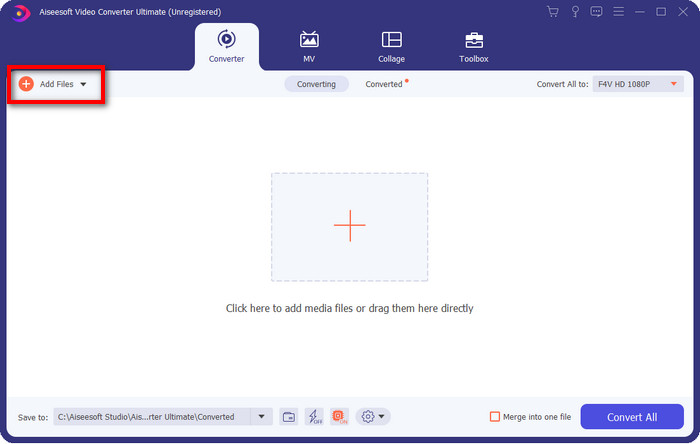
Trin 2. Klik på softwaren for at åbne den, indsæt filen ved at klikke på Add Files øverst til højre i grænsefladen, og klik på Open, når du har valgt den F4V-fil, du vil konvertere.
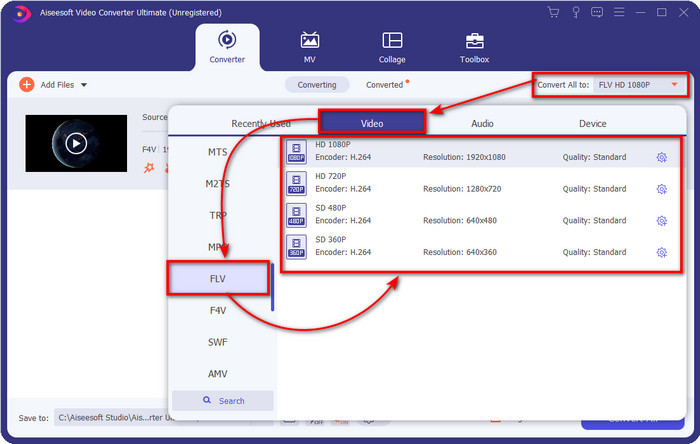
Trin 3. Klik på knappen Convert All to, og ændr formatet til FLV.
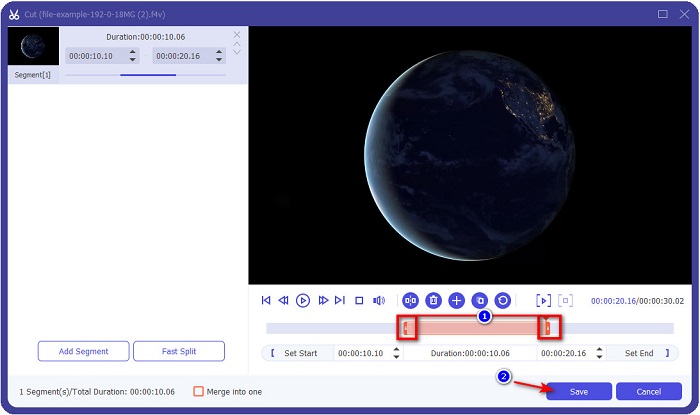
Vil du gøre videoen kortere? Hvis ja, så klik på saks-ikonet. Juster skyderen efter den længde, du ønsker, og klik derefter på Save for at gemme ændringerne.
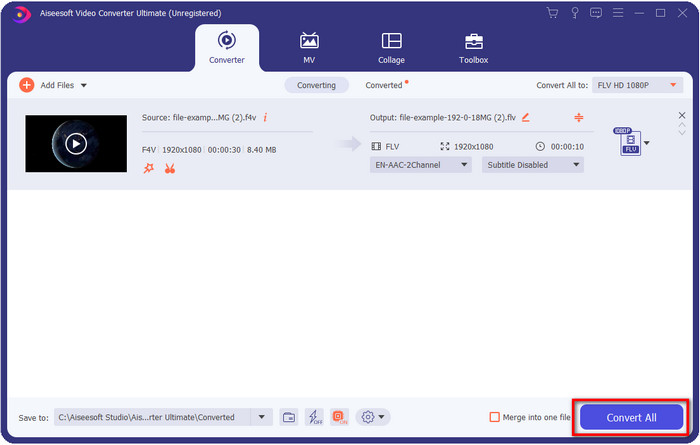
Trin 4. For at ændre F4V til FLV skal du klikke på Convert All, og processen vil begynde med det samme. En mappe på computeren vil dukke op, hvor din fil ligger.
Fordele
- Det konverterer ubesværet flere F4V til FLV, AVI, MOV, MKV og 200+ flere formater.
- Hardwareacceleration og hurtig konvertering er tilgængelige her for at gøre konvertering hurtigere.
- Den er tilgængelig i alle Windows og macOS.
- Enestående videoredigeringsfunktioner til at få din video til at se fænomenal ud er under Værktøjskasse.
Ulemper
- Skal købes før du kan bruge den.
- Det er nødvendigt at downloade konverteren på dit skrivebord.
2. valg. FVC gratis videokonverter online
FVC Free Video Converter Online hjælper dig med at gennemføre konverteringsprocessen online. Dette værktøj er tilgængeligt i alle browsere til at konvertere F4V til FLV online uden begrænsninger. Du kan dog ikke foretage batchkonvertering her, fordi det ikke er understøttet. Ikke desto mindre kan du opnå det format, du ønsker at konvertere til, med denne onlinekonverter. Vil du vide hvordan? Så følg trinene nedenfor.
Sådan konverterer du F4V til FLV med hjælp fra FVC Free Video Converter Online:
Trin 1. For at åbne webværktøjet skal du klikke på dette link.
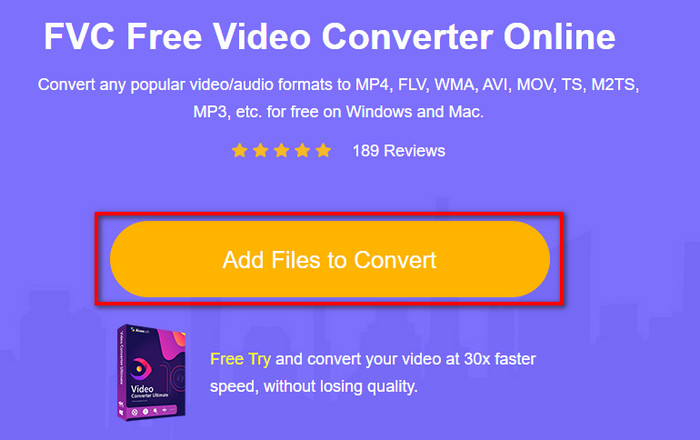
Trin 2. På hovedgrænsefladen til webkonverteren skal du klikke på knappen Add Files to Convert. Find F4V-filen i den mappe, der vises, og tryk på Open.
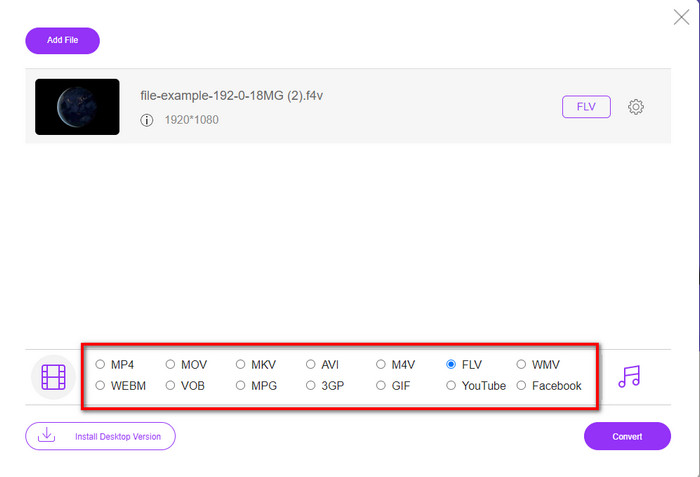
Trin 3. Nederst er der mange formater, du kan vælge imellem; klik på FLV.
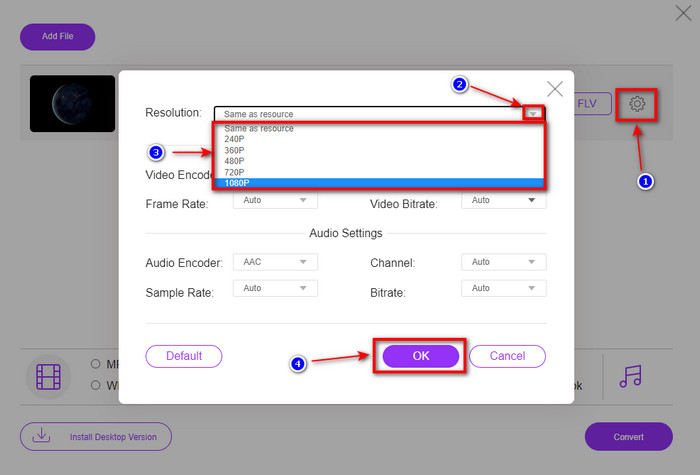
Vil du ændre videoens opløsning? Klik så på tandhjuls-ikonet, tryk på rullemenuen, og vælg videokvalitet.
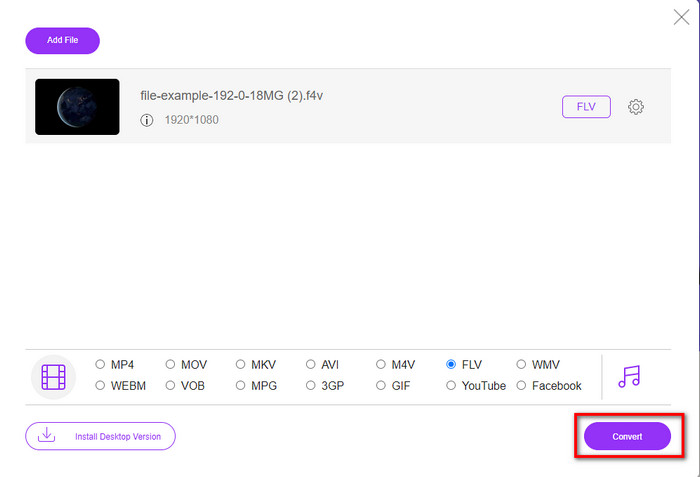
Trin 4. Start konverteringsprocessen af F4V til FLV ved at klikke på Convert.
Fordele
- Tilgængelig i alle de webbrowsere, du har.
- Gratis og nem at bruge online konverter.
- Malware-fri og ingen annoncer på hovedwebstedet.
Ulemper
- Internetforbindelse er et must.
- Det understøtter ikke videoredigeringsfunktioner som FVC Video Converter Ultimate.
Del 2. F4V vs. FLV: Hvilket af formaterne er bedst
Som sagt i begyndelsen er disse to formater Adobe-containere, du kan bruge til at distribuere dem på nettet. Men lad os nu sammenligne forskellene mellem de to formater ved at læse detaljerne nedenfor.
F4V-formatet er en Quicktime-beholder ligesom MP4-formatet. Det er et ISO-baseret mediefilformat til streaming af videoer over internettet. Dette format er også en opgraderet version af FLV. Alligevel er der mange problemer med at kode video og lyd, der er på FLV. Derudover kan du ikke generere en HTML-webside, som FLV kan gøre for dig.
FLV er filer, der har næsten samme struktur som SWF. Dette format er mere understøttet i Adobe Flash Player og de fleste HTML 5. Det understøtter video- og lydkomprimering som Sorenson Spark eller VP6 codecs. Desuden, hvis du overvejer at downloade en video på nettet, er dette format det bedste valg. I modsætning til F4V, hvis du ønsker at generere HTML på din webside, er dette formatet for dig.
Det ville være bedst at konvertere F4V til FLV, fordi de fordele, du ville få på FLV, som ikke er tilgængelige på F4V. Selvom det siges, at F4V er den nye version af FLV, er det unikke ved FLV stadig en af slagsen, som F4V ikke kan kopiere i mange aspekter.
Del 3. Ofte stillede spørgsmål om F4V til FLV-konvertering
Hvordan kan jeg afspille F4V-videoer?
Med hjælp fra en kraftfuld medieafspiller kan du gøre det uden besvær, og det bedste eksempel er Aiseesoft Blu-ray Player. Følg disse enkle trin for at lære, hvordan du afspiller F4V-filer. Først skal du downloade softwaren på din computer og starte den. Upload filen i værktøjet ved at klikke på Open File. Når filen er indlæst, vil den automatisk blive afspillet.
Hvilken er bedre? F4V eller MOV?
Det kommer an på, hvad du vil bruge det til. For eksempel er F4V fantastisk til at distribuere mediefiler på nettet uden kvalitetstab. Men hvis du vil redigere videoer på Mac, så vælg MOV. Så hvis du vil redigere dine F4V-videoer på Mac, skal du lære, hvordan du konverterer F4V til MOV.
Indeholder F4V output af høj kvalitet?
F4V-filer kan indeholde 1080 eller 720 videokvalitet, men filstørrelsen forbliver minimal.
Konklusion
Nu hvor vi har lært, hvordan man ændrer F4V til FLV ved hjælp af konverterne, er det nu det rette tidspunkt at vælge din pålidelige konverter baseret på anmeldelserne. Hvis du vil opleve en gratis online konverteringsproces, skal du bruge FVC Free Video Converter Online. Men dette webværktøj kan ikke overgå den ultimative konverter øverst. Uden yderligere introduktion foretrækker vi at bruge FVC Video Converter Ultimate, da den klarer din konverteringsopgave nemt og hurtigt. Denne enestående konverter er helt unik og imponerer mange brugere med sine specielle funktioner. Så nu kan vi sige, at vi er ét skridt tættere på succes med hjælp fra disse værktøjer.
-
 4 nyeste online- og offlinekonvertere til at konvertere F4V til AVI-format
 Ved du ikke, hvilken konverter du skal bruge til at konvertere F4V til AVI eller et andet videoformat? Så læs denne artikel, mens vi lærer, hvordan du konverterer med det tilgængelige værktøj.
-
 Sådan konverteres F4V til MOV uden at miste kvalitet [Løst]
 Hvis du kæmper for at anerkende nogle videoformater som F4V. Læs denne artikel for at lære mere om F4V- og MOV-videoformater og lære, hvordan du konverterer F4V til MOV ved hjælp af forskellige metoder.
-
 Konverter TRP til FLV med nemmeste offline og online metoder
 Vil du konvertere din TRP-videofil til FLV hurtigt og uden besvær? Læs denne artikel for at give dig den bedste software og onlineservice, der passer bedst til situationen.
