


 Video Converter Ultimate
 Skærmoptager
 Video reparation
 Sikker download
Sådan konverteres dine FLV-videofiler til 3G2-format på skrivebordet og online
Man siger, at teknologi ændrer livet og gør vores daglige liv og arbejde lettere. Men hver mønt har to sider, og det gælder også teknologi. Det digitale videoformat giver os for eksempel mulighed for at få adgang til underholdning og information hvor som helst og når som helst. Problemet er videoformaterne. Ifølge en nylig undersøgelse findes der over hundrede videoformater. Denne vejledning fokuserer på, hvordan du kan konvertere FLV til 3G2 eller 3GP på computer og online gratis.

Del 1: Sådan konverteres FLV til 3G2 på PC / Mac
Metode 1: Konverter FLV til 3G2 med Free FLV Converter
Der er kun et begrænset antal videokonvertere, der understøtter 3G2-formatet. FVC Free FLV Converter er en af dem. Desuden kan den opfylde dine behov uden at du behøver at betale en eneste krone. Hvis du har mange FLV-filer, kan den behandle dem alle på én gang og hurtigt.
Hovedfunktioner i den bedste FLV til 3G2-konverter
- 1. Konverter FLV til 3G2 uden tab af kvalitet.
- 2. Batchhåndterer flere FLV-filer ved hjælp af multi-thread-teknologi.
- 3. Tilbyder en bred vifte af bonusværktøjer, som f.eks. Videoredigering.
Gratis downloadTil Windows 7 eller nyereSikker download
Gratis downloadTil macOS 10.7 eller nyereSikker download
Sådan konverterer du FLV til 3G2 i batch gratis
Trin 1: Tilføj FLV-filer
Når du skal konvertere FLV til 3G2, skal du installere den bedste gratis videokonverter på din computer og starte den. Klik på knappen Add File(s), find alle de FLV-filer, du vil konvertere, og åbn dem.

Trin 2: Vælg outputformat
Gå til området nederst, efter at videoerne er indlæst. Klik på og udvid indstillingen Output format, søg efter 3G2 i søgefeltet, og vælg det i højre side. Klik på knappen Open Folder, og vælg en bestemt mappe til at gemme outputfilerne.

Trin 3: Konverter FLV til 3G2
Klik til sidst på knappen Convert for straks at begynde at konvertere FLV til 3G2. Efter få minutter finder du 3G2-filerne i den mappe, du har valgt.

Metode 2: Sådan konverteres FLV til 3G2 med VLC
VLC er ikke kun en open source medieafspiller, men også en gratis FLV til 3G2-konverter. Det giver dig mulighed for at lave videokonverter gratis på både Windows og Mac. Her er trinene:
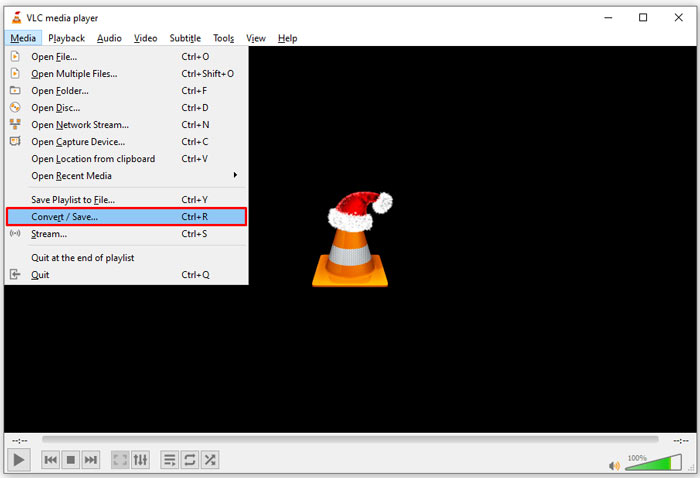
Trin 1: Åbn VLC, gå til menuen Media i topmenuen, og vælg Convert/Save.
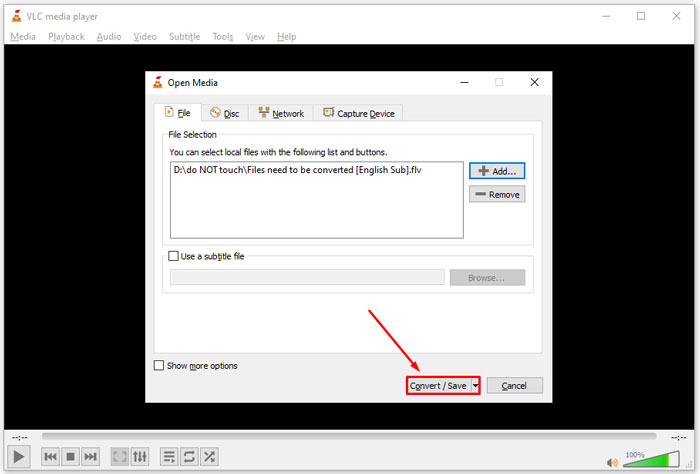
Trin 2: Klik på knappen Add, og åbn den FLV-fil, du vil ændre til et andet format. Tryk på knappen Convert/Save for at fortsætte.
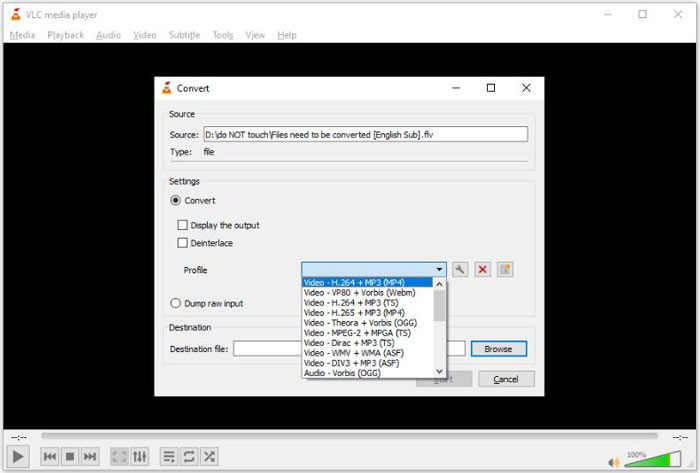
Trin 3: Fold indstillingen Profile ud, og vælg 3G2 eller et beslægtet format. Indstil derefter outputmappen ved at klikke på knappen Browse.
Trin 4: Når du klikker på knappen Start, vil VLC konvertere FLV til 3G2. Det tager et stykke tid, og du skal være tålmodig.
Del 2: Sådan konverteres FLV til 3G2 online
Nogle gange har du kun brug for at konvertere FLV til 3G2 en gang imellem. I sådanne tilfælde er en webapp et praktisk valg, såsom FVC Free Online Video Converter. Den er gratis at bruge, uden registrering eller begrænsning på filstørrelse.
Trin 1: Besøg https://www.free-videoconverter.net/free-online-video-converter/ i en vilkårlig browser. Klik på knappen Add Files to Convert, og hent launcheren.

Trin 2: Når downloadet er færdigt, dukker launcheren op. Klik på knappen Add File, og upload FLV-filerne. Denne webbaserede videokonverter understøtter batchkonvertering.
Hvis du vil justere parametrene, såsom opløsning, billedhastighed og mere, skal du klikke på Gear-ikonet og åbne dialogen Settings.

Trin 3: Gå ned i bunden, og vælg et passende outputformat i formatområdet. Når du er klar, skal du klikke på knappen Convert. Download derefter resultatet til din harddisk.
Her er noget, du måske kan lide:
Del 3: Ofte stillede spørgsmål om FLV til 3G2
Hvad er 3G2 filer?
3G2, står for 3rd Generation Partnership Project Group 2, er en udvidelse til multimediefiler baseret på MPEG-4. Det blev oprettet af en gruppe på syv standardudviklingsorganisationer til mobiltelefoner på CDMA-netværk. Det ligner meget 3GP.
Kan Windows Media Player åbne 3G2?
Nej, WMP kan ikke åbne eller afspille 3G2-videofiler, da den mangler de tilsvarende codecs. Du har tre muligheder for at åbne 3G2 filer: konvertere det til standard videoformat, downloade en 3G2 videoafspiller eller installere ekstra codec-pakke til WMP.
Er FLV bedre end 3G2?
Svaret afhænger af dit formål. Hvis du ser videoen på mobiltelefon med CDMA-netværk, er 3G2 et bedre valg. Til videodeling er FLV bedre end 3G2.
Konklusion
Nu skal du forstå, hvad 3G2 står for, og hvordan man konverterer FLV til 3G2 uden kvalitetstab. VLC er en gratis videokonverter, der har kapacitet til at ændre videoformater. FVC Free FLV Converter klarer sig imidlertid bedre. Det er lettere at bruge end VLC og helt gratis. Hvis du har flere problemer, bedes du efterlade en besked under dette indlæg, og vi svarer hurtigt på det.
-
 FLV til WAV - Konverter FLV til WAV online gratis og på Mac / PC
 Hvordan konverterer jeg en FLV-fil? Kan VLC konvertere FLV til WAV? Dette indlæg fortæller 3 gratis måder at konvertere FLV til WAV uden kvalitetstab.
-
 FLV til MPG - Sådan konverteres FLV til MPG på Mac, PC og gratis online
 Sådan konverteres FLV til MPEG? Kan jeg konvertere FLV til MPG gratis? Dette indlæg deler 3 gratis videokonvertere, der hjælper dig med at konvertere FLV til MPG uden kvalitetstab.
-
 FLV til Xbox - Sådan konverteres og afspilles FLV på Xbox
 Kan ikke afspille FLV-filer på Xbox One eller Xbox 360? Brug for at konvertere FLV til Xbox-understøttet format som MP4, AVI, MOV eller WMV? Dette indlæg viser 3 gratis FLV til Xbox-konvertere, så du kan spille FLV på Xbox.
