


 Video Converter Ultimate
 Skærmoptager
 Video reparation
 Sikker download
Sådan konverteres dine FLV-videofiler til 3GP-format gratis
Denne artikel viser dig de bedste måder at konvertere FLV til 3GP på. Ifølge undersøgelser findes der masser af videofilformater på markedet. Udviklere har udgivet dem til forskellige formål. FLV, for eksempel, som står for Flash Video, bruges til at gemme visuelt indhold, der kan afspilles i Adobe Flash Player via internettet.
3GP er derimod multimedieformatet oprettet af Third Generation Partnership Project for at spare båndbredde og dataforbrug på mobile enheder. Med et andet ord, skal du hellere konvertere FLV til 3GP og se videoer på håndsættet.

Del 1: Bedste måde at konvertere FLV til 3GP på Desktop
FVC Free FLV Converter er en kraftfuld videokonverter. Som navnet antyder, gør den det muligt at konvertere FLV til 3GP uden at betale en krone. Desuden tilbyder den en række nyttige funktioner, såsom video- og lydredigering. Endnu vigtigere er det brugervenlige interface, der gør, at du hurtigt finder det, du har brug for.
Nøglefunktioner i den bedste gratis FLV-konverter
- 1. Konverter FLV-videoer til ethvert multimedieformat, f.eks. 3GP.
- 2. Batch håndterer flere videofiler på samme tid.
- 3. Transcode FLV-filer til afspilning på mobile enheder.
Gratis downloadTil Windows 7 eller nyereSikker download
Gratis downloadTil macOS 10.7 eller nyereSikker download
Sådan konverteres FLV til 3GP gratis
Start den bedste gratis FLV-konverter, efter du har installeret den på din computer. Den er kompatibel med Windows 10/8/7 og Mac OS X. Klik på knappen Add File(s) for at åbne dialogboksen til filvalg. Vælg de FLV-filer, du vil konvertere, og klik på Open. Derefter vises videoerne i biblioteksområdet.

Trin 2: Indstil outputformat
Klik på og udvid rullemenuen Profile format nederst, så får du vist profilboksen. Indtast 3GP i feltet Search Profile, og tryk på Enter-tasten på tastaturet. Vælg derefter outputformatet. Hvis du vil afspille videoerne på din mobile enhed, skal du vælge producenten og derefter vælge den rigtige model direkte.

Trin 3: Konverter FLV til 3GP
Vælg en bestemt mappe til at gemme outputfilen ved at klikke på knappen Open Folder nederst. Klik til sidst på knappen Convert for at starte konverteringen fra FLV til 3GP. Efter få minutter finder du 3GP-filerne på din harddisk.

Del 2: Sådan konverteres FLV til 3GP online
Webbaserede videokonverteringsapps er en anden populær måde at konvertere FLV til 3GP gratis. De fleste af dem har dog forskellige ulemper, såsom filstørrelsesbegrænsning, vandmærke, sikkerhedsproblemer osv. Heldigvis kan FVC Free Online Video Converter hjælpe dig med at løse disse problemer. Den er helt gratis uden nogen begrænsninger. Outputkvaliteten er fremragende.
Trin 1: Gå til https://www.free-videoconverter.net/free-online-video-converter/ i en webbrowser, og klik på knappen Add Files to Convert for at hente startprogrammet. Det optager ikke lokal plads på din computer.
Download skrivebordsversionen for at konvertere filer i batch.
Trin 2: Klik på menuen Add File, og upload de FLV-filer, du vil konvertere. Webappen giver dig mulighed for at batchkonvertere videoer på én gang.
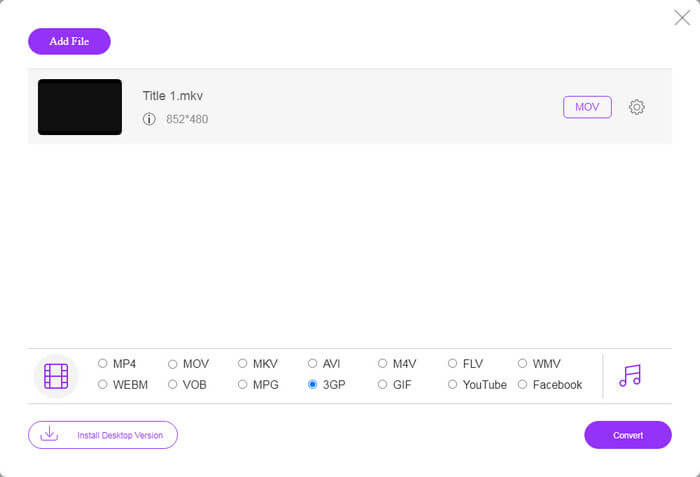
Trin 3: Gå ned i bunden og vælg 3GP i profilsektionen. Klik på knappen Convert for at starte onlinekonverteringen af FLV til 3GP. Hvis din internetforbindelse er hurtig, bliver det færdigt på få sekunder. Download derefter 3GP-filerne til din harddisk.
Gå ikke glip af:
Del 3: Sådan konverteres FLV til 3GP med VLC
Nogle gange er freeware lige så stærk som professionel software. VLC er f.eks. En populær open source medieafspiller. Det er i stand til at konvertere FLV til 3GP på Windows, Mac og Linux gratis. Selvfølgelig er udgiften åbenbar, såsom svær at bruge. Derfor deler vi nedenstående trin:
Trin 1: Kør den gratis FLV-til-3GP-konverter på din computer. Du skal installere den først. Den officielle hjemmeside stiller et sikkert installationsprogram til rådighed.
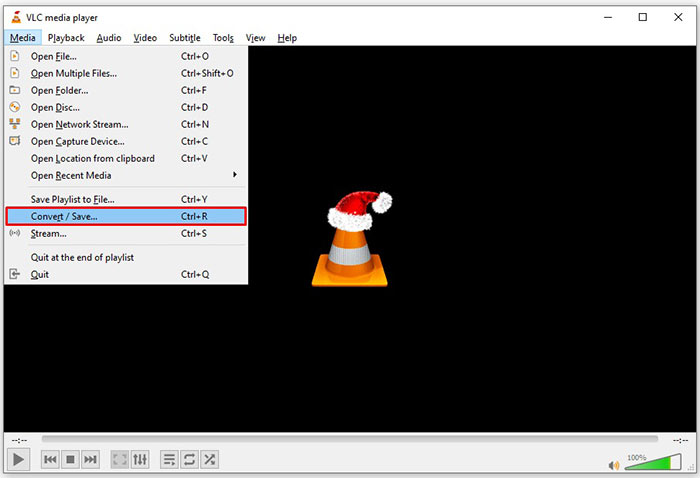
Trin 2: Gå til menuen Media på den øverste menulinje, og vælg Convert/Save. Derefter dukker dialogboksen til medieåbning op.
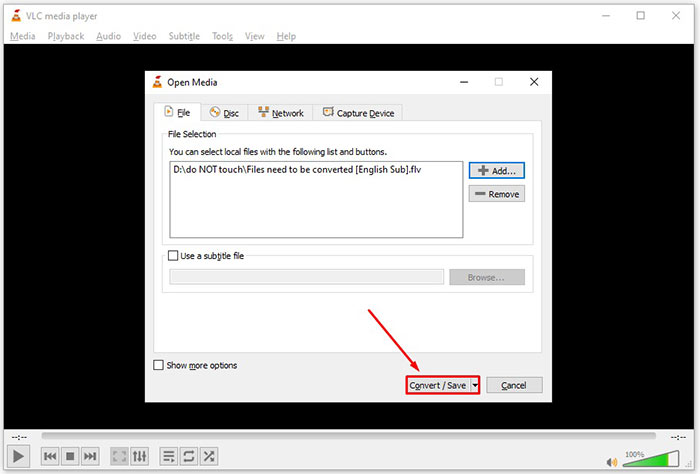
Trin 3: Klik på knappen Add, find den FLV-fil, du skal konvertere, vælg den, og klik på Open. Klik på knappen Convert/Save for at gå videre til næste vindue.
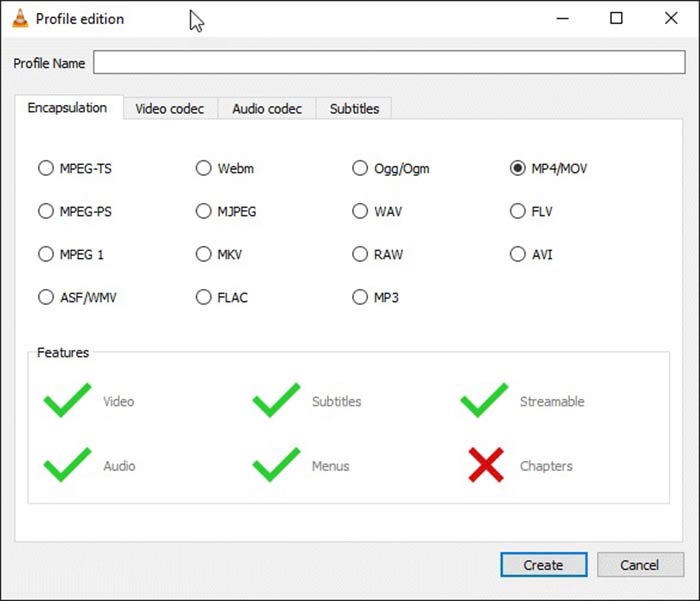
Trin 4: Fold rullemenuen ved siden af Profile ud, og vælg 3GP eller et beslægtet videoformat. Hvis du vil ændre videocodec eller andre parametre, skal du klikke på knappen Profile Edit ved siden af rullemenuen og tilføje 3GP.
Trin 5: Klik på knappen Browse, og vælg en bestemt mappe til at gemme den færdige 3GP-fil i sektionen Destination.
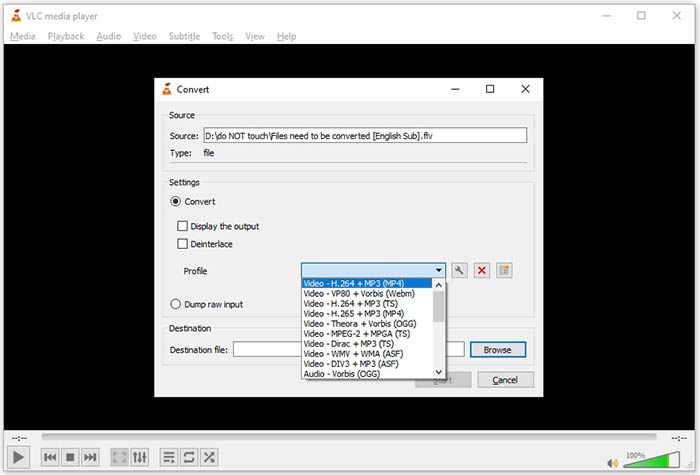
Trin 6: Så snart du klikker på knappen Start, begynder VLC at konvertere FLV til 3GP.
Det tager et øjeblik at gennemføre konverteringen, da VLC gør jobbet ved at optage den originale video. Det betyder, at processen bruger så længe som længden af din FLV-video.
FLV vs. 3GP
Adobe Flash Player brugte FLV til at levere videoindhold som film og tv-shows. I dag udvikler Adobe ikke længere afspilleren og anbefaler brugere at afinstallere den af sikkerhedsmæssige årsager. Du kan dog stadig bruge FLV-formatet på mange ikke-Adobe/Macromedia-programmer.
3rd Generation Partnership Project (3GPP) producerede 3GP/3GPP-formatet som et multimediebeholderformat. Det er faktisk baseret på ISO-mediefilformatet. Vi bruger det ofte til at gemme video-/lydstreams, der transmitteres mellem 3G-mobiltelefoner og online.
Del 4: Ofte stillede spørgsmål om konvertering af FLV til 3GP
Vil konvertering af FLV til 3GP skade videokvaliteten?
Generelt mister videokonvertering kvalitet. Imidlertid er et kraftigt videokonverteringsprogram i stand til at løse dette problem og optimere videokvaliteten ved hjælp af avanceret teknologi.
Hvor lang tid tager det at konvertere en FLV-video?
Det bestemmes af flere faktorer, såsom videolængden, den videokonverteringssoftware, du bruger, din hardwareydelse og mere. Hvis du bruger en webvideoomformer, er din internetforbindelse et vigtigt element.
Hvorfor spiller FLV ikke på min iPhone?
iPhone understøtter MOV, en del af MP4, ASF og AVI. Derfor kan du ikke åbne FLV på iPhone direkte. Der er dog måder at se FLV på mobile enheder. Hvis din FLV-fil hostes af internettjenester, som f.eks. Google Drive, er den indbyggede medieafspiller tilgængelig. Plus, du kan bruge en anden medieafspiller, som VLC.
Konklusion
Denne guide har fortalt dig tre gratis måder at konvertere FLV-videofiler til 3GP-format på computer eller online. Hvis du forbereder dig på at se FLV-videoer på mobile enheder, skal du hellere konvertere den til 3GP eller andre mobilvenlige videoformater med FVC Free FLV Converter. Det er ikke kun let at bruge, men også i stand til at beskytte din videokvalitet. Flere spørgsmål? Skriv en besked nedenfor.
-
 Sådan konverteres dine FLV-videofiler til MP4 uden at betale en krone
 Denne guide deler fire gratis metoder til at konvertere dine FLV-videofiler til MP4-format på Windows 10/8/7 / XP og Mac OS X, så du kan nyde videoerne på alle enheder.
-
 Sådan konverteres dine FLV-videoer til MP3-lydfiler på skrivebordet og online
 Sådan konverteres en FLV til en MP3-fil? Alt hvad du skal gøre er at læse denne artikel omhyggeligt, finde din yndlingsmetode og følge vores trin-for-trin guide for at få det, du ønsker.
-
 Top 3 måder at konvertere FLV til MOV
 Sådan konverteres FLV til MOV? Hvordan konverterer jeg FLV til MOV på Mac? Er der nogen gratis måde at konvertere FLV til MOV online? Dette indlæg deler 3 FLV til MOV-konvertere for at ændre FLV-filer til MOV.

