


 Video Converter Ultimate
 Skærmoptager
 Video reparation
 Sikker download
Sådan konverteres dine FLV-videofiler til AVI-format på PC / Mac
Denne vejledning fokuserer på, hvordan du konverterer FLV til AVI med desktopsoftware og online-apps. Der er mange grunde til, at du kan få brug for at konvertere dine FLV‑videoer. FLV blev udviklet til distribution af videomateriale online, men ikke til afspilning på digitale enheder. Når du vil se FLV på din computer, er du nødt til at ændre den til et andet videoformat. Derudover er det en god idé at konvertere FLV til et ukomprimeret videoformat, hvis du vil redigere dine videofiler.

Del 1: Top 2 gratis måder at konvertere FLV til AVI
Metode 1: Konverter FLV til AVI med Free FLV Converter
Når du konverterer FLV til AVI, kan du være bekymret for flere faktorer, såsom outputkvalitet, brugervenlighed og mere. FVC Free FLV Converter er det bedste valg. Selvom den er gratis, får du en masse funktioner på professionelt niveau uden at behøve særlige tekniske færdigheder. Derudover tilbyder den mange ekstra værktøjer, f.eks. videoredigering.
Hovedfunktioner i den bedste FLV-konverter
- 1. Konverter FLV-videoer til andre multimedieformater let.
- 2. Understøtter næsten alle videoformater, som AVI, MP4, MKV osv.
- 3. Batchprocesser hundredvis af FLV-filer pr. Konvertering.
Gratis downloadTil Windows 7 eller nyereSikker download
Gratis downloadTil macOS 10.7 eller nyereSikker download
Sådan konverteres FLV til AVI på skrivebordet gratis
Trin 1: Tilføj FLV‑filer
Når du har installeret den bedste gratis FLV‑konverter på din computer, skal du starte den. Den er kompatibel med både PC og Mac. Klik på menuen Add File(s) øverst til venstre for at åbne dialogboksen til filvalg. Find og vælg derefter FLV‑videoerne på din computer, og klik på knappen Open for at tilføje dem.

Trin 2: Redigér video og angiv format
Hvis du vil ændre dine videofiler, skal du vælge FLV‑filen og klikke på menuen Edit. Derefter bliver du ført til vinduet til videoredigering. Følg vejledningen på skærmen for at redigere filen, og gå derefter tilbage til hovedgrænsefladen.
Klik på rullemenuen Outputformat nederst i hovedgrænsefladen for at åbne profildialogen. Søg derefter efter AVI, og vælg den under fanen Generel video.

Trin 3: Konvertér FLV til AVI
Klik på ikonet med de tre prikker ved siden af feltet Output folder, og vælg en bestemt mappe til at gemme AVI‑filerne i. Til sidst klikker du på knappen Convert for straks at begynde at konvertere FLV til AVI.

Metode 2: Sådan konverteres FLV til AVI med VLC
VLC er langt mere end en simpel medieafspiller. Du kan finde en masse nyttige funktioner, herunder videokonvertering. Som et open source-projekt giver VLC dig mulighed for at konvertere FLV til AVI gratis. Desuden er VLC i stand til at reparere beskadigede AVI-videoer.
Trin 1: Åbn den gratis FLV‑konverter. Hvis du ikke har VLC, skal du downloade det gratis fra den officielle hjemmeside.
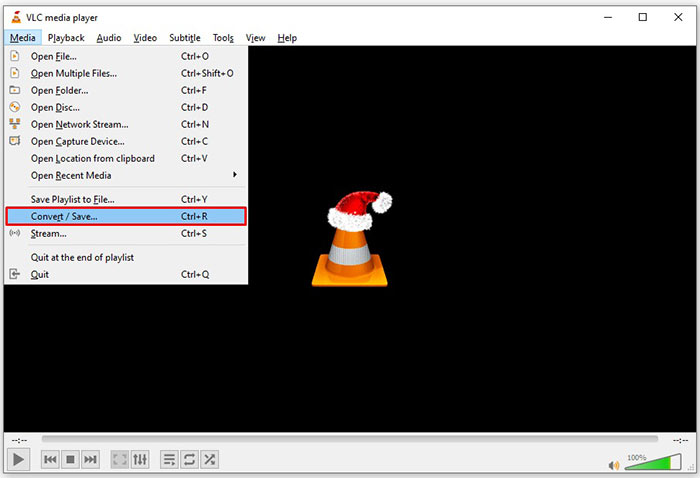
Trin 2: Gå til menuen Media i den øverste værktøjslinje, og vælg Convert/Save. Vælg Convert/Stream i menuen File på Mac.
Trin 3: Klik på knappen Add i dialogboksen Open Media, og tilføj den FLV‑fil, du vil konvertere.
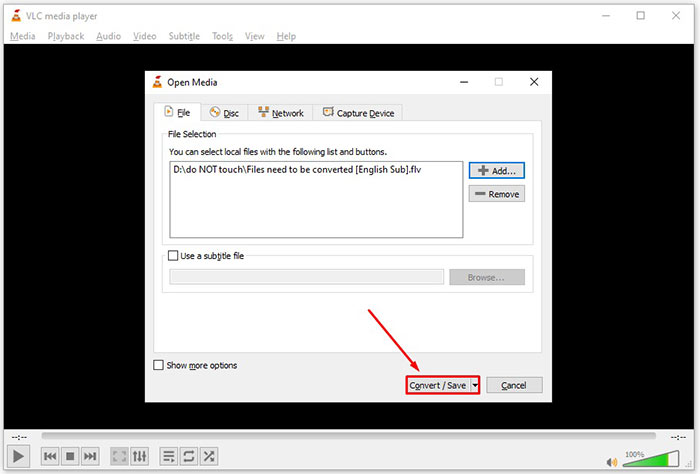
Trin 4: Klik derefter på knappen Convert/Save for at gå videre til næste dialog.
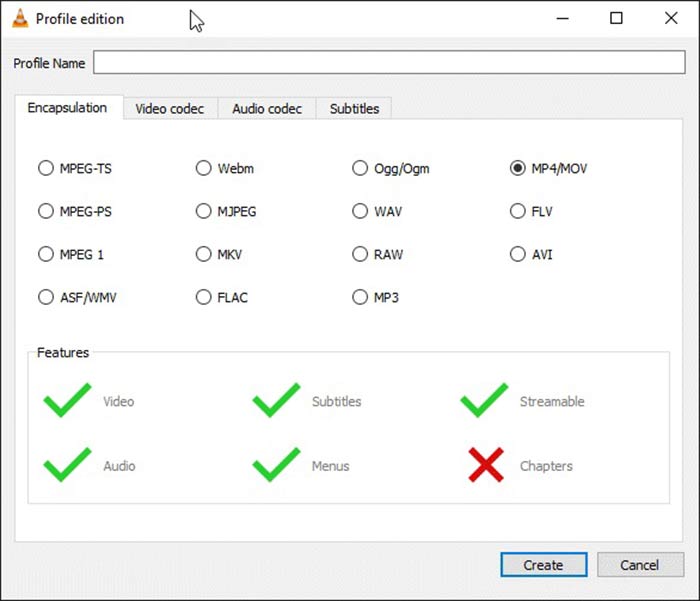
Trin 5: Åbn rullemenuen Profile, og vælg AVI. Hvis du ikke kan finde det, skal du klikke på den tredje knap ved siden af Profile. Det åbner dialogboksen Profile edition. Vælg AVI, og skriv et Profile Name. Klik på Create for at bekræfte. Vælg derefter det nye element under Profile.
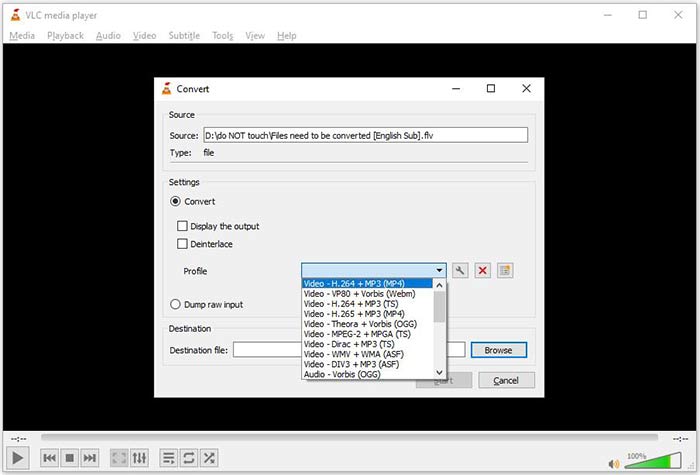
Trin 6: Angiv outputmappen ved at klikke på knappen Browse. Klik på knappen Start, og VLC vil konvertere FLV til AVI.
Gå ikke glip af:
- • Top 3 måder at konvertere FLV til MOV
- • Sådan konverteres dine FLV-videoer til MP3-lydfiler på skrivebordet og online
Del 2: Sådan konverteres FLV til AVI Online
Nogle gange har du kun brug for at konvertere FLV til AVI online en gang imellem. Og nogle foretrækker ikke at installere software. FVC Free Online Video Converter kan opfylde dit behov. Den kører online, men er fuldt tilstrækkelig til at konvertere flere FLV‑filer til AVI. I modsætning til andre webapps har den ingen begrænsninger for filstørrelse, vandmærke osv.
Trin 1: Besøg https://www.free-videoconverter.net/free-online-video-converter/ i en browser, når du har brug for at konvertere videoer. Klik på knappen Add Files to Convert, og download startprogrammet.
Download skrivebordsversionen for at konvertere filer i batch.
Trin 2: Efter download dukker startprogrammet automatisk op. Klik på knappen Add File øverst til venstre, og upload de FLV‑filer, du vil konvertere. Vælg derefter AVI nederst.
Hvis du vil ændre opløsning, billedhastighed og andre parametre, skal du klikke på Gear-ikonet for at åbne profildialogen.
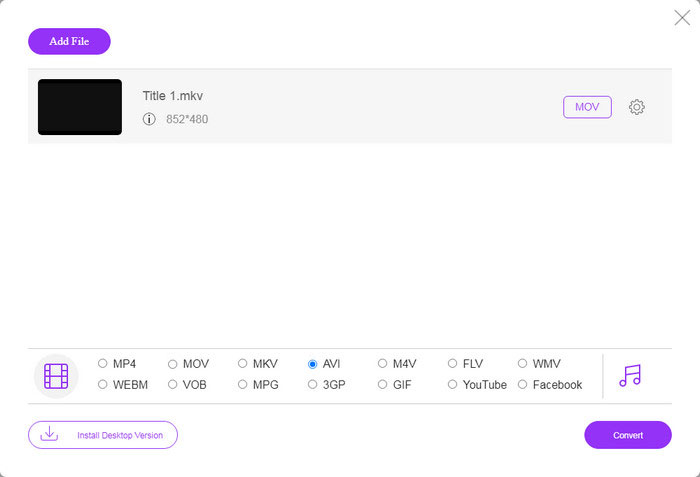
Trin 3: Når du klikker på knappen Convert, vil webappen arbejde, som du ønsker. Når du bliver bedt om det, skal du downloade AVI‑videofilerne til din harddisk.
Sammenlignet med andre webvideoomformere fungerer Free Online Video Converter hurtigt, men du har også brug for en god internetforbindelse.
FLV vs. AVI
Adobe Flash Player brugte FLV til at levere videoindhold som film og tv-shows. I dag udvikler Adobe ikke længere afspilleren og anbefaler brugere at afinstallere den af sikkerhedsmæssige årsager. Du kan dog stadig bruge FLV-formatet på mange ikke-Adobe/Macromedia-programmer.
Baseret på Resource Interchange File Format (RIFF), blev AVI-formatet introduceret af Microsoft i 1992. Det kan gemme video/lyd i høj kvalitet, da det bruger mindre komprimering. Men det forårsager også den store filstørrelse af en AVI-fil, hvilket kan være et problem, når der er begrænset plads.
Del 3: Ofte stillede spørgsmål om FLV til AVI
Hvor længe skal jeg vente med at konvertere FLV til AVI?
Det afhænger af din situation. Generelt er det meget hurtigt at konvertere videoer på skrivebordet. For onlineværktøjer bestemmer din internetforbindelse effektiviteten.
Er det sikkert at konvertere FLV til AVI online?
De fleste online FLV-konverterings-apps lover at slette dine videoer efter konvertering. Du bør dog ikke uploade private videoer online, medmindre du er sikker på, at webappen er 100% sikker at bruge.
Er AVI bedre end FLV?
FLV er et tabsfrit videoformat, mens AVI er ukomprimeret videoformat. Det betyder, at FLV-filen er mindre end AVI i samme tilstand. AVI giver dog bedre videokvalitet. FLV bruges til at dele videoer online, mens AVI er et godt valg til at redigere videoer.
Konklusion
Denne vejledning har delt tre måder at konvertere FLV-videofiler til AVI-format med desktop-software og webapp. VLC er både en gratis medieafspiller og en videoomformer, selvom det er svært at bruge. Desuden kan du udføre jobbet online uden at installere nogen software. Vi foreslår dog, at du prøver FVC Free FLV Converter, da outputkvaliteten er fantastisk. Plus, det er ret nemt at bruge og navigere. Hvis du har andre spørgsmål relateret til FLV til AVI-konvertering, skal du efterlade en besked under dette indlæg.
-
 3 gratis måder at konvertere FLV til WAV
 Hvordan konverterer jeg en FLV-fil? Kan VLC konvertere FLV til WAV? Dette indlæg fortæller 3 gratis måder at konvertere FLV til WAV uden kvalitetstab.
-
 3 gratis måder at konvertere FLV til MPG
 Sådan konverteres FLV til MPEG? Kan jeg konvertere FLV til MPG gratis? Dette indlæg deler 3 gratis videokonvertere, der hjælper dig med at konvertere FLV til MPG uden kvalitetstab.
-
 3 gratis måder at konvertere FLV til at spille på Xbox
 Kan ikke afspille FLV-filer på Xbox One eller Xbox 360? Brug for at konvertere FLV til Xbox-understøttet format som MP4, AVI, MOV eller WMV? Dette indlæg viser 3 gratis FLV til Xbox-konvertere, så du kan spille FLV på Xbox.

