


 Video Converter Ultimate
 Skærmoptager
 Video reparation
 Sikker download
Sådan konverteres FLV-videofiler til WMV uden at miste kvalitet
FLV-filer understøttes ikke af alle medieafspillere eller mobile enheder. Derfor vil du måske konvertere dine FLV-filer til WMV-format eller et andet format, der er kompatibelt med din videoafspiller. Det nye problem er, at du har brug for det rette værktøj til at udføre opgaven på din computer eller online. Spild ikke tid på at lede efter det på internettet. Denne demonstration vil lære dig, hvordan du konverterer dine FLV‑videoer til WMV, så du kan fortsætte dit projekt uden besvær.

Del 1: 2 Nemme metoder til at konvertere FLV til WMV gratis
Metode 1: Konverter FLV til WMV med Free FLV Converter
FVC Free FLV Converter er en kraftfuld måde at konvertere dine FLV-filer til WMV på. Selvom den hverken kræver betaling eller sætter vandmærker, finder du masser af funktioner, der svarer til professionel software. Endnu vigtigere er det, at den er meget nem at bruge og ikke kræver tekniske færdigheder.
Nøglefunktioner i den bedste FLV-konverter
- 1. Konverter FLV-videoer til andre formater med et enkelt klik.
- 2. Batch håndterer flere FLV-videofiler på samme tid.
- 3. Støtte en bred vifte af multimedieformater.
Gratis downloadTil Windows 7 eller nyereSikker download
Gratis downloadTil macOS 10.7 eller nyereSikker download
Sådan konverteres FLV til WMV gratis
Trin 1: Importér FLV
Download og installer den bedste gratis FLV-videokonverter, og start den derefter. Videokonverteren er kompatibel med Windows 10/8/7 og Mac OS X. Klik på menuen Add File(s) øverst til venstre, og tilføj alle de FLV-filer, du ønsker at konvertere. Softwaren udnytter multitrådning til at behandle videoer i batch.

Trin 2: Indstil WMV som outputformat
Find området nederst efter indlæsning af video, og klik på og udvid rullemenuen Output format. Gå til fanen General Video, og vælg WMV. Du kan hurtigt finde outputformatet ved at søge efter det i feltet Search Profile.
Hvis du vil redigere dine videoer, skal du klikke på knappen Edit i topbåndet for at åbne videoredigeringsvinduet.

Trin 3: Konverter FLV til WMV
Klik på knappen Open Folder, og angiv destinationsmappen i feltet Output folder. Klik til sidst på knappen Convert for at begynde at konvertere FLV til AVI. Ifølge vores undersøgelser tager det kun et par minutter at konvertere adskillige FLV-filer.

Metode 2: Sådan konverteres FLV til WMV med VLC
Mange mennesker foretrækker at åbne videokonvertere. VLC er for eksempel ikke kun en videoafspiller, men også i stand til at konvertere FLV til WMV gratis. Imidlertid klagede mange brugere over, at VLC er vanskelig at bruge. Derfor sender vi en grundlæggende vejledning nedenfor.
Trin 1: Kør den gratis FLV til WMV-konverter. Du kan installere den fra den officielle hjemmeside uden at betale en krone.
Trin 2: Gå til menuen Media, og vælg Convert/Save på pc. Hvis du bruger VLC på Mac, skal du vælge Convert/Stream i menuen File.
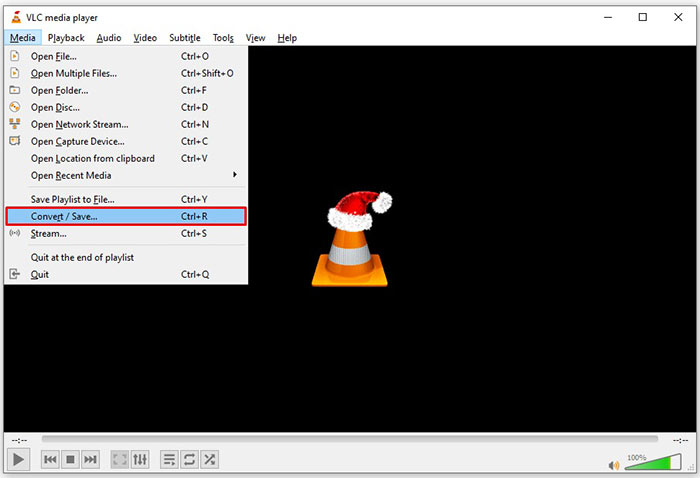
Trin 3: Klik på knappen Add for at tilføje en FLV-fil, som du vil konvertere. På Mac skal du klikke på knappen Open media for at importere FLV-videoen.
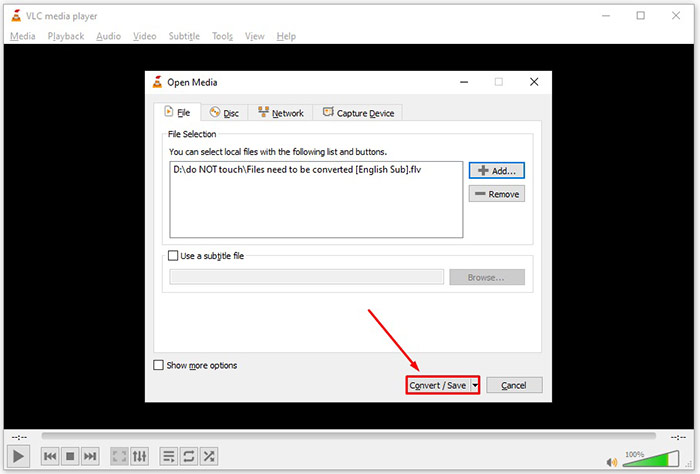
Trin 4: Tryk på knappen Convert/Save for at gå videre til næste vindue. På Mac skal du rulle ned til sektionen Choose Profile.
Trin 5: Som standard understøtter VLC ikke WMV som output, men du kan tilføje det manuelt. Klik på knappen Profile edit på pc eller Customize på Mac for at åbne dialogen Profile edition.
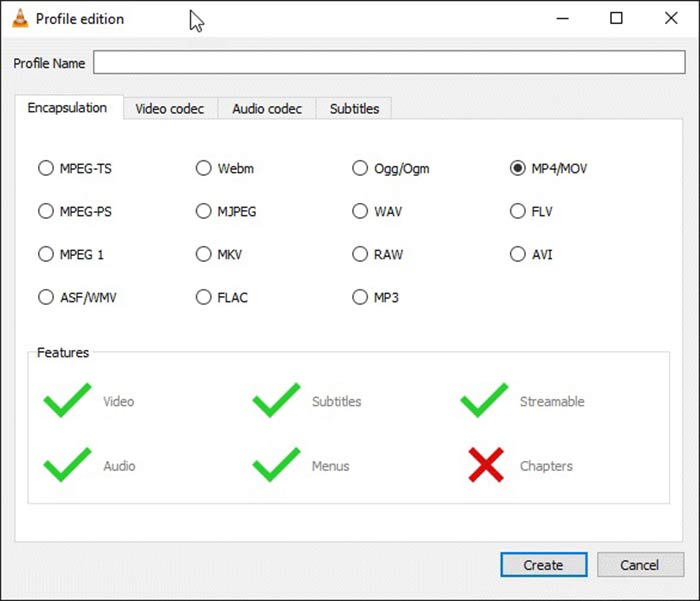
Trin 6: Skriv WMV i feltet Profile Name, og vælg ASF/WMV. Klik på knappen Create, og luk dialogen. Åbn derefter rullemenuen Profile, og vælg WMV.
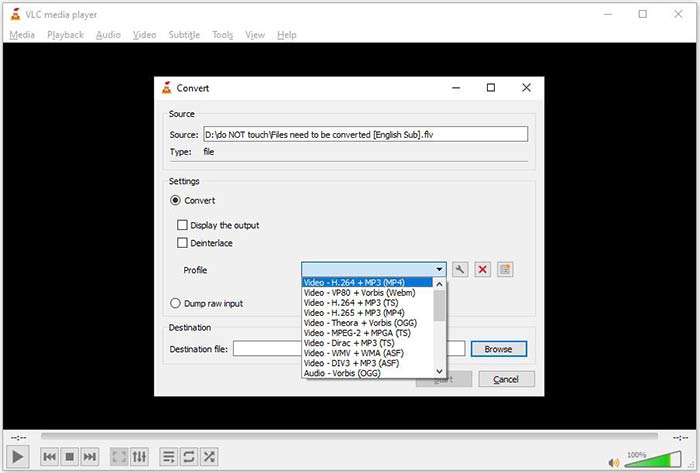
Trin 7: Klik på knappen Browse, og vælg en bestemt mappe til at gemme den konverterede WMV-fil. Klik til sidst på knappen Start for straks at begynde at konvertere FLV til WMV. Konverteringen tager lige så lang tid som videofilens længde, så du skal være tålmodig.
Del 2: Sådan konverteres FLV til WMV Online
For folk, der ikke bryder sig om at installere software, er webapps den bærbare alternative løsning til at udføre forskellige opgaver. FVC Free Online Video Converter kan for eksempel hjælpe dig med gratis at konvertere FLV-filer til WMV-format online. I modsætning til andre webapps anvender den avanceret teknologi til at konvertere videoer online uden begrænsning på filstørrelse.
Trin 1: Åbn https://www.free-videoconverter.net/free-online-video-converter/ i din browser, når du skal konvertere FLV til WMV. Klik på knappen Add Files to Convert for at downloade og installere startprogrammet.
Download skrivebordsversionen for at konvertere filer i batch.
Trin 2: Når installationen er færdig, dukker startprogrammet automatisk op. Klik på knappen Add File, og upload derefter de FLV-filer, du vil konvertere.
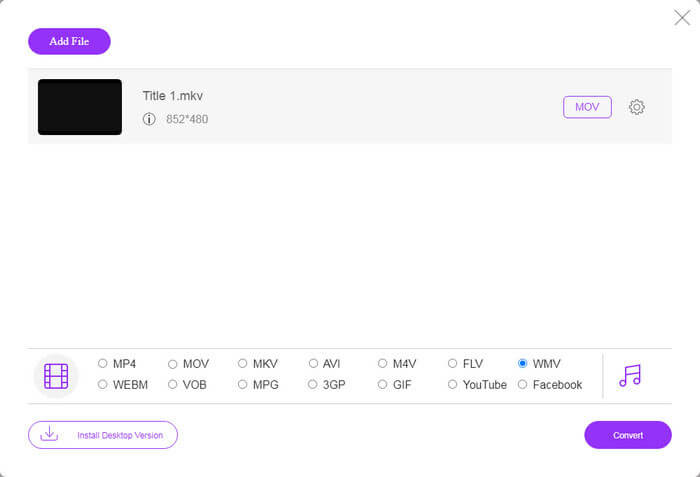
Trin 3: Vælg derefter indstillingen WMV nederst, og klik på knappen Convert. Det tager et stykke tid at gennemføre konverteringen. Download derefter de konverterede filer til din harddisk.
Gå ikke glip af:
FLV vs. WMV
Adobe Flash Player brugte FLV til at levere videoindhold som film og tv-shows. I dag udvikler Adobe ikke længere afspilleren og anbefaler brugere at afinstallere den af sikkerhedsmæssige årsager. Du kan dog stadig bruge FLV-formatet på mange ikke-Adobe/Macromedia-programmer.
Produceret af Microsoft var WMV et af de mest almindelige videoformater tilbage i 2000'erne. Den kan ses over nettet og afspilles af forskellige medieafspillere på Windows. Og det er også standardvideofilformatet for Windows Media Player. Men det er blevet overtaget af andre formater for nylig.
Del 3: Ofte stillede spørgsmål om FLV til WMV
Kan jeg konvertere FLV til WMV på Windows 10?
Der er ingen indbygget funktion på Windows 10, der kan konvertere videofiler. For at udføre jobbet skal du også have et videokonverteringsprogram eller en app installeret på din pc.
Hvorfor spiller FLV ikke i Windows Media Player?
Som vi ved, er FLV et format, der er blevet populært ved levering af videoer via internettet. FLV understøttes dog ikke af Windows Media Player. Her har du to muligheder, brug en anden medieafspiller eller installer codec-pakke til WMP.
Er det sikkert at konvertere FLV til WMV online?
Det er vanskeligt at besvare dette spørgsmål. Selvom de fleste webvideoomformere lover at slette dine videoer efter konvertering, kan nogle af dem muligvis lægge dine filer i andre hænder. Derfor skal du bruge et pålideligt værktøj, som FVC Free Online Video Converter.
Konklusion
Denne guide har delt tre måder at konvertere FLV til WMV på desktop og online. Når du har et sådant behov, kan du følge vores konkrete guide for at afslutte jobbet let. FVC Free FLV Converter er for eksempel ikke kun gratis, men konverterer også dine videofiler uden at skade kvaliteten. Hvis du støder på andre problemer, er du velkommen til at kontakte os ved at efterlade en besked under dette indlæg.
-
 Sådan konverteres dine FLV-videofiler til MP4 uden at betale en krone
 Denne guide deler fire gratis metoder til at konvertere dine FLV-videofiler til MP4-format på Windows 10/8/7 / XP og Mac OS X, så du kan nyde videoerne på alle enheder.
-
 Sådan konverteres dine FLV-videoer til MP3-lydfiler på skrivebordet og online
 Sådan konverteres en FLV til en MP3-fil? Alt hvad du skal gøre er at læse denne artikel omhyggeligt, finde din yndlingsmetode og følge vores trin-for-trin guide for at få det, du ønsker.
-
 Top 3 måder at konvertere FLV til MOV
 Sådan konverteres FLV til MOV? Hvordan konverterer jeg FLV til MOV på Mac? Er der nogen gratis måde at konvertere YouTube FLV til MOV online? Dette indlæg deler 3 FLV til MOV-konvertere for at ændre FLV-filer til MOV.

