


 Video Converter Ultimate
 Skærmoptager
 Video reparation
 Sikker download
3 gratis måder at konvertere FLV til at spille på Xbox
FLV bruges i vid udstrækning på nyheds- og videodelingssider. Når du downloader onlinevideoer fra YouTube, Hulu eller Facebook, får du oftest FLV-filer. FLV-formatet kan understøttes af mange afspillere, enheder, platforme og browsere. Men det kan ikke afspilles på Xbox.
Xbox er mere end blot en spilkonsol; den giver dig også mulighed for at afspille video og musik via et USB-flashdrev eller en ekstern harddisk. Xbox er kompatibel med mange populære mediefiltyper. Men som nævnt ovenfor kan du ikke afspille FLV direkte på Xbox. Når du vil se FLV-filer på Xbox, skal du konvertere FLV til et Xbox-understøttet format.

Dette indlæg deler 3 gratis måder at konvertere FLV til Xbox på. Når du vil se FLV-filer på din Xbox One, Xbox 360, den nye Xbox Series X eller Xbox Series S-konsol, kan du bruge disse metoder til at konvertere FLV til en fil, som Xbox understøtter.
Del 1. Sådan konverteres FLV gratis til Xbox Online
Mange videokonvertere kan hjælpe dig med at konvertere FLV til Xbox-understøttet format som AVI eller MP4. Hvis du har at gøre med nogle små FLV-videoklip, skal du først prøve den gratis online FLV til Xbox-konverter.
Free Online Video Converter er en brugervenlig videokonverter, som lader dig konvertere FLV til MP4, AVI, WMV, MOV eller et andet format, der understøttes af Xbox-konsoller. Sammenlignet med andre onlinekonvertere kræver den ingen konto eller login. Desuden er der ingen begrænsning på filstørrelsen for din FLV-konvertering. Guiden nedenfor viser dig, hvordan du bruger den.
Trin 1. Denne online FLV til Xbox-konverter er kompatibel med enhver webbrowser som Chrome, Safari, IE og Firefox. Åbn din browser, og gå til siden Online FLV til Xbox-konverter.
Trin 2. Når du er kommet dertil, skal du klikke på Add Files to Convert og derefter på Download-knappen for at installere et lille startprogram til FLV-konverteringen. Når startprogrammet er klar, vises der et pop op-vindue, hvor du kan tilføje din FLV-fil.

Trin 3. Du kan se, at en række populære videoformater, herunder MP4, AVI, MOV, FLV, WMV, MKV og flere, er listet under den indlæste FLV-fil. Du kan vælge et Xbox-understøttet format som MP4 eller AVI.
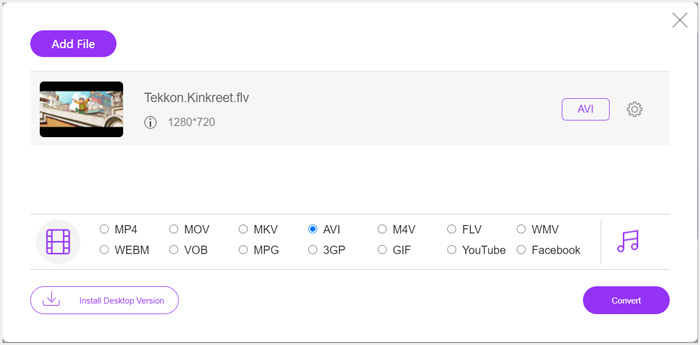
Trin 4. Hvis du vil tilpasse flere indstillinger for video og lyd, kan du klikke på ikonet Settings ved siden af outputformatet. Derefter kan du klikke på knappen Convert for at starte konverteringen af FLV til Xbox. Den konverterede video bliver automatisk gemt på din computer, så snart konverteringen er færdig.
Del 2. Sådan konverteres FLV til Xbox Online med FreeConvert
FreeConvert er en anden populær video- og lydkonverter, som kan hjælpe dig med at konvertere FLV til Xbox-understøttet MP4, AVI eller WMV. Den har en særlig FLV to Xbox Video Converter, så du direkte kan konvertere dine FLV-filer til Xbox.
Trin 1. Åbn din browser, og gå til denne FLV to Xbox Video Converter-side.
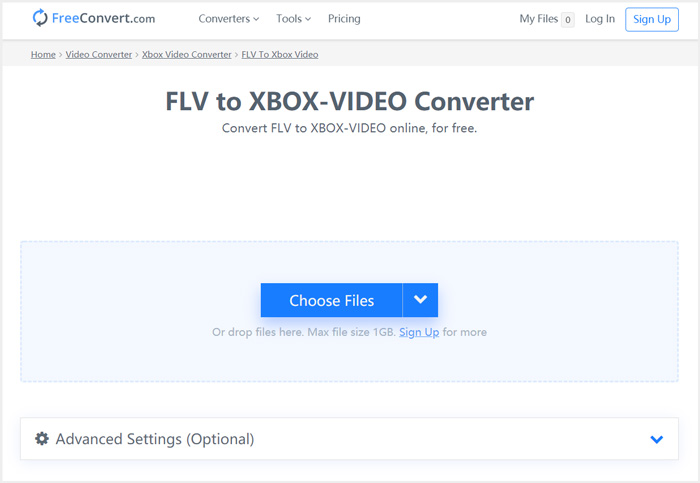
Trin 2. Klik på knappen Choose Files for at gennemse og uploade din FLV-fil. Du kan også tilføje filer via URL, Google Drive og Dropbox.
Trin 3. Du kan klikke på Add More Files for at uploade andre FLV-filer, du vil konvertere. Målformatet vil som standard være sat til XBOX. Du kan blot klikke på knappen Convert to Xbox Video for at starte konverteringen fra FLV til Xbox.
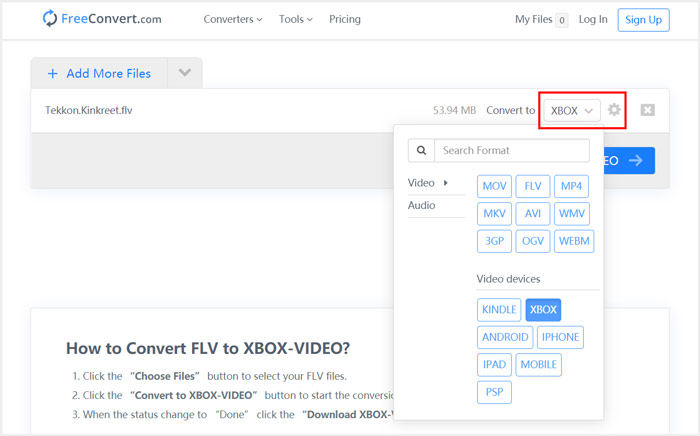
Følger du lignende trin, kan du afspille al slags musik på Xbox, efter du har konverteret filerne til formater, som Xbox er kompatibel med.
Denne FLV to Xbox Video Converter begynder at uploade og konvertere din video. Når konverteringen er færdig, kan du klikke på knappen Download for at gemme den på din Mac eller Windows-pc. Eller du kan vælge at gemme den på Google Drive og Dropbox. Du vil se nogle annoncer, mens du bruger denne gratis FLV til Xbox-konverter.
Del 3. Bedre måde at gratis konvertere FLV til Xbox på Mac og Windows PC
Ud over online FLV-konvertere kan du også bruge andre gratis videokonvertere til at konvertere og afspille dine FLV-filer på Xbox-spilkonsollen. Her præsenterer vi den kraftfulde Free FLV Converter for dig. Den er specielt udviklet til at håndtere forskellige FLV-konverteringer.

- Konverter ethvert FLV til Xbox-understøttet format som MP4, AVI, WMV, MOV og mere.
- Tilby en række temaer til redigering og tilpasning af FLV-fil.
- Avancerede multi-core CPU'er og GPU-accelerationer til at konvertere FLV til Xbox i hurtig hastighed.
- Konverter en eller flere FLV-filer til Xbox uden tab af billed- eller lydkvalitet.
Gratis downloadTil Windows 7 eller nyereSikker download
Gratis downloadTil macOS 10.7 eller nyereSikker download
Trin 1. Først kan du dobbeltklikke på download-knappen for at installere den gratis på din computer. Åbn programmet, og klik på Add Files for at importere dine FLV-fil(er).

Trin 2. Vælg MP4 eller AVI som målformat i rullemenuen Output format. For flere indstillinger kan du klikke på ikonet Settings ved siden af outputformatet for at åbne vinduet Profile Settings.
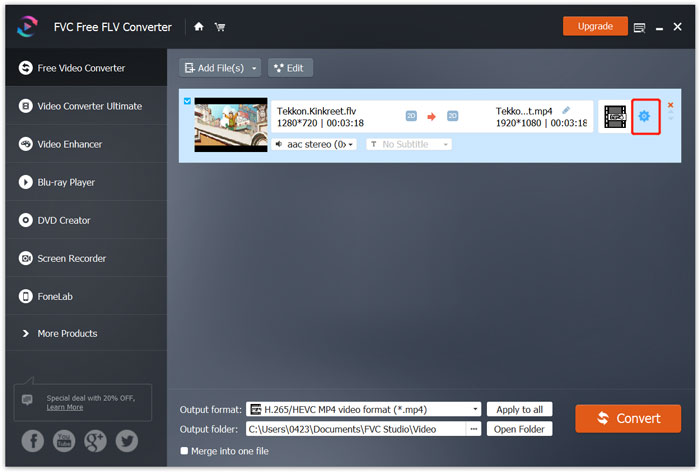
Der findes også en specifik Xbox-kategori i Output format, så du direkte kan konvertere FLV til en fil, som Xbox One eller Xbox 360 understøtter. Men du skal opgradere til en betalingsversion for at bruge den.
Trin 3. Klik på knappen Convert for at starte videokonverteringen fra FLV til MP4 eller et andet Xbox-understøttet videoformat.
Del 4. Ofte stillede spørgsmål om at spille FLV på Xbox
Spørgsmål 1. Hvilke formater kan understøttes af Xbox One?
Som en af de mest populære spilkonsoller er XBox kompatibel med mange ofte anvendte video- og lydformater, herunder MP4, AVI, M4V, MOV, WMV, MKV, H.264 AVCHD, WAV, WMA, 3GP-video, 3GP-lyd, AAC , MP3 og mere.
Spørgsmål 2. Hvordan afspilles videoer på Xbox?
Hvis du har appen Film & TV på din Xbox One eller Xbox 360, når du caster video til Xbox eller tilslutter dit eksterne drev til Xbox, kan du nemt bruge den til at se videoer.
Spørgsmål 3. Hvilken afspiller kan afspille FLV-filer?
Når du vil afspille FLV-filer på din Mac, Windows PC eller bærbare iOS / Android-enhed, er VLC Media Player altid en god mulighed for at gøre det. Det tilbyder desktop- og mobilapps, så du kan afspille FLV-filer på din computer eller telefon.
Konklusion
Kan du ikke afspille FLV-filer på din Xbox-spilkonsol? For at gøre det skal du først konvertere FLV til Xbox-understøttet fil. Du kan finde 3 gratis metoder til at konvertere og spille FLV på Xbox fra dette indlæg.
-
 Top 10 FLV-afspillere til Windows, Mac, iOS og Android i 2021
 FLV-afspiller hjælper dig med let adgang til dine FLV-filer på din Windows-, Mac-, Android-, iOS-enhed. Se de bedste FLV-filafspillere, du kan downloade lige nu.
-
 Vejledning til at komprimere GIF og reducere dens filstørrelse med høj kvalitet
 Her er 2 nemme måder at komprimere GIF på din computer eller mobiltelefon. Du kan bruge FVC Free Online Video Compressor og Photoshop reducere GIF-filstørrelsen i forskellige aspekter.
-
 Top 4 gratis måder at konvertere FLV-videoer til MP4 på Desktop og online
 Denne guide deler fire gratis metoder til at konvertere dine FLV-videofiler til MP4-format på Windows 10/8/7 / XP og Mac OS X, så du kan nyde videoerne på alle enheder.
