


 Video Converter Ultimate
 Skærmoptager
 Video reparation
2 af de bedste M4V til FLV-konvertere til Windows/Mac/Online
En video- og lydcontainer, der primært er lavet til brug i Apple iTunes, M4V. Dette format er beskyttet af DRM‑ophavsretsbeskyttelse for at undgå problemer med ophavsret. I dette tilfælde er filen svær at afspille, hvis du ikke har en iTunes‑konto med de korrekte loginoplysninger. Så hvis du vil se videoerne på din pc eller Android‑telefon, er det nødvendigt at konvertere dem til en afspillelig FLV. For at finde ud af, hvordan du konverterer M4V til FLV, kan du læse denne artikel og få et kort overblik over M4V og FLV.

Del 1. 1. valg om at konvertere M4V til FLV på Mac & PC
Det er den mest effektive konverter, du vil elske at bruge, især hvis du vil konvertere M4V til FLV på Mac eller pc. FVC Video Converter Ultimate er den konverter, som mange brugere allerede stoler på. Hvis du desuden ønsker et alsidigt værktøj, der giver et enestående resultat, er dette et must. Du kan også konvertere enhver mediefil her og sætte kvaliteten til SD, HD, 1080 eller endda 4K‑videoer. Forvent ikke mindre, når du downloader dette værktøj til din disk, for som navnet antyder, er det ultimativt. Følg desuden vejledningen nedenfor, hvis du vil opleve dette værktøjs maksimale konverteringskapacitet.
Sådan konverterer du M4V til FLV med hjælp fra FVC Video Converter Ultimate:
Trin 1. Klik på downloadknappen nedenfor, og vælg det styresystem, du bruger. Når du har downloadet, klik på Installér, og en velkomstgrænseflade vises, tryk derefter på Start nu.
Gratis download til Windows 7 eller nyere Sikker download
Gratis download til MacOS 10.7 eller nyere Sikker download
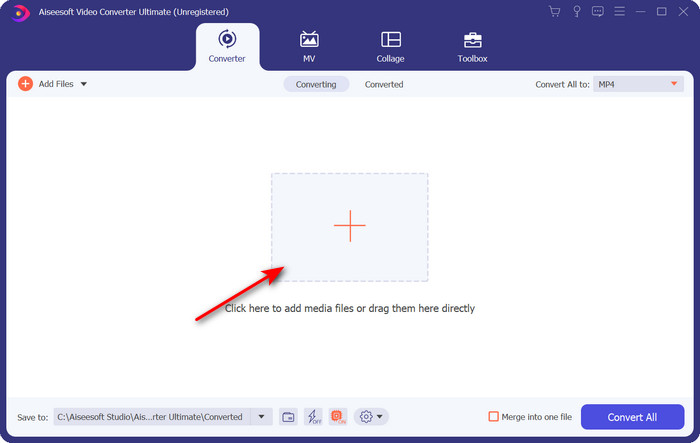
Trin 2. Start værktøjet, klik på +‑tegnet i midten af grænsefladen, og vælg .m4v‑filen i den mappe, der vises, klik på den, og tryk på Åbn.
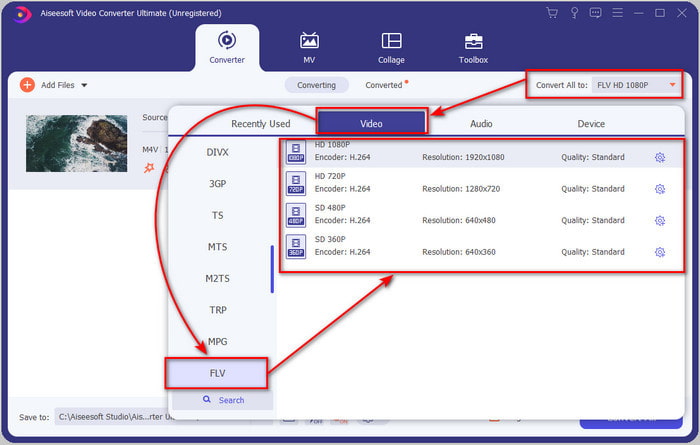
Trin 3. Når .m4v‑filen er i grænsefladen, skal du klikke på Convert All to og finde formatet FLV.
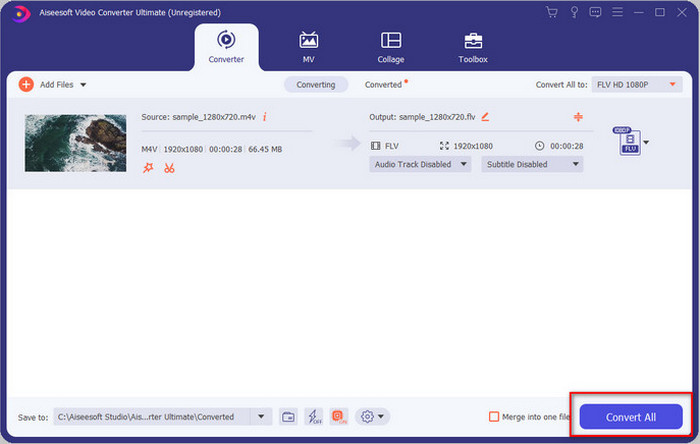
Trin 4. Gå videre og klik på Convert All for at begynde at ændre M4V til FLV.
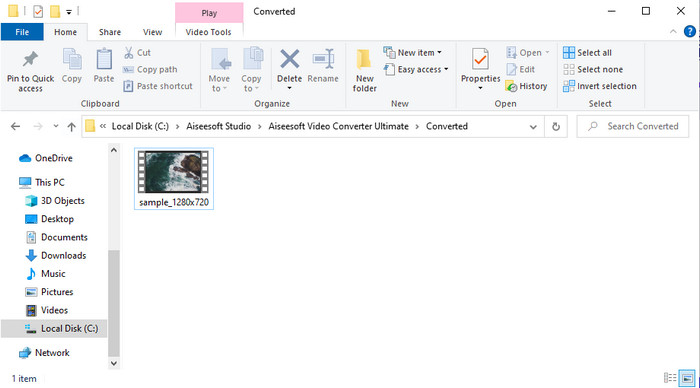
Trin 5. Konverteringen af filen tager mindre end et minut på grund af den hurtige konvertering, dette værktøj leverer. En mappe vil vise din konverterede fil; klik på filen for at se den eller dele den online.
Fordele
- Hurtig konvertering og hardwareacceleration er tilgængelige for den bedste oplevelse.
- Tilgængelig på alle platforme som pc eller Mac.
- At udføre redigering af videoer for at gøre dem fremragende kan overgås her.
Ulemper
- Betaling før brug, men prisen er overkommelig.
- Download softwaren før brug.
Del 2. 2. valg om konvertering af M4V til FLV gratis via online
Konvertering af dine filer online kan udføres effektivt, hvis du bruger et ordentligt værktøj til at konvertere M4V til FLV online med hjælp fra FVC Free Video Converter Online. Dette onlineværktøj er den bedste konverter, du kan tilgå i alle webbrowsere, hvis du har internetforbindelse. Du kan også konvertere her uden størrelsesbegrænsning, men du kan ikke udføre batchkonvertering. Selvom online‑softwaren er fremragende, kræves der stadig internetforbindelse, så hvis du ikke har det, er dette ikke en mulighed – ligesom andre webkonvertere. Men hvis du har internetforbindelse og vil opleve en gennemført, gratis onlinekonvertering, skal du følge trinnene nedenfor.
Sådan konverterer du M4V til FLV med hjælp fra FVC Free Video Converter Online:
Trin 1. Klik på dette link for at gå til den gratis onlinekonverter, som FVC stiller til rådighed for dig.
Trin 2. Klik på Add Files to Convert i webgrænsefladen for at downloade installationsprogrammet. Når download af installationsprogrammet er færdig, skal du klikke på Add Files to Convert igen, hvorefter en mappe vises, og derefter vælge M4V‑filen.
Download skrivebordsversionen for at konvertere filer i batch.
Trin 3. En ny webgrænseflade vil blive vist; nedenfor skal du vælge formatet FLV ved at klikke på det.
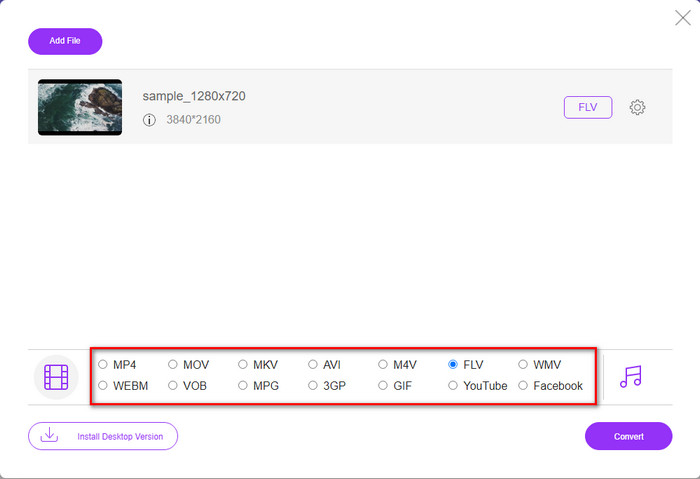
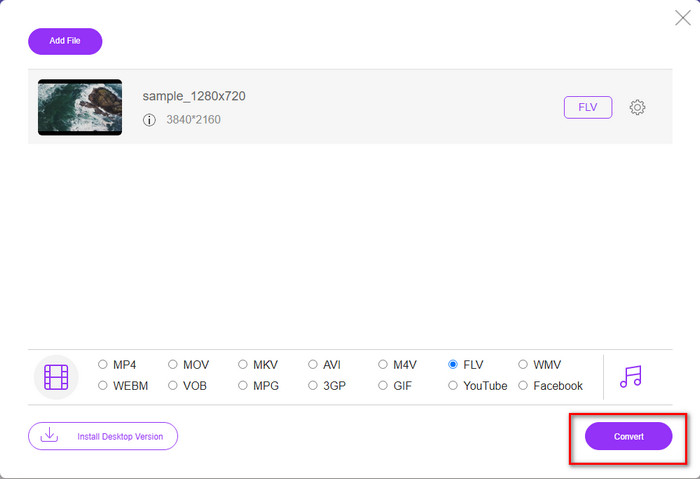
Trin 4. For at begynde at konvertere M4V til FLV gratis skal du klikke på Convert.
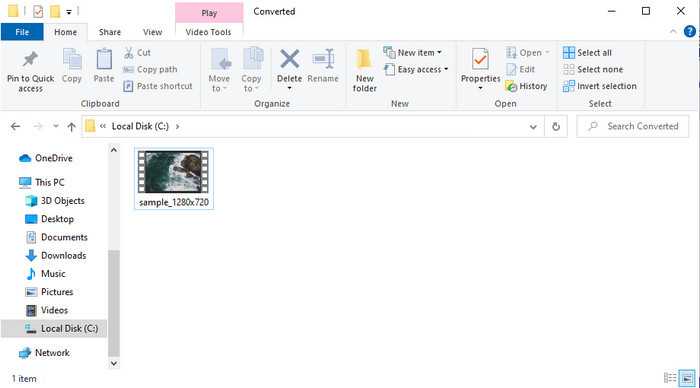
Trin 5. Efter konverteringen vil en mappe blive vist i grænsefladen; klik på filen for at afspille den i din lokale medieafspiller.
Fordele
- Gratis og kompatibel i alle webbrowsere.
- Ubegrænset filstørrelse og konvertering.
- Sikker og ingen annoncer i det primære webværktøj.
Ulemper
- Det kræver internetforbindelse for at bruge værktøjet.
- Mindre understøttet format at uploade og konvertere til.
Del 3. Forskelle mellem M4V- og FLV-formater
M4V gemmer den højeste videokvalitet, der er downloadet på din Apple iTunes Store. Dette format ligner MP4, fordi de bruger MPEG-4 codec som en kompressor. Men M4V-videoerne er beskyttet under Apples FairPlay DRM-ophavsretsbeskyttelse. Så det er svært at afspille videoer under dette format, fordi det ikke afspilles med det samme, hvis du indsætter dem på en anden medieafspiller end iTunes eller Quicktime Player. Ubeskyttede M4V-filer kan tilgås på din medieafspiller ved at ændre filtypenavnet til .mp4.
I modsætning hertil bruges FLV til at overføre video- og lyddata over nettet så hurtigt som muligt. Flash Video er det mest gunstige format, der findes på alle HTML 5-websteder. Dette format blev dog afbrudt, fordi Adobe Flash allerede var gået på pension. Alligevel kan du stadig afspille det på dine nødvendige medieafspiller-plugins, når du har downloadet det eller konverteret.
M4V vs. FLV
M4V er udviklet af Apple, som også bruger MPEG 4. M4V-filer bruges ofte til at gemme de videoer, der er downloadet fra Apple iTunes Store, som musikvideoer, tv-episoder osv. Du kan finde nogle M4V-filer kopibeskyttede, da den bruger Apples FairPlay DRM ophavsretsbeskyttelse.
Adobe Flash Player brugte FLV til at levere videoindhold som film og tv-shows. I dag udvikler Adobe ikke længere afspilleren og anbefaler brugere at afinstallere den af sikkerhedsmæssige årsager. Du kan dog stadig bruge FLV-formatet på mange ikke-Adobe/Macromedia-programmer.
Del 4. Ofte stillede spørgsmål om M4V til FLV-konvertering
Hvilken er bedre; MP4 eller M4V?
Hvis du vil beskytte din fil, så er M4V formatet du skal bruge, fordi dette kun er tilgængeligt på Apples, og det er beskyttet. Men antag, at du vil have et format, der er kompatibelt med alle medieafspillere, editoren og mere. I så fald er MP4 det universelle medieformat, du ville elske at bruge.
Kan jeg spille M4V på VLC?
VLC er gratis at bruge og kompatibel med alle platforme, og det kan også afspille næsten alle medieformater. Men beskyttede M4V‑filer kan ikke afspilles her, fordi de er beskyttet. Så hvis du vil se .m4v i VLC, er det nødvendigt at konvertere M4V‑filen til MP4 eller AVI.
Mister jeg kvaliteten efter konvertering af M4V?
Efter konvertering af M4V bør kvaliteten af den bevare standardsatsen for den originale M4V-kvalitet. Nogle konvertere understøtter dog ikke konvertering af videoen til HD, 1080 eller 4k. Så du må hellere vælge det perfekte værktøj og ikke det okay værktøj, der vil være tilstrækkeligt til dine behov for konvertering uden at miste dets kvalitet.
Konklusion
Alt i alt er de to online‑ og offlineværktøjer, der præsenteres her, skabt til at levere topresultater, især hvis du vil konvertere M4V til FLV. Vi har også fået indsigt i de to formater, M4V og FLV. Selvom det er nødvendigt at ændre M4V for at se den beskyttede fil, kan det være svært at vælge det rette værktøj til den rette opgave. Derfor præsenterer vi to værktøjer, du kan bruge til gratis at konvertere formatet ved hjælp af FVC Free Video Converter Online. Eller du kan opleve nye højder inden for konvertering ved at bruge FVC Video Converter Ultimate. Så hvad venter du på, hvis du vil se din M4V gratis? Vælg et af værktøjerne ovenfor, følg de hurtige og enkle trin, og voilà – nyd videoen.
-
 [Guide] Sådan konverteres M4V-videoer til animerede GIF'er på Windows/Mac
 Hvis du vil lave animerede GIF -filer fra dine foretrukne M4V -videoer, kan du lære om 2 nemme og effektive måder at konvertere M4V -videoer til GIF'er med tilpassede indstillinger.
-
 3 Video Converter Program Bruges til at konvertere iTunes M4V til AVI på Mac
 Har du ingen idé om, hvordan man konverterer MKV til et AVI-format? Mens vi fortsætter med at læse denne artikel, kender vi de 3 værktøjer, der kan hjælpe dig med at konvertere dette filformat.
-
 Gratis M4V til MOV-konverter - Sådan konverteres M4V til MOV
 Hvis din medieafspiller'ikke understøtter M4V, har du nogensinde kæmpet for at se en film på din iPhone? Hovedemnet i denne artikel er at konvertere den til en MOV-videofil.

