


 Video Converter Ultimate
 Skærmoptager
 Video reparation
5 hurtige og ubesværede måder at omdanne MKV til FLV gratis [Online & Offline]
Kan du ikke dele dine MKV‑filer over internettet, fordi filstørrelsen er for stor? Hvorfor ikke konvertere dem i stedet for at komprimere filen og dermed undgå kvalitetstab? Dette problem er løst, hvis du læser detaljerne nedenfor, før du sender den. Du behøver ikke bruge en time på at læse denne artikel, så lad os uden videre se på de seks konvertere, du kan bruge til at konvertere MKV til FLV.

Del 1. Top of the Line Bedste MKV til FLV Converter at downloade
FVC Video Converter Ultimate kan hjælpe dig med nemt og effektivt at ændre MKV til FLV uden besvær. Denne enestående konverter er helt anderledes end de konvertere, der er på denne liste, eller andre konvertere du allerede bruger eller ikke bruger. Det er den førsteklasses encoder og decoder, du kan downloade på din pc eller Mac, og den fungerer fejlfrit offline, selv om du ikke har en kraftig stationær computer.

FVC Video Converter Ultimate
4.987.355+ downloads- Konverter MKV til FLV, AVI, MP4, MOV eller til 200+ formater tilgængelige på Windows og Mac.
- Gør dit MKV-format kompatibelt med alle skriveborde og enheder.
- Det kan udføre batchkonvertering til dine MKV-formater eller andre formater.
- Idiotsikker konverter til brug af alle.
- Understøtter high definition output og endda op til 4k videokvalitet.
Gratis download til Windows 7 eller nyere Sikker download
Gratis download til MacOS 10.7 eller nyere Sikker download
Trin til, hvordan man konverterer MKV til FLV med FVC Video Converter Ultimate
Trin 1. Download programmet til din disk, og følg derefter installationsprocessen.
Gratis download til Windows 7 eller nyere Sikker download
Gratis download til MacOS 10.7 eller nyere Sikker download
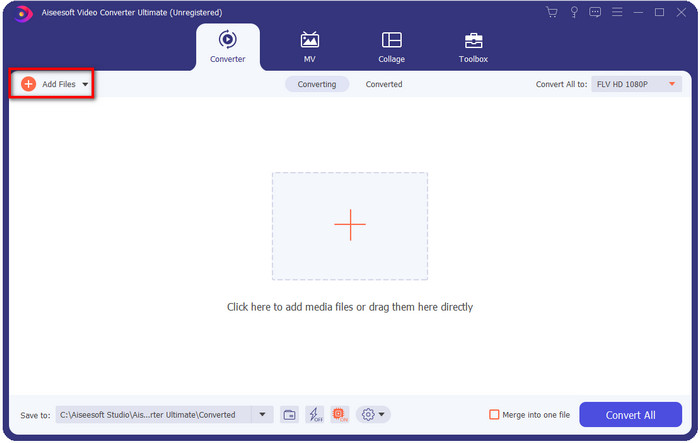
Trin 2. Efter installationen åbner du programmet for at tilføje MKV‑filerne; du kan trække‑og‑slippe filen til grænsefladen eller klikke på knappen Add Files.
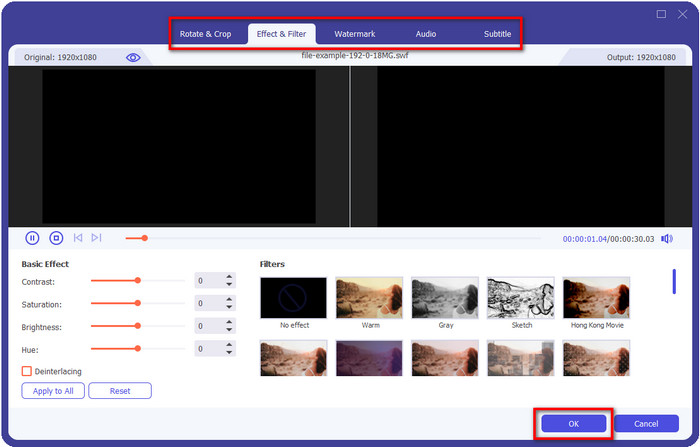
Hvis du vil redigere dine MKV‑filer, før du konverterer dem, kan du klikke på tryllestavsknappen for at tilføre lidt magi til dit output, såsom at tilføje effekter, beskære, tilføje undertekster og mere. For at gemme den magi, du har tilføjet til din video, skal du klikke på OK.
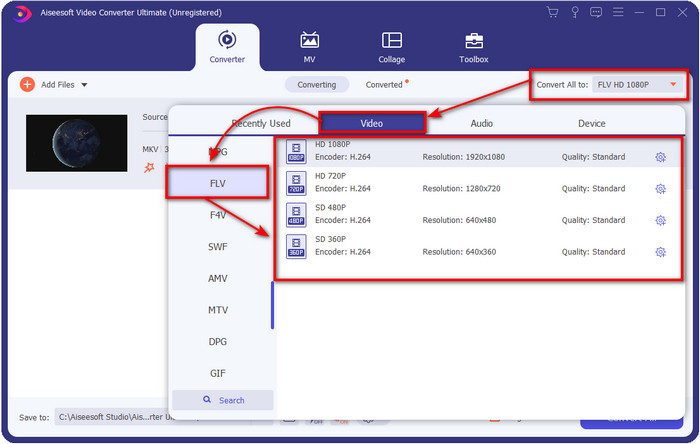
Trin 3. Klik på drop‑down‑knappen, og vælg FLV-formatet på listen.
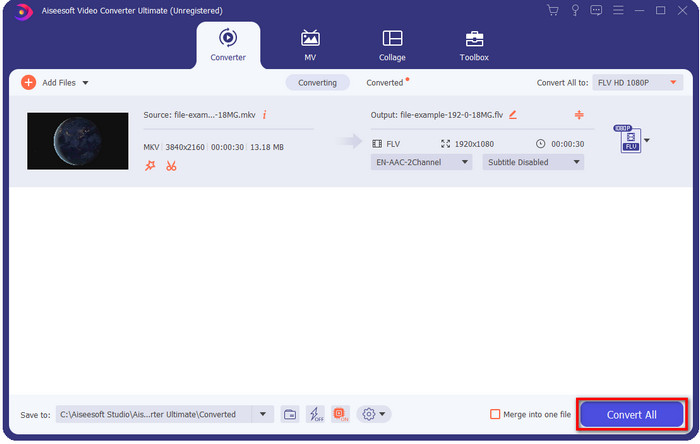
Trin 4. Klik på knappen Convert All for at begynde at ændre MKV til FLV gratis. En mappe vises efter processen med den nye FLV‑fil.
Del 2. 4 Bedste webbaserede MKV til FLV Converter
1. FVC Free Video Converter Online
FVC Free Video Converter Online byder på en enkel, men imponerende gratis online MKV‑til‑FLV‑konverter, der kan bruges i alle browsere. Den understøtter også et mellemstort udvalg af formater, du kan vælge og uploade til. Selvom værktøjet er afhængigt af internetforbindelse, er det lettere og hurtigere at konvertere og uploade filer her. Vil du vide, hvordan du bruger det? Så følg trinene nedenfor.
Fordele
- Den er tilgængelig til at blive brugt af alle med internettet.
- Brugervenlig og letforståelig grænseflade.
- Ingen begrænsning for filstørrelse.
- Avancerede indstillinger for video og lyd.
Ulemper
- Mellemskala format.
Trin 1. For at åbne den online konverter skal du klikke på dette link.
Trin 2. Tryk på knappen Add Files to Convert for at tilføje filen fra din computers mappe, og klik derefter på Open.
Download skrivebordsversionen for at konvertere filer i batch.
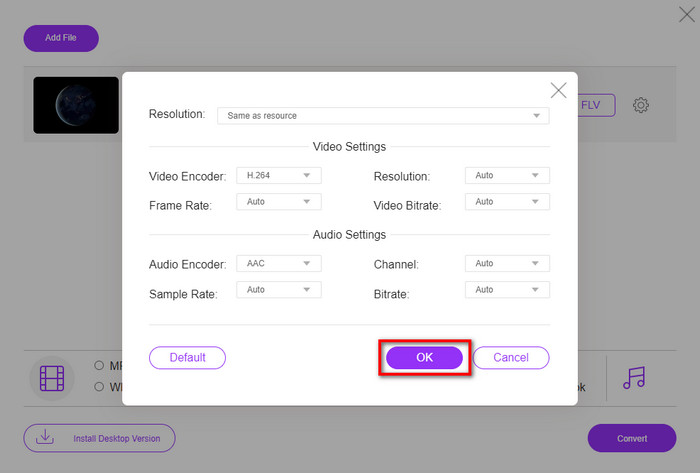
Selvom du ikke kan redigere videoer her, kan du ændre video‑ og lydindstillinger ved at klikke på tandhjulsknappen.
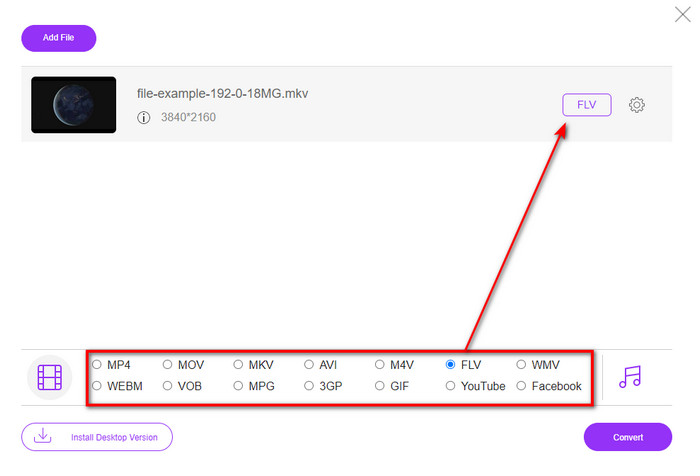
Trin 3. Vælg FLV-formatet under listen.
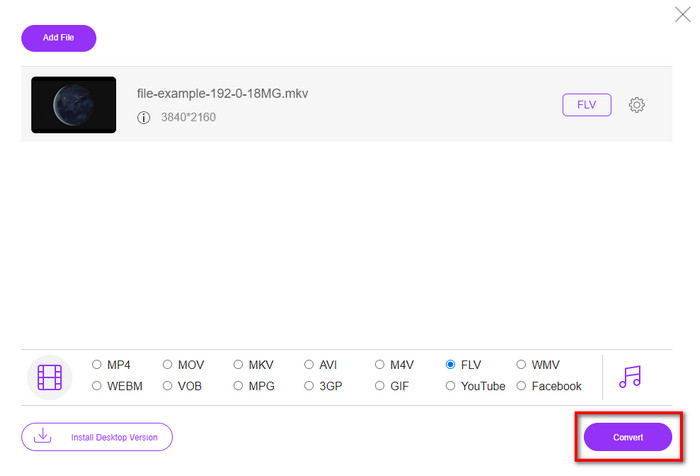
Trin 4. Klik på Convert for at starte konverteringsprocessen.
2. Mkonverter
En af de sikreste MKV‑til‑FLV‑konvertere online, du kan bruge, er Mconverter. Ud over at konvertere video‑ og lydformater kan du også konvertere dine billeder, arkiver, dokumenter og mange andre medieformater her. Selvom denne konverter er gratis at bruge, er der en grænse for hver fil, du kan indsætte.
Fordele
- Konverter videoer, lyd, dokumenter og mere online.
- Det understøtter flere konverteringer.
- Let at bruge.
Ulemper
- Filstørrelsen må ikke overstige 200 MB.
- Nogle annoncer under konvertering af filen.
Trin 1. Åbn Mconverter i din browser, træk .mkv‑filen, og slip den i boksen.
Trin 2. Klik på FLV-formatet, og processen begynder automatisk.
Trin 3. Når den er færdig, vil den automatisk blive downloadet til din disk.
3. Freeconvert.com
Freeconvert.com vil hjælpe dig med at konvertere MKV til FLV online gratis. Denne webkonverter har en brugervenlig grænseflade, som alle kan bruge. Dog understøtter denne online konverter kun et mindre udvalg af formater, du kan vælge imellem, og der er mange annoncer på websiden.
Trin 1. Søg efter Freeconvert.com i din søgemaskine.
Trin 2. Klik på Choose File for at uploade .mkv‑filen fra din computers mappe, tryk på drop‑down‑knappen, og vælg FLV-formatet.
Trin 3. Klik på Convert FLV for at begynde konverteringen, og for at downloade den skal du klikke på Download FLV.
Fordele
- En gratis online konverter, du kan bruge.
- Sikker og enkel webkonverter.
- Det understøtter en 1GB fil til at konvertere.
Ulemper
- Det understøtter et lille format.
- Processen med at konvertere og downloade vil tage meget af din tid.
4. Movavi Online Video Converter
Movavi Online Video Converter er en af de anbefalede konvertere, du bør bruge til at konvertere MKV til FLV online. Det er den gratis webversion af Movavi Video Converter, som bruges af mange brugere på hele nettet på grund af den effektivitet, værktøjet tilbyder, og dets professionelle look.
Trin 1. Åbn din foretrukne browser, og søg efter Movavis hjemmeside.
Trin 2. Tryk på +Add Your Media for at tilføje den fil, du vil konvertere. Klik på drop‑down‑knappen og tryk på Video; find FLV-formatet, og klik på det.
Trin 3. Tryk på Convert for at starte konverteringsprocessen.
Fordele
- Ingen annoncers webgrænseflade.
- Enkel konverter, som alle kan bruge.
- Det understøtter et mellemformat format.
Ulemper
- Processen med at konvertere format tager længere tid.
- Internet-afhængig ligesom de andre web-konvertere.
Del 3. Sammenligningstabel
| Funktioner | FVC Video Converter Ultimate | FVC gratis videokonverter online | Mconverter | Freeconvert.com | Movavi Online Video Converter |
| Konvertering af formatfunktioner |  | | | | |
| Internet-afhængig |  | | | | |
| Batchkonvertering | | | | | |
| Avancerede redigeringsfunktioner | | | | | |
| Tilgængelige platforme | Desktop-baseret værktøj | Web-baseret værktøj | Web-baseret værktøj | Web-baseret værktøj | Web-baseret værktøj |
MKV vs. FLV
Matroska multimediebeholderformatet, udgivet i 2002, er et open source-format, der kan omfatte en række video-, lyd-, billed- og undertekstspor. Så du kan nemt bruge den til at gemme korte videoklip, tv-shows og film. Det er ret populært til anime-fan-subbing.
Adobe Flash Player brugte FLV til at levere videoindhold som film og tv-shows. I dag udvikler Adobe ikke længere afspilleren og anbefaler brugere at afinstallere den af sikkerhedsmæssige årsager. Du kan dog stadig bruge FLV-formatet på mange ikke-Adobe/Macromedia-programmer.
Del 4. Ofte stillede spørgsmål om MKV til FLV-konvertering
Hvorfor er MKV-filer for store?
Der er to primære grunde til, at MKV‑filer er så store. Den første grund er, at dette format kan indeholde ubegrænset indhold og elementer for video, lyd og metadata i én fil. Den anden grund er, at hvis din video er lang, kan du forvente, at filstørrelsen vokser tilsvarende. Du kan dog komprimere MKV‑filen ved hjælp af denne MKV‑kompressor, du kan bruge. Men hvis du vil have en nemmere løsning, bør du overveje at konvertere MKV‑filerne til MP4, AVI, MOV, FLV osv.
Er MKV bedre end AVI?
MKV og AVI er næsten ens formater, da de kan indeholde video i høj opløsning og store filstørrelser. Disse containere har dog forskellige formål og strukturer, som gør dem unikke. For eksempel er AVI‑formatet et ukomprimeret format, der kan indeholde rå videodata, hvilket er bedst til afspilningsformål. Det er også grundlaget for udviklingen af MKV‑filen. Selvom MKV‑filer har en kompressor, er deres indhold og elementer langt mere omfattende, end hvad AVI kan rumme. Så hvis du vil bevare den høje kvalitet på dine videoer, skal du vælge MKV‑formatet. Men hvis du vil have kompatibilitet, er AVI det rigtige valg. Hvis du vil vide, hvordan du konverterer MKV til AVI, skal du klikke på dette link.
Klarer håndbremse at konvertere MKV til FLV?
Håndbremse kan klare dette job, men denne konverter understøtter ikke macOS- og Windows-programmer, der ikke er 10 ovenfor.
Konklusion
Afslutningsvis ved du nu, hvordan du konverterer MKV til FLV online og offline. Disse værktøjer ovenfor er ikke tilfældigt udvalgt; vi har valgt dem efter brugernes præferencer. Da vi søgte og undersøgte, fandt vi ud af, at disse seks værktøjer klarer sig bedst i deres opgave som konvertere. Men FVC Video Converter Ultimate overgår det, vi forventede af en konverter. Vil du kende de andre evner ved denne enestående konverter? Hvad venter du så på? Du skal downloade den nu.
-
 MKV til MOV - Sådan konverteres MKV til MOV
 Hvordan konverterer jeg MKV til MOV på Mac? Kan iMovie læse MKV? Hvad betyder MOV-format? Dette indlæg fortæller 2 enkle måder at hjælpe dig med at konvertere MKV til MOV med gratis online og professionelle videokonvertere.
-
 Sådan konverteres MKV -videoer til animerede GIF'er uden Photoshop/FFmpeg
 Efter at have downloadet og set MKV -film på din computer, vil du måske dele nogle vidunderlige øjeblikke med venner eller på internettet som GIF'er. I denne artikel kan du lære om de 2 nemmeste måder at konvertere MKV til GIF.
-
 Tips og tricks til, hvordan man konverterer MKV-filer til MP3 [2025]
 Har du problemer med at vælge den rigtige konverter til MKV til MP3? Fortsæt derefter med at læse dette indlæg, da vi præsenterede forskellige løsninger på et problem.

