


 Video Converter Ultimate
 Skærmoptager
 Video reparation
 Sikker download
Adobe Resize Images - nemmeste måder at ændre størrelsen på et billede online og offline
Hvis du vil ændre størrelsen på billeder i Adobe, har vi løsningen, du leder efter. Adobe er et velkendt navn inden for billed- og videoredigeringsprogrammer. Adobe har mange programmer, hvor du kan forbedre, beskære, redigere og meget mere – du nævner det! Adobe har næsten alle apps til video- og fotoeditering. Men vidste du, at Adobe også har et program, hvor du kan ændre størrelsen på et billede? Du læste rigtigt! Adobe Express er et onlineværktøj til ændring af billedstørrelse. Og hvis du vil ændre størrelsen offline, kan du bruge Adobe Photoshop. Nedenfor gennemgår vi værktøjerne og viser dig, hvordan du ændrer størrelse på billeder med Adobe Express og Adobe Photoshop.
Del 1. Sådan ændrer du størrelse på billede i Adobe Express Online
Hvis du kan lide at bruge en online billedstørrelse, er der masser af værktøjer, du kan søge på internettet. Dog vil søgning på internettet nogle gange ikke være det bedste valg, fordi der er værktøjer, der ikke giver resultater i høj kvalitet. Også mange mennesker søger på Adobe Photoshop online ændre størrelse på billeder. Problemet er, at Adobe Photoshop ikke har en onlineversion. Så vi vil præsentere et andet Adobe-værktøj til at ændre størrelsen på et billede.
Adobe Express er sandsynligvis det bedste onlineværktøj til ændring af billedstørrelse, du kan finde på internettet. Denne onlineapplikation giver dig mulighed for at ændre størrelsen på et billede ved at vælge en skalaforudindstilling fra valgmulighederne. Du kan vælge mellem 9:16 (Story), 1:1 (Kvadrat), 4:5 (Portræt) og 1,91:1 (Landskab). Desuden har den en enkel grænseflade, hvilket gør den brugervenlig. Du kan også manuelt skalere dit billede ved at holde og trække skyderen. Hvis du derudover vil ændre størrelsen på et billede til Instagram, Facebook, Twitter eller Pinterest, hjælper Adobe Express dig også med det. Men i modsætning til andre Adobe-redigeringsapps har dette værktøj ingen andre redigeringsfunktioner.
Sådan ændrer du størrelsen på et billede ved hjælp af Adobe Express:
Trin 1. Åbn din browser, og søg efter Adobe Express image resizer i søgefeltet. Klik derefter på knappen Upload your Photo på hovedgrænsefladen for at uploade det billede, du vil ændre størrelsen på.
Trin 2. Træk og slip derefter dit billede fra dine computermapper. Du kan også blot klikke på knappen Browse on your device for at uploade et billede.
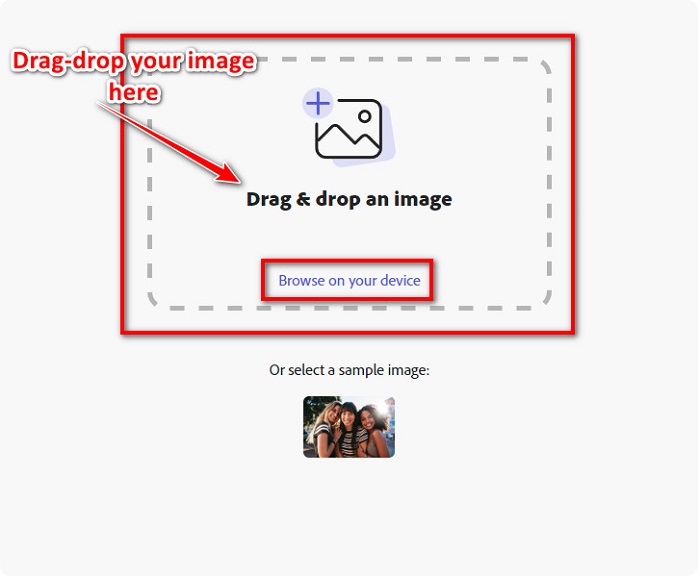
Trin 3. Vælg til sidst, hvad du vil ændre størrelsen til, ved at klikke på rullemenuen ved siden af Resize for. Vælg derefter din foretrukne størrelse i venstre side af grænsefladen. Du kan også manuelt ændre størrelsen på dit billede ved at holde og trække skyderen under størrelsesforudindstillingerne.
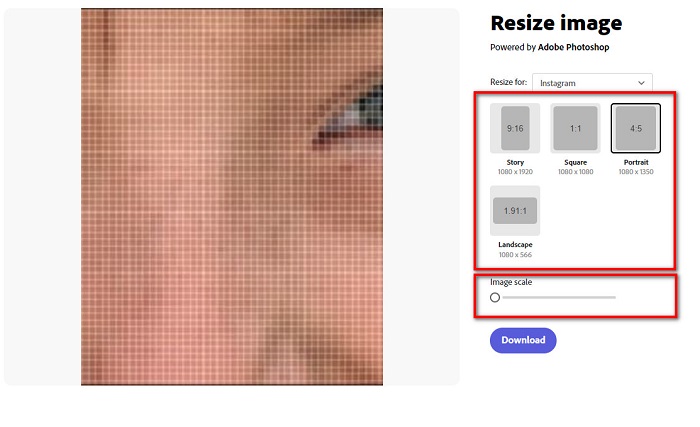
Trin 4. Klik på knappen Download for at downloade dit billede med ændret størrelse.
Del 2. Sådan ændrer du størrelse på billede ved hjælp af Adobe Photoshop Offline
På trods af det er det godt at bruge et onlineværktøj, fordi det giver dig mulighed for at spare plads på din enhed, men det er stadig det bedste valg at bruge et offlineværktøj. De fleste offline billedresizers indeholder mange redigeringsfunktioner. Fordelen ved at bruge offlineværktøjer er også, at du ikke behøver at få adgang til internettet for at ændre størrelsen på dit billede. I denne del vil vi præsentere den mest fremragende offline video resizer.
Adobe Photoshop er det bedste fotoediteringsprogram, du kan have på din pc. Denne fotoediteringsapp har mange værktøjer og funktioner, som du kan bruge til at redigere dine billeder. Derudover kan du bruge dette værktøj til at ændre størrelsen på ethvert billede. Appen giver dig mulighed for at forbedre digitale billeder, tegninger, malerier og animationer, som du kan bruge til forretningsformål. Desuden bruger mange professionelle dette billedredigeringsprogram på grund af dets funktioner og den kvalitet, det leverer.
Hvad mere er, er, at du kan bruge denne app til at tilføje tekst, skabe 3D og tilføje skarphed til dit billede. Men ulempen ved Adobe Photoshop er, at du skal købe appen, før du bruger den. Og det er også svært at bruge, især for begyndere. Ikke desto mindre er denne app sin pris værd, og du vil helt sikkert nyde at bruge denne app.
Sådan ændrer du størrelsen på billeder ved hjælp af Adobe Photoshop offline:
Trin 1. Download Adobe Photoshop på din enhed. Følg derefter appens installationsproces, og kør den på din enhed.
Trin 2. Åbn dit billede i Photoshop, gå derefter til Image øverst til venstre i grænsefladen. Vælg derefter Image Size.
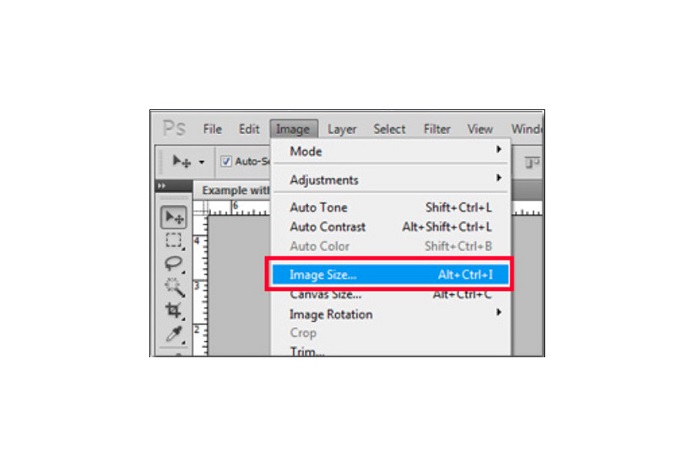
Trin 3. Derefter vises et nyt vindue, hvor du skal klikke i feltet ved siden af Constrain Proportions.
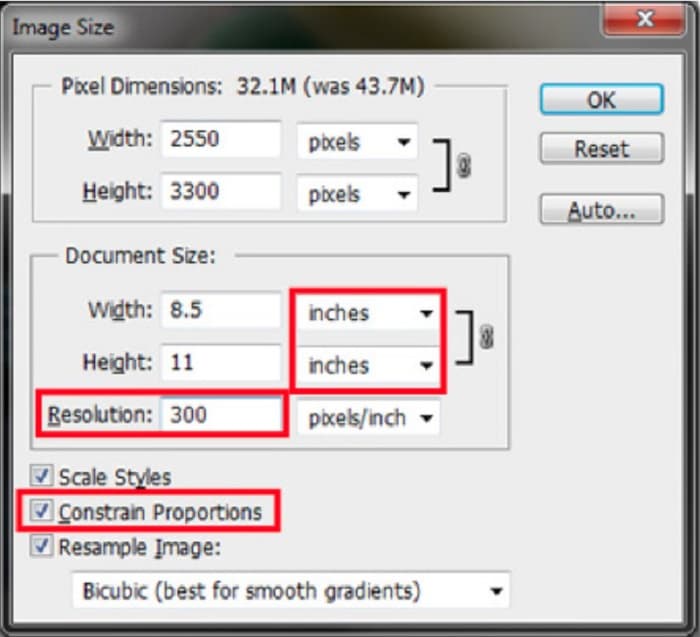
Trin 4. Og under Document Size skal du vælge inches som din måleenhed. Sørg for, at opløsningen ikke er lavere end 200 pixels per inch.
Trin 5. Skriv den bredde og højde, du ønsker til dit billede. Sæt derefter flueben ved knappen OK for at gemme ændringerne.
Trin 6. Til sidst skal du gemme din fil på din computer.
Nu hvor du har lært, hvordan du ændrer størrelsen på et billede med den bedste Adobe photo resizer, vil vi vise dig et alternativt værktøj til ændring af billedstørrelse, du kan bruge.
Del 3. Alternativ til Adobe Photoshop om størrelsesændring af billeder
Da Adobe Photoshop ikke er et brugervenligt værktøj, har vi søgt efter et alternativ, som du kan bruge til at ændre størrelsen på dit billede. Så vi vil præsentere et softwareprogram, du kan downloade på din Windows- eller Mac-enhed. Vi vil også lære dig, hvordan du ændrer størrelsen på et billede ved hjælp af denne ultimative app.
FVC Free Image Resizer er endnu et kraftfuldt online værktøj til ændring af billedstørrelse, som du kan bruge, hvis du vil ændre størrelsen på dit billede. Du kan også bruge apps til ændring af billedstørrelse til at rette kvaliteten på dit foto, og det er netop, hvad FVC Free Image Resizer gør. Dette onlineværktøj kan opskalere dit billede op til 2x, 4x, 6x og 8x forstørrelse. Derudover understøtter det alle billedformater som JPG, JPEG, PNG og BMP. Det, der er endnu bedre ved denne applikation, er dens brugervenlige grænseflade. Desuden bruger den AI-teknologi, der automatisk registrerer de uskarpe dele af et billede og derefter forbedrer dem.
Sådan ændrer du størrelsen på et billede ved hjælp af FVC Free Image Upscaler:
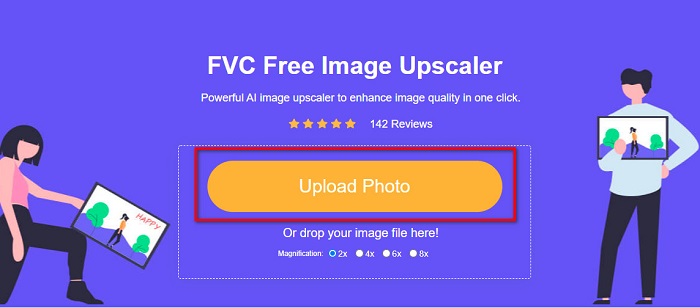
Trin 1. Søg efter FVC Free Image Upscaler i din browser, og gå derefter til appens hovedside. Tryk på knappen Upload Photo på hovedgrænsefladen for at uploade det billede, du vil ændre størrelsen på.
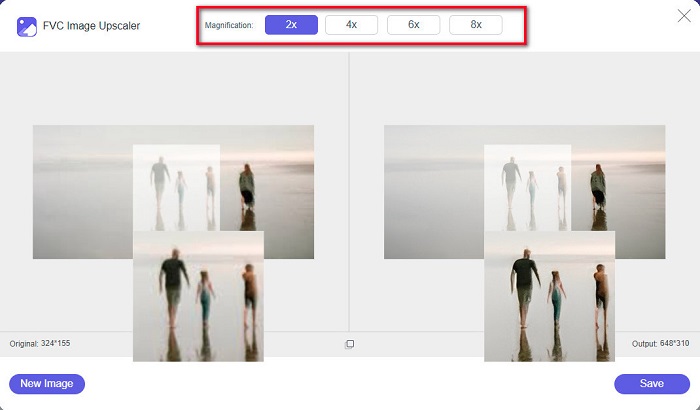
Trin 2. Efter upload af dit billede skal du vælge den forstørrelse, du ønsker til dit foto. Du kan vælge mellem 2x, 4x, 6x og 8x. Jo højere tallet er, desto bedre bliver kvaliteten.
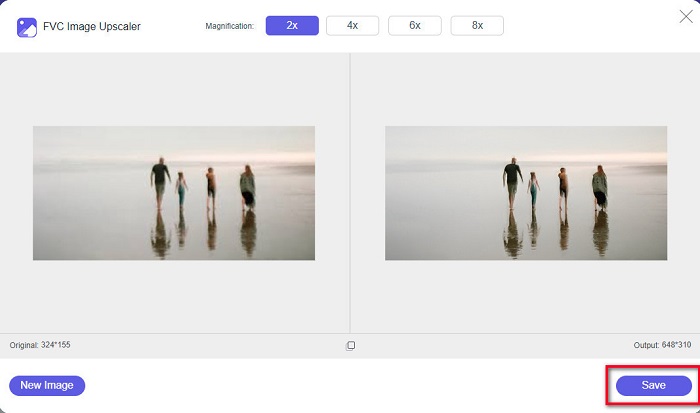
Trin 3. Klik derefter på knappen Save for at gemme dit resultat på din enhed.
Del 4. Ofte stillede spørgsmål om, hvordan man ændrer størrelse på billede i Adobe Photoshop
Ændrer Adobe størrelsen på billeder uden tab?
Ved hjælp af Adobe Photoshop kan du ændre størrelsen på dine billeder uden at miste kvaliteten. Derudover producerer den output af høj kvalitet.
Hvilke filformater understøtter Adobe Photoshop?
Adobe Photoshop accepterer næsten alle kendte billedformater, som JPG, JPEG, PNG, BMP, TIFF, EPS, PDF og mere.
Hvad er prisen på Adobe Photoshop?
Du kan købe Adobe Photoshop for $19,99 pr. måned. Du kan bruge dens 30-dages gratis prøveperiode til at teste applikationen først.
Konklusion
Nu hvor dit spørgsmål om Adobe resize images er blevet løst, kan du ændre størrelsen på et billede med Adobe Express eller Adobe Photoshop. Uanset hvilken app du vælger blandt ovennævnte værktøjer, kan du med succes ændre størrelsen på dit billede. Men hvis du vil have en nemmere og mere effektiv måde at ændre og forbedre et billede på, så brug FVC Free Image Upscaler.
-
 Sådan skærpes billedet online og offline på 4 nemme måder
 Der er mange metoder, du kan gøre, hvis du vil gøre et billede skarpere. Vi vil nedenfor diskutere de bedste og nemmeste måder at skærpe billeder online og offline.
-
 Restaurering af gamle billeder online og offline [Easy Steps]
 Vil du gendanne et gammelt billede? Med disse værktøjer vil du kende den gamle fotogendannelsesproces. Læs dette indlæg for at lære de mest ligetil metoder.
-
 Sådan ændrer du størrelse på billede til Facebook [Hurtige og nemme trin]
 Hvis du har problemer med at uploade et stort billede på Facebook, har vi en løsning til dig. Afslut denne artikel for at lære, hvordan du ændrer størrelsen på billeder til Facebook.
