


 Video Converter Ultimate
 Skærmoptager
 Video reparation
 Sikker download
Nemmeste procedurer ved hjælp af Pixlr til at fjerne vandmærker
Hvis du er her for at lære, hvordan du bruger Pixlr til at fjerne vandmærker fra dine fotos, så er du kommet til det rette sted. Personligt synes jeg, det er irriterende at få et billede med vandmærke på, så det er bedre at fjerne dem. Fra begyndelsen til slutningen af dette indlæg vil du lære mange ting – ikke kun hvordan du bruger Pixlr-applikationen, men også hvordan du bruger fremragende alternativer til at fjerne vandmærker fra dine fotos. Så hvis du er her for at få løst dit problem, kan du fortsætte med at læse denne artikel og lære nogle vejledninger til at fjerne irriterende vandmærker fra dine billeder.

Del 1: Fjern vandmærker fra fotos ved hjælp af Pixlr
Pixlr er et redigeringsværktøj, du kan bruge til at forbedre dine billeder. Det tilbyder også forskellige skabeloner, der kan gøre dit foto smukt og unikt. Ud over disse funktioner, vidste du så, at Pixlr kan fjerne vandmærker fra dine billeder? Ja! Du hørte rigtigt! Pixlr kan øjeblikkeligt fjerne alle forstyrrende elementer, du ikke ønsker på dit foto, inklusive vandmærker, klistermærker, emojis, tekst og mere. Derudover er denne online software gratis, så du behøver ikke tænke på betalinger eller abonnementer. Men det er ikke så let at bruge Pixlr. Det har mange funktioner, du kan støde på, og komplicerede arbejdsgange, hvilket gør det mindre egnet til ikke-professionelle brugere. For at bruge denne applikation skal du se vejledninger eller få hjælp fra erfarne brugere. Det er også webbaseret software, så det er nødvendigt at have en hurtig internetforbindelse; ellers vil det ikke fungere ordentligt. Følg denne enkle vejledning nedenfor for at fjerne vandmærker med Pixlr.
Trin 1: For at bruge Pixlr skal du først besøge Pixlrs hjemmeside. Klik derefter på knappen Open Image for at uploade et foto med vandmærke, som du vil fjerne. Du kan også indsætte billedet via URL.

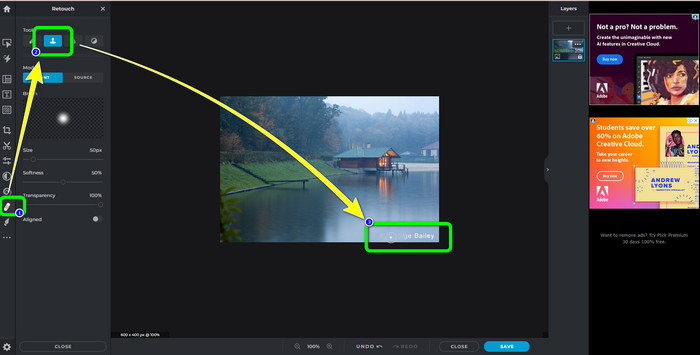
Trin 2: Når du har uploadet dit ønskede billede, skal du vælge knappen Retouch i venstre side af grænsefladen. Så vises værktøjerne. Vælg Clone Stamp-værktøjet. Når du har valgt det, kan du klikke på området med vandmærket med musen for at slette vandmærker.
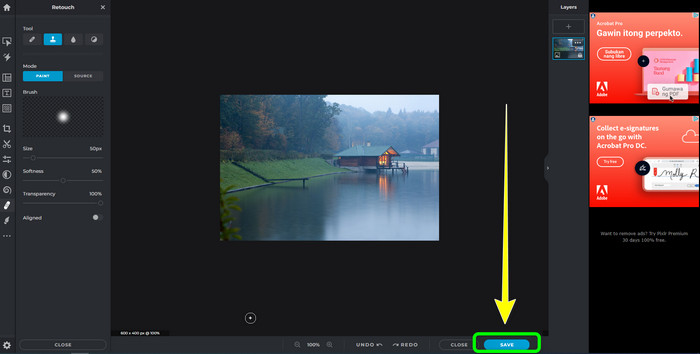
Trin 3: Når du har fjernet alle de vandmærker, du vil fjerne, skal du klikke på knappen Save. Derefter skal du gemme det på den ønskede placering.
Del 2: Fremragende Pixlr-alternativer til at slette vandmærker fra fotos
FVC gratis vandmærkefjerner
Som du kan se, er det svært at bruge Pixlr, især for begyndere. Hvis du ønsker et mere ligetil værktøj til at fjerne vandmærker, er det bedste alternativ, vi kan tilbyde dig, FVC Free Watermark Remover. Denne online software har en enkel metode og grænseflade, hvilket er perfekt til begyndere. Dette program kan nemt slette alle uønskede elementer fra dine fotos, såsom vandmærker, logoer, datostempler osv. Det er også 100% gratis, og du kan fjerne flere vandmærker fra dine billeder.
Men vent, der er mere. FVC Free Watermark Remover tilbyder dig to måder at fjerne vandmærker på. Den første måde er ved at bruge værktøjerne til fjernelse af vandmærker. Disse værktøjer er Pensel, Lasso og Polygonal. Du kan bruge disse værktøjer til at fremhæve og fjerne vandmærker fra dit billede. Den anden måde er ved at bruge beskæringsværktøjet. Hvis vandmærkeområdet er på kanten af dit billede, skal du kun beskære dem med musen. Hvis du vil have et eksempel på fjernelse af vandmærker ved hjælp af disse to metoder, skal du følge nedenstående trin.
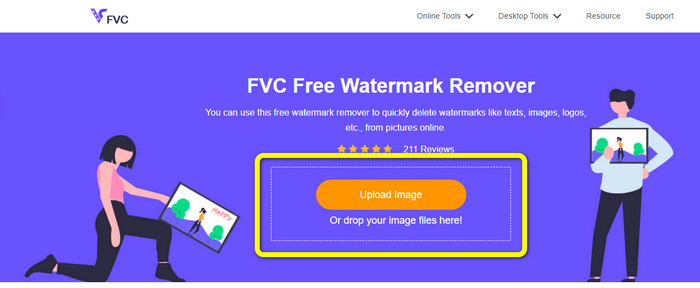
Trin 1: Åbn din browser og gå til hjemmesiden for FVC Free Watermark Remover. Vælg derefter knappen Upload Image og upload dit ønskede foto med vandmærke.
Trin 2: Derefter kan du bruge værktøjer til at fjerne vandmærker som Polygonal, Lasso og Brush. Du kan også bruge Eraser-værktøjet til at slette overskydende markeringer. Du kan desuden bruge zoomværktøjet under dit foto til at zoome ind og ud for at se de små vandmærker.
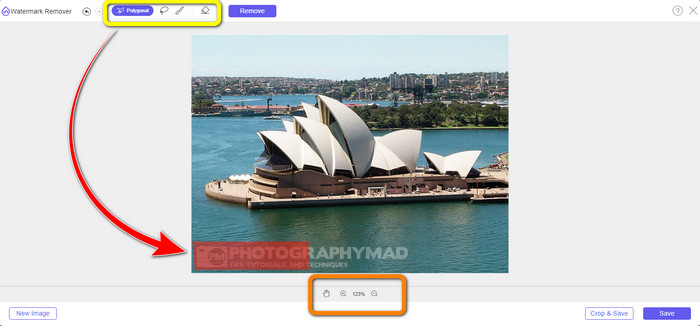
Trin 3: I denne del, når du er færdig med at markere alle vandmærkerne på dit foto, kan du fjerne dem ved at klikke på knappen Remove. Vent derefter på, at fjernelsesprocessen er færdig.
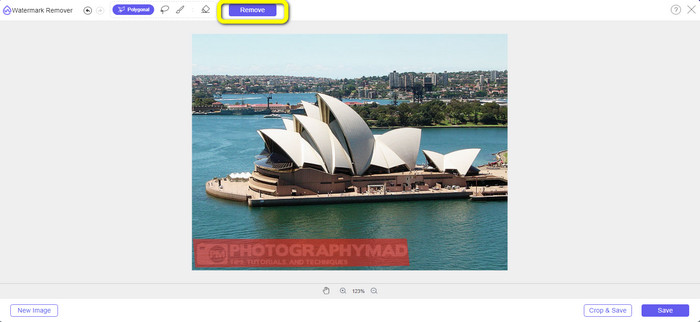
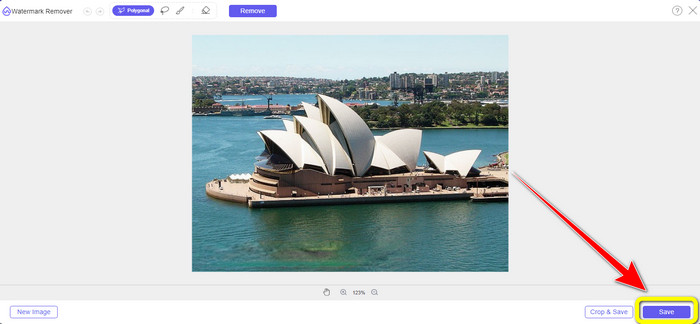
Trin 4: Nu kan vi gå videre til det sidste trin. Når du har fjernet alle vandmærker fra dit foto, skal du klikke på knappen Save for at downloade dit endelige resultat.
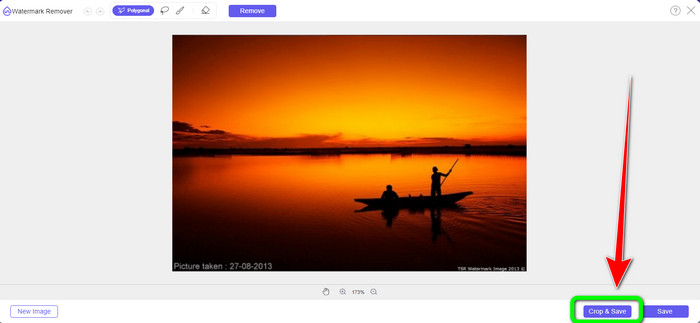
Trin 5: En anden måde at fjerne vandmærket på er ved at bruge beskæringsværktøjet. Vælg knappen Crop & Save efter du har indsat billedfilen.
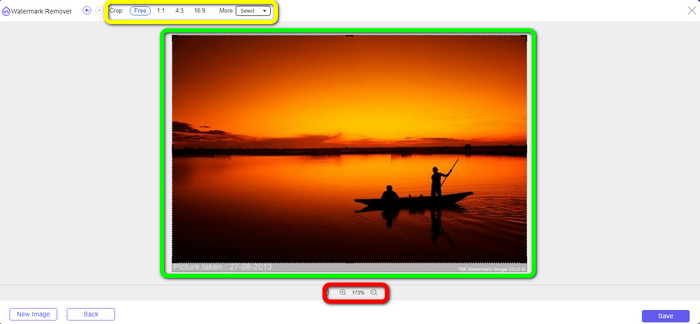
Trin 6: I dette trin kan du beskære dit foto for at fjerne vandmærker ved at flytte musen, mens du klikker på kanten af billedet. Som du kan se i den gule boks, kan du finde mange muligheder for, hvordan du vil beskære dit foto. I den røde boks kan du skalere fotoet op eller ned.
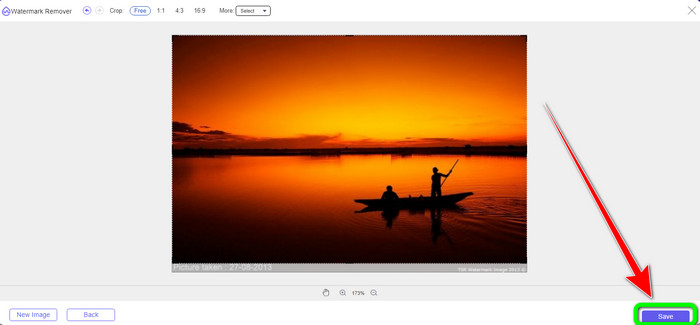
Trin 7: Til det sidste trin, når du er færdig med at beskære dit foto, skal du klikke på knappen Save for at gemme filen. Derefter kan du åbne den for at se fotoet uden vandmærke.
Vandmærke Remover.io
En anden nemmere måde at fjerne et vandmærke fra et foto på er at bruge Watermark Remover.io. Denne online applikation er meget enklere end Pixlr. Den har en overskuelig grænseflade og grundlæggende trin, så selv en ny bruger kan betjene den uden problemer. Den kan også fjerne flere vandmærker på én gang. Det bedste er, at den understøtter flerfarvede vandmærker, hvilket betyder, at selv hvis vandmærkerne har forskellige farver, kan den stadig fjerne dem med det samme.
Men desværre har Watermark Remover.io begrænsede funktioner. På en måned er det maksimale billede, du kan uploade, kun 50 billeder. Desuden kan den kun tilbyde 25 GB lagerplads, hvilket ikke er nok. Hvis du vil have denne applikation til at fungere godt, skal du også have en hurtig internetforbindelse.
Følg trinene nedenfor for at slette vandmærker fra dit billede.
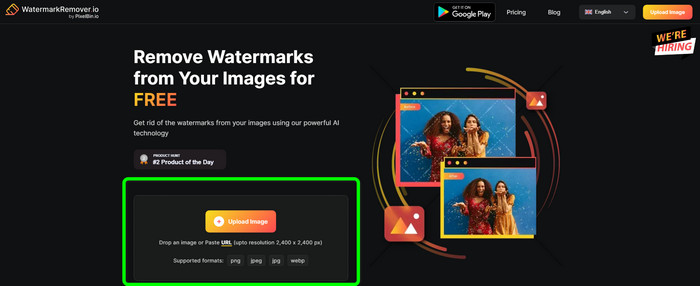
Trin 1: Besøg hjemmesiden for Watermark Remover.io i din browser. Klik derefter på knappen Upload Image. Den vil automatisk fjerne vandmærkerne fra dit foto, så vent på, at processen er færdig.
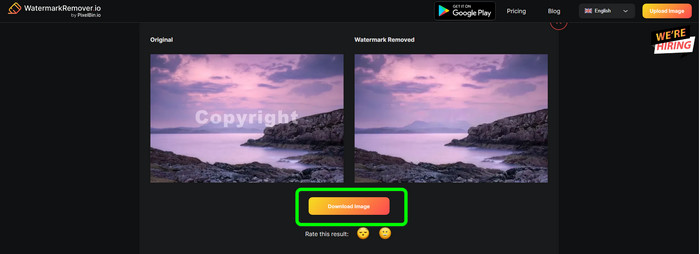
Trin 2: Når vandmærkerne på dit foto er væk, skal du klikke på knappen Download Image for at gemme det på din computer. Du kan bruge dette værktøj til at fjerne Alamy-vandmærker fra fotos.
Del 3: Ofte stillede spørgsmål om fjernelse af vandmærker ved hjælp af Pixlr
1. Hvad er den bedste gratis vandmærkefjerner?
Det bedste værktøj til at fjerne vandmærker gratis, du kan bruge, er FVC Free Watermark Remover. Denne applikation kan fjerne alle irriterende elementer fra dit foto uden, at du behøver at betale en krone.
2. Hvordan tilføjer jeg et vandmærke i Pixlr?
Du skal logge ind på din Pixlr-konto. Gå derefter til "Pixlr Editor" og start den. Klik derefter på "Opret nyt billede". Så kan du allerede oprette et vandmærke på dit foto og indstille højden og bredden på dit billede.
3. Er Pixlr et lovligt værktøj?
Helt sikkert, ja! Pixlr er en legitim applikation. Alle dens funktioner er tilladt og godkendt til at bruge. Så du kan betjene denne online applikation uden at bekymre dig.
Konklusion
Det er virkelig tilfredsstillende at se et foto uden vandmærker, ikke? Det er den bedste grund til, at denne artikel viser dig, hvordan du bruger Pixlr til at fjerne et vandmærke. Vi har også introduceret dig til andre onlineværktøjer, du kan bruge, som har nemmere arbejdsgange. Men hvis du vil have nyttig og praktisk software, kan du bruge FVC Free Watermark Remover.
-
 3 bedste måder til, hvordan man fjerner vandmærker fra PNG-billeder
 Oplev disse tre bedste metoder til at fjerne vandmærker fra PNG online. Læs dette indlæg og gør dine billeder pæne og mere behagelige for dine seeres øjne.
-
 Ligefremme måder at fjerne vandmærke fra JPG Online
 Lad os opdage de bedste taktikker til, hvordan man fjerner vandmærker fra JPG online ved hjælp af effektive applikationer. Følg denne artikel for at lære procedurerne.
-
 Komplet vejledning til nemt at fjerne iFunny vandmærker
 Oplev den mest exceptionelle iFunny vandmærkefjerner til dig. Lær også disse enkle metoder til at fjerne iFunny-vandmærker fra dine billeder
