


 Video Converter Ultimate
 Skærmoptager
 Video reparation
Top of the Line OGV til MOV Converter til at konvertere OGV-filer på Mac
Et af de bedste tabsende videoformater, der ofte bruges til at gemme videoindhold på websider, er OGV. Dette format har næsten samme struktur som OGG-filer, men indeholder video. Selvom formatet kan gemme mediefiler og overføre dem på internettet, har det stadig ikke global understøttelse i alle medieafspillere og -redigeringsprogrammer. For at få formatet til at passe til standarden for videoafspilleren eller -editoren på Mac, skal du konvertere OGV-filer til et accepteret format som MOV. Heldigvis giver vi dig trin, du nemt kan følge for at konvertere OGV til MOV uden at ændre kvaliteten.

Del 1. Konverter OGV til MOV på Mac med den bedste OGV til MOV-konverter
Vil du vide, hvad den ultimative OGV til MOV-konverter på Mac er? Hvis det er det, du ønsker, så brug FVC Video Converter Ultimate. Hvorfor? Fordi det er en enestående konverter, du kan bruge til at gøre kodning og dekodning af OGV lige så let som 1-2-3. Desuden kan du fuldføre konverteringen på under et minut eller endda på få sekunder sammenlignet med andre online og offline konvertere.
Ikke nok med det – du kan også redigere din video, flette dem, lave GIF’er, gøre videoer hurtigere eller sænke hastigheden og meget mere. Uden tvivl er dette den fremragende konverter, der allerede har hjulpet mange brugere, og den næste bliver dig. For at løse dit problem går vi nu videre til vejledningen i, hvordan du bruger konverteren.
Trin 1. For at bruge dette værktøj på din Mac skal du først downloade det og derefter installere det. Når denne proces er færdig, vises et velkomstvindue – klik på Start Now.
Gratis download til Windows 7 eller nyere Sikker download
Gratis download til MacOS 10.7 eller nyere Sikker download
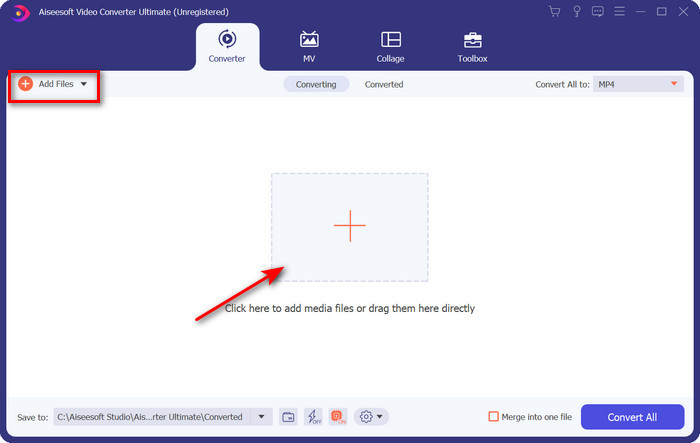
Trin 2. Overfør din .ogv-fil hertil, og find den i mappen ved at klikke på Add Files eller +.
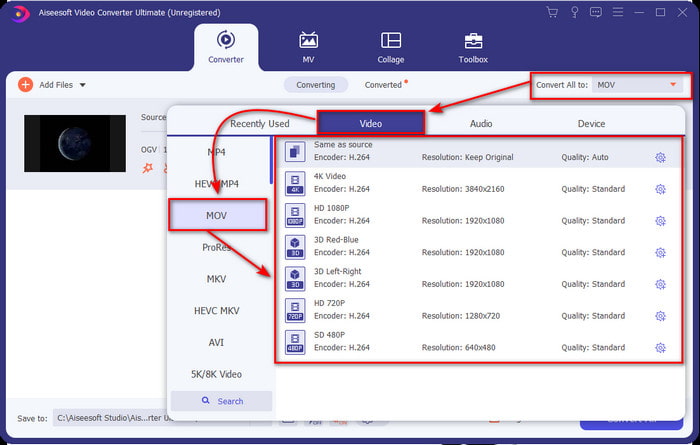
Trin 3. Når du har uploadet filen, skal du ændre formatet til MOV under Convert All.
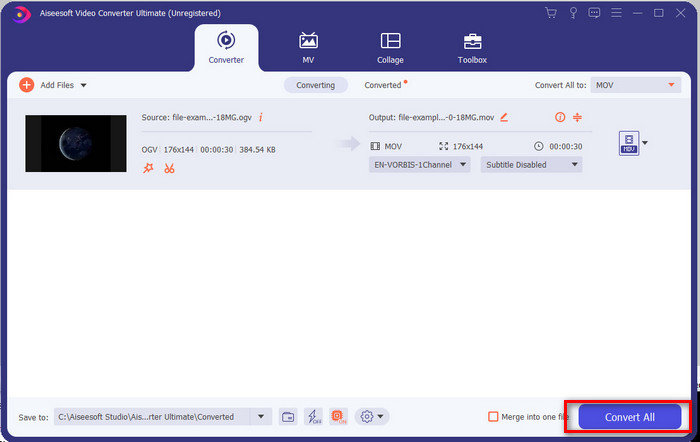
Trin 4. Start konverteringsprocessen ved at klikke på knappen Convert All.
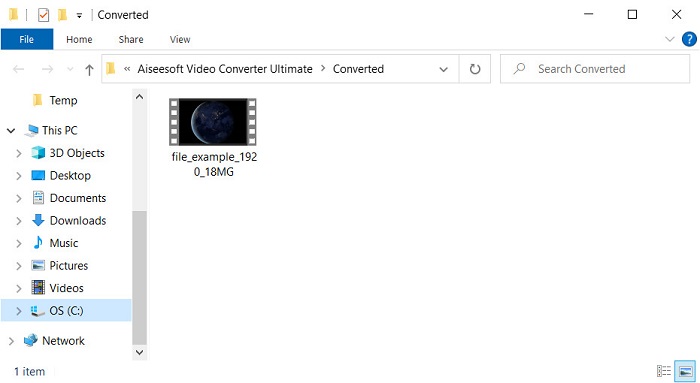
Trin 5. Når konverteringen fra OGV til MOV er færdig, vises en ny mappe med din fil. Du kan nu frit klikke på filen for at se eller redigere mediefilen i det nye MOV-format.
Fordele
- Næste niveau konverter du kan bruge på Mac eller endda på pc.
- Avancerede funktioner som redigering, fletning, klipning, beskæring og mere er i værktøjskassen.
- Fordelagtigt valg af brugere, der altid konverterer på grund af hvor let denne software er.
- Batchkonverter dit OGV, MOV, AVI, MKV, MP4, 200+ format mere her.
Ulemper
- Betal for at bruge software.
Del 2. Konverter OGV til MOV online med den gratis og brugervenlige konverter
Vil du undgå besværet med at downloade, installere og konfigurere en konverter? Så prøv at bruge denne OGV til MOV onlinekonverter, som er tilgængelig via alle søgemaskiner. FVC Free Video Converter Online er en innovativ online videokonverter, der bruges til at gøre dit ikke-understøttede format afspilleligt. Mange internetbrugere nyder allerede den samlede ydeevne af dette webværktøj. Derudover kræver dette værktøj ingen registrering, før du bruger det, og der er ingen irriterende annoncer på websiden, der afbryder din konvertering. Men du kan ikke bruge det, hvis du ikke har internetforbindelse. Så hvis du vil skifte fra din sædvanlige konverter, skal du bruge dette værktøj og følge trinene nedenfor.
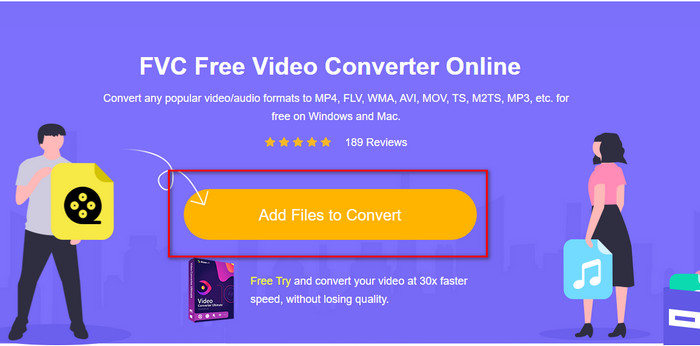
Trin 1. Klik på dette FVC Free Video Converter Online for at gå til webværktøjets hjemmeside.
Trin 2. Klik på Add Files to Convert i webgrænsefladen; derefter vises en mappe, hvor du kan finde OGV-filen, og klik så på Open.
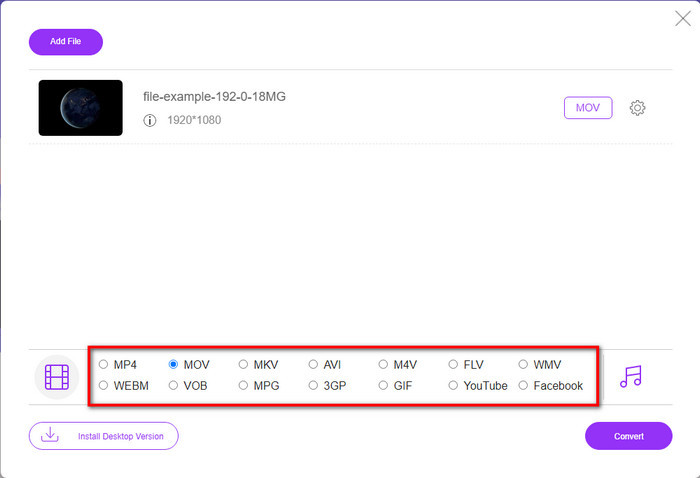
Trin 3. Vælg formatet MOV nedenfor eller et andet format, du ønsker som slutresultat.
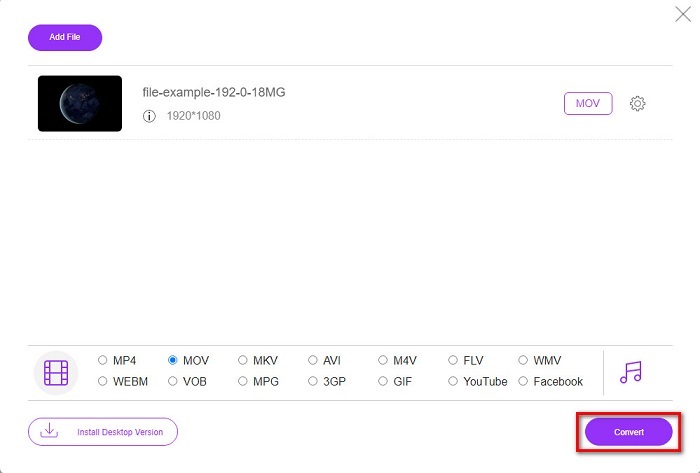
Trin 4. Marker Convert for at begynde konverteringsprocessen.
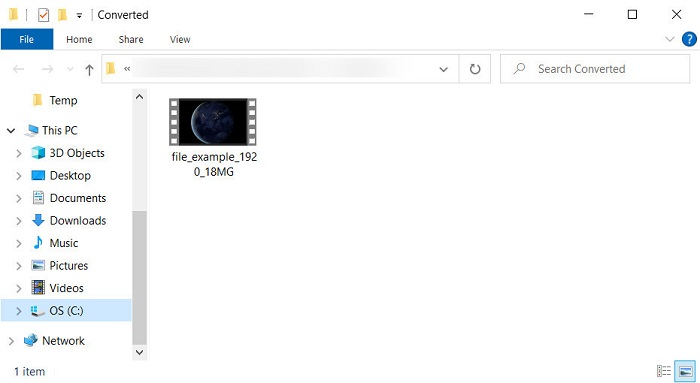
Trin 5. File Explorer vises, når konverteringen er færdig; den fil, du har konverteret, vil være der – klik på den for at afspille den.
Fordele
- Understøtter medium-range format og kompatibel i alle webbrowsere.
- Gratis at bruge og ingen tilmelding nødvendig.
- Pesky annoncer vises ikke i webværktøjet og under konvertering.
Ulemper
- Internetafhængig.
- Understøtter ikke batchkonvertering.
Del 3. OGV vs. MOV
OGV er et multimediefilformat, der bruger flere codecs som Theora, Dirac eller Daala til HTML 5-videotags. Men når du bruger det på HTML, omtales det som .ogg, selvom filen indeholder videoindhold. Da det er på et websted, er det udfordrende at afspille det på en standardmedieafspiller på grund af den unikke struktur af formaterne og flere codecs. Men hvis du vil tilføje en fremragende visuel og lyd på dit websted, er dette et must-brug.
MOV er formatet lavet af Apple til at gemme flere spor og mediedata, samtidig med at kvaliteten af lyd, video og undertekster bevares. Du kan også synkronisere mediespor, der er kodet til MPEG-4 eller med de andre codecs. Selvom formatet er til Quicktime, kan du stadig afspille det på Windows Media Player, fordi det er understøttet.
For at afslutte det hele, hvis du vil indsætte en video og lyd på dit websted og overføre data hurtigere, skal du gå med OGV. Men hvis du vil redigere videoen først og afspille den på din Mac, skal du ikke bruge OGV, fordi den ikke understøttes. Brug i stedet MOV, fordi det er kompatibelt med alle Apple-enheder, uanset om det er en Mac, iPhone, iPod eller iPad. Konvertering af din OGV til MOV er et must for at have kompatibiliteten på Quicktime Player, iMovie eller med de andre værktøjer, du kan finde på Apple.
Del 4. Ofte stillede spørgsmål om OGV til MOV-konvertering
Kan jeg komprimere OGV?
Det er ofte nødvendigt at komprimere filen, især hvis du vil sende den via e-mail, da der er begrænsninger på afsendelse af mediefiler dér. Så hvis du vil gøre din filstørrelse mindre, kan du læse denne artikel for at lære, hvordan du komprimerer OGV-filer.
Understøtter VLC OGV-filer til afspilning?
Selvom formålet med dette format er at være på HTML 5-tag, kan du stadig bruge VLC-afspilleren til at se de downloadede OGV-filer. Men vidste du, at der er andre VLC-alternativer, du kan bruge til at afspille dette format? Hvis du vil vide, hvad der er medieafspilleralternativerne til VLC, så klik på dette link.
Vil kvaliteten af OGV ændre sig efter konvertering?
Efter konvertering af OGV-filen skal kvaliteten af den bevare den samme som originalen. Men du kan gøre videohastigheden højere eller lavere ved hjælp af FVC Video Converter Ultimate. I modsætning til andre konvertere, der ikke giver manipulation af kvaliteten til dit ønske. Du kan også indstille den til 1080 eller 4k, hvis du vil have en video i høj opløsning.
Konklusion
Som et resultat af resultaterne er konvertering af den downloadede OGV-fil et must, før du kan afspille eller redigere. Denne gang er det i din hånd at vælge, hvilken måde du vil bruge og konvertere dine OGV-filer til MOV. For at få en kort opsummering, hvis du vil konvertere filer online gratis og uden forstyrrelser, så gå med FVC Free Video Converter Online. Men hvis du vil opleve nye højder af konvertering, så skal du downloade FVC Video Converter Ultimate. Vælg den bedste konverter, der vil hjælpe dit problem med OGV-formatet.
-
 4 måder at konvertere DivX til MOV gratis [Online & Offline]
 Kæmper du med begrænsningerne ved en DivX, eller har du ikke medieafspillere til at få adgang til videoer i dette format? Hvis du vil konvertere det til MOV-format, skal du fortsætte med at læse denne artikel for at udfylde hullerne.
-
 Gratis M4V til MOV-konverter - Sådan konverteres M4V til MOV
 Hvis din medieafspiller'ikke understøtter M4V, har du nogensinde kæmpet for at se en film på din iPhone? Hovedemnet i denne artikel er at konvertere den til en MOV-videofil.
-
 3 effektive metoder til at konvertere MPEG til MOV [Offline & Online]
 Er du træt af at finde medieafspiller til at afspille dit MPEG-videoformat? Prøv at konvertere det til andre formater, der sandsynligvis vil spille, især på Mac, for eksempel et MOV-videoformat. Læs denne artikel for at vide mere.
