


 Video Converter Ultimate
 Skærmoptager
 Video reparation
Find ud af de bedste video til MP3-konvertere på web, desktop og mobiltelefoner
Musik er en af de bedste former for underholdning, som verden kan give os. For at støtte vores kærlighed til musik, især til de kunstnere vi lytter til hver dag. I nogle tilfælde vil der komme et tidspunkt, hvor du virkelig gerne vil lytte til din yndlingsmusik, men der er ikke noget internet. Ingen grund til bekymring – du er nu reddet ved at downloade musikvideoen. Men filstørrelsen på den musikvideo, du downloader, er meget større end kun en lydfil. For at løse dette problem vil vi undersøge de forskellige værktøjer, du kan bruge til at konvertere video til MP3-format for at spare plads. Du kan også stole på denne artikel, fordi den giver stærke beviser til at løse dette problem, så hold tempoet og lad os komme i gang.

Del 1. Bedste video til MP3-konverter til Windows og Mac med sammenligningsskema
FVC Free MP3 Converter
Hvis du leder efter en gratis video til MP3‑konverter, så tilbyder FVC Free MP3 Converter netop det. Selvom dette værktøj giver mange funktioner, der ligner mobilkonvertere og andre webbaserede konvertere, er det stadig kongen af konvertere på nettet, fordi det leverer hurtig og præcis konvertering. Men dette værktøj understøtter kun et lille udvalg af formater, hvilket kan begrænse dine muligheder for at konvertere helt efter eget ønske. Ikke desto mindre er det stadig en god konverter. For at få mere at vide om værktøjet skal du læse videre i trinene nedenfor om, hvordan du bruger det.
Trin 1. Klik på hyperlinket ovenfor, som fører til hovedværktøjet på nettet.
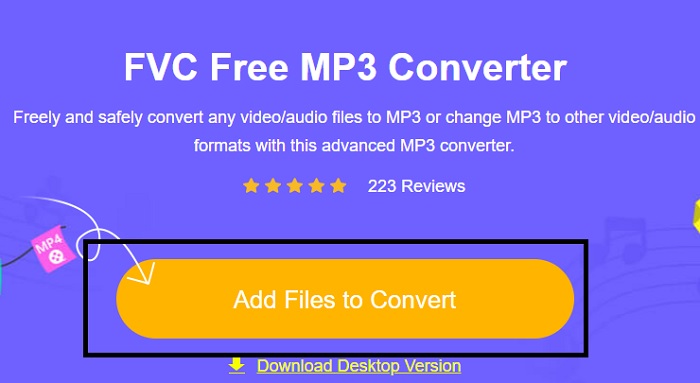
Trin 2. Klik derefter på Add Files to Convert for at åbne og starte værktøjet.
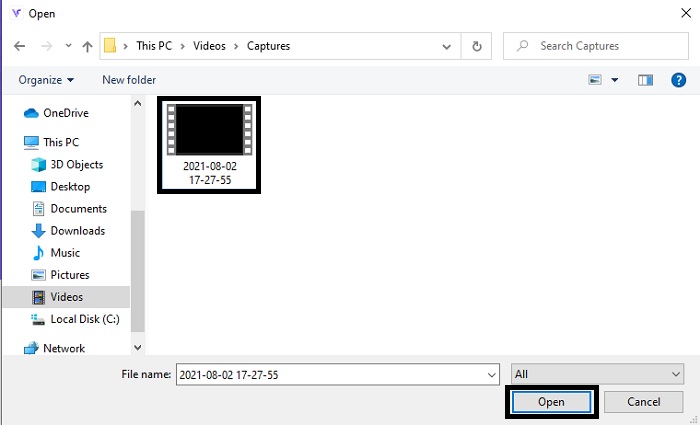
Trin 3. Find den videofil, du vil konvertere, og klik på Open for at indsætte filen.
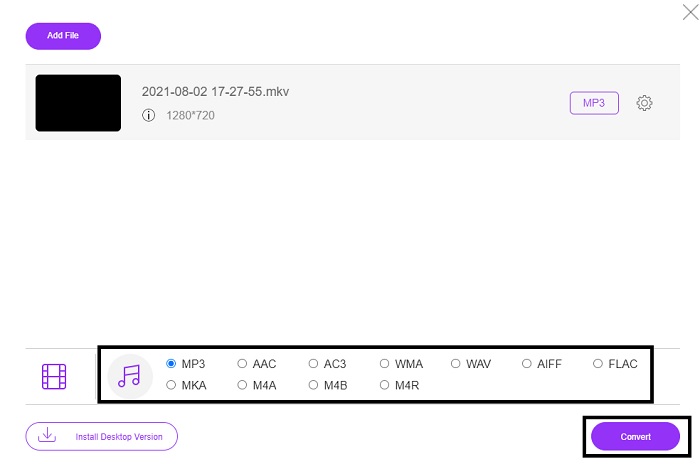
Trin 4. Vælg her, hvilket lydformat du vil have. Når du er klar til at starte konverteringen, skal du klikke på Convert.
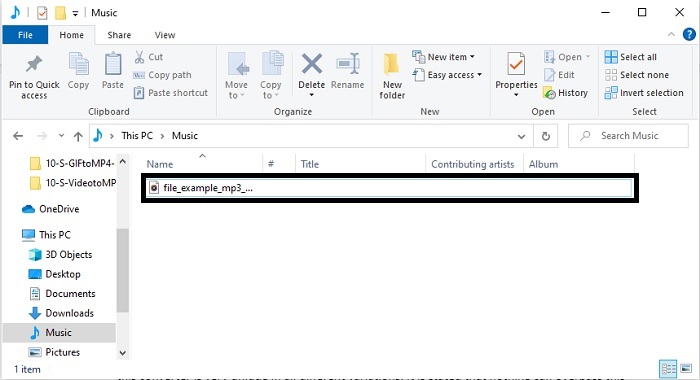
Trin 5. Hvis du vil lytte til den konverterede fil, kan du klikke på denne folder for at få vist filen på skærmen.
FVC Video Converter Ultimate
Hvis det første værktøj ikke giver dig den konvertering, du ønsker, kan du bruge denne FVC Video Converter Ultimate, en favoritkonverter gennem tiderne. I modsætning til andre konvertere, du allerede har brugt eller ikke har brugt, er denne konverter meget unik på mange måder. Det siges, at intet kan overgå dette værktøj, når det gælder konvertering, redigering, oprettelse, forbedring osv. Men måske tænker du, at dette værktøj ikke er brugervenligt, og der tager du fejl. Det er virkelig nemt at bruge, og selv om du ikke er professionel til at konvertere, kan du stadig skabe et flot resultat. Så, som sagt, lad os undersøge, hvordan man konverterer video til MP3 ved hjælp af den bedste konverter, du kan ønske dig.
Trin 1. Først og fremmest skal du downloade dette skrivebordsbaserede værktøj til din harddisk. Ændr opsætningen, hvis du vil, og klik på Finish for at gemme ændringerne.
Gratis download til Windows 7 eller nyere Sikker download
Gratis download til MacOS 10.7 eller nyere Sikker download
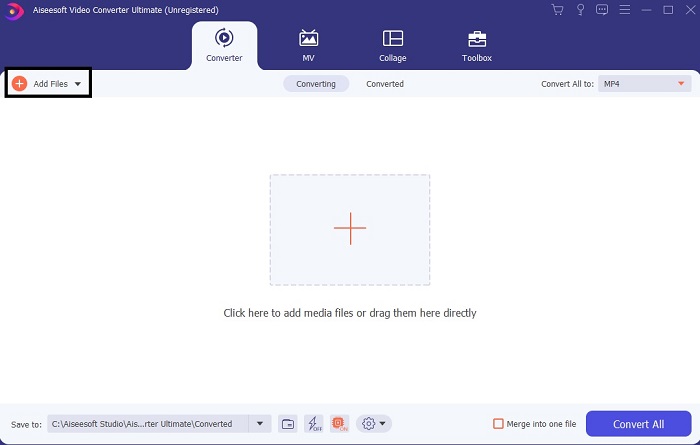
Trin 2. Et interface som dette vil blive vist på din skærm. Tryk på Add Files eller plus‑tegnet for at indsætte filen i interfacet.
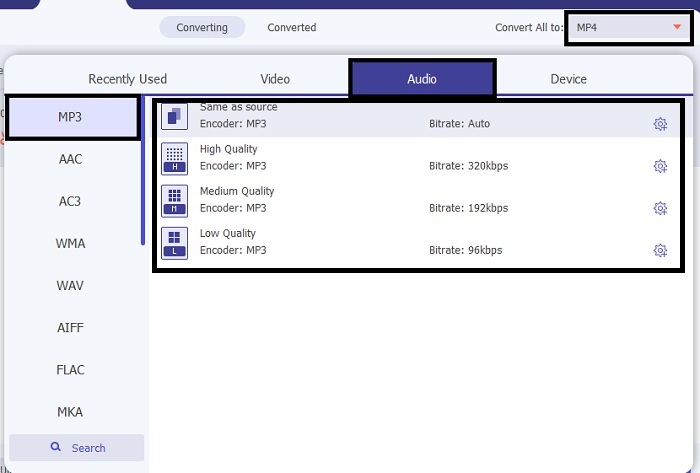
Trin 3. Når du har valgt den fil, du vil konvertere, skal du klikke på drop‑down-menuen ved siden af Convert All to og vælge mellem mere end 500 formater.
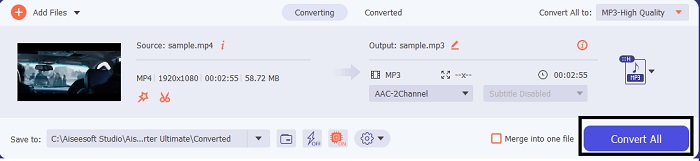
Trin 4. Klik derefter på Convert All for at starte konverteringen af video til MP3.
Trin 5. Når alt er færdigt, vises en filhåndtering på din skærm. Klik på den fil, du har konverteret, for at lytte til og nyde den.
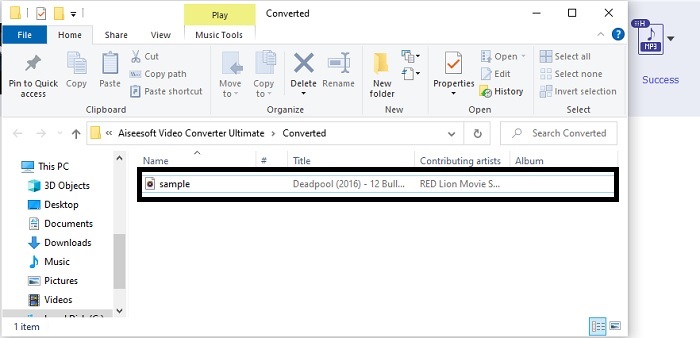
Yderligere trin til at booste din lyd før konvertering ved hjælp af FVC Video Converter Ultimate
Redigér lyden med en af funktionerne i FVC Video Converter Ultimate. Før du konverterer videofilen, er det bedre at forbedre lyden, så du senere kan lytte til den i endnu bedre kvalitet. For at lære hvordan, skal du følge denne trin‑for‑trin‑vejledning i, hvordan du forstærker lyden med Volume Booster.
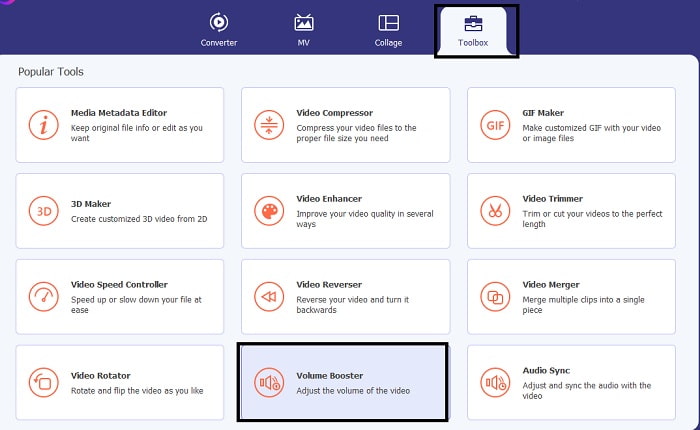
Trin 1. Hvis du allerede har installeret værktøjet, skal du gå til Toolbar og der klikke på Volume Booster.
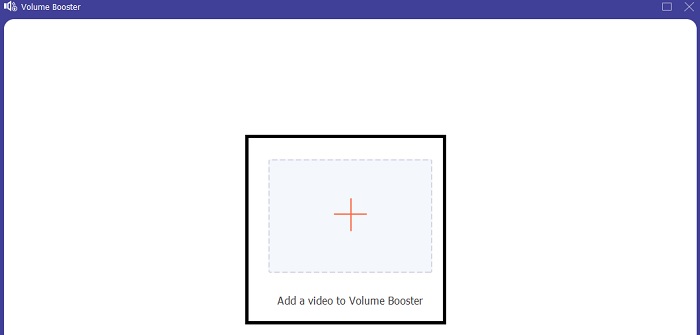
Trin 2. Vælg den videofil, du vil forbedre, og klik på Open for at indsætte den.
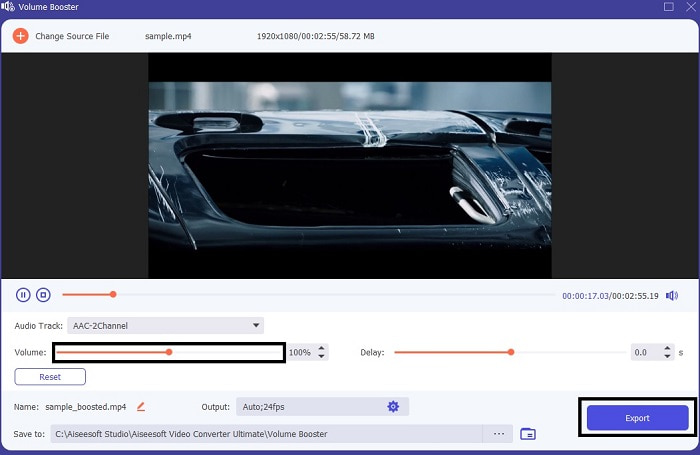
Trin 3. Justér volume slides efter dine ønsker. Klik derefter på cog-ikonet og ændr outputindstillingerne; når du er færdig, skal du klikke på OK for at gemme ændringerne. Klik på Export for at gemme det endelige resultat og nyd det.
Sammenligning af FVC Free Video Converter og Video Converter Ultimate
Selvom begge værktøjer giver, hvad du har brug for, fordi de er de bedste inden for deres eget speciale. Det kan være svært at beslutte, hvad du skal bruge. Men for at afgøre denne sag, her er sammenligningsdiagrammet mellem de to værktøjer. Lad os undersøge deres svagheder og deres styrker som individuelle værktøjer.
| Funktioner | FVC Free MP3 Converter | Video Converter Ultimate |
| Audio konvertering |  | |
| Redigeringsfunktioner |  | |
| Nem at downloade eller få adgang til | | |
| Brugervenlig | | |
| Program understøttet | Web-baseret værktøj | Desktop-baseret værktøj |
| Tilgængelig software | I al software | I al software |
| Prisklasse | Dens gratis online værktøj | I 1 måned: $25.00 I et år: $31.20 For livstidslicens: $55.20 |
Del 2. Video til MP3 Apps til iPhone og Android-enheder
1. Video til MP3 Converter
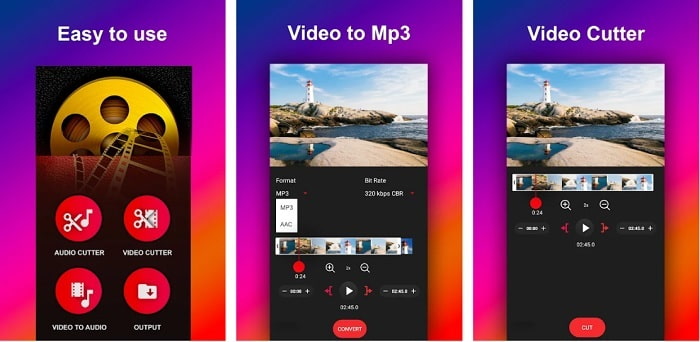
Hvis du leder efter den bedste video til MP3‑konverter på Android, vil du måske prøve denne Video to MP3 Converter. Dette værktøj er lavet specifikt til at konvertere enhver mediefil til MP3‑ eller AAC‑filformat. Du kan også ændre bitrate og klippe i filen med dette værktøj. På trods af den høje kvalitet bliver den fil, du har konverteret, dog ikke gemt direkte i musikmappen. Det er en smule irriterende, for i stedet for at lytte med det samme skal du finde filen efter konverteringsprocessen.
2. MP4 til MP3 - Konverter video til lyd, klip ringetoner
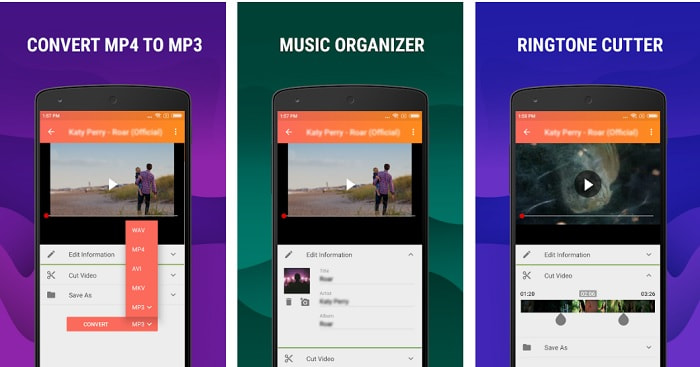
Selvom det første værktøj på listen giver den MP3‑konvertering, du ønsker, kan MP4 to MP3 - Convert Video to Audio, Cut Ringtones alligevel overgå det på nogle punkter. Dette er dog kun et værktøj til Android‑brugere, så hvis du er iOS‑bruger, kan du ikke bruge denne app. Værktøjet har en bedømmelse på 4,0 stjerner i Play Butik, men antallet af brugere er meget lavt. De har alle den samme bekymring: Efter at du har konverteret i denne app, er filen ikke til at finde, præcis som med den første app. Ikke desto mindre bruger nogle stadig dette som deres personlige MP3‑konverter, fordi du kan konvertere flere filer på én gang.
Relateret:
3. Audio Converter
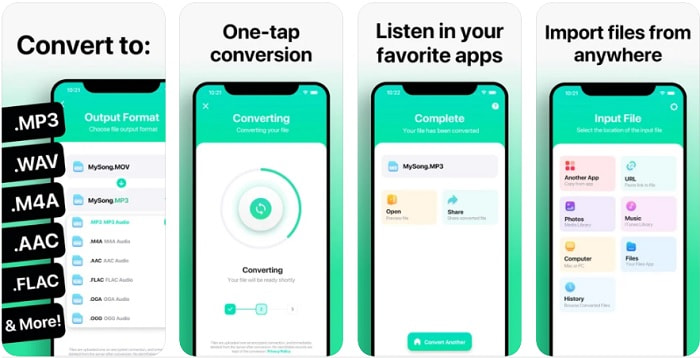
Hvis du som iOS‑bruger tror, at du ikke kan konvertere lyd på din telefon med en løsning, der også giver en stærk konvertering, tager du fejl. The Audio Converter leverer nemlig en af de bedste konverteringsprocesser og mere til. At konvertere video til MP3 på iPhone er let med hjælp fra dette værktøj. Ulempen er dog, at der er en størrelsesgrænse, hvis du bruger gratisversionen. Så hvis du vil konvertere en større fil, skal du betale for et abonnement. I nogle tilfælde, hvis du vil opsige abonnementet, er der ingen annulleringsknap til at stoppe det. Vær forsigtig med dette værktøj, da der kan komme uønskede træk på dit kort, hvis du bruger denne betalingsmetode.
Del 3. Sammenligningstabel
| Funktioner | FVC Free MP3 Converter | FVC Video Converter Ultimate | Video til MP3 Converter | MP4 til MP3 - Konverter video til lyd, klip ringetoner | Audio Converter |
| Audio Converter | | | | | |
| Formater understøtter | MP3, AAC, AC3, WMA, WAV, AIFF, FLAC, MKA, M4A, M4B, M4R | 500+ medieformater tilgængeligt | MP3 og AAC | MP3 | MP3 og AAC |
| Værktøjets tilgængelighed | Web-baseret værktøj | Desktop-baseret værktøj | Android telefonbaseret app | Android telefonbaseret app | iOS-telefonbaseret app |
| Prisklasse | Dens gratis online værktøj | I 1 måned: $25.00 I et år: $31.20 For livstidslicens: $55.20 | Gratis download-app til Android | $6.49 – $19.99 pr. stk | Premium Pass$3.99 Livstidspas$6.99 |
Del 4. Ofte stillede spørgsmål om video til MP3
Hvorfor kan mine videoer ikke afspilles på min computer?
Der er en chance for, at videoformatet ikke understøttes af din standardmedieafspiller. I så fald vil du måske bruge denne FVC Free Video Player til at afspille din video. Den understøtter mere end 200 kendte formater, så du kan se enhver videofil her uden at bekymre dig om, at den ikke kan afspilles.
Er MP3 det bedste lydformat?
Selvom MP3 er kendt som det universelle lydformat, fordi det bruges overalt til at afspille, optage og gemme lydfiler, findes der et bedre lydformat end MP3, nemlig AAC. Selvom dette format er bedre, har det stadig en større filstørrelse end MP3, men bare rolig – den er ikke så stor som AVI. For at ændre MP3‑filer kan du bruge denne MP3 til AAC webkonverter i stedet for usikre værktøjer med dårlig komprimering.
Hvad er ulempen ved lyd?
Lydfiler fylder meget mindre end videofiler, men de er mindre interaktive, især fordi de ikke giver publikum noget visuelt at se på. Så hvis du laver en podcast, bør du vælge den bedste lydoptager, og det er FVC Screen Recorder. Dette værktøj er fremragende til at redigere dine optagelser, og det understøtter mange flere lydformater end andre værktøjer, du kan downloade eller bruge online. Hvis optagelse er dit problem, er der kun én løsning, og den løsning er FVC Screen Recorder. Klik her for at få flere professionelle MP3‑optagere.
Konklusion
Og nu, hvor vi er nået til slutningen af denne artikel, er problemet, vi havde i starten, nu løst. Selvom vi nu går hver til sit og overlader sagen til dig, er jagten ovre, når du har valgt det perfekte værktøj, du kan stole på, ligesom FVC Video Converter Ultimate. Hver gang du bruger dette værktøj, kan du forvente en hurtig, pålidelig og sikker konverteringsproces. Og hvis du støder på et problem med din lyd og vil forbedre den, kan du også gøre det her. Vi håber desuden, at du vil fortsætte med at undersøge FVC Video Converter Ultimate, da dette værktøj giver den fineste konvertering. Med hjælp af disse præcise beviser, som vi har præsenteret kun for dig. Hvis du nu er tilfreds, kan vi sige, at sagen er lukket.
-
 [2021] Top 6 gratis og online måder at konvertere M2TS til MP3
 Kan en M2TS-fil konverteres til MP3? I dette indlæg har vi listet top 6 gratis og online måder at hjælpe dig med at konvertere M2TS til MP3, AAC, AIFF og mere lydformater.
-
 4 100% Arbejdsmetoder til konvertering af FLV-videofiler til MP3-format
 Sådan konverteres en FLV til en MP3-fil? Alt hvad du skal gøre er at læse denne artikel omhyggeligt, finde din yndlingsmetode og følge vores trin-for-trin guide for at få det, du ønsker.
-
 Top 4 metoder til at konvertere OGG til MP3 uden at miste kvalitet
 Sådan konverteres dine OGG-filer til MP3-format til lytning til på computer eller mobilenhed? Her deler vi 5 nemmeste måder at gøre det på desktop eller online.
