


 Video Converter Ultimate
 Skærmoptager
 Video reparation
 Sikker download
Matchløse og perfekte måder at konvertere AMV til MP4
Ønsker du at kunne nyde dine AMV‑videoer i alle programmer? Så skal du konvertere din AMV‑fil til MP4‑format. Men bare rolig! Vi giver dig den bedste løsning til at konvertere dine videofiler. De konvertere, du vil lære at kende i denne artikel, er allerede blevet testet. På den måde behøver du ikke være bekymret for, om programmerne er sikre. Derudover vil vi introducere de funktioner, du kan få glæde af, når du bruger softwaren. Hvis vi har fanget din interesse, og du hører til de brugere, der vil konvertere AMV til MP4, så læs denne artikel og få viden om, hvordan man konverterer videoer.

Del 1: Introduktion til AMV og MP4
AMV
Filtype: .amv
Udviklet af: MTV
Filkategori: Video filformat
Beskrivelse: Videoer, der er gemt i Actions Media Video‑filformatet, som understøttes af nogle kinesiske bærbare medieafspillere, kaldes AMV-filer. De indeholder en komprimeret film med lav opløsning (96x96 til 320x240 pixels). Både pc‑softwaren, der følger med AMV‑medieafspillere, og VideoLAN VLC‑medieafspilleren kan afspille AMV‑filer.
Tilknyttede programmer: K-Lite Codec Pack, Video LAN og VLC Media Player
AMV
Filtype: .mp4
Udviklet af: Moving Picture Experts Group (MPEG)
Filkategori: Video filformat
Beskrivelse: AAC- og MPEG-4-videostandarderne definerer i fællesskab MP4-udvidelsen. Enhver medietype, inklusive lyd, video, undertekster og 2D- og 3D-grafik, kan være indeholdt i beholderen. Næsten enhver afspiller kan afspille MP4-filer på Windows, men på Mac skal du installere et plug-in eller konvertere MP4-filen til et andet format. En gruppe kaldet The Moving Picture Experts.
Tilknyttede programmer: Apple, QuickTime Player, VLC Media Player, Microsoft, Windows Media Player og Video LAN.
Del 2: Fremragende procedurer til at konvertere AMV til MP4 offline
Vi har den bedste løsning til dig, hvis du ønsker at konvertere AMV til MP4 med et downloadbart værktøj. Du kan bruge Video Converter Ultimate. Det understøtter mere end 100 videoformater, inklusive AVI, MKV, WMV, MOV, FLV, M4V, SWF, MTS, M2TS og flere. Dette værktøj har en intuitiv brugerflade med enkle metoder, hvilket gør det egnet til alle brugere. Med dette værktøj kan du konvertere flere filer på én gang, da det giver mulighed for batchkonvertering. Men vent, en af de mest bemærkelsesværdige funktioner ved konverteringen er ultrasort hastighed – op til 30 gange hurtigere end andre konvertere. Du kan også redigere dine AMV‑videoer med dette værktøj. For at opdage flere funktioner i dette program kan du læse oplysningerne nedenfor.
Funktioner
◆ Konverter forskellige videoformater, såsom MP4, AMV, WMV, AVI, MKV, FLV, SWF, MOV og 100+ flere.
◆ Det tilbyder en batchkonverteringsproces til at konvertere flere filer samtidigt.
◆ Det giver videoredigeringsværktøjer, såsom en videoforstærker, trimmer, cropper, rotator, farvekorrektion og mere.
Følg de enkle instruktioner nedenfor for at konvertere AMV til MP4 ved hjælp af FVC Video Converter Ultimate.
Trin 1: Du skal først downloade Video Converter Ultimate til din Windows‑ eller Mac‑computer. Klik på Download-knappen nedenfor. Installer og åbn derefter softwaren.
Gratis download til Windows 7 eller nyere Sikker download
Gratis download til MacOS 10.7 eller nyere Sikker download
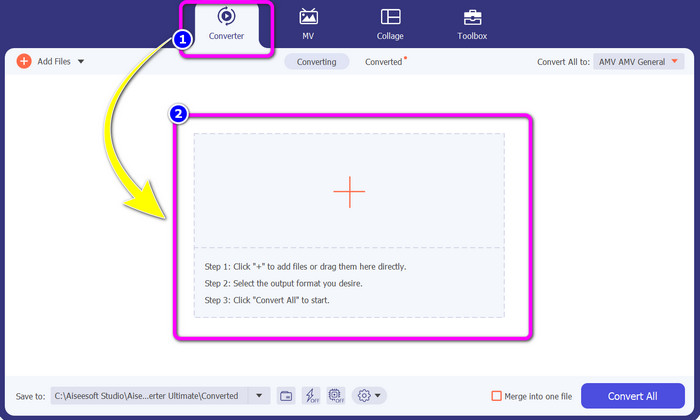
Trin 2: Vælg panelet Converter, og klik på knappen med Plus-tegnet. Din mappe vises på skærmen, og du vælger den AMV‑video, du vil konvertere.
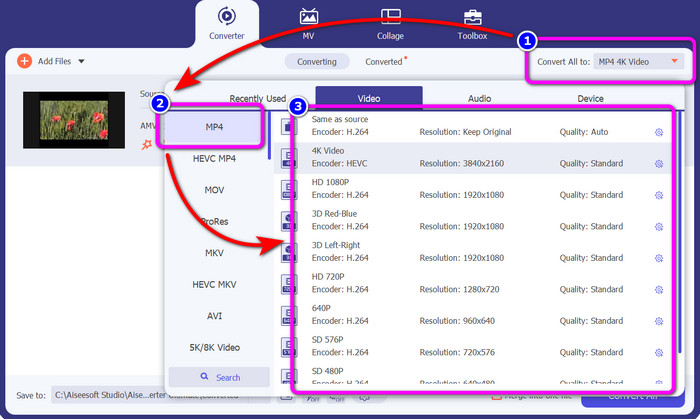
Trin 3: Tryk på knappen Convert All to. Når formatindstillingerne vises, skal du vælge det ønskede outputformat, nemlig MP4-filen. Derefter kan du vælge opløsningen til din video, op til 4K‑videokvalitet. Vælg den opløsning, du foretrækker, eller vælg den samme opløsning som din originale video.
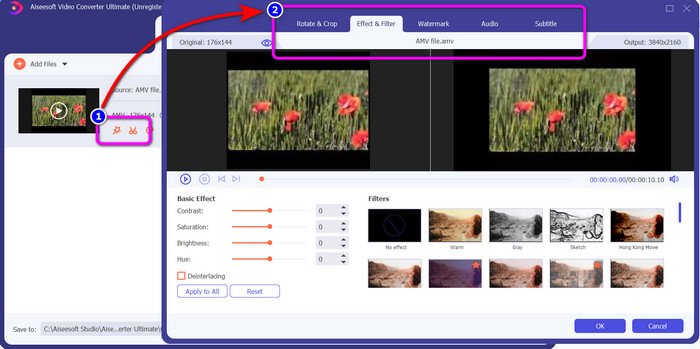
Trin 4: Hvis du vil redigere din video, skal du klikke på ikonet Edit. Derefter kan du redigere din video ved at ændre, tilføje eller fjerne vandmærker, tilføje effekter eller filtre samt rotere og beskære dine videoer. Klik derefter på OK. På denne måde kan du forbedre din video.
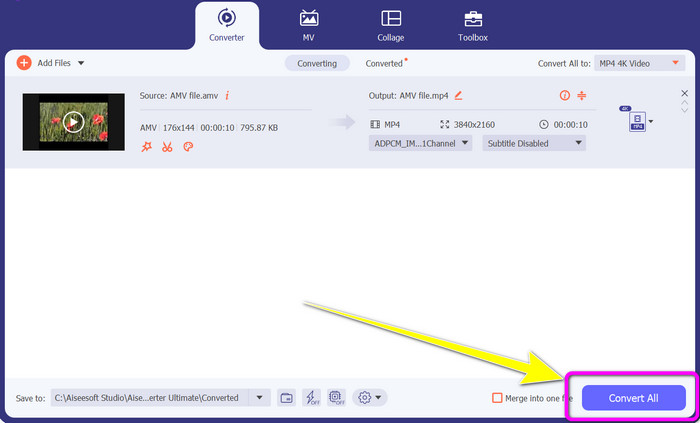
Trin 5: Når du er færdig med at redigere videoen, skal du klikke på knappen Convert All for at starte konverteringsprocessen. Derefter gemmer du dit endelige output på computeren. Åbn den konverterede video på din computer for at se det endelige resultat. Klik her for at se, hvordan du konverterer DV til MP4.
Del 3: Den nemmeste måde at konvertere AMV til MP4 online gratis
En anden måde at konvertere AMV til MP4 online på er ved at bruge FVC Free Video Converter Online. Dette værktøj har få trin og en enkel brugerflade, hvilket gør det velegnet til både erfarne og uerfarne brugere. Du kan konvertere videoer med blot et par klik. Desuden understøtter denne konverter mange videoformater, såsom AVI, MP4, M4V, FLV, MOV, WMV, MKV og flere. Du kan også udføre batchkonvertering for at konvertere flere filer på samme tid. Derudover kan du ændre opløsningen på din video, mens du konverterer filerne. Det er også muligt at justere din videos bitrate og billedhastighed. Du kan bruge dette onlineværktøj gratis, og du kan downloade dine videoer uden uønskede elementer som vandmærker, logoer, klistermærker, tekst osv. Det er desuden tilgængeligt i alle browsere, herunder Google Chrome, Safari, Internet Explorer, Microsoft Edge osv.
Funktioner
◆ Konverter forskellige videoformater, herunder MP4, AMV, FLV, AVI, MOV, VOB, MKV og mere.
◆ Tilbyder batchkonverteringsproces for hurtigere procedure.
◆ Rediger videoens bithastighed, billedhastighed og opløsning.
◆ Konverter lydformater som MP3, FLAC, WAV, AAC, AC3 osv.
◆ Juster lydens bitrate og sample rate.
Brug de enkle procedurer nedenfor til at konvertere AMV til MP4 ved hjælp af FVC Free Video Converter Ultimate.
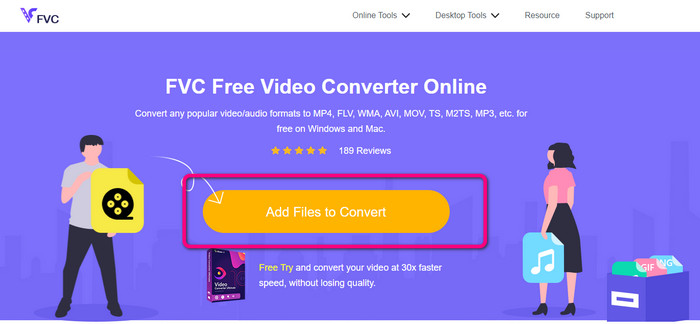
Trin 1: Gå ind i din browser og gå til hjemmesiden for FVC Free Video Converter Online. Tryk på knappen Add Files to Convert for at uploade den AMV‑video, du vil konvertere.
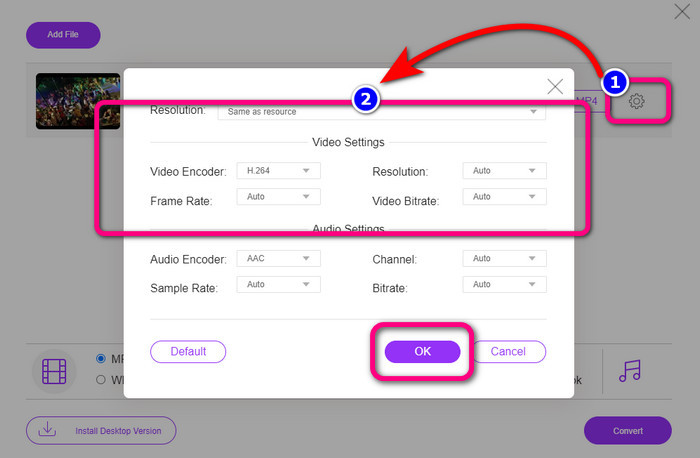
Trin 2: Når AMV‑videoen er tilføjet, skal du klikke på ikonet Setting for at justere videoens billedhastighed, bitrate og opløsning. Tryk derefter på OK.
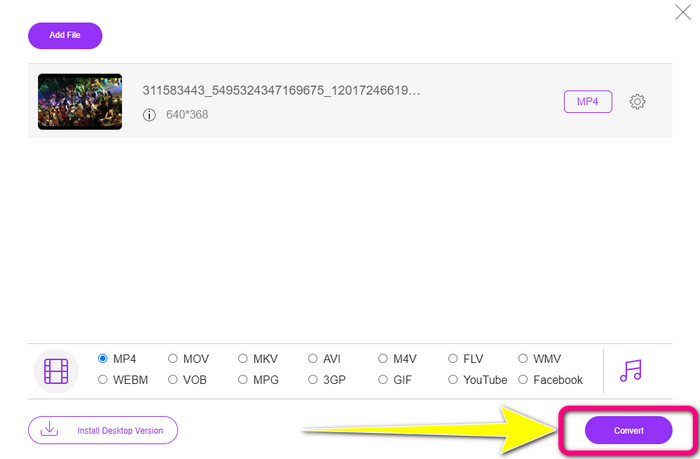
Trin 3: Gå ned til den nederste del af brugerfladen, og vælg filformatet MP4. Klik derefter på knappen Convert. Du kan også bruge dette værktøj til at konvertere AMV til MKV.
Del 4: Ofte stillede spørgsmål om konvertering af AMV til MP4
1. Er AMV det samme som WMV?
De er ikke ens. AMV er et MP4- og S1 MP3-afspiller-kompatibelt videofilformat. Sammenlignet med andre videoformater som WMV er den mindre i størrelse. Det kræver ikke meget processorkraft at spille.
2. Hvad er bedre, AVI eller AMV?
Du kan bruge AVI-filen, hvis du vil afspille din video hvor som helst. AMV-filformatet er dog et godt valg, hvis du foretrækker en mindre filstørrelse.
3. Hvordan konverterer jeg videofiler til MP4?
Du kan bruge Video Converter Ultimate. Det understøtter næsten alle videoformater, og du kan konvertere videofiler hurtigere.
Konklusion
Det er nemt at konvertere AMV til MP4, hvis du bruger de to konvertere, der er nævnt ovenfor. Både avancerede og uerfarne brugere kan bruge værktøjerne, fordi de begge tilbyder en intuitiv brugerflade og enkle fremgangsmåder. Så brug Video Converter Ultimate og FVC Free Video Converter Online med det samme!
-
 Succesfulde metoder til at konvertere DIVX til MP4 med det samme
 Hvordan konverterer jeg DIVX til MP4? Hvis du leder efter den bedste løsning, er du i den rigtige artikel. Vi viser dig, hvordan du nemt konverterer DIVX til MP4
-
 Sådan konverteres F4V til MP4 med de mest effektive metoder
 Er dine F4V-videoer ikke af en god kvalitet? Gør den derefter til en MP4-fil. Dette indlæg vil tilbyde den bedste måde at konvertere F4V til MP4 online og offline
-
 Fem populære metoder til at konvertere Xvid til MP4-format
 Få et glimt af disse fantastiske metoder til, hvordan man konverterer Xvid til MP4-filformat i denne artikel. Du vil også lære de bedste apps, du kan bruge til konvertering
