


 Video Converter Ultimate
 Skærmoptager
 Video reparation
3 Online & Offline MPG til MP4-konvertere Du skal prøve at konvertere MPG-filer
MP4 er et af de mest almindelige filformater, du ser på internettet nu om dage. Selvom MPG og MP4 har mange ligheder, har de også deres forskelle. Og hvis du vil konvertere din MPG-fil til MP4-filformat, har vi testet videokonvertere, som er populære i øjeblikket. Derudover har vi udvalgt de bedste MPG til MP4-konvertere, som du kan tjekke ud!

Del 1. Hvorfor skal du konvertere MPG til MP4
Hvad er betydningen af at konvertere MPG til MP4? MPG og MP4 er formater, der ofte bruges til videoer på internettet. Men hvad er forskellen? MPG eller MPEG er det oprindelige format, der bruger MPEG-codec. Det er en encoder, der giver videoudgange i høj kvalitet.
På den anden side er MP4 et af de mest almindelige videofilformater og bruger moderne videokomprimering. Så hvilken er bedre? MP4's høje komprimeringsevne gør det muligt at komprimere filer i mindre størrelser end noget andet videofilformat som MPG.
Del 2. 3 måder at konvertere MPG til MP4
Her er de fremragende videokonvertere, du kan bruge online og offline og lære, hvordan du ændrer MPG til MP4.
1. Brug Video Converter Ultimate
Video Converter Ultimate er en mediefilkonverter, der lader dig konvertere din MPG-fil til MP4-filformat let. Denne konverter har en brugervenlig grænseflade, men leverer imponerende resultater. Den har funktioner, der gør det muligt at redigere, forbedre og komprimere din MPG-fil. Derudover kan du batchkonvertere dine MPG-filer til MP4 i denne konverter.
Video Converter Ultimate har også en mulighed, hvor du kan collage billeder og videoer. Også, hvis du vil oprette en GIF, har denne konverter denne funktion. Derudover kan du ved at bruge denne konverter konvertere store filer uden at ødelægge deres kvalitet. Selvom dets funktioner virker professionelt, kan du bruge dem hurtigt, fordi de kun er nemme at bruge.
Trin 1. For at downloade denne konverter skal du klikke på download-knappen nedenfor. Følg installationsprocessen, og åbn derefter programmet.
Gratis download til Windows 7 eller nyere Sikker download
Gratis download til MacOS 10.7 eller nyere Sikker download
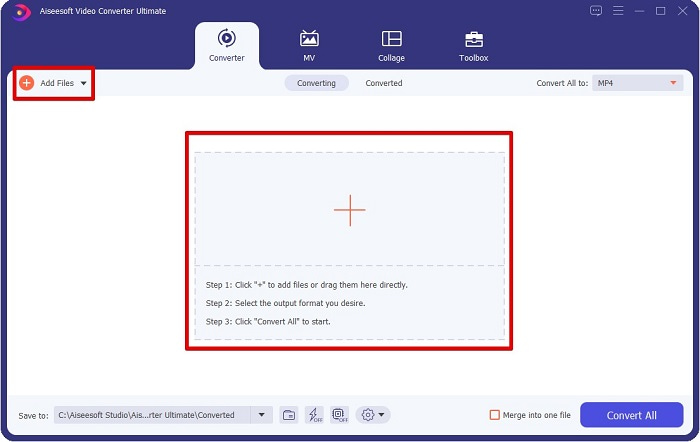
Trin 2. Når du har startet konverteren, skal du klikke på knappen Add Files eller +-knappen for at uploade din MPG-fil. Dine computerfiler vises, hvor du skal finde din fil i dine mapper. Klik derefter på Open for at føje din fil til køen.
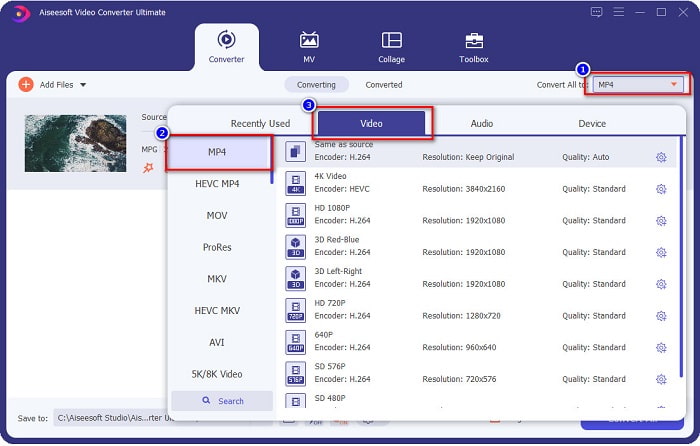
Trin 3. For at ændre formatet på din MPG-fil skal du klikke på Convert All to i øverste højre hjørne af skærmen. Når du ser en liste over filformater, skal du vælge filformatet MP4.
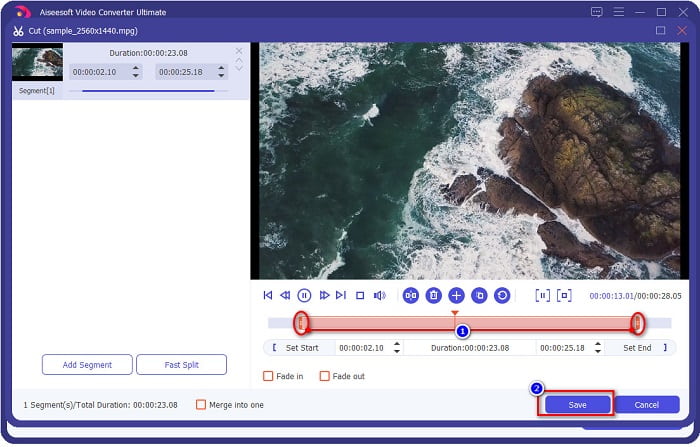
Hvis du vil afkorte længden på din video, skal du klikke på scissor-knappen for at trimme din video. Ved at trække i play head-knapperne kan du justere længden på din video. Klik på Save for at afslutte.
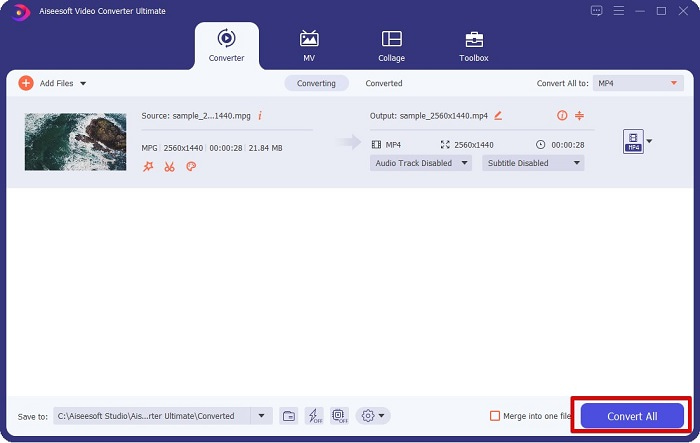
Trin 4. Når du har valgt det filformat, du ønsker, skal du klikke på Convert All for at konvertere din MPG-fil til en MP4-fil. Vent et øjeblik, så bliver din MPG-fil konverteret til en MP4-fil. Med disse enkle trin har du let konverteret din MPG-fil til MP4.
2. Brug gratis online konverter
FVC Free Online Video Converter giver dig mulighed for at konvertere din MPG-fil til MP4-filformat gratis uden tilmelding. Det er en gratis online videokonverter, der lader dig konvertere uden begrænsninger. Desuden kan du konvertere store filer online med denne konverter. Du behøver heller ikke at downloade noget, fordi du kan få adgang til den online. Ulempen er dog, at den er afhængig af internetforbindelsen, hvilket betyder, at hastigheden på din konvertering afhænger af internettet. Ikke desto mindre er denne konverter blevet brugt af mange brugere, og den har vist sig at være en fantastisk videokonverter.
Her er listen over trin til at konvertere i FVC Free Online Video Converter:
Trin 1. Gå til din browser og søg efter FVC Free Online Video Converter.
Trin 2. Når du allerede er på websiden, skal du klikke på Add Files to Convert. En tekstboks vises, hvor du først skal downloade starteren. Når starteren er downloadet, bliver du ført til dine filer; vælg den MPG-fil, du vil konvertere.
Download skrivebordsversionen for at konvertere filer i batch.
Trin 3. Når du har valgt din MPG-fil, vil du se den første grænseflade med den foruddefinerede liste over videoformater. Vælg MP4, før du konverterer din MPG-fil til MP4 online.
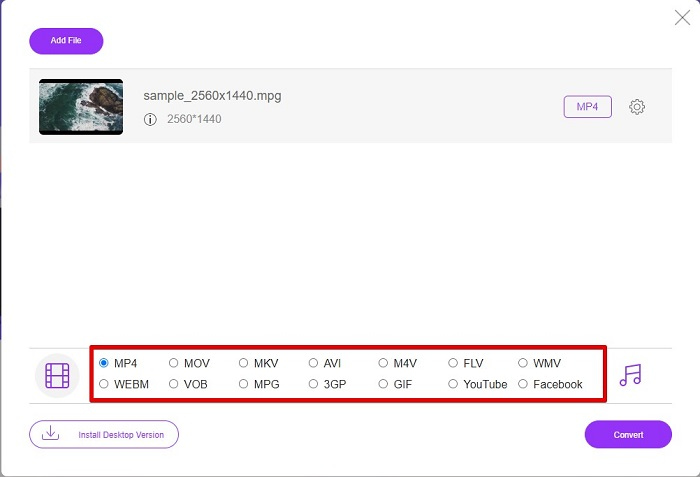
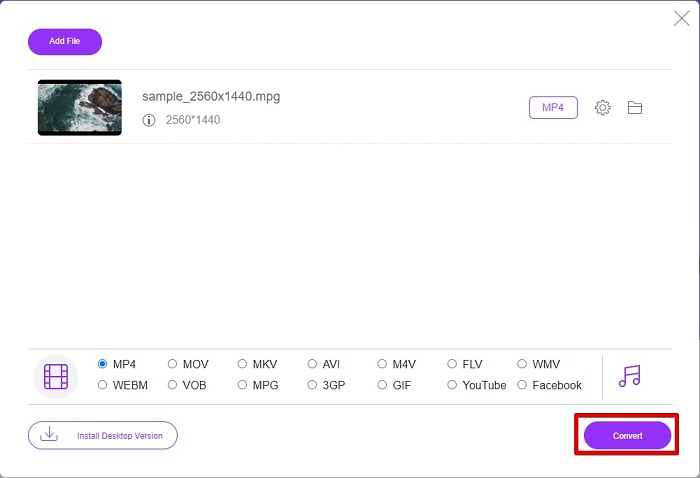
Trin 4. Klik på knappen Convert for at starte konverteringen. En ny fane vises, hvor du vælger, hvor du vil gemme din konverterede fil i dine computerfiler, og klik derefter på select folder.
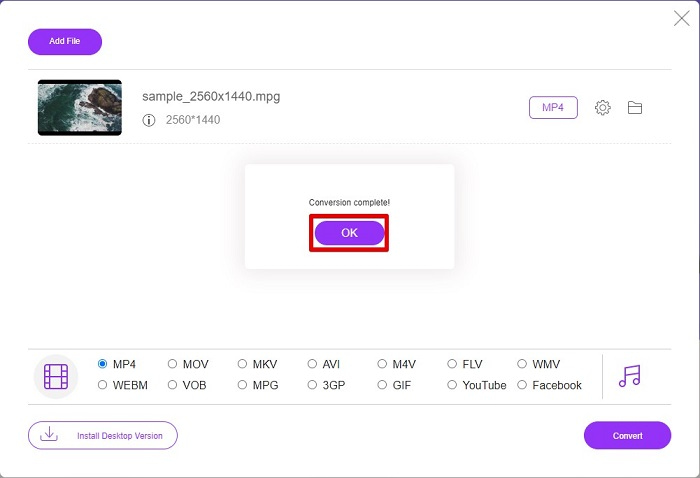
Trin 5. Til sidst begynder din fil at blive konverteret; når den er færdig med at konvertere, skal du klikke på OK for at afslutte. Og det var det! Du er færdig med at konvertere lige så nemt som 1-2-3!
3. Brug ConvertFiles.com
ConvertFiles.com er en gratis online konverter-app til at konvertere din MPG-fil til MP4. Det giver dig mulighed for at konvertere filformater, op til 300 varianter af filformater. Og hvis du leder efter en MPG til MP4-konverter online, som gør det muligt for dig at konvertere dokumenter, tegninger, videoer, præsentationer og mere. Men når du bruger denne online-konverter, vil du støde på en masse forstyrrende annoncer. Ikke desto mindre er denne online-konverter stadig værd at prøve og har vist sig lovende.
Sådan konverterer du din MPG-fil til MP4-filformat:
Trin 1. Søg i din browser efter ConvertFiles.com for at gå direkte til websiden.
Trin 2. Vælg din MPG-fil ved at klikke på den rektangulære knap eller Browse-knappen ved siden af Choose a local file. Find din MPG-fil, og vælg den.
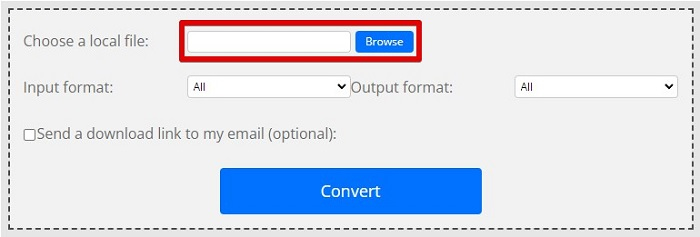
Trin 3. Når du har valgt den MPG-fil, du vil konvertere, skal du i outputformatet vælge .mp4-format ved at klikke på drop-down-knappen.
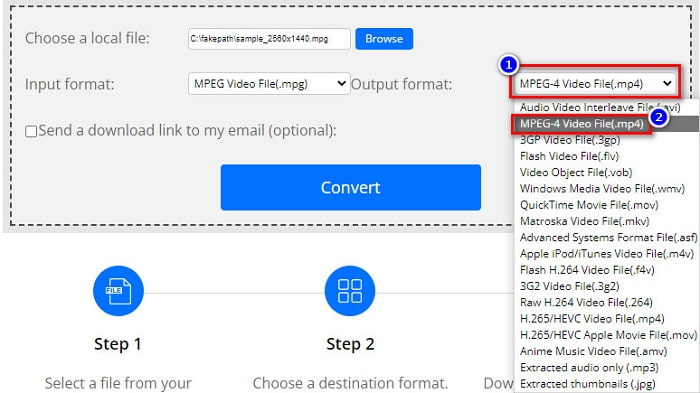
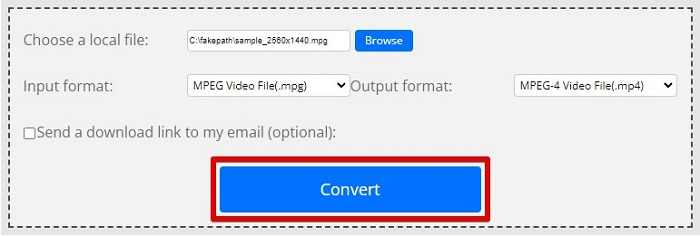
Trin 4. Når du har valgt det filformat, du ønsker, kan du nu konvertere din fil ved at klikke på Convert.
MPG vs. MP4
Lavet af Moving Picture Experts Group (MPEG), MPG er et almindeligt digitalt videoformat til at gemme video-, lyd- og metadataoplysninger. Det er ret nyttigt, når du laver film til deling på internettet. Disse filer i MPG indeholder normalt MPEG-1 eller MPEG-2 video/lydkomprimering.
Udgivet af Moving Picture Experts Group (MPEG) i 2001, kan MP4-formatet hjælpe dig med at gemme video-, lyd-, undertekst- og billeddata i separate spor. Det er en forkortelse for MPEG-4 Part 14. Derudover er det et af de mest populære formater, der bruges til at streame og dele videoer.
Del 3. Ofte stillede spørgsmål om MPG og MP4-format
Kan jeg konvertere MPG-filer til MP4 uden at miste kvaliteten?
Ja. Video Converter Ultimate giver dig mulighed for at konvertere din MPG til MP4-format uden at miste kvaliteten på trods af dens filstørrelse.
Hvor kan jeg afspille MPG-filer?
MPG-filer er bredt understøttet. Derfor kan mange medieafspillere åbne dette filformat, herunder Microsoft Windows Media Player og VideoLAN VLC Media Player. Du kan læse denne artikel for flere oplysninger. Bedste 4 MPG/MPEG-afspillere til Windows/Mac/Android/iPhone [2021]
Kan jeg konvertere MP4 til MPG?
Ja. Du kan konvertere MPG til MP4 filformat ved hjælp af filkonverterene, som vi har angivet ovenfor.
Konklusion
De konvertere, vi har listet ovenfor, er gennemprøvede og pålidelige. De er nemme at bruge og gratis! Men hvis du vil have en filkonverter, der kan konvertere din MPG-fil til MP4-filformat og har fantastiske funktioner, der kan forbedre din fil, så er Video Converter Ultimate det bedste valg. Hvis du derimod ønsker en online konverter uden reklamer, som også kan konvertere store filer uden besvær, så prøv FVC Free Online Converter.
-
 3 nemme måder at konvertere MPG til MOV på din Mac/Windows/Online
 Vil du konvertere dine MPG-filer og senere transportere dem på din iOS, iPod, iPad eller Mac? Denne artikel hjælper med at finde ud af, hvordan man konverterer MPG til MOV med trin.
-
 Sådan konverteres MPG til FLV uden at miste kvalitet [Bevist]
 Du skal se din yndlingsfilm på denne medieafspiller, men den understøtter ikke MPG. Prøv at konvertere din MPG-fil til FLV ved hjælp af disse konvertere, som denne artikel introducerer.
-
 2 ultimative MPG-konvertere til at konvertere MPG til WMV gratis
 Vil du konvertere MPG til WMV gratis? I så fald er du heldig, fordi vi fandt ud af, at der er to værktøjer, du kan bruge til at konvertere dine MPG-filer.

