


 Video Converter Ultimate
 Skærmoptager
 Video reparation
 Sikker download
4 nyttige tip til løsning af VLC-afspiller afspiller ikke MKV
MKV (Matroska‑videofil) er et gratis og åbent multimediefilformat. Men det understøttes ikke af mange ofte anvendte afspillere, herunder Windows Media Player og QuickTime Player. Derfor kan du vælge den populære VLC Media Player til at afspille MKV. Mange brugere er dog stødt på problemet VLC‑afspiller afspiller ikke MKV.

Problemerne med MKV‑afspilning kan være forskellige, f.eks. at lydsporet i din MKV‑fil er forsinket, hakkende afspilning, sløret billede, og fejl i brugerfladen osv. I dette indlæg vil vi dele 4 nyttige tips til at løse problemet MKV‑filer kan ikke afspilles i VLC.
Del 1. Indstil præferencer for at rette VLC Player kan ikke afspille MKV
VLC er et meget populært mediefiler, der afspiller værktøj, der kan understøtte de fleste digitale video- og lydformater, herunder MKV, MP4, AVI, FLV, MP3, AAC, M4A, FLAC osv. Og VCD'er, Audio CD'er og DVD'er.
VLC Media Player tiltrækker millioner af brugere, fordi den kan afspille alle mediefiler, du har. Men VLC-afspilleren kan ikke afspille MKV-filer, problemet opstår fra tid til anden. Hvis VLC-afspiller bare springer din MKV- eller HD MKV-fil over, kan du tilpasse præferencer for at rette den.
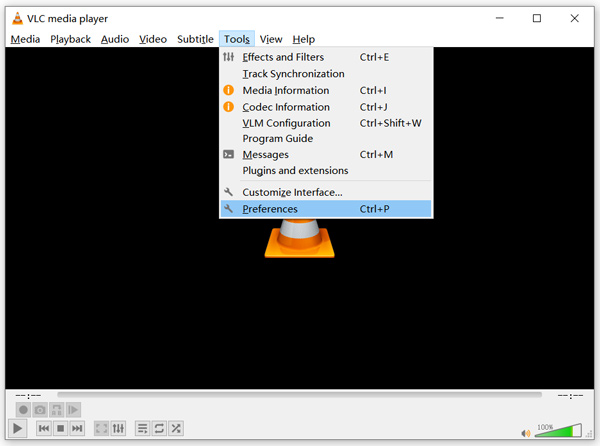
Trin 1. Åbn VLC Media Player, og vælg menuen Værktøjer. Vælg derefter Indstillinger i rullemenuen.
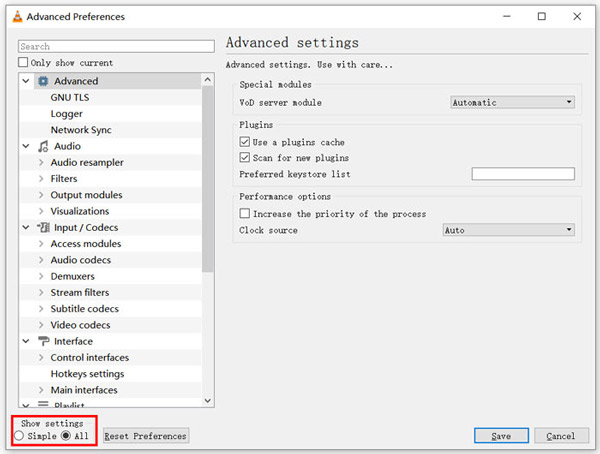
Trin 2. Markér Alle under Vis indstillinger nederst til venstre i dialogvinduet. På den måde får du vist vinduet Avancerede indstillinger.
Trin 3. Vælg sektionen Input/Codecs til venstre, og find derefter indstillingen File Caching (ms) til højre. Du skal muligvis rulle ned for at finde den.
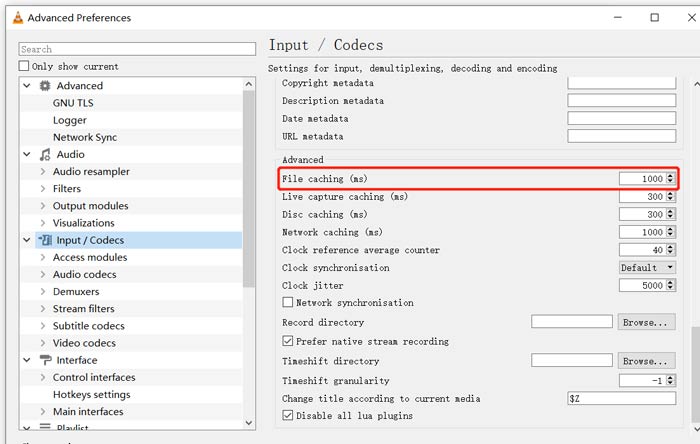
Trin 4. Indstil File Caching til 1000, og klik derefter på knappen Gem for at bekræfte din handling. Efter det kan du genstarte VLC og afspille din MKV‑fil igen.
Del 2. Opdater eller geninstaller VLC for at rette afspilleren kan ikke afspille MKV
Hvis VLC-afspilleren ikke kan afspille MKV-problemet stadig eksisterer, kan du vælge at opgradere det til den nyeste version. Du skal vide det, en ny version vil altid rette mange fejl i gamle versioner. Du kan følge nedenstående trin for at opdatere din VLC Media Player.
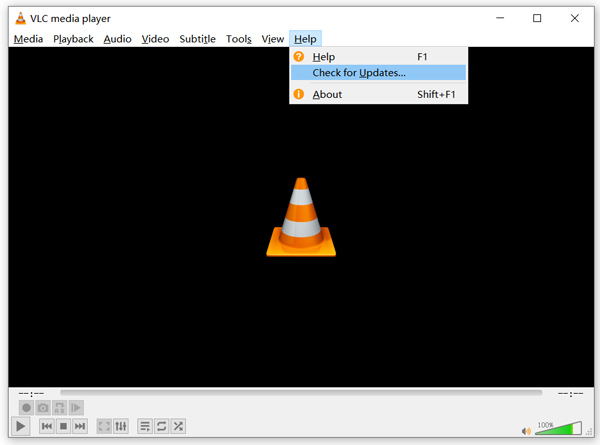
Åbn VLC, og klik på menuen Hjælp. Vælg indstillingen Søg efter opdateringer i rullemenuen. VLC begynder så at tjekke, om der findes en tilgængelig opdateret version. Derefter kan du følge vejledningen for at opgradere VLC til den nyeste version.
Du kan også helt afinstallere VLC fra din computer og derefter gå til det officielle websted, VideoLAN, for at installere en passende version. Når du har installeret en ny VLC Media Player, kan du afspille din MKV‑fil og kontrollere, om den nu kan afspilles normalt.
Del 3. Aktiver lyd for at rette VLC-afspiller Ingen lyd under afspilning af MKV
Hvis din VLC Media Player kan afspille MKV-fil, men ingen lyd, skal du kontrollere, om dens lydindstillinger er korrekte.
Trin 1. Vælg Værktøjer i VLC’s menulinje. Vælg Indstillinger i rullemenuerne. Så kommer du til vinduet Enkle indstillinger.
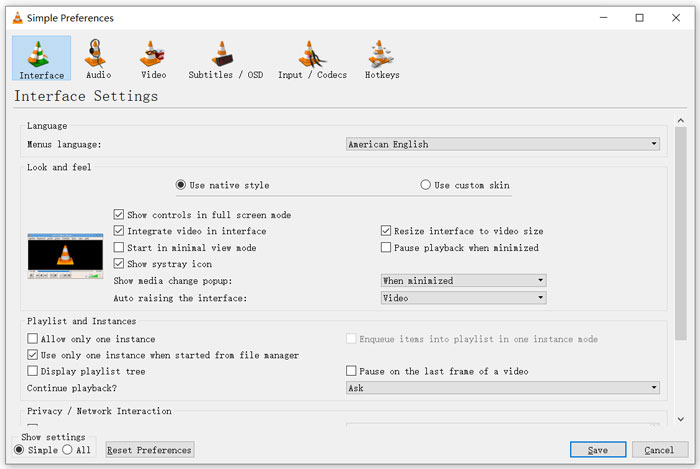
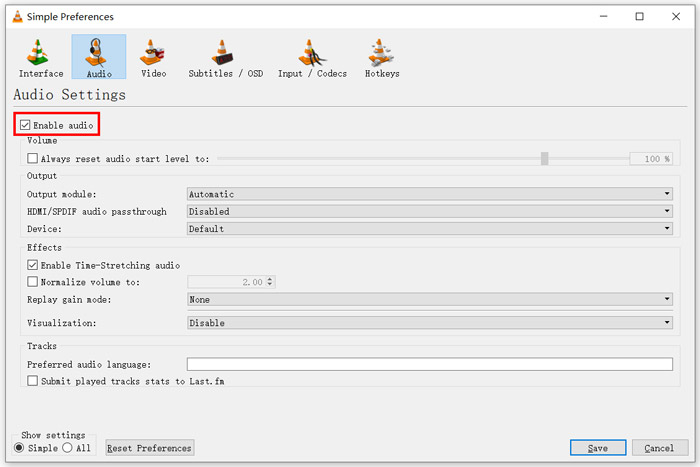
Trin 2. Klik på fanen Lyd, og marker derefter indstillingen Aktivér lyd. I dette trin kan du også tilpasse Outputmodul, HDMI/SPDIF‑lydgennemgang og Enhed efter behov. Klik på knappen Gem for at gemme dine ændringer.
Nu er du tilbage i VLC’s hovedvindue. Du kan klikke på Medier og derefter Åbn fil for at afspille din MKV‑fil.
Del 4. Vælg et VLC Player-alternativ til afspilning af MKV-filer
Når du vil se MKV‑film, kan du også vælge en anden afspiller i stedet for VLC. Du kan prøve den populære Free Online Video Player. Uanset om du bruger en Windows 10/8/7‑pc eller en Mac, kan du bruge den til at afspille enhver MKV‑fil i høj kvalitet.
Denne gratis online-afspiller har mulighed for at afspille 4K, 1080p / 720p HD, SD-videoer, 3D-videoer og lydfiler problemfrit. Udover MKV understøtter den også mange andre formater, herunder MP4, MOV, FLV, AVI, MPEG, WMV, WMA, AAC, MP3 og mere.
Trin 1. Når du vil se MKV‑filer, kan du gå til siden Free Online Video Player. Den er kompatibel med enhver webbrowser som Chrome, IE, Firefox og Safari. Klik på knappen Play Now for hurtigt at installere et lille startprogram til MKV‑afspilning.
Trin 2. Når installationen er fuldført, startes denne gratis online MKV‑afspiller automatisk. Klik på knappen Open File for at importere din MKV‑fil. Her kan du også klikke på Open Disc for at se en DVD‑film.
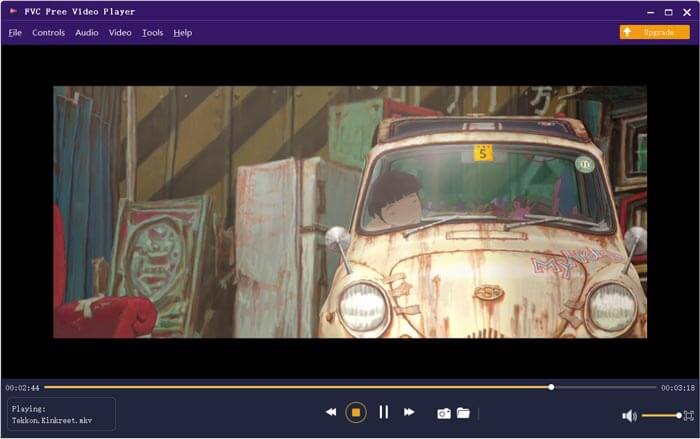
Din MKV‑video afspilles derefter automatisk. Du får fuld kontrol over MKV‑afspilningen. Sammenlignet med VLC Media Player giver den en lettere måde at nyde MKV‑filer på. Denne gratis online MKV‑afspiller understøtter både DTS‑HD og Dolby TrueHD, så du får en fremragende lydoplevelse.
Del 5. Ofte stillede spørgsmål om VLC Player spiller ikke MKV
Afspiller smart TV MKV-filer?
Ja. Mange smarte tv'er som Sony og Samsung, der kan understøtte MKV-filer. Du kan afspille din MKV via en ekstern harddisk eller UBS-enhed
Hvordan afspilles DVD med VLC Media Player?
Når du vil afspille en DVD-film med VLC, skal du først indsætte DVD-disken i din computers diskdrev. Åbn VLC, klik på Media på menulinjen, og vælg derefter Åbn disk. Gennemse og indlæs denne DVD-film til VLC, og afspil den.
Sådan deaktiveres dekodning af hardwareacceleration på VLC?
For at deaktivere afkodning af hardwareacceleration på VLC Media Player skal du gå til Indstillinger fra menuen Funktioner. Vælg Input / Codecs-kategori og derefter Codecs. Find den hardware-accelererede afkodningsindstilling, og deaktiver den der.
Konklusion
Når du står over for problemet VLC‑afspiller afspiller ikke MKV, kan du direkte bruge en anden afspiller, som den anbefalede Free Online Video Player, til at se dine MKV‑filer. Du kan også vælge at opgradere VLC Media Player eller tilpasse forskellige indstillinger for at løse det.
-
 Gratis og professionelle måder at konvertere MKV til MOV
 Hvordan konverterer jeg MKV til MOV på Mac? Kan iMovie læse MKV? Hvad betyder MOV-format? Dette indlæg fortæller 2 enkle måder at hjælpe dig med at konvertere MKV til MOV med gratis online og professionelle videokonvertere.
-
 Sådan konverteres M2TS til MKV uden at miste kvalitet
 Vil du konvertere M2TS til MKV, mens du opretholder den originale kvalitet? Dette indlæg viser dig gratis og online metoder til at skifte M2TS til MKV tabsfrit.
-
 VLC Media Player - En kort gennemgang videoafspiller og de bedste alternativer på Windows og Mac
 Hvorfor lyden ikke fungerer på VLC Media Player? Hvis du vil lære mere om den populære medieafspiller, kan du lære mere om anmeldelsen og de bedste alternativer fra artiklen.
