


 Video Converter Ultimate
 Skærmoptager
 Video reparation
 Sikker download
FLAC vs. MP3: Introduktion og sammenligning af lydformater
The debate between FLAC vs. MP3 file formats has been ongoing for years. While MP3 is one of the oldest and most widely-used formats, FLAC has gained popularity among audiophiles for its lossless audio compression. But which one is better? In this guide, we'll take a closer look at the differences between FLAC and MP3, including their sound quality, file size, compatibility, and more, to help you decide which format to choose for your music collection.

Del 1. FLAC vs. MP3: Introduktion af lydformater
MP3 Anecdote
MP3 er et populært format til digitale lydfiler, som har været meget brugt siden introduktionen i 1990'erne. Den bruger en form for komprimering med tab for at reducere størrelsen af lydfiler og samtidig bevare en god lydkvalitet. MP3-filer kan nemt deles, downloades og afspilles på forskellige enheder, hvilket gør det til et bekvemt valg for digital musikentusiaster. Spørgsmålet er, er FLAC bedre end MP3? Lad os finde ud af det ved at læse beskrivelsen af FLAC.
FLAC Anecdote
FLAC (Free Lossless Audio Codec) er et lydfilformat af høj kvalitet, der bruger tabsfri komprimering til at bevare de originale lyddata uden at ofre kvaliteten. Det betyder, at FLAC-filer er meget større end MP3-filer, men bevarer samme lydgengivelsesniveau som det originale kildemateriale.
Del 2. Understøttede enheder/platforme af FLAC og MP3
Lad os nu se MP3 vs. FLAC sammenligningen for at se, hvordan de klarer sig med hensyn til de platforme eller enheder, de understøtter.
MP3 er et bredt understøttet lydfilformat, der kan afspilles på forskellige platforme, herunder:
◆ Computere, der kører Windows, macOS og Linux-operativsystemer.
◆ Portable media players, such as iPods and other MP3 players.
◆ Smartphones og tablets, der kører iOS, Android og andre mobile operativsystemer.
◆ Bilstereo med USB eller aux-indgange.
◆ Hjemmebiografsystemer og stereomodtagere med USB- eller netværkstilslutning.
◆ Musikstreamingtjenester, som Spotify og Apple Music, bruger ofte MP3 som deres standardformat til streaming og download af musik.
FLAC er ikke så bredt understøttet som MP3, men det kan stadig afspilles på en række forskellige platforme, herunder:
◆ Computere, der kører Windows, macOS og Linux-operativsystemer.
◆ Nogle bærbare medieafspillere, såsom Astell&Kern AK Jr og PonoPlayer.
◆ Nogle smartphones og tablets, der kører Android og andre mobile operativsystemer.
◆ Nogle bilstereoanlæg og hjemmebiografsystemer med USB- eller netværkstilslutning.
◆ Nogle streamingmusiktjenester, såsom Tidal, som tilbyder high-fidelity FLAC-streaming og downloadmuligheder.
Del 3. Er FLAC bedre end MP3?
Lad os denne gang liste forskellen mellem FLAC og MP3 ved at sammenligne disse lydformater omfattende.
Her er en omfattende sammenligning af FLAC og MP3 baseret på forskellige faktorer:
Sound quality: FLAC offers better sound quality than MP3, for it is a lossless format that preserves all the audio data in the source material. On the other hand, MP3 is a lossy format that discards some audio data during compression, which can result in a loss of audio quality.
File size: MP3 files are much smaller than FLAC files, as MP3 uses lossy compression to reduce the file size. This makes MP3 a more practical choice for those with limited storage space or those who need to share or download music files quickly over the internet.
Compatibility: MP3 is widely compatible with various devices and software, including desktop and laptop computers, portable media players, smartphones, car stereos, and streaming music services. FLAC, on the other hand, may not be compatible with some devices and software due to its larger file size and lossless compression.
Bitrate: MP3 files can be encoded at a lower bitrate to reduce the file size further, but this also results in a loss of audio quality. FLAC files, on the other hand, always maintain the same bitrate as the original source material.
Editing: FLAC is a better choice for audio editing, as it offers a higher level of audio fidelity and doesn't introduce any additional compression artifacts. MP3 files, on the other hand, may introduce additional compression artifacts during editing due to their lossy compression.
Price: Both FLAC and MP3 are free and open-source formats, so there is no cost associated with using either format.
Del 4. Konverter FLAC til MP3 eller MP3 til FLAC
Nu hvor vi er færdige med processen til at sammenligne FLAC med MP3, lad os gå videre til processen med, hvordan man konverterer MP3 til FLAC eller omvendt.
Video Converter Ultimate is a powerful software tool that allows you to easily convert audio and video files from one format to another. One of the many formats supported by FVC Video Converter Ultimate is FLAC, a high-quality, lossless audio format that is often used by audiophiles and music enthusiasts. You can quickly and easily convert your FLAC files to MP3, allowing you to save space on your device and make your music more easily shareable. Video Converter Ultimate offers a user-friendly interface and a range of options for customization, making it a convenient and helpful tool for anyone who needs to convert audio and video files.
For at konvertere lydfiler mellem FLAC- og MP3-formater ved hjælp af dette værktøj, skal du følge et par enkle trin.
Step 1. First, download and install the program on your computer by clicking on one of the Free Download buttons and following the setup wizard. Next, launch the program to access its user-friendly interface.
Free DownloadTil Windows 7 eller nyereSikker download
Gratis downloadTil macOS 10.7 eller nyereSikker download
Step 2. Next, add the audio file you want to convert by clicking the plus sign button from the main interface. Once added, you'll see a thumbnail of each file on the interface.
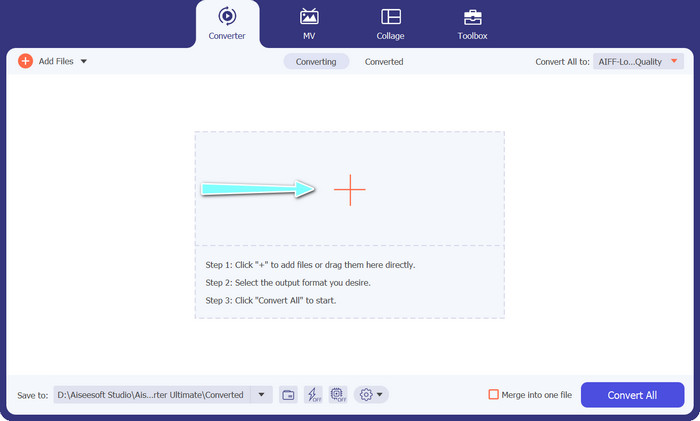
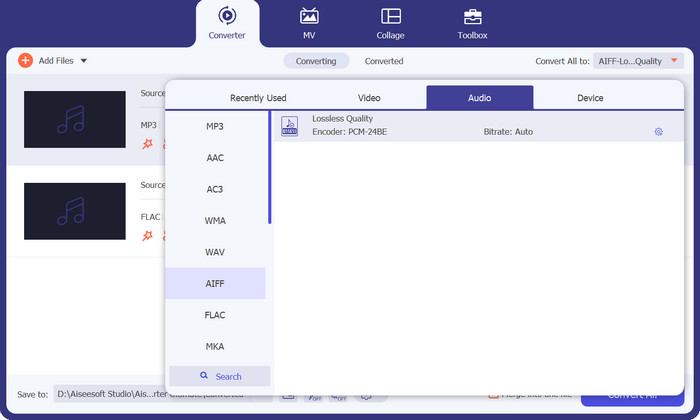
Step 3. Specify the output format by selecting the Audio tab from the Profile menu on the upper right side of the tool. Choose either MP3 or FLAC, depending on the direction of the conversion.
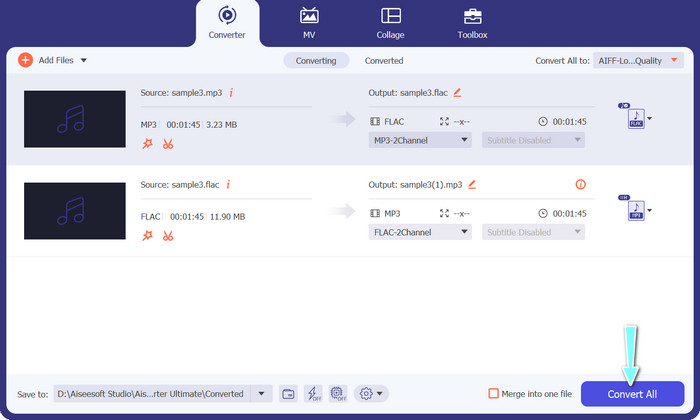
Step 4. Specify the output folder where you want to save the converted files by selecting the appropriate location at the bottom of the interface. Lastly, hit on the Convert All button to start the conversion process.
If you're in need of a free online tool to convert FLAC to MP3, look no further than Free Video Converter Online. This convenient program allows users to convert video and audio files without any cost and also offers the ability to customize output settings according to your preference. The conversion speed is also reliable, so long as you have an internet connection. To get started, follow these steps:
Step 1. Launch your preferred web browser and navigate to the Free Video Converter Online website.
Step 2. Click the Add Files to Convert button to upload the FLAC file you want to convert to MP3.
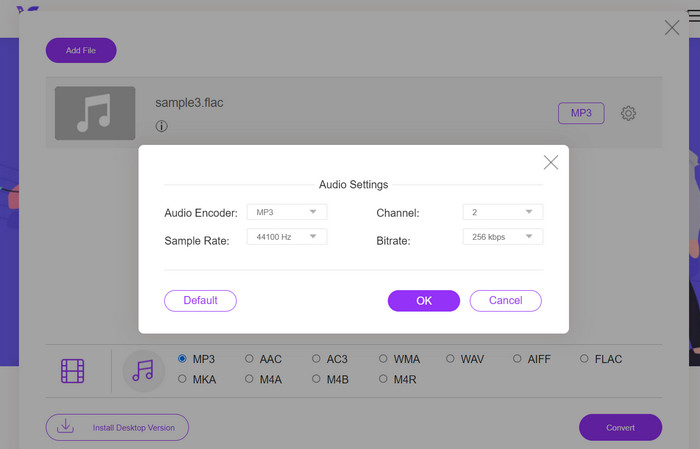
Step 3. Choose MP3 as the output format from the list of available formats under the Audio format menu. You can also select your desired bitrate or output quality for the MP3 file.
Step 4. Click the Convert button to start the conversion process.
Del 5. Ofte stillede spørgsmål om FLAC vs. MP3
Hvad er bedre mellem 16-bit FLAC vs 320Kbps MP3?
Valget mellem 16 bit FLAC og 320 kbps MP3 afhænger af personlige præferencer og den påtænkte brug af lydfilen. Hvis du prioriterer lydkvalitet og har nok lagerplads, kan 16 bit FLAC være den bedre løsning. Hvis du har brug for en mindre filstørrelse uden at gå for meget på kompromis med lydkvaliteten, kan 320 kbps MP3 være et godt valg.
Er FLAC-filer større end MP3-filer?
Ja, FLAC-filer er typisk større end MP3-filer på grund af deres tabsfri karakter.
Understøtter alle medieafspillere FLAC?
Nej, ikke alle medieafspillere understøtter FLAC. Imidlertid understøtter mange moderne medieafspillere og software FLAC-afspilning, inklusive VLC, Foobar2000 og Winamp.
Konklusion
Choosing between MP3 and FLAC depends on your personal preference and specific needs. Therefore, FLAC vs. MP3 is a must for your decision-making. Ultimately, the decision on which format to use comes down to your priorities in terms of sound quality, file size, and compatibility.
-
 De 4 bedste metoder til nemt at konvertere MOV til MP3 på Windows og Mac
 Når du vil udtrække MP3-lydfiler fra MOV-filer, kan du lære mere om de 4 mest effektive MOV til MP3-konvertere for at få de ønskede filer fra artiklen.
-
 Bedste MP3-konvertere til nemt at omdanne lydfiler til MP3
 Konverter ubesværet ethvert lydformat til MP3 med vores brugervenlige online og offline MP3-konvertere. Få resultater i høj kvalitet med blot et par klik.
-
 Top 3 FLAC Metadata Editors på Mac og Windows [Opdateret 2023]
 Vil du ændre FLAC-metadata? I dette tilfælde skal du læse denne artikel, da vi giver tilstrækkelig viden om den nyeste FLAC-metadataeditor til at kunne bruge.
