


 Video Converter Ultimate
 Skærmoptager
 Video reparation
Bedste af de bedste konvertere du kan bruge til at konvertere 3GP til AVI online og offline
3GP-formatet er et fleksibelt format, der overfører lyd- og videostrømme til tredje generations mobiltelefoner via GSM. Det matcher 3G-forbindelsen for hurtigere filoverførsel. Dette format blev mest brugt på ældre telefoner, fordi det er alsidigt og hurtigt at overføre. Men nu om dage kan 3GP-filer ikke afspilles på din lokale medieafspiller, fordi formatet ikke gør det muligt for nyere afspillere at forstå strukturen. Den bedste måde at se alle dine 3GP-filer på telefon eller computer er derfor at konvertere dem. I stedet for at lede på internettet efter, hvilken konverter der er bedst, har vi samlet fire konvertere, du kan vælge imellem. Værktøjerne nedenfor er ideelle og kan konvertere 3GP til AVI-format uden kvalitetstab.

Del 1. Konverter 3GP til AVI offline med Ultimate Converter
FVC Video Converter Ultimate
Hvis du ikke vil bruge kræfter på at konvertere dine 3GP-filer, anbefaler vi stærkt, at du bruger FVC Video Converter Ultimate. Denne software er et af de bedste valg til filkonvertering og kan konvertere filer på få sekunder, altså meget hurtigt. Desuden deler mange brugere af programmet den samme oplevelse. Kort sagt siger de helt klart, at dette værktøj hjælper med at løse deres konverteringsproblemer på et øjeblik.
Yderligere forklaring, dette værktøj er ikke kun det bedste til at konvertere filen; den har også de mest avancerede funktioner, du gerne vil prøve. Eksempler er editor, GIF maker, volume booster, synkronisering af lyd og video, reversering og mere. Hvis du køber dette værktøj, får du alle de nævnte værktøjer tidligere, og der er meget mere i vente. Så lad os nu prøve at følge trin-for-trin for at konvertere 3GP til AVI på Mac og pc uden at miste kvaliteten.
Trin 1. Klik på download-knappen og vælg, om du er PC- eller Mac-bruger, og installer det derefter.
Gratis download til Windows 7 eller nyere Sikker download
Gratis download til MacOS 10.7 eller nyere Sikker download
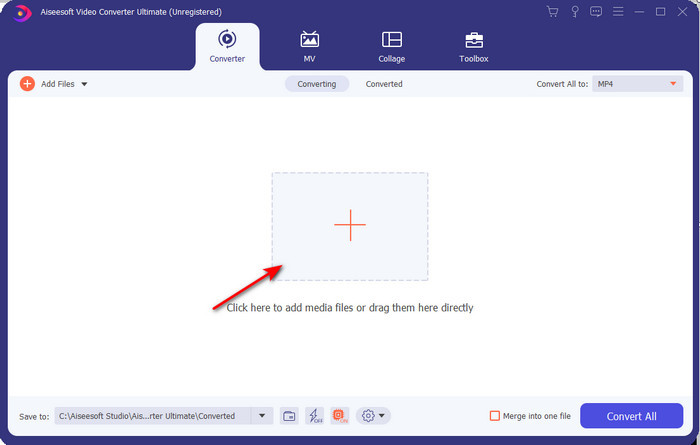
Trin 2. Start værktøjet, klik på +‑tegnet i midten af grænsefladen, vælg .3gp-filen i din mappe, og klik på Open. Du kan også lave batch-konvertering her: klik på Add Files for at tilføje flere filer.
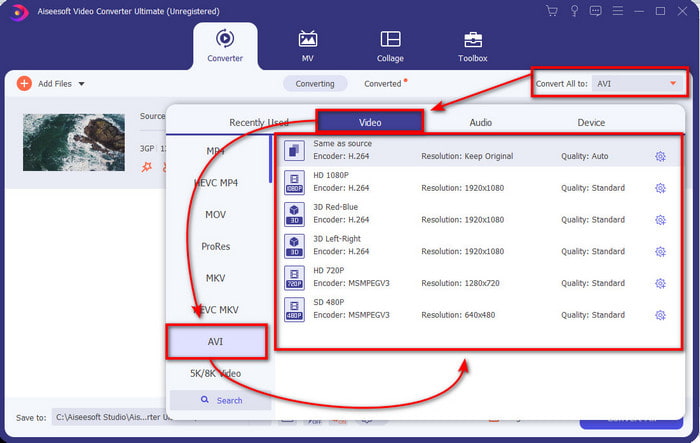
Trin 3. For at ændre 3GP-formatet skal du klikke på Convert All-indstillingen og vælge AVI-formatet under kategorien Video.
Trin 4. For at starte konverteringen skal du klikke på Convert All, og konverteringen af dine 3GP-filer går i gang.

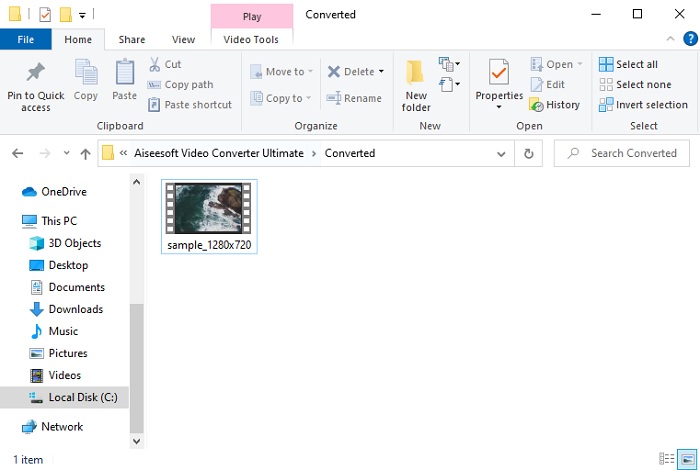
Trin 5. Når konverteringen er færdig, vises en mappe på skærmen med den konverterede 3GP-fil. Klik på den nykonverterede AVI-fil for at se den og eventuelt redigere den senere.
Del 2. 3 tilgængelige online-konvertere til at konvertere 3GP til AVI
1. FVC Free Video Converter Online

Vi kan garantere, at det bedste 3GP til AVI-konverteringsværktøj online på denne liste er FVC Free Video Converter Online. Alle de funktioner, du gerne vil have i en online konverter, findes her. Det er den bedste online-konverter, vi nævner ud fra alle forskellige aspekter. For eksempel, hvis du vil have en effektiv online-konverter, en sikker konverteringsproces og helt uden reklamer, er dette webværktøjet for dig. Selvom webværktøjet både ser godt ud og fungerer fint, understøtter det stadig kun et mellemniveau af formater. Avancerede funktioner, som du kan møde i FVC Video Converter Ultimate, er ikke tilgængelige her. Men fordelen i forhold til softwareversionen er, at dette er helt gratis. Uden yderligere forsinkelse går vi videre til trinnene til at konvertere din fil til en ny version.
Trin 1. Klik på dette link for at gå til hjemmesiden.
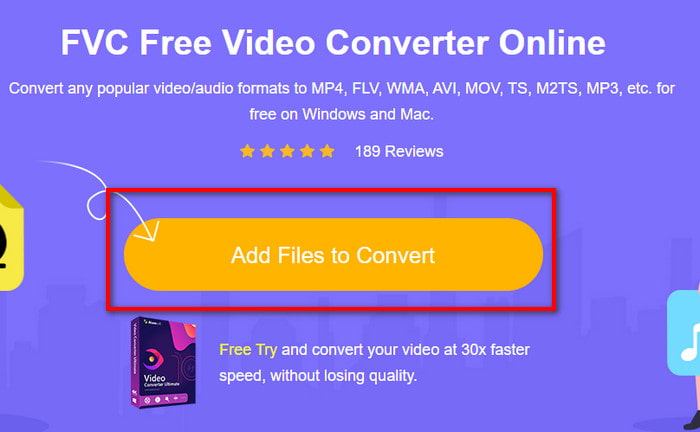
Trin 2. Tryk på Add Files to Convert for at starte onlinetjenesten; en mappe vises, og du finder .3gp-filen. Hvis det er første gang, du bruger værktøjet, skal du downloade startprogrammet ved at klikke på Add Files to Convert og derefter klikke igen for at starte det.
Trin 3. Når du har valgt filen, vælger du AVI-formatet i sektionen nedenfor.
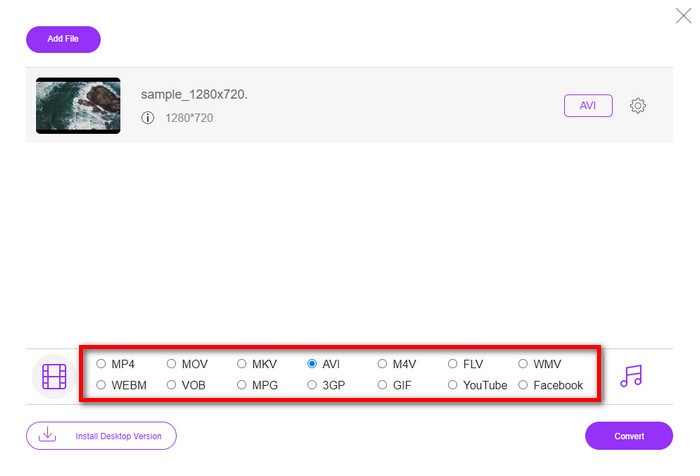
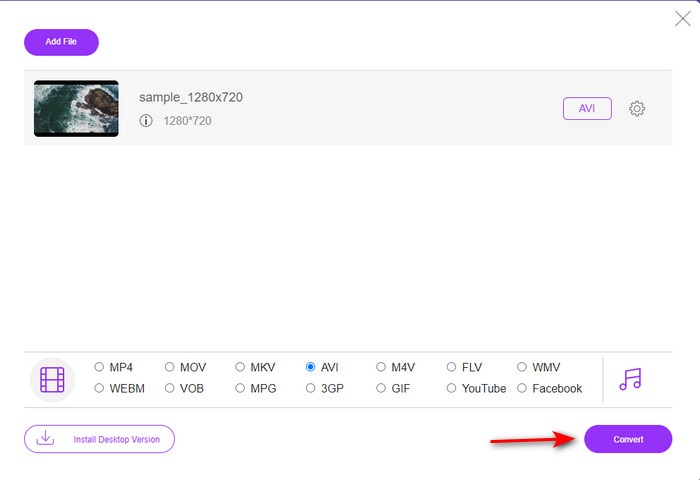
Trin 4. Når du er klar til at konvertere filen, skal du klikke på Convert.
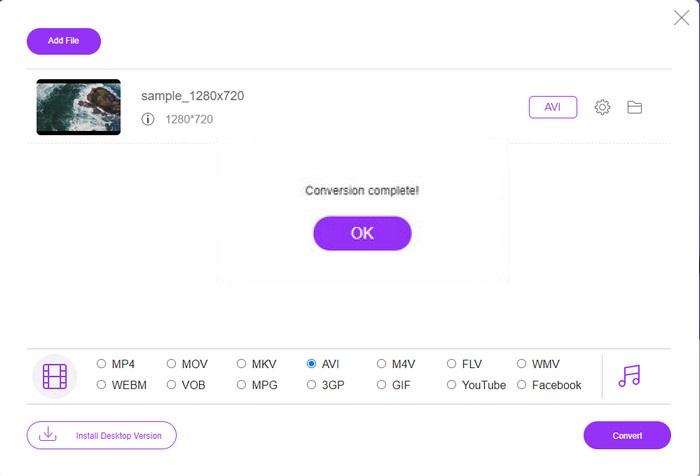
Trin 5. Efter konverteringen vises en mappe igen, men nu med den fil, du konverterede tidligere.
2. Fconvert.com
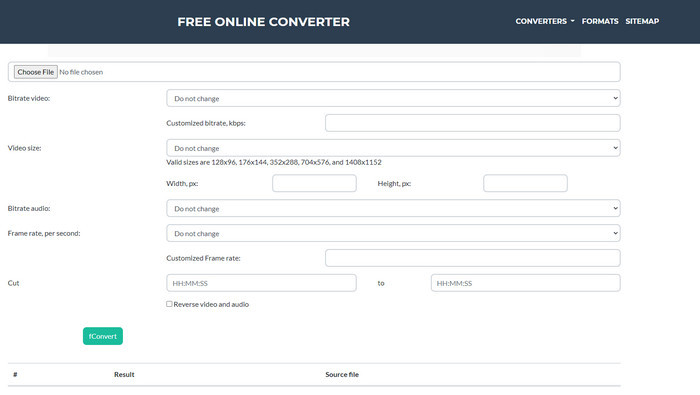
Når man taler om filkonvertering, skal Fconvert.com være med på listen, for dette webværktøj er en af de fremragende konvertere, du kan bruge gratis. Denne konverter kan konvertere næsten alle de formater, du kender – og sandsynligvis også dine filer. Der er dog et problem med dette værktøj, og det er reklamerne. Hver gang du klikker på noget på websitet, kommer der først en reklame, før du kommer videre til det, du klikkede på. Selvom reklamerne er irriterende, ser tjenesten stadig pæn ud og fungerer rigtig godt til formatkonvertering. Hvis du vil opleve, hvor godt dette værktøj er, skal du følge trinnene nedenfor og lære, hvordan du konverterer 3GP til AVI gratis.
Trin 1. Søg efter dette værktøjs officielle hjemmeside i din browser.
Trin 2. Klik på AVI under video, klik på Choose File, find .3gp-filen, rul ned og klik på fConvert.
Trin 3. Rul længere ned, så ser du Result; klik på filen for at downloade den.
3. Enhver konv
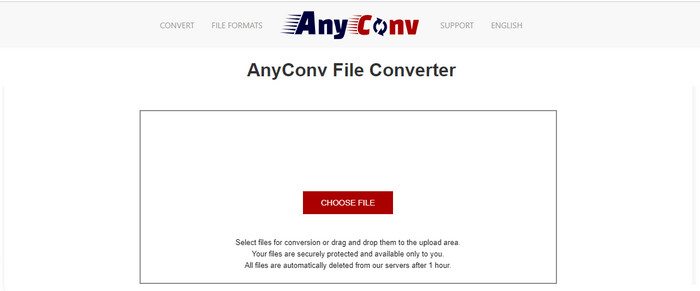
Et andet værktøj, der er specialiseret i formatkonvertering, er Anyconv. Dette webværktøj er meget anderledes end Fconvert.com, fordi det er både bedre og hurtigere. Derudover har det færre reklamer end det forrige værktøj. Selv om der er færre reklamer, er de til gengæld større end på Fconvert.com, men når det gælder ydeevne, klarer dette værktøj sig rigtig fint. Lad os teste dette værktøj for at se, om det kan konvertere 3GP til AVI gratis uden yderligere forsinkelse.
Trin 1. Åbn din søgemaskine, og find Anyconv-hjemmesiden.
Trin 2. Tryk på Choose File, og en mappe vises; indsæt .3gp-filen i webværktøjet og gå videre. For at ændre format skal du klikke på drop-down-knappen og finde AVI. For at starte konverteringen skal du klikke på Convert.
Trin 3. Vent, til processen er færdig, og klik derefter på Download AVI for at downloade den konverterede fil.
Del 3. Hvilket format er det bedste; 3GP eller AVI
Hvis du bruger en 3. generations telefon og ønsker at gemme video i høj kvalitet, skal du overføre den hurtigere i 3. generation af telefonen, så er 3GP formatet for jobbet. Men hvis du prøver at sende AVI-format til 3. generations telefoner, åbnes filen ikke, fordi dette format ikke understøttes. Men i dagens tilfælde er AVI meget bedre. Det har allerede fået stor støtte fra alle medieafspillere og redaktører sammenlignet med 3GP. Selvom AVI-format er det bedste valg i dag, er filstørrelsen enorm sammenlignet med 3GP, og hvis du var ved at gemme det på din telefon, ville det æde meget plads. Desuden er begge formater fantastiske, men de har forskellige formål og anvendelser.
Del 4. Ofte stillede spørgsmål om 3GP og AVI
Kan jeg bruge FFmpeg til at konvertere 3GP til AVI?
Du kan bruge FFmpeg til at konvertere din 3GP-fil; det er dog lidt svært, men det kan lade sig gøre, hvis du giver dig tid. Første trin er at downloade zip-filen med FFmpeg til din computer og pakke den ud. Andet trin er at åbne din CMD for at kunne kommunikere med værktøjet. Find derefter din fil via kommandoprompten, ffmpeg -i input.3gp -vn -ar 44100 -ac 2 -b:a 192k output.avi kopiér denne kode, indsæt den i CMD, og tryk Enter for at starte konverteringen.
Kan 3GP afspilles på 4. generations telefoner?
Dette format blev brugt på telefoner i 3. generation, og du kan stadig afspille videoer i 3GP-format på nogle 4. generations-telefoner, men ikke alle. For som nævnt tidligere er 3GP til 3. generation og ikke til alle 4. generations-telefoner. Du kan også bruge professionelle 3GP-afspillere til at nyde dine videoer.
Hvilket format er bedre: 3GP eller MP4?
Når det gælder kvalitet og mest understøttede formater, er MP4 langt bedre. Men 3GP er meget mindre og fungerer bedre i 3G-netværk til hurtigere overførsel af denne filtype. Vil du konvertere MP4 til 3GP eller omvendt, så klik her for at få flere oplysninger.
Konklusion
Hver rejse skal komme til en ende, og nu kan du nemt konvertere 3GP til AVI ved hjælp af værktøjerne nævnt ovenfor. Desuden fungerer alle de værktøjer, der er præsenteret ovenfor, lad os inkludere FFmpeg, godt. Alligevel falder det bedste valg altid til FVC Video Converter Ultimate. Dette værktøj overgår alle de online konvertere kan gøre i konvertering og mange flere aspekter. Så nu, hvis du vil have softwaren, skal du klikke på download-knappen og udføre konverteringen hurtigt.
-
 [Online og gratis] 3 metoder til at konvertere MP4 til 3GP problemfrit
 Vil du konvertere MP4 til 3GP på en hurtig og nem måde? Her skal vi dele 3 MP4 til 3GP-konvertere for at ændre MP4 til 3GP til afspilning på forskellige mobiltelefoner.
-
 Top 3 gratis måder at konvertere FLV til 3GP på Windows / Mac
 Kan du ikke åbne FLV-filer på smartphone eller tablet? Bare rolig! Her deler vi tre metoder til at konvertere FLV til 3GP uden at miste kvalitet til at spille på mobilen.
-
 Fremragende valg til at konvertere MKV til et AVI -format
 Lær hvordan du konverterer MKV -videoer med nemme trin, der udelukkende er til dig. Vil du vide hvordan? Klik derefter på dette link for at lære mere.
