


 Video Converter Ultimate
 Skærmoptager
 Video reparation
 Sikker download
Detaljerede procedurer til at konvertere AVI-filer til M4V-format
Multimediebeholderformatet AVI, som står for Audio Video Interleaved, er en funktion i Windows’ videoprogrammer. Det gør det muligt at afspille lyd- og videodata samtidigt, samlet i én enkelt fil. Med sine unikke muligheder, herunder synkroniseret styring og visning i realtid, blev AVI hurtigt et af de mest anvendte videoformater. Men hvis du vil afspille din video på din Mac, skal du konvertere AVI til M4V, fordi M4V er et Apple-format, der kan afspilles i iTunes, Apple QuickTime Player og på iOS-enheder. Nogle gange vil du måske konvertere .avi-filer på en Mac til et universelt format som M4V. I denne situation anbefales det at konvertere AVI til M4V for at fungere korrekt på macOS. Vi viser dig de bedste metoder til at konvertere AVI til M4V ved hjælp af online- og offlineprogrammer.

Del 1: Introduktion til AVI og M4V
| AVI | M4V | |
| Filnavn | Audio Video Interleave | MPEG-4-video |
| Filudvidelse | .avi | .m4v |
| Beskrivelse | AVI-filformatet er en af de mest populære multimediebeholdere, der nogensinde er skabt. Akronymet AVI, som står for audio video interleaved, blev oprindeligt gjort tilgængeligt for offentligheden af Microsoft i 1992 som en del af deres multimedieramme, "video til Windows." En AVI-fil med filtypenavnet.avi kan have både synkroniseret video- og lydindhold, fordi det er et containerformat. Således kan forfattere redigere og indkode audio-video-sekvenser eller videosekvenser ved hjælp af standarden. | Apple skabte M4V filtypenavnet, som er bemærkelsesværdigt lig MP4 filtypenavnet, til indholdet af iTunes Store. Apple-enheder er de eneste, der kan afspille M4V-filer. For at afspille på Apple-enheder kan andre videoformater som MP4 og MOV konvertere til M4V. Den primære skelnen mellem filformaterne M4V og MP4 er, at førstnævnte understøtter DRM-Copyright Protection, som forbyder krænkelse af medieindhold krænkelse af copyright. Computeren skal give tilladelse ved at logge ind på iTunes-kontoen for at købe mediefilen for at afspille en DRM-beskyttet M4V-fil. Men hvis filerne ikke er DRM-beskyttede, kan brugeren blot omdøbe M4V-filtypen til MP4 for at gøre den kompatibel med ikke-Apple-enheder. |
| Udviklet af | Microsoft | Apple Inc. |
| Tilknyttede programmer | VLC Media Player Apple QuickTime Player Adobe Premiere Pro 2020 Windows Media Player | KMPlayer Klassisk medieafspiller Zoom afspiller \VLC medieafspiller |
| Filkategori | Video | Video |
| MIME-type | video/x-video | video/x-m4v |
Del 2: Bedste måde at konvertere AVI til M4V
Vil du konvertere AVI til M4V gratis? Du kan bruge FVC Free Video Converter Online. Dette værktøj kan nemt konvertere dit AVI-filformat til M4V. Derudover understøtter det flere videoformater, såsom FLV, MP4, MOV, WMA og mere. Hvis du desuden planlægger at konvertere flere AVI-filer til forskellige filformater, kan du bruge dette program, fordi det tilbyder batchkonvertering. Du kan også redigere dine videoer, før du konverterer dem, f.eks. ændre billedhastighed, opløsning og bitrate. Derudover kan FVC Free Video Converter Online konvertere lydfiler som MP3, AAC, AC3, FLAC osv.
Funktioner
◆ Konverter adskillige videofilformater, såsom M4V, AVI, MP4, MOV, VOB, FLV, WMV osv.
◆ Kan ændre videoens opløsning, bithastighed og billedhastighed.
◆ Konverter lydfiler som MP3, AAC, AC3, FLAC osv.
Følg de enkle vejledninger nedenfor for nemt at konvertere AVI til M4V.
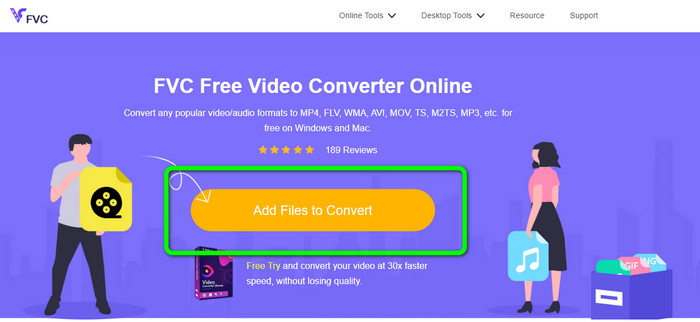
Trin 1: Åbn først din browser, og gå til websiden FVC Free Video Converter Online. Tryk på knappen Add Files to Convert for at uploade din AVI-fil.
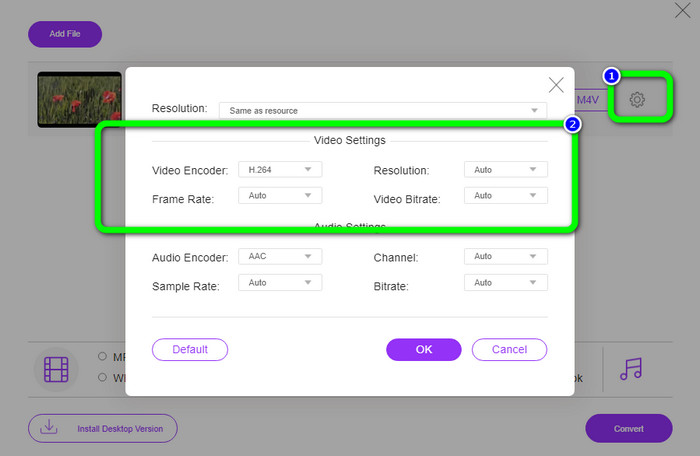
Trin 2: Hvis du ønsker at ændre din videos opløsning, billedhastighed og bitrate, skal du klikke på ikonet Settings i den venstre del af grænsefladen. Når du er færdig med at ændre dem, skal du trykke på OK.
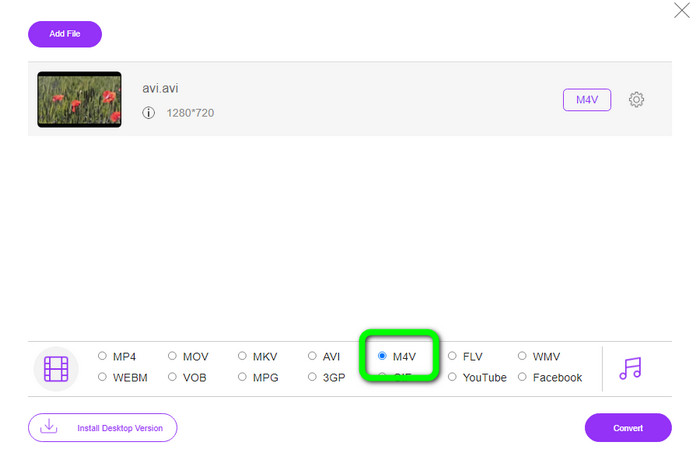
Trin 3: Vælg derefter nederst i grænsefladen filtypen M4V som dit outputformat.
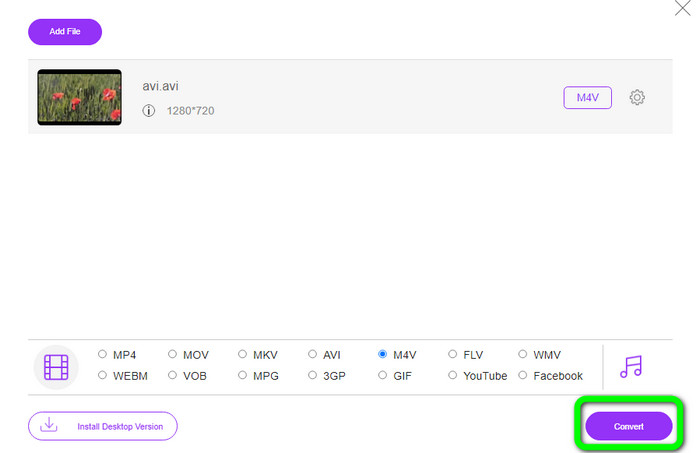
Trin 4: Klik til sidst på knappen Convert for at gemme din videofil. Vent på konverteringsprocessen, og download dit endelige resultat.
Del 3: Nem metode til at konvertere AVI til M4V på Windows og Mac
En anden fremragende konverter, du kan bruge, er FVC Video Converter Ultimate. Dette værktøj kan konvertere AVI til M4V på Windows. Det kan konvertere dine filer øjeblikkeligt, fordi det har en ultrasnabb konverteringsproces, som er 30x hurtigere. Desuden kan du konvertere flere filer på én gang, da det understøtter batchkonvertering. Derudover har det en enkel arbejdsgang med en intuitiv grænseflade, som er perfekt til begyndere. Dette offlineværktøj er desuden ikke kun tilgængeligt på Windows. Det er også tilgængeligt på Mac. Ydermere kan du også foretage nogle ændringer i dine videoer, mens du konverterer. Du kan redigere dine videoer ved at forbedre dem, klippe dem, tilføje filtre og meget mere.
Funktioner
◆ Konverterer mere end 100 videofiler, inklusive M4V, MP4, AVI, FLV, MKV, MOV, VOB, WMV og mere.
◆ Det er muligt at lave en collage med gratis skabeloner og filtre.
◆ Tilbyder musikvideoproducent.
◆ Redigér videoer med en video-forbedrer, trimmer, vandmærkefjerner, kompressor osv.
◆ Konverter billedfilformater, såsom BMP, JPG, PNG osv.
◆ Sæt farten op og sænk en video.
Brug de detaljerede guider nedenfor for at vide, hvordan du konverterer AVI til M4V på Windows og Mac ved hjælp af FVC Video Converter Ultimate. Vi vil bruge Windows-versionen.
Trin 1: Download FVC Video Converter Ultimate på din Windows eller Mac ved at klikke på downloadknappen.
Gratis download til Windows 7 eller nyere Sikker download
Gratis download til MacOS 10.7 eller nyere Sikker download
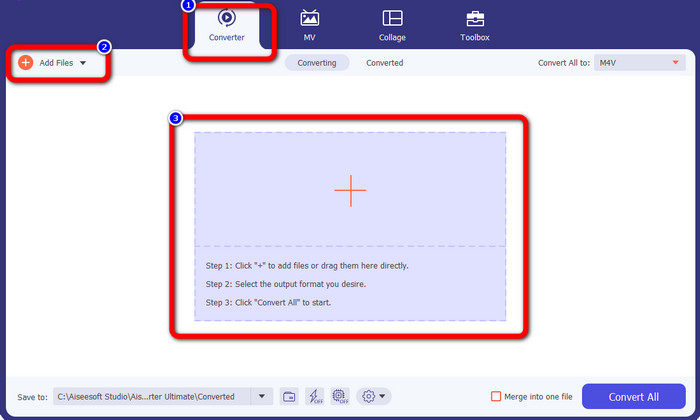
Trin 2: Gå til panelet Converter, efter du har åbnet programmet. Derefter har du tre muligheder for at indsætte din AVI-fil. For det første kan du klikke på knappen Add File i den anden boks. Den anden mulighed er at klikke på Plus-tegnet i den tredje boks. Og til sidst kan du slippe filen direkte ind i midten.
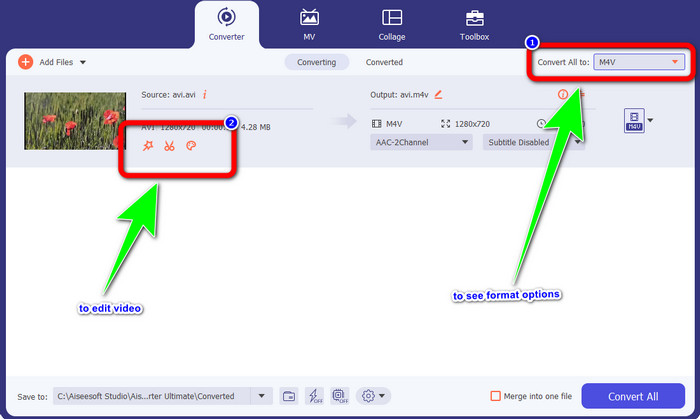
Trin 3: Når du har tilføjet din AVI-fil, skal du klikke på knappen Convert All to for at se formatmulighederne og vælge filformatet M4V. Hvis du derefter vil redigere din video, kan du gå til den anden boks. Du kan bruge værktøjerne til at redigere din video, f.eks. tilføje filtre, rotere og beskære videoer, klippe og mere.
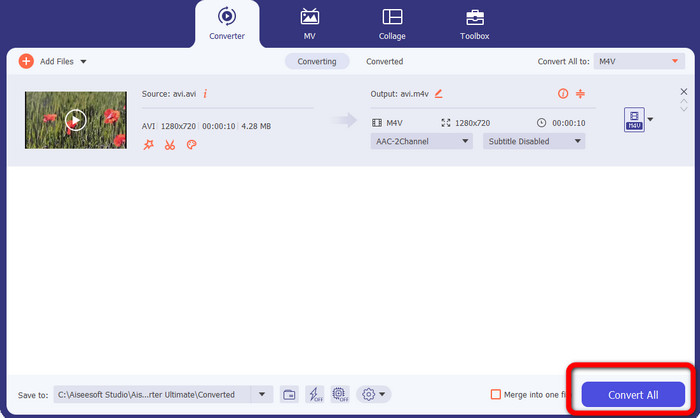
Trin 4: Til det sidste trin skal du klikke på knappen Convert. Vent på den hurtige konverteringsproces, og gem din konverterede video.
Del 4: Sådan konverteres AVI til M4V ved hjælp af håndbremse
Handbrake er endnu en konverter til at konvertere AVI til M4V gratis. Den kan konvertere flere filtyper som WEBM, M4V, MP4, MKV osv. Med hjælp fra dette værktøj kan du nemt konvertere mange filer. Handbrake er dog kompliceret at bruge. Du skal have tilstrækkelig viden om denne konverter. Derudover er installationsprocessen forvirrende. Du skal igennem mange trin, før du kan bruge det, hvilket er tidskrævende for brugerne.
Trin 1: Download Handbrake på din computer.
Trin 2: Vælg det AVI-filformat, du vil konvertere.
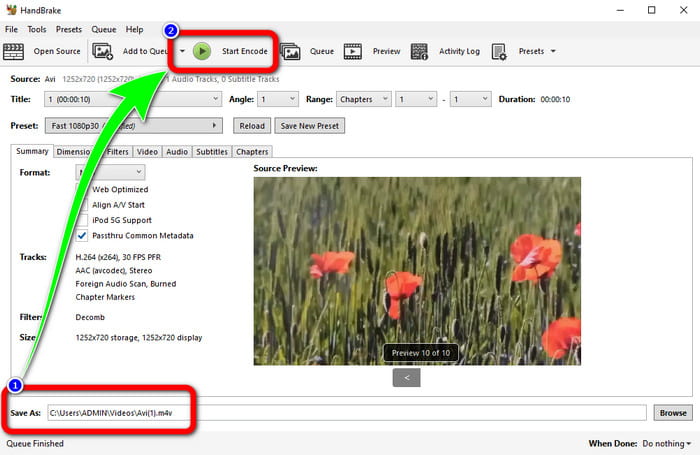
Trin 3: Gå til format og vælg M4V. Start derefter konverteringsprocessen ved at klikke på knappen Start.
Del 5: Ofte stillede spørgsmål om konvertering af AVI til M4V
1. Hvordan konverterer man AVI til M4V på Mac?
Du kan bruge FVC Video Converter Ultimate. Denne konverter kan nemt konvertere din AVI til M4V ved hjælp af din Mac.
2. Hvor stor er en AVI-fil?
Da AVI-videoer er ukomprimerede, optager de mere plads på harddisken. For eksempel kan en enkelt times 352x288 AVI-videooptagelser bruge op til 33 GB (3300 MB) harddiskplads.
3. Er AVI-filen universel?
Ja. Selvom mere moderne formater som MP4, MOV eller WMV har afløst AVI-formatet, bruger folk stadig AVI på grund af, hvor portabelt det er. Næsten enhver computer eller enhed kan afspille AVI-filer.
Konklusion
Denne vejledning viser dig de fremragende metoder til at konvertere AVI-filer til M4V ved hjælp af de tre konvertere. Men hvis du vil have en ultrasnabb konverteringsproces, skal du bruge FVC Video Converter Ultimate. Og hvis du vil have en mere enkel metode, skal du bruge FVC Free Video Converter Online.
-
 Top 5 M4V-afspillere til Windows / Mac / Android / iOS, du bør kende
 Når du ikke kan afspille dine M4V-videoer på QuickTime Player, bør du lære mere fra de 5 fremragende M4V-afspillere til Windows, Mac, Android og iOS fra denne artikel
-
 AVI VS MP4 - Forskelle og ligheder mellem AVI- og MP4-formater
 Hvilket er et bedre videoformat, AVI eller MP4? Hvis du vil have den detaljerede sammenligning, kan du tjekke denne AVI VS MP4-artikel. Du kan kende forskellene og lighederne mellem AVI og MP4 i mange aspekter
-
 3 Video Converter Program Bruges til at konvertere iTunes M4V til AVI på Mac
 Har du ingen idé om, hvordan man konverterer MKV til et AVI-format? Mens vi fortsætter med at læse denne artikel, kender vi de 3 værktøjer, der kan hjælpe dig med at konvertere dette filformat
