


 Video Converter Ultimate
 Skærmoptager
 Video reparation
 Sikker download
MOV til MPG: Hurtig guide til, hvordan man konverterer disse formater i 2023
For protokollen får MOV-filer ros i dag, fordi de betragtes som et af de mest egnede formater til lagring af film. Denne filtype er bredt anerkendt som standardformatet til Apple‑produkter som iPhones, iPad og MacBooks. Når du forsøger at uploade MOV‑filer på internettet, kan du dog løbe ind i problemer, fordi de fylder mere end andre videoformater. For at løse dette kan du vælge at konvertere MOV til MPG. Så følg med i denne vejledning, hvor vi hjælper dig med at lære, hvordan du gør.

Del 1. Konverter MOV til MPG
1. Video Converter Ultimate
Video Converter Ultimate er den ultimative offline‑løsning til alle dine behov for at konvertere MOV til MPG. Med få klik kan programmet hjælpe dig med at omdanne en fil, uanset om den er stor eller lille. Derudover er dette værktøj udstyret med indstillinger til tilpasning af output, så brugerne kan få et output i høj kvalitet og tilpasse det efter deres præferencer. Her er en gennemgang af den enkle vejledning til hurtigt at konvertere MOV til MPG.
Trin 1. Installer programmet
Klik først på den Download-knap nedenfor, der passer til din enhed. Klik derefter på installationsfilen, og kør den for at starte programmet på skærmen.
Gratis download til Windows 7 eller nyere Sikker download
Gratis downloadTil MacOS 10.7 eller nyereSikker download
Trin 2. Upload MOV‑filer, der skal konverteres
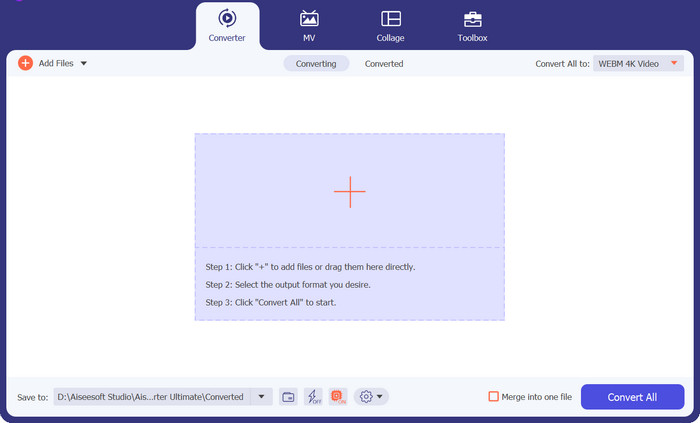
Efter installation af programmet skal du klikke på Plus-knappen i midten af grænsefladen. Når computerens mappeoversigt vises, vælger du den MOV‑fil, du vil uploade. Desuden kan du uploade mere end én fil til batchkonvertering.
Trin 3. Vælg output
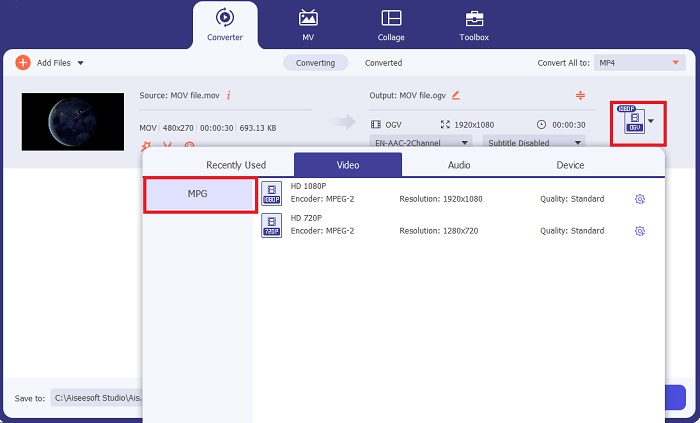
Et miniaturebillede af din MOV‑fil vises i programmet som bekræftelse på, at uploaden er gennemført. For at vælge dit outputformat skal du åbne fanen Output og klikke på Video-panelet. Herfra ruller du ned og vælger MPG.
Trin 4. Start konverteringen
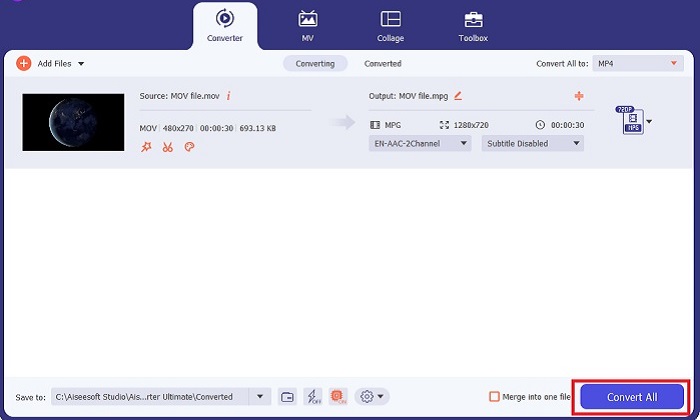
Til sidst kan du tilpasse dine kvalitetskrav til output ved at justere outputindstillingerne. Når du er færdig, skal du klikke på knappen Convert for at behandle din MOV til MPG.
Nøglefunktioner
◆ Sømløs MOV til MPG-konvertering: En ting, vi elsker ved Video Converter Ultimate, er dens brugervenlige grænseflade. Dette værktøj er bedst for alle, uanset om du er nybegynder eller erfaren bruger.
◆ 50x hurtigere konverteringshastighed: Takket være hjælpen fra GPU Acceleration-kodningsteknologi overliste Video Converter Ultimate alle andre offline-konvertere på grund af dens hurtige konvertering uden at have forsinkelser og nedbrud.
◆ Bulk-konverteringsfunktion: Med Video Converter Ultimate kan du også konvertere en mappe med MOV-filer til et udvalg af 100o+ formater andre end MPG.
2. Gratis Video Converter Online
Free Video Converter Online er endnu et program, der fornyer selve konverteringsprocessen. Selvom dette onlineværktøj ikke tilbyder lige så omfattende funktioner som offline‑software, består det prøven som et pålideligt program til at konvertere MOV til MPG online. Det understøtter batchkonvertering og giver dig fuld kontrol over dit output.
Trin 1. Gå først til hovedsiden for Free Video Converter Online. Før du uploader MOV‑filen, skal du klikke på Add Files, hvorefter du først bliver bedt om at starte onlineværktøjet.
Trin 2. For at uploade den fil, du vil konvertere, klikker du igen på knappen Add Files og uploader din fil. Du kan også bruge træk‑og‑slip‑funktionen.
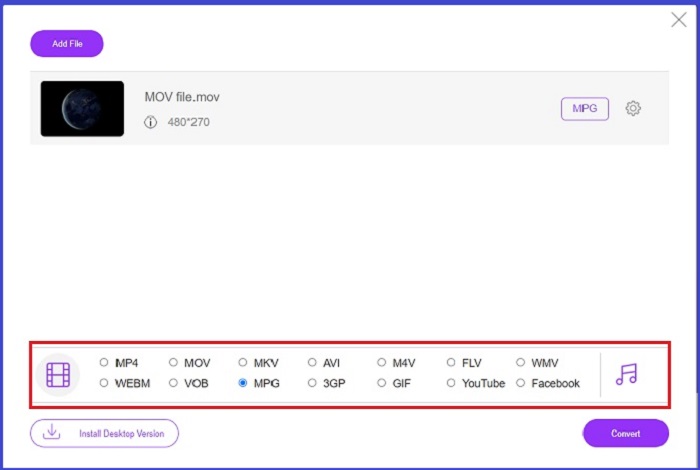
Trin 3. Når din rå fil vises, skal du vælge dit outputformat i det nederste hjørne af skærmen. På videopanelet ser du alle mulige formater, og i vores tilfælde vælger du MPG. Klik til sidst på knappen Convert og vent på, at din fil bliver downloadet.
Nøglefunktioner
◆ Multi-platform Online Converter: Uanset om du er på din telefon, tablet eller computer, fungerer dette værktøj perfekt, hvilket gør video- eller lydkonvertering mulig.
◆ Privatlivsgaranti: Hvem ønsker at få private oplysninger invaderet? Med Free Video Converter Online bør du stå over for nul dilemmaer om dette problem. Dette onlineværktøj giver brugerne mulighed for at konvertere MOV til MPG gratis uden at kræve tilmeldingsprocesser.
◆ Ingen installationskrav: Dette værktøj er endnu en problemfri konverter, der hjælper dig med at slippe afsted med hektiske installationer, især hvis du løber tør for noget digitalt rum.
Del 2. Konverter MPG til MOV
1. Video Converter Ultimate
Endnu en gang er Video Converter Ultimate stadig den bedste løsning, vi kan tilbyde dig til at konvertere MOV til MPG på Mac‑ og Windows‑enheder. Dette værktøj understøtter mere end 1000 video‑ og lydformater, inklusive formater, der er særligt tilpasset enheder som Samsung, Apple, Sony og flere. Følg vejledningen herunder for at omdanne en hvilken som helst af dine MPG‑filer til MOV.
Gratis download til Windows 7 eller nyere Sikker download
Gratis downloadTil MacOS 10.7 eller nyereSikker download
Trin 1. Klik på knappen Add Files for at importere MPG til programmet.
Trin 2. Når din fil er indlæst på skærmen, vælger du output ved at klikke på Output > Video > MOV. For bedre kvalitet kan du også justere videoparametre.
Trin 3. Klik på knappen Convert for at få programmet til at konvertere filer fra MPG til MOV. Du kan kontrollere outputtet i programmet, når konverteringen er afsluttet.
2. AnyConv
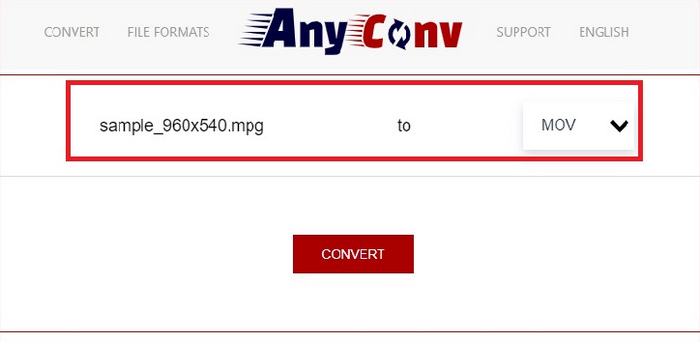
AnyConv er en gratis MPG til MOV-konverter online. Dette program fungerer godt på enhver enhed og tilbyder en træk-og-slip-funktion, når du uploader dine MPG-filer. Desuden sikrer denne online løsning brugernes data ved at slette deres konverterede filer efter en time. Bortset fra MOV, kan du konvertere dine MPG-filer til 3GP, AVCHD, MP4, MKV og mere.
Trin 1. Åbn først AnyConvs hjemmeside. Når den vises på skærmen, skal du klikke på Choose File og vælge det MOV‑klip, du vil konvertere.
Trin 2. Når din MOV‑fil er uploadet, vælger du MPG fra listen over outputformater i Output‑kolonnen i midten.
Trin 3. Til sidst skal du klikke på knappen Convert og vente på, at din fil bliver downloadet.
Yderligere læsning:
3 bedste måder til hurtigt at konvertere MPG til MP4
5 bedste ultimative MOV til 3GP‑konvertere, du ikke må gå glip af
Del 3. Ofte stillede spørgsmål om, hvordan man konverterer MPG til MOV
Er der en gratis MOV til MPG-konverter?
Helt sikkert, ja! Online konvertere er dit bedste valg for at undgå at betale gebyrer. Du kan vælge den gratis online videokonverter til at konvertere MOV til MPG gratis.
Er MPG bedre end MOV?
MOV er bedre end MPG på grund af deres typeforskelle. MOV er et containerformat, der gemmer alle dine originale data. Samtidig er MPG et komprimeret codec, der bruges til at reducere en videos filstørrelse for en hurtigere filoverførsel via internettet.
Hvad er fordelen ved en MOV-fil?
MOV-filer er velegnede til redigering og betragtes som standarder for at vælge det bedste videoformat. En ulempe ved denne fil er, at kun få medieafspillere åbner dette format.
Reducerer MOV til MPG kvaliteten?
Ja. Konvertering af dine filer fra MOV til MPG vil ikke kun formindske din videos filstørrelse, men også reducere kvaliteten. Begge filer er gode i alle tilfælde, du har brug for dem.
Kan jeg afspille MOV i Windows Media Player?
Heldigvis kan MOV-filer på Windows Media Player afspilles, så længe det er i version 12 eller nyere.
Konklusion
Nu kender du de mulige måder at konvertere MPG til MOV eller omvendt. Begge formater kan dække dine forskellige behov. Med onlinekonvertere kan du få en enkel og ligetil konvertering. Hvis du derimod ønsker at finpudse dine filer ved at ændre kvaliteten og endda redigere dem, anbefaler vi Video Converter Ultimate.
-
 FLV til MPG - Sådan konverteres FLV til MPG på Mac, PC og gratis online
 Sådan konverteres FLV til MPEG? Kan jeg konvertere FLV til MPG gratis? Dette indlæg deler 3 gratis videokonvertere, der hjælper dig med at konvertere FLV til MPG uden kvalitetstab.
-
 Sådan konverteres MPG til M4V på Mac og ved hjælp af onlineværktøj
 Er du ny Mac-bruger og ved ikke, hvordan man konverterer MPG til M4V? Så kan du læse denne artikel for at vide mere og finde ud af, hvordan du konverterer filer ved hjælp af din Mac.
-
 8 bedste MOV-afspillere til at spille QuickTime MOV-filer med original kvalitet
 Lær bare mere om de 8 bedste MOV-afspillere, der er tilgængelige for både Windows og Mac. Du kan vælge den ønskede og passende til at afspille MOV-filer med den originale kvalitet.
