


 Video Converter Ultimate
 Skærmoptager
 Video reparation
Fænomenal Mini DV til AVI Converter tilgængelig på Windows og Mac OS
DV-filers primære formål er at indeholde digital video fra videokameraer eller camcordere fra producenterne Panasonic og Sony fra slutningen af 1995. Denne codec- og båndstandard blev kendt for overgangen fra analog til digital produktion. Men i dag kan du ikke afspille DV-filer i din standardmedieafspiller eller endda dele dem online. Hvis du nu vil afspille denne fil, bør du overveje at konvertere filen til et mere understøttet og afspilleligt format som AVI. Desuden vil forklaringerne nedenfor hjælpe dig med at forstå DV, konvertere DV-filer til AVI og afspille dem i en medieafspiller, hvis du ikke ønsker at konvertere.

Del 1. Battle of the Formats: DV VS AVI
DV-fil og AVI er næsten ens, da disse to formater kan indeholde video og lyd. Deres formål og hvordan de gemmer mediefilen er dog langt fra hinanden. I så fald, lad os bestemme, hvad forskellene mellem DV og AVI er ved at sammenligne deres 3 unikke evner.
Formatets kompatibilitet
AVI har bredere støtte og er et af de mest kompatible formater til at afspille og redigere video. Dette format kan indeholde videoafspilning i et synkroniseret format. I modsætning hertil er DV-filer ikke understøttet af adskillige videoredigeringsprogrammer og medieafspillere på pc og Mac. Derfor er dette en af grundene til, at du har brug for en mini DV til AVI-konverter.
Understøttet komprimering
AVI er et tabsfrit filformat til robust og avanceret lagring af mediefiler. Dette format vil dog æde meget af dit harddisklager, fordi det er ukomprimeret. Mens DV bruger en tabskomprimering til sin video, men lydfilen er ukomprimeret. Grunden til, at formatet er tabsgivende, er, at det bruger DCT'en som grundlag for billede-for-billede, der bruges til at komprimere video.
Lydkvalitet
Audiofidelity DV-filen understøtter mellem gennemsnitlig og bedste lydkvalitet, fordi den bruger en sampling PCM-lyd på op til 48 kHz med en 20-bits længde af et ord. AVI bruger en ukomprimeret PCM, og kvaliteten af lyden er fremragende. Alligevel kan det være bedre, hvis du bruger DV som encoder for at opnå DV-AVI, der komprimerer.
Nu hvor vi forstår, hvad disse formater er, er det nu det rigtige tidspunkt at konvertere DV til AVI på Mac eller din pc ved at læse vejledningen nedenfor.
Del 2. Bedste fænomenale konverterværktøj til at konvertere DV til AVI på Mac og Windows
FVC Video Converter Ultimate
Har du problemer med at vælge en konverter, der skaber et fremragende resultat? Hvis det er tilfældet, vil vi gerne have, at du bruger FVC Video Converter Ultimate. Denne software er blevet et af de mest populære valg for brugere, der ofte konverterer formater. Og navnet “ultimate” er ikke kun et navn, men afspejler også den ydelse, programmet leverer. Generelt set er dette program ideelt for alle, der har brug for en hjælpende hånd til deres konverteringsproblemer. Før vi går videre til trinene, skal vi først se på de fordele, du får ved at downloade denne software.

Video Converter Ultimate
30000+ downloads- Konverter din DV-videofil til mere end 200 tilgængelige formater.
- Understøtter alle operativsystemer som pc og Mac.
- Dens værktøjskasse indeholder avancerede funktioner som at lave GIF'er, redigere videoer, flette og mere.
- Intuitiv grænseflade for alle.
- Det understøtter 30x hurtigere konvertering sammenlignet med de andre konvertere online eller offline.
Gratis download til Windows 7 eller nyere Sikker download
Gratis download til MacOS 10.7 eller nyere Sikker download
Så uden videre, lad os fortsætte til vejledningen nedenfor, og lad os konvertere DV til AVI uden at miste kvaliteten af videoen.
Trin til, hvordan du konverterer DV til AVI med FVC Video Converter Ultimate:
Trin 1. Tryk på Download-knappen nedenfor, og vælg det operativsystem, du bruger. Installer softwaren på din harddisk, og klik på Start nu for at gå videre til næste trin.
Gratis download til Windows 7 eller nyere Sikker download
Gratis download til MacOS 10.7 eller nyere Sikker download
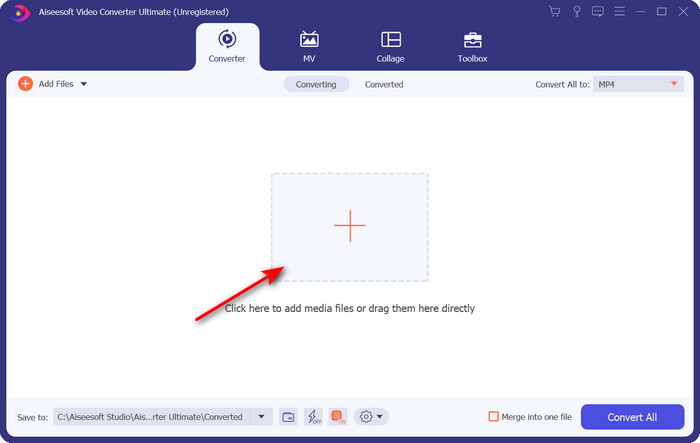
Trin 2. Åbn softwaren, og klik på +-knappen i midten af værktøjets grænseflade. En mappe vises, og for at uploade .dv-filen skal du klikke på Åbn.
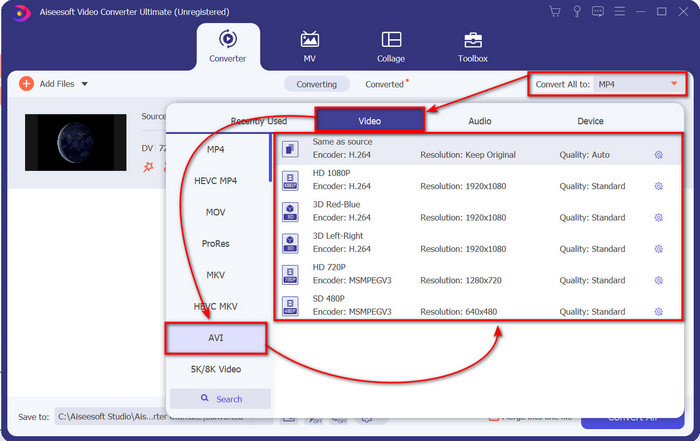
Trin 3. For at ændre .dv-filen til en .avi skal du klikke på rullemenu-knappen og finde AVI-formatet.
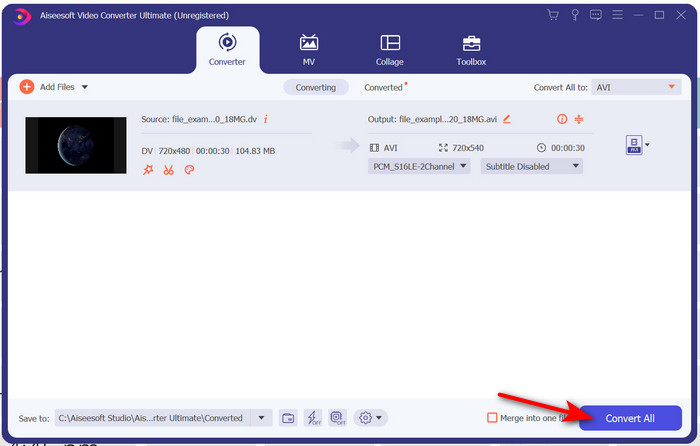
Trin 4. Når du har valgt formatet, er det nu det rette tidspunkt at omdanne din DV til AVI ved at klikke på Konverter alle.
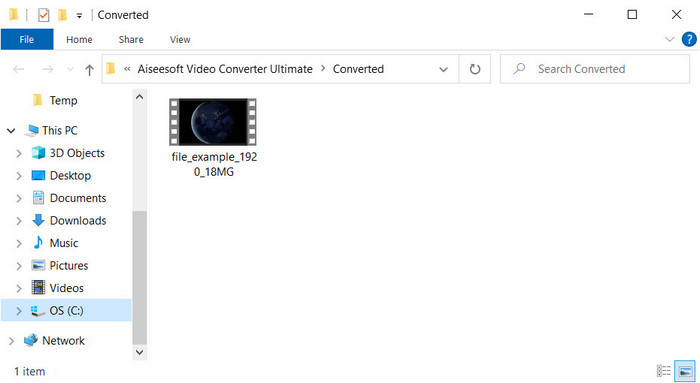
Trin 5. Konverteringen af en fil tager under et minut, så ventetid er næsten ikke nødvendig. En ny mappe vises med de konverterede filer.
Del 3: Afspil dine DV-filer med DV-videoafspilleren tilgængelig på pc og Mac
Blu-ray-afspiller
Vil du ikke konvertere mini DV til AVI, så prøv at bruge denne medieafspiller, der understøtter denne type format, nemlig Blu-ray Player. Denne medieafspiller understøtter mere end 300 formater og codecs til at afspille video på din computer uden besvær. Desuden har denne medieafspiller de mest avancerede funktioner, en medieafspiller bør tilbyde, for at forbedre din seeroplevelse. Du kan også bruge en cd, dvd eller Blu-ray-disk til at afspille videoen på din computer; grundlæggende bruger alle en bærbar medieafspiller. Så hvis du ikke vil bøvle med at konvertere .dv-filen, skal du følge disse trin for at afspille videoen.
Trin til, hvordan du afspiller DV-filen ved hjælp af Blu-ray Player:
Trin 1. For at downloade denne medieafspiller skal du klikke på knappen nedenfor, derefter installere afspilleren og starte den.
Gratis downloadTil Windows 7 eller nyereSikker download
Gratis downloadTil macOS 10.7 eller nyereSikker download
Trin 2. Klik på Åbn fil, find derefter .dv-filen i din mappe, og tryk på Åbn.
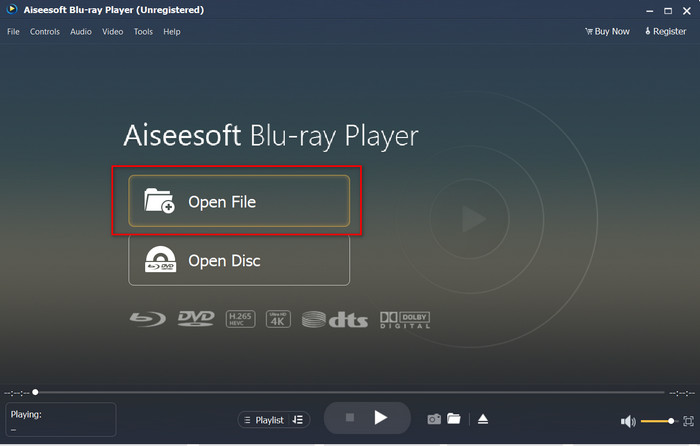
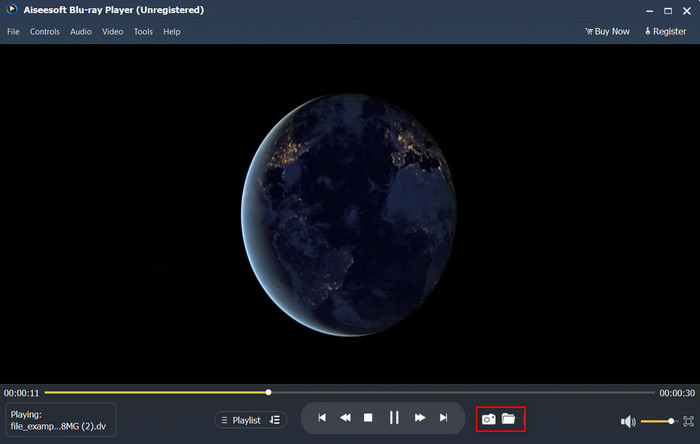
Trin 3. DV-filen vil automatisk blive afspillet på din computer. Klik desuden på kamera-knappen, hvis du vil tage et skærmbillede af det, du ser. Hvis du vil finde de snapshots, du har taget, skal du klikke på mappe-knappen.
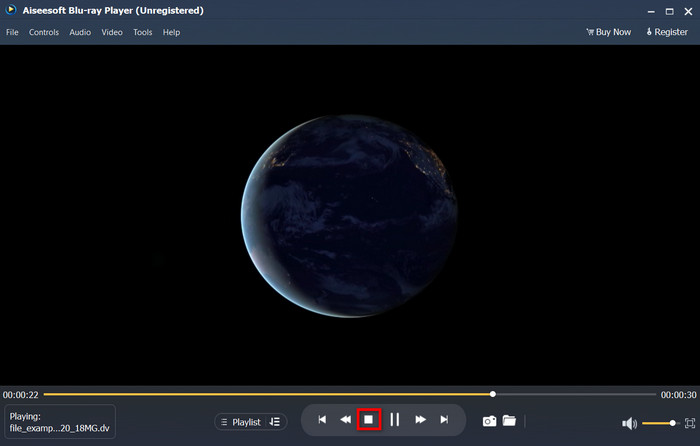
Trin 4. Hvis du vil stoppe afspilningen af .dv-filen, skal du klikke på terning-knappen.
Trin 5. For at se en anden fil i et andet format skal du følge trin 2 og 3 og derefter nyde den video i høj kvalitet.
Relateret:
Del 4. Ofte stillede spørgsmål om DV til AVI-konvertering
Mister konvertering af DV-filer deres kvalitet?
Konvertering af et hvilket som helst format til en ny version bør ikke forringe kvaliteten af det originale videoformat. Nogle konvertere understøtter dog ikke konvertering af 1080 eller 4k videokvalitet, fordi det vil tage tid. Så hvis du ikke ønsker at miste kvalitet, så brug FVC Video Converter Ultimate. Forvent intet mindre, fordi denne software ikke berører din kvalitet og giver dig mulighed for at gøre den højere eller bevare den.
Kan jeg spille .dv på VLC?
Hvad angår i dag, understøtter VLC ikke nogen .dv-fil at afspille; Men hvis du komprimerer AVI og bruger DV-AVI i stedet, kan du afspille videoen på VLC.
Hvilket format er den bedste erstatning for DV?
Hvis du vil vide den bedste erstatning for en DV-fil, så prøv at bruge MP4-filen. Dette format er kendt som det multifunktionelle format, fordi det er kompatibelt med alle desktops og enheder, hvis de ønsker at afspille videoen eller redigere den. Men kvaliteten af MP4 og DV er meget forskellig fra hinanden, hvis vi skulle sammenligne dem. Ikke desto mindre er kompatibilitetsmæssigt MP4 det bedste medieformat, du kan bruge som erstatning.
Konklusion
For at opsummere har vi kun præsenteret én DV-til-AVI-konverter, fordi dette er den eneste software, der klarer sig rigtig godt til konvertering af denne filtype. Mens vi fortsatte med at læse denne artikel, fandt vi en anden måde at afspille .dv-filen på ved at bruge denne DV-afspiller. Vi har altså præsenteret to værktøjer, der hver især udfører deres opgave, alt efter om du vil afspille .dv-filen eller konvertere den. Så hvis du vælger FVC Video Converter Ultimate, kan du forvente et fænomenalt kvalitetsresultat på kort tid. Men hvis du vælger blot at afspille DV-filen, så bør dit førstevalg være Blu-ray Player.
-
 Bedste 5 valg til at konvertere MPEG til AVI-format [Online & Offline]
 Har du svært ved at lede efter en konverter til MPEG? Prøv derefter at læse denne artikel, mens vi lærer, hvordan du ændrer MPEG til AVI-format med detaljerede trin.
-
 4 fantastiske konvertere til gratis Konverter WMV til AVI Online [2021]
 Leder du efter en WMV til AVI-konverter? Og hvis det er tilfældet, så prøv at læse denne artikel, mens vi finkæmmer alle de værktøjer, vi kan finde på nettet, for at hjælpe dig med denne opgave.
-
 4 nyeste online- og offlinekonvertere til at konvertere F4V til AVI-format
 Ved du ikke, hvilken konverter du skal bruge til at konvertere F4V til AVI eller et andet videoformat? Så læs denne artikel, mens vi lærer, hvordan du konverterer med det tilgængelige værktøj.
