


 Video Converter Ultimate
 Skærmoptager
 Video reparation
Bedste gratis MKV til WMV-konvertere, der kan konvertere dine filer hurtigt
MKV (Matroska) er en standardcontainer til omfattende lyd- og videofiler. Selvom det er et almindeligt filformat, skal du stadig konvertere det til et filformat, der er et bredt understøttet videoformat som WMV. Så hvis du leder efter en gratis MKV til WMV-konverter, er denne artikel noget for dig.

Del 1. Hvorfor skal du konvertere MKV til WMV
MKV (Matroska) kan indeholde en stor mængde audiovisuelle og multimediefiler, fordi det er en gratis standardcontainer. På trods af at det er et almindeligt filformat, er det ikke en industristandard. Derfor understøtter nogle medieafspillere muligvis ikke denne type fil. I modsætning hertil er WMV eller Windows Media Video et filformat, som understøttes bredt af mange medieafspillere på alle typer enheder. Derudover er det en codec, der komprimerer filstørrelsen, hvilket gør det til et af de mest almindelige og velegnede filformater i mange medieafspillere.
Del 2. Konverter MKV til WMV ved hjælp af lynhastighedskonverteren
Der er ingen tvivl om, at FVC Video Converter Ultimate er det bedste værktøj for dig, når det kommer til at konvertere MKV til WMV-filer. Denne gratis og ultrahurtige konverter lader dig konvertere MKV til WMV uden at miste kvalitet. Denne konverter har også imponerende funktioner, der gør det muligt for dig at redigere, forbedre og endda flette flere filer til én. Desuden giver det dig mulighed for at konvertere forskellige filformater som MKV til WMV, MP4, M4V, AVI, MOV og mere.

FVC Video Converter Ultimate
5.689.200+ downloads- Understøtter batchkonvertering til at konvertere flere filer på samme tid.
- Den har en funktion, der giver dig mulighed for at konvertere dine MKV-filer ultrahurtigt.
- Det understøtter 200+ inklusive MKV, WMV, MP4, AVI, MPG, MOV, VOB og mere.
- Tilgængelig på forskellige platforme, som Windows og Mac.
Gratis download til Windows 7 eller nyere Sikker download
Gratis download til MacOS 10.7 eller nyere Sikker download
Sådan konverterer du dine filer med FVC Video Converter Ultimate
Trin 1. For at installere FVC Video Converter Ultimate skal du klikke på knappen Download nedenfor. Følg derefter installationsprocessen, og åbn programmet.
Gratis download til Windows 7 eller nyere Sikker download
Gratis download til MacOS 10.7 eller nyere Sikker download
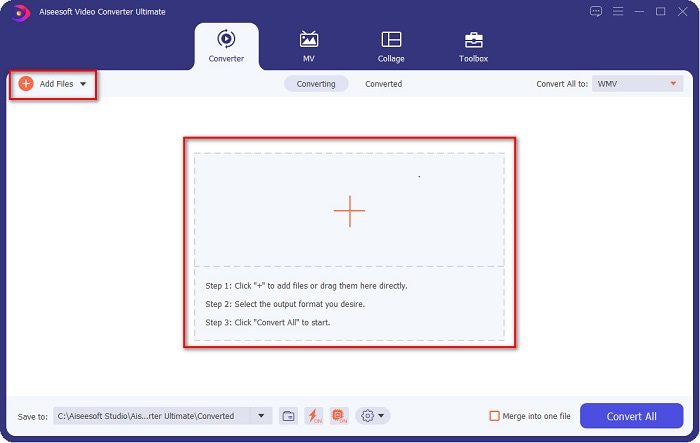
Trin 2. Når du har åbnet programmet, skal du klikke på Add Files eller +-knappen for at uploade filer i køen, så du kan begynde konverteringsprocessen.
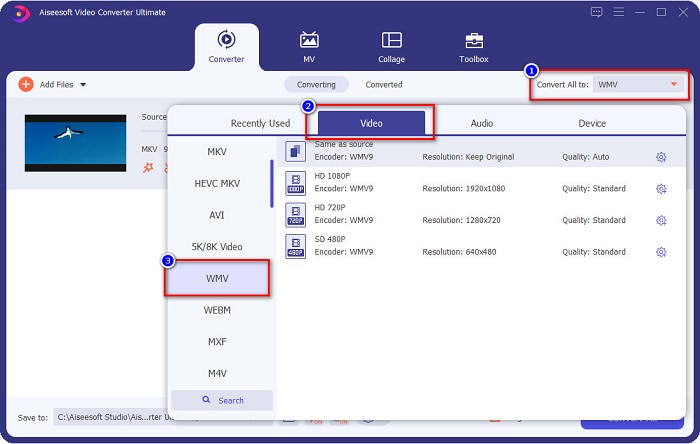
Trin 3. Klik derefter på knappen Convert All to, som findes i øverste højre hjørne af softwarens brugerflade. En liste over filformater vises, vælg derefter WMV-fil.
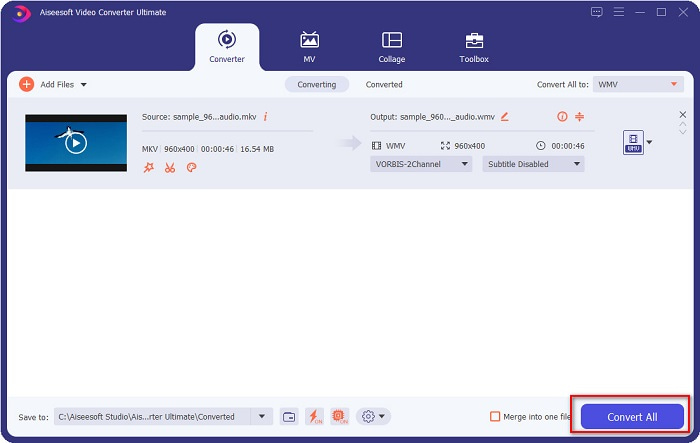
Trin 4. Når du har valgt det ønskede filformat, skal du klikke på knappen Convert All for at konvertere din MKV-fil til WMV-filformatet. Vent derefter et par sekunder, så er din WMV-fil klar!
Ved at følge disse nemme trin i at bruge FVC Video Converter Ultimate, kan du hurtigt konvertere denne MKV til WMV-konverter.
Del 3. Konverter MKV til WMV ved hjælp af VLC Media Player Converter
En anden måde, hvor du kan konvertere din MKV-fil til en WMV-fil, er at bruge en freeware-konverter. VLC Media Player er ikke kun en videoafspiller; den kan også konvertere filer som MKV til WMV, WebM, MP4 osv. Dens grænseflade er dog lidt svær at forstå. Ikke desto mindre bliver denne konverter brugt af mange brugere.
Hurtig guide til, hvordan du bruger VLC Media Player Converter:
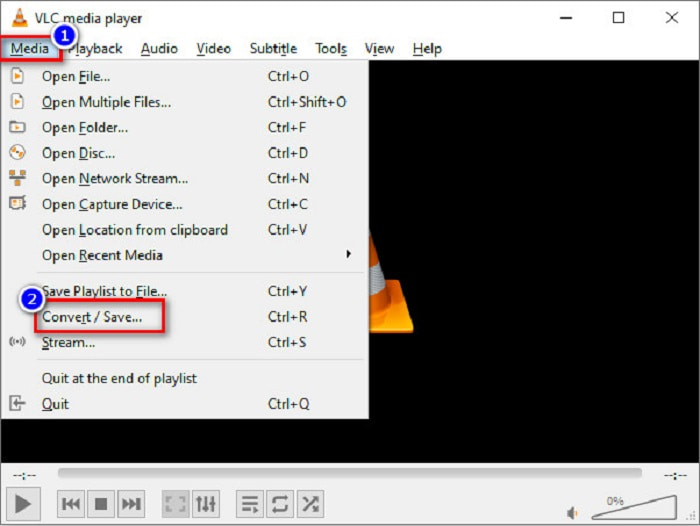
Trin 1. Åbn VLC Media Player, eller hvis det endnu ikke er downloadet til din computer, så søg efter VLC Media Player og følg installationsprocessen. Klik derefter på Media-indstillingerne øverst til venstre på skærmen, og klik på knappen Convert/Save.
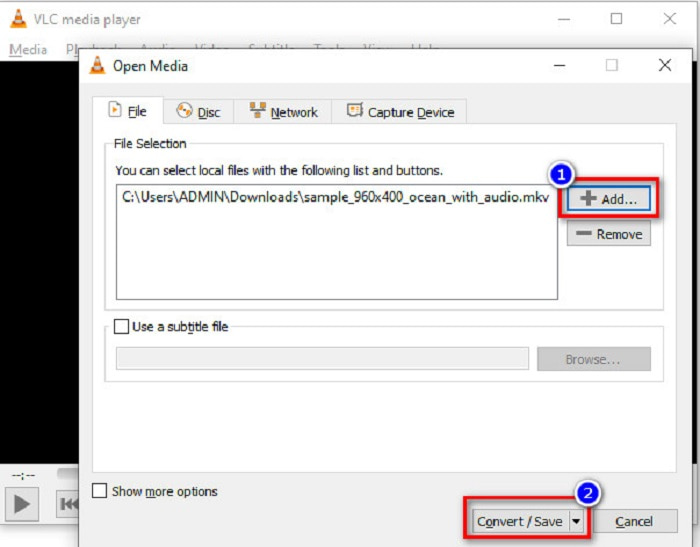
Trin 2. Efter at have klikket på knappen Convert/Save vises en ny grænseflade, hvor du kan se listen over lokale filer, du har uploadet. For at uploade skal du klikke på knappen + Add for at uploade din MKV-fil. Tryk på knappen Convert/Save nedenfor for at gå videre til næste trin.
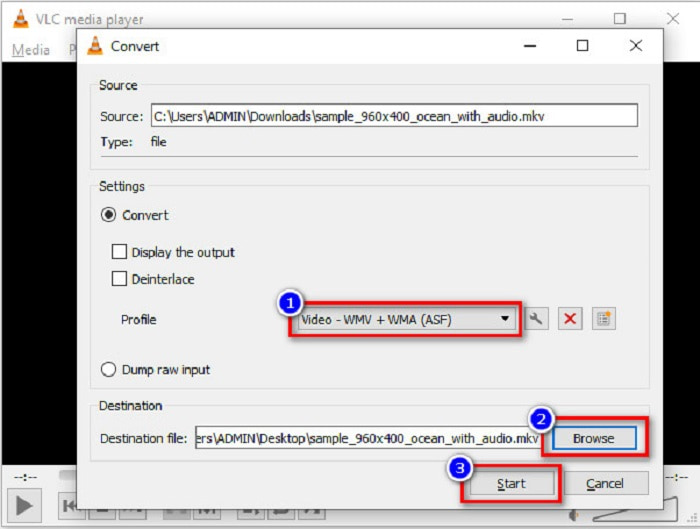
Trin 3. Til sidst skal du vælge WMV-fil som dit filformat. Klik på knappen Browse for at vælge destinationen for din fil, når konverteringen er færdig. Og til sidst skal du markere knappen Start for at begynde at konvertere din MKV-fil til en WMV-fil.
Del 4. Konverter MKV til WMV ved hjælp af gratis online konverter
FVC Free Video Converter Online er en gratis online MKV til WMV-konverter, som lader dig konvertere adskillige lyd- og videoformater, herunder MKV til WMV, AVI, MPG, MOV, MP4, MP3 og flere. Denne konverter har også en funktion, hvor du kan redigere videobitrate, billedhastighed og endda opløsningen på din fil. Selvom det er en fremragende onlinekonverter, kan du opleve langsom konvertering på grund af din internetforbindelse, fordi den er afhængig af internettet. Ikke desto mindre leverer den stadig fremragende ydeevne og anses af mange for at være en af de bedste.
Her er trinnene til, hvordan du konverterer din MKV-fil til WMV ved hjælp af FVC Free Video Converter Online
Trin 1. Søg på FVC Free Video Converter Online i din browser for at komme til deres hjemmeside.
Trin 2. Når du er kommet ind på deres hjemmeside, skal du klikke på knappen Add Files to Convert og starte den. Dine computerfiler vil blive vist, hvor du vælger din MKV-fil.
Download skrivebordsversionen for at konvertere filer i batch.
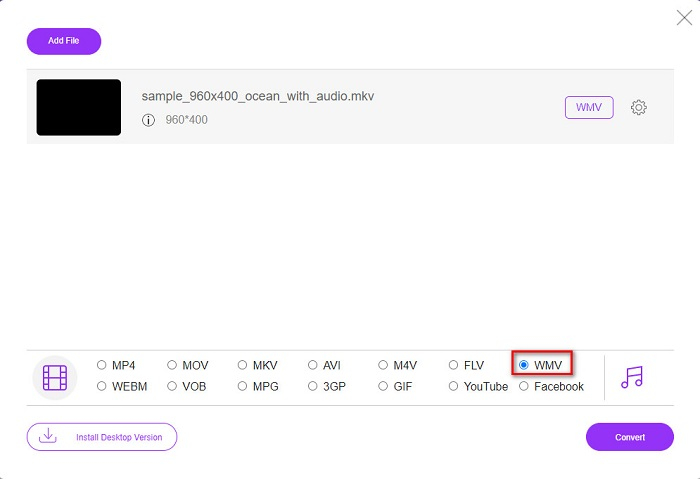
Trin 3. Du vil se listen over filformater nederst i softwarens anden grænseflade. Sæt kryds i cirklen ved siden af WMV-filen.
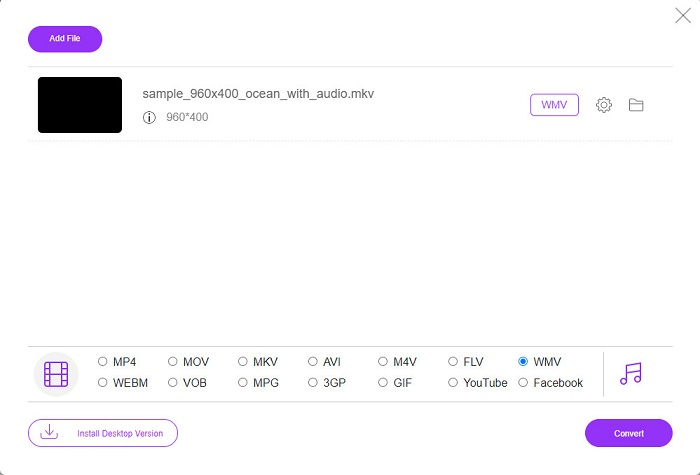
Trin 4. Som sidste trin skal du klikke på knappen Convert, der findes i nederste højre hjørne af softwarens brugerflade. Derefter begynder konverteringen af din MKV-fil.
MKV vs. WMV
Matroska multimediebeholderformatet, udgivet i 2002, er et open source-format, der kan omfatte en række video-, lyd-, billed- og undertekstspor. Så du kan nemt bruge den til at gemme korte videoklip, tv-shows og film. Det er ret populært til anime-fan-subbing.
Produceret af Microsoft var WMV et af de mest almindelige videoformater tilbage i 2000'erne. Den kan ses over nettet og afspilles af forskellige medieafspillere på Windows. Og det er også standardvideofilformatet for Windows Media Player. Men det er blevet overtaget af andre formater for nylig.
Del 5. Ofte stillede spørgsmål om konvertering af MKV til WMV
Kan du ændre MKV til WMV uden at miste kvaliteten af din fil?
Helt bestemt. Ved at bruge FVC Video Converter Ultimate kan du konvertere din MKV-fil til WMV uden at miste kvaliteten af din fil.
Hvad er det bedste filformat til at konvertere din MKV-fil?
Som nævnt ovenfor understøtter nogle medieafspillere ikke dette filformat. Derfor skal du konvertere det til et filformat, som mange medieafspillere bredt understøtter. Ét af dem er MP4-formatet. Hvis du vil vide mere om dette emne, kan du læse denne artikel [Online & Free] How Can I Convert MKV to MP4 on Windows/Mac.
Kan Windows Media Player afspille MKV-filer?
Windows Media Player understøtter ikke MKV-filformater. Så når du forsøger at afspille en MKV-fil i Windows Media Player, afspiller den kun lyden. Læs videre i Best MKV Player for at finde den afspiller, du ønsker.
Konklusion
Der er mange måder, hvordan du vil være i stand til at konvertere din MKV-fil til WMV. Konverterne præsenteret ovenfor har forskellige funktioner, der adskiller dem fra hinanden.
Blandt de bedste MKV til WMV-konvertere, der er nævnt, anbefaler vi at bruge FVC Video Converter Ultimate, fordi denne konverter er mere effektiv og nem at bruge. Derudover har den også unikke funktioner, som kan hjælpe dig med at forbedre din fil. Stadig i tvivl? Download den nu for at opleve denne ultrahurtige konverter.
-
 MKV til MOV - Sådan konverteres MKV til MOV
 Hvordan konverterer jeg MKV til MOV på Mac? Kan iMovie læse MKV? Hvad betyder MOV-format? Dette indlæg fortæller 2 enkle måder at hjælpe dig med at konvertere MKV til MOV med gratis online og professionelle videokonvertere.
-
 Sådan konverteres MKV -videoer til animerede GIF'er uden Photoshop/FFmpeg
 Efter at have downloadet og set MKV -film på din computer, vil du måske dele nogle vidunderlige øjeblikke med venner eller på internettet som GIF'er. I denne artikel kan du lære om de 2 nemmeste måder at konvertere MKV til GIF.
-
 Tips og tricks til, hvordan man konverterer MKV-filer til MP3 [2021]
 Har du problemer med at vælge den rigtige konverter til MKV til MP3? Fortsæt derefter med at læse dette indlæg, da vi præsenterede forskellige løsninger på et problem.

