


 Video Converter Ultimate
 Skærmoptager
 Video reparation
 Sikker download
Hurtigste metode til, hvordan man konverterer MXF til M4V på desktop og online
MXF-fil er et industristandardformat til lyd og video. Dette filformat understøttes dog ikke af Apple QuickTime Player, så det er umuligt at afspille din MXF-fil med dette program. Hvis du ikke kan afspille din MXF-fil i Apple QuickTime Player, skal du konvertere den til et andet filformat, f.eks. M4V. Du er heldig, for vi har den bedste løsning til dig. Denne artikel giver dig de mest effektive og nyttige metoder til at konvertere MXF til M4V ved hjælp af pålidelige konvertere både offline og online. Derudover giver vi dig et indblik i, hvordan du gør dine videoer mere attraktive ved blot at redigere dem. Læs denne artikel med det samme og få den information, du har brug for.

Del 1: Fantastisk metode til at konvertere MXF til M4V online
En af de bedste onlinekonvertere, du kan bruge til at konvertere MXF til M4V, er FVC Free Video Converter Online. Denne onlinesoftware er i stand til at konvertere forskellige videofiler, såsom MOV, MKV, AVI, FLV, MP4, WEBM, VOB og flere. Du kan også konvertere mange filer i én proces, fordi denne konverter understøtter batchkonvertering. Derudover kan du, før du konverterer dine videoer, redigere deres opløsning, bitrate og billedhastighed efter din egen præference. Den har også en brugervenlig grænseflade og en enkel måde at konvertere filer på. På den måde kan alle betjene denne onlinekonverter, både avancerede og uøvede brugere. Desuden er denne onlinekonverter tilgængelig i alle browsere, såsom Google Chrome, Mozilla Firefox, Microsoft Edge og flere, hvilket gør den let tilgængelig for brugerne.
Udover videokonvertering kan du desuden også konvertere adskillige lydformater, herunder AAC, MP3, M4A, M4B, FLAC og mere. Den har også en lydindstilling, der lader dig justere deres sample- og bithastigheder. Med disse funktioner kan du se, at FVC Free Video Converter Online er pålidelig.
Funktioner
◆ Konverter forskellige videoformater, såsom MP4, AVI, M4V, MXF, MOV, WMV, MKV, FLV og mere.
◆ I stand til at redigere videoens opløsning, bithastighed og billedhastighed.
◆ Tilbyder batchkonverteringsproces.
◆ Konverter lydfiler som MP3, AAC, AC3, M4B, FLAC og mere.
◆ Kan redigere lydens samplerate og bitrate.
Se trinene nedenfor for at lære om konvertering af MXF-filen til M4V-format ved hjælp af FVC Free Video Converter Ultimate.
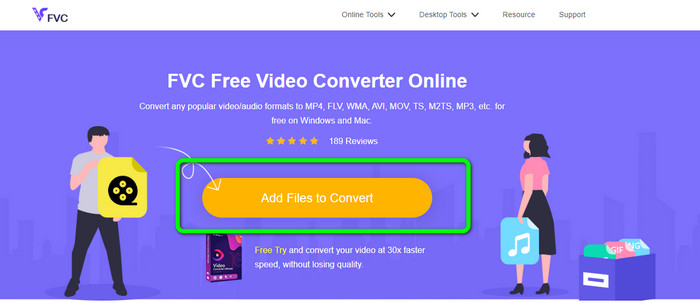
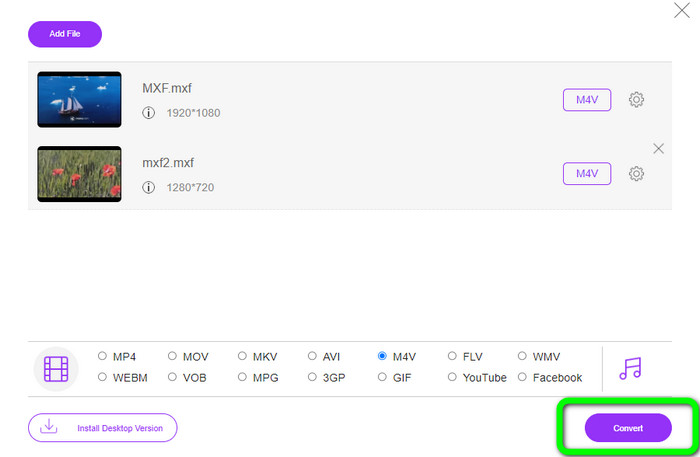
Trin 1: Gå til din browser, og besøg websitet FVC Free Video Converter Online. Når du er på startsiden, skal du klikke på Add Files to Convert for at uploade den MXF-videofil, du vil konvertere.
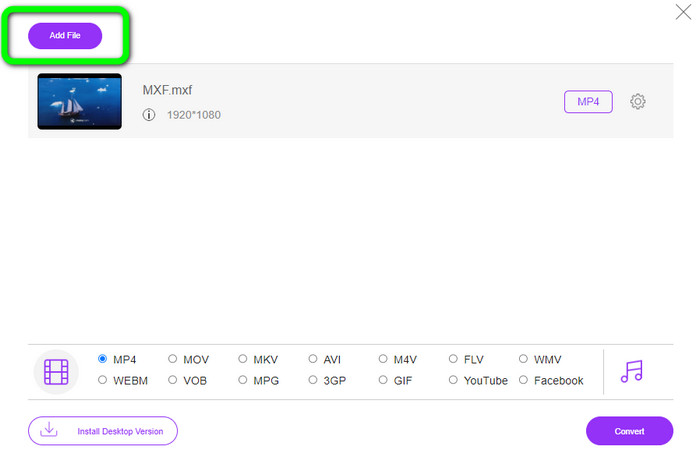
Trin 2: Denne konverter tilbyder en batchkonverteringsproces. Så hvis du vil uploade flere MXF-filer, skal du klikke på knappen Add File.
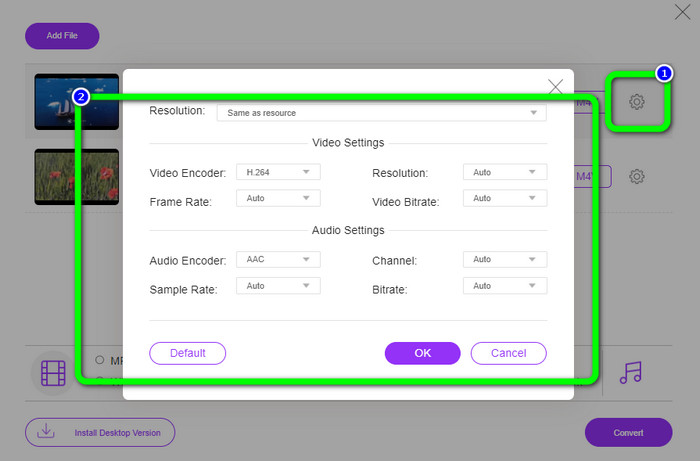
Trin 3: I denne del kan du redigere din video ved at klikke på ikonet Setting. Når du har klikket på dette ikon, kan du redigere videoens billedhastighed, opløsning og bitrate. Du kan også ændre lydens samplerate og bitrate. Klik derefter på knappen OK.
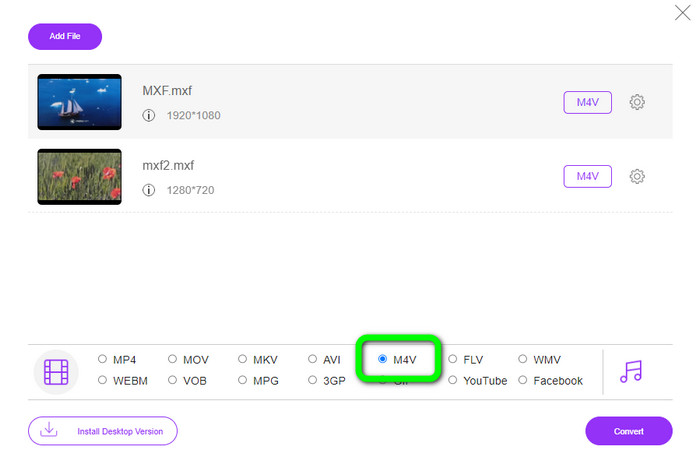
Trin 4: Når du har redigeret dine videoer, kan du ændre outputformatet ved at klikke på M4V-formatet blandt formatindstillingerne i den nederste del af grænsefladen.
Trin 4: Til det sidste trin skal du trykke på knappen Convert. Vent på konverteringsprocessen, og gem din video på den ønskede placering.
Del 2: Hurtigste måde at konvertere MXF til M4V tabsfrit
Hvis du vil have et downloadbart værktøj til at konvertere MXF til M4V uden kvalitetstab, er Video Converter Ultimate det bedste valg. Denne ultimative konverter kan hurtigt konvertere forskellige filer, fordi den har en hurtig konverteringsproces – ikke 10x, ikke 20x, men 30x hurtigere end den gennemsnitlige konverteringshastighed. Derudover har den en anden fantastisk funktion, du kan få glæde af. Du kan konvertere flere filer på samme tid, fordi denne konverter tilbyder en batchkonverteringsproces. Og udover MXF og M4V understøtter dette værktøj også forskellige videoformater, herunder MP4, FLV, AVI, MKV, MOV, WMV, VOB og flere. Desuden er Video Converter Ultimate tilgængelig på både Windows og Mac, hvilket er ideelt for både Mac- og Windows-brugere.
Desuden har denne downloadbare applikation flere fantastiske funktioner udover at konvertere videoer. Hvis du ønsker at lave en musikvideo til din partner, familie, venner osv., så kan du bruge dette værktøj. Video Converter Ultimate tilbyder en musikvideoskaber, hvor du kan lave vidunderlige film med musik. Det giver også gratis temaer, såsom glade, smarte, enkle, sneklædte nætter, romantiske og meget mere. Hvis du har en video med en stor filstørrelse, kan du også komprimere den ved hjælp af videokompressoren. Med dette værktøjs hjælp kan du nemt ændre størrelsen på din video.
Funktioner
◆ Konverter 100+ videofilformater, inklusive M4V, MXF, FLV, AVI, MP4, XVID, VOB, MOV, SWF, MKV og mere.
◆ Konverter flere filer samtidigt.
◆ Tilbyder musikvideoproducent.
◆ Lav en fantastisk collage.
◆ Tilbyd videoredigeringsværktøjer, såsom videotrimmer, kompressor, forstærker, farvekorrektion osv.
◆ Konverter billedfilformater som BMP, PNG, JPG og mere.
Følg de detaljerede trin nedenfor for at konvertere MXF til M4V tabsfrit ved hjælp af FVC Video Converter Ultimate.
Trin 1: Download Video Converter Ultimate på din enhed ved at klikke på knappen Download. Der er to downloadknapper nedenfor. Hvis du er Windows-bruger, skal du klikke på Windows-versionen. Og klik på Mac-versionen, hvis du er Mac-bruger. Start derefter programmet.
Gratis download til Windows 7 eller nyere Sikker download
Gratis download til MacOS 10.7 eller nyere Sikker download
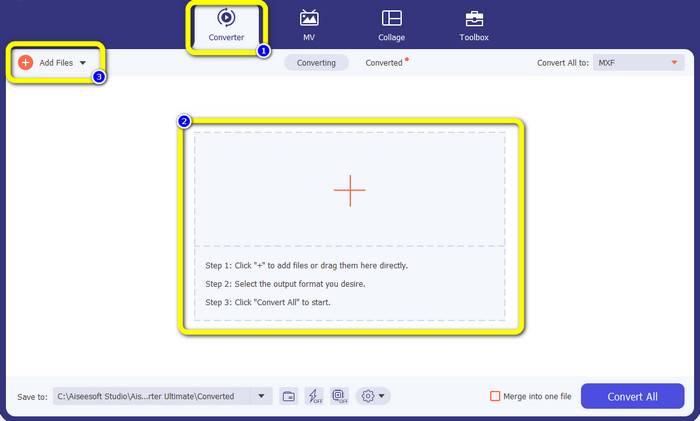
Trin 2: Vælg derefter panelet Converter. Klik på +-ikonet eller knappen Add File for at importere MXF-videofilen.
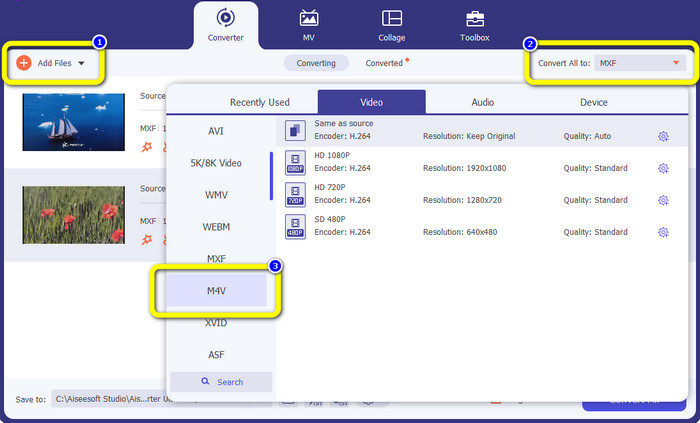
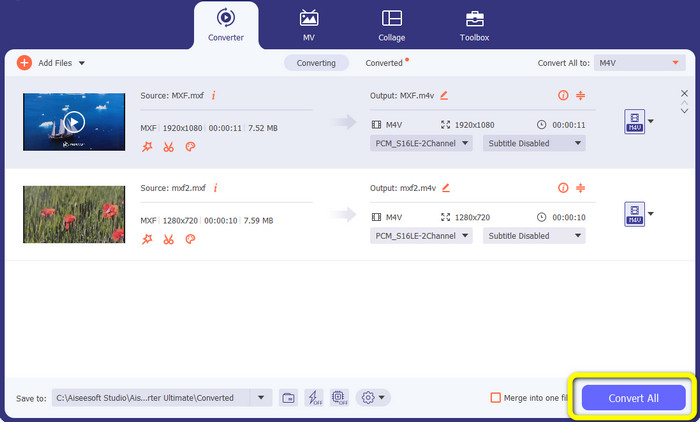
Trin 3: Hvis du vil konvertere flere filer samtidig, skal du klikke på knappen Add File. Klik derefter på knappen Convert All og vælg filformatet M4V. Du kan også vælge den ønskede opløsning til din video.
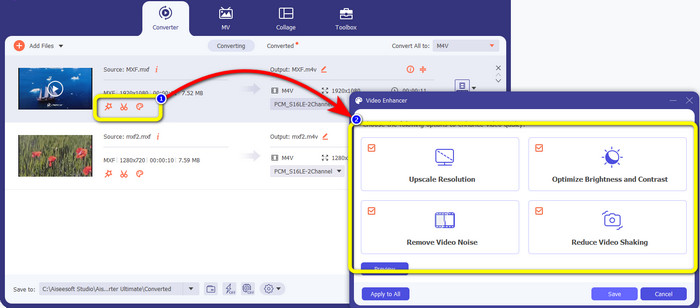
Trin 4: Hvis du vil redigere dine videoer, før du konverterer dem, kan du gøre det. Klik på redigeringsværktøjerne i den første boks. Vælg derefter ikonet video enhance. Markér så alle felter for at forbedre opløsningen, optimere lysstyrke og kontrast samt reducere videostøj og rystelser.
Trin 5: Når du er færdig med at redigere og ændre outputformatet på dine videoer, skal du klikke på knappen Convert All og gemme din video på din enhed.
Del 3: Hvad er MXF?
SMPTE-foreningen skabte MXF-mediebeholderen til erhvervsbrug. MXF implementerer en del af Advanced Authoring Format (AAF) dataskemaet og er for nylig dukket op som industristandarden for ikke-lineær professionel videoredigering. MXF-filer kan nemt konverteres til ethvert almindeligt videoformat og komprimeres ved hjælp af næsten ethvert codec. Det er vigtigt at bemærke, at dette formats implementering af Sony, Panasonic og Canon havde adskillige inkompatibiliteter, en stor svaghed ved denne beholder. Standardens revision fra 2009 adresserer disse problemer.
Del 4: Hvad er M4V?
M4V er en type videobeholder, der bruges af iTunes-filer til at gemme både lyd- og videodata. Det er bedst at købe lyd- eller videofiler fra iTunes Store, hvis de er Apple FairPlay DRM-beskyttet mod uautoriseret visning og kopiering. Fordi formatet er baseret på MPEG-4-struktur, kan praktisk talt enhver moderne afspiller vise ubeskyttede filer.
Yderligere læsning:
Bedste MXF til WMV-konvertere til at konvertere MXF til WMV gratis
Top 4 bedste løsninger til at konvertere MXF til MKV [Løst]
Del 5: Ofte stillede spørgsmål om konvertering af MXF til M4V
Hvor stor er en MXF-fil?
MXF understøtter filstørrelser op til 2 gigabyte. Derudover understøtter MXF længere filer. Den maksimale mediefiloptagelsestid for OMF-formatet er tre timer. MXF kan håndtere 12 timers lyd på to kanaler ved 48 kHz.
Hvem bruger MXF-filer?
Flere produktionsreklamer, herunder SONY MSW 2000-serien af IMX-videooptagere, brugte den. Avid-redigeringsudstyr understøtter også en bestemt variant af MXF.
Hvordan konverterer jeg MXF til MOV?
Du kan bruge FVC Free Video Converter Online. Upload din MXF-fil, vælg MOV-formatet fra formatindstillingerne, og klik på knappen Convert. På den måde kan du konvertere MXF til MOV med det samme.
Konklusion
Der er mange måder at konvertere MXF til M4V på. Men hvis du vil have de bedste og mest værdifulde konvertere, kan du bruge de programmer, der er nævnt ovenfor: Video Converter Ultimate og FVC Free Video Converter Online. Disse to konvertere kan konvertere filer hurtigere end andre konvertere, og du kan bruge dem gratis.
-
 Forskellige metoder til, hvordan man ændrer MOV til M4V-filformat
 Ønsker du en effektiv metode til at konvertere MOV-filen til M4V-format? Så vil denne artikel opfylde dit ønske. Her er de bedste konvertere, du kan bruge.
-
 Fremragende teknikker til øjeblikkeligt at konvertere GIF til M4V
 Denne guidepost giver dig de mest effektive strategier til at konvertere GIF til M4V. Plus, vi vil introducere dig til de bedste to konvertere, du kan prøve.
-
 Top 2 ekstraordinære måder til, hvordan man konverterer M2TS til M4V
 Tror du det er muligt at konvertere M2TS-filen til et andet format? Vi viser dig, hvordan du konverterer M2TS til M4V filformat, hvis du vil have den bedste løsning.
