


 Video Converter Ultimate
 Skærmoptager
 Video reparation
 Sikker download
Enkel instruktion om, hvordan man konverterer OGV til MKV
Vil du gerne vide, hvordan man konverterer OGV til MKV og åbner det i en anden medieafspiller? Så er du heldig, for dette indlæg vil introducere dig til fremragende programmer med enkle trin til at konvertere forskellige filer. Du behøver heller ikke at bekymre dig; disse værktøjer er værd at bruge, og du vil aldrig blive skuffet. Så det er bedst at gå videre til selve gennemgangen, for vi vil ikke have, at du skal vente længere. Lad os opdage disse metoder og læse denne artikel med det samme.

Del 1: Information om OGV og MKV-format
Før du konverterer OGV-filen til MKV-format, lad os først give deres værdifulde oplysninger.
Hvad er OGV?
Et gratis, open source, ikke-patenteret multimediebeholderformat og codec er Ogg Vorbis (OGV). Det tilhører Ogg-formatet og codec-familien, som nonprofitorganisationen Xiph.Org Foundation oprettede for at tage patent på codecs. OGV kan time-direct multiplex (TDM) tekst (undertekster) og metadata. Derudover understøtter den streaming til tabsgivende og tabsfri komprimering.
Hvad er MKV?
MKV er en open source-beholder, der kan indeholde mediemateriale, der er blevet komprimeret ved hjælp af forskellige codecs. Det har mange fordele i forhold til den traditionelle AVI-container, herunder evnen til at inkludere lydspor og undertekster på mange sprog, der kan skiftes uden at pause afspilningen og hurtig filsøgning og tilbagespoling. Derudover er formatet nemt at ændre, hvilket gør det nemt at udtrække lyd- og videodata.
Del 2: Sådan konverteres OGV til MKV tabsfrit
Hvis du er her for at lære, hvordan man konverterer OGV til MKV uden kvalitetstab, er du det rette sted. Den bedste konverter, du kan downloade, er Video Converter Ultimate. Det er en af de mest pålidelige konvertere til dine Windows- og Mac-computere. Værktøjet understøtter også over 100 formater, såsom FLV, MP4, M4V, MOV, SWF, AVI, MTS og flere. Det er heller ikke begrænset til videokonvertering. Du kan også konvertere billedformater her, da det understøtter JPG, PNG, GIF, WEBP osv. Det bedste er, at du kan konvertere filer op til 30x hurtigere end andre værktøjer med normal konverteringshastighed. Derudover understøtter værktøjet batchkonvertering, hvilket betyder, at du kan tilføje flere videofiler og konvertere dem i én proces.
Desuden er der flere ting, du kan gøre på din OGV-fil. Hvis du vil ændre størrelsen på din video, fordi filstørrelsen er for stor, kan du bruge denne applikation, fordi den tilbyder en videokomprimeringsfunktion, hvor du kan ændre størrelsen på din video. Der er flere funktioner, du kan nyde for at forbedre din OGV-fil før eller efter konvertering af den til MKV-format.
Funktioner
◆ Konverter videoformater som MP4, M4V, AVI, FLV og 1000+ flere.
◆ Giv forskellige temaer til oprettelse af en musikvideo.
◆ Det er muligt at oprette en collage.
◆ Kan kombinere lyd og video.
◆ Tilbyder forskellige funktioner til at forbedre videoer, såsom videoforstærker, vandmærkefjerner, videohastighedscontroller osv.
◆ Det gør det muligt at ændre hastigheden på en video.
Fordele
- Har en forståelig grænseflade, som er perfekt til begyndere.
- Konverteringsprocessen er 30 gange hurtigere.
- Det tilbyder batchkonvertering.
- Konverter filer uden at miste kvalitet.
Ulemper
- Du skal have pro-versionen for at opleve ekstraordinære funktioner.
For at konvertere OGV til MKV-filformatet ved hjælp af Video Converter Ultimate, følg de detaljerede vejledninger nedenfor.
Trin 1: Download Video Converter Ultimate på din Mac og Windows. Kør programmet efter installationen.
Gratis download til Windows 7 eller nyere Sikker download
Gratis download til MacOS 10.7 eller nyere Sikker download
Trin 2: Når du har startet programmet, skal du vælge panelet Converter. Der er to muligheder for at tilføje OGV-filen. Du kan klikke på knappen Add Files eller klikke på Plus-ikonet.
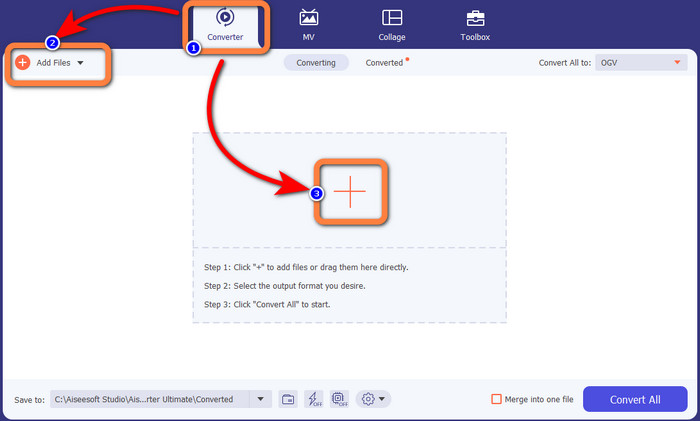
Trin 3: Gå til formatindstillingerne ved at klikke på rullemenu-ikonet ved siden af Convert All to, og vælg MKV-filformatet til næste trin.

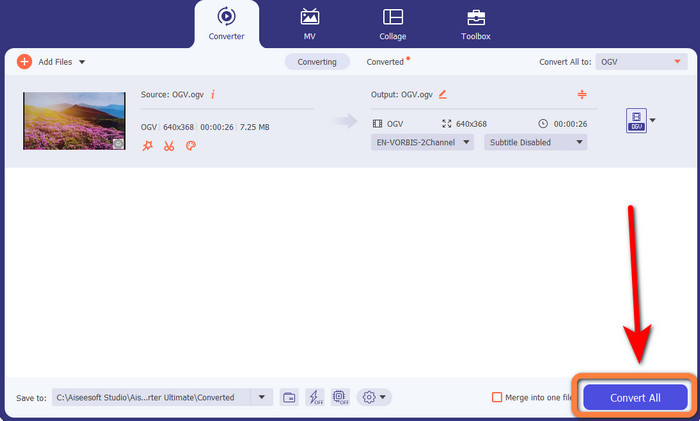
Trin 4: Det sidste trin er at konvertere din fil ved at klikke på knappen Convert All. Derefter kan du gemme din video som en MKV-fil.
Del 3: Nemme onlineløsninger til at konvertere OGV til MKV
Brug af Converthelper
Hvis du er imponeret over Video Converter Ultimate, kan du roligt regne med også at blive tilfreds med at bruge Converthelper. Dette onlineværktøj lader dig konvertere OGV til MKV nemt og effektivt. Det understøtter også forskellige filer som WMA, FLV, AVI, MP4, 3GP og flere. Det har desuden enkle metoder til at konvertere filer, så selv en nybegynder ikke vil få problemer med at bruge denne onlineapplikation. Derudover kan denne gratis videokonverter også konvertere dine videoer uden kvalitetstab. På den måde kan du være sikker på, at din video ser ud på samme måde kvalitetsmæssigt. Der er dog tilfælde, hvor Converthelper ikke fungerer optimalt, især hvis du har en langsom internetforbindelse. Desuden har den en langsom konverteringsproces, hvilket er tidskrævende for brugere. Prøv at konvertere din OGV-fil til MKV med denne software.
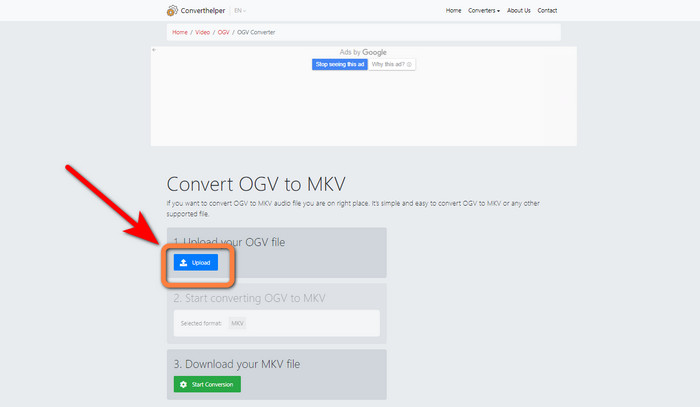
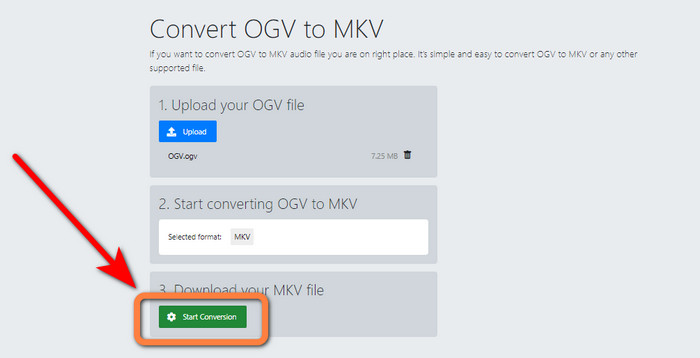
Trin 1: Gå ind på Converthelper-websiden. Klik derefter på knappen Upload, og importer OGV-filformatet.
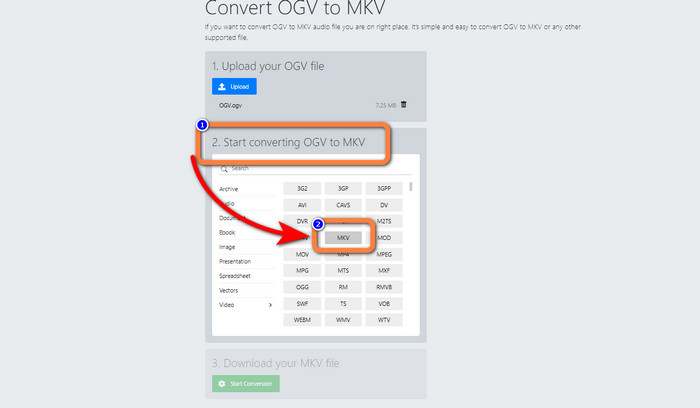
Trin 2: Gå videre til nummer 2. Vælg MKV-filformatet i formatindstillingerne.
Trin 3: Til det sidste trin skal du klikke på knappen Start Conversion og vente på konverteringsprocessen. Dette værktøj gør det også muligt for dig at konvertere OGV til FLV.
Brug af FreeConvert
FreeConvert lader dig konvertere OGV til MKV med det samme. Du kan også bruge dette værktøj til at konvertere andre filformater, såsom MP4, WMV, AVI, WEBM, 3GP, MOV osv. Det har desuden enkle trin til at konvertere filer, hvilket er perfekt til begyndere. Ud over konvertering kan FreeConvert også komprimere videoer, billeder, lyd, dokumenter og mere. Derudover kan du redigere din video med dets redigeringsværktøjer, såsom en videobeskærer og en videotrimmer. Desværre kan det ved konvertering kun håndtere en maksimal filstørrelse på 1 GB. Dermed kan du kun konvertere et begrænset antal filer. Du skal købe et abonnement, hvis du vil øge den maksimale filstørrelse. Det er også en webbaseret applikation, så det er nødvendigt at have internetforbindelse. Følg nedenstående trin for at konvertere OGV til MKV.
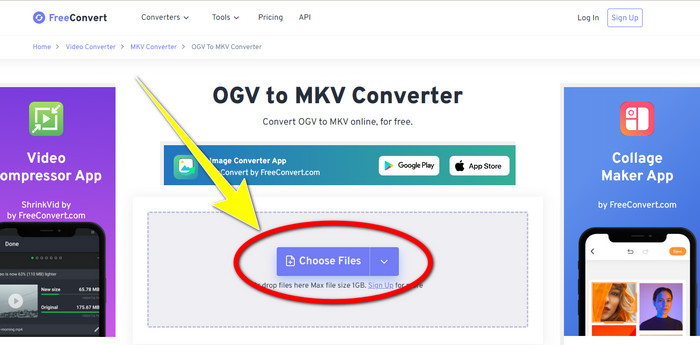
Trin 1: Gå til FreeConverts hjemmeside. Klik på knappen Choose File for at tilføje OGV-filen.
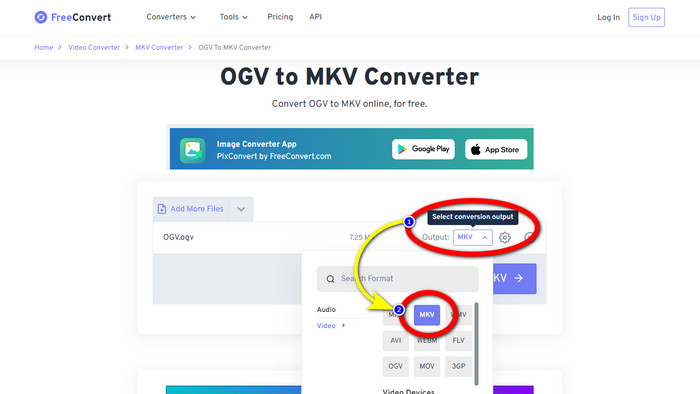
Trin 2: Det næste trin er at gå til knappen Output. Klik på den for at se formatindstillingerne, og vælg filformatet MKV.
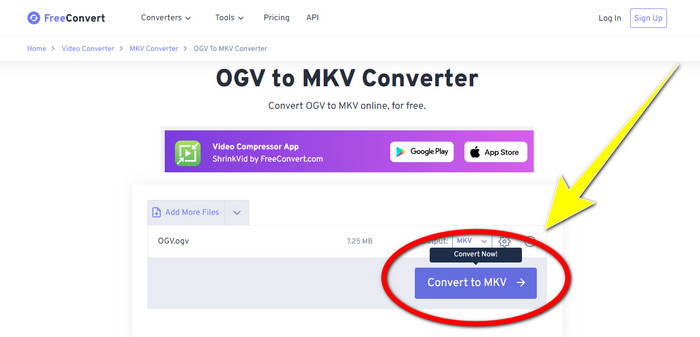
Trin 3: Når du har valgt MKV-filformatet, skal du klikke på knappen Convert to MKV. Så vil konverteringsprocessen begynde, og din endelige video bliver gemt.
Del 4: Ofte stillede spørgsmål om konvertering af OGV til MKV
1. Kan jeg bruge FFmpeg til at konvertere OGV til MKV?
Selvfølgelig kan du det. Download FFmpeg. Det er et kommandobaseret værktøj, der kan konvertere forskellige videofiler, inklusive OGV, MKV, MOV, MP4, AVI og flere.
2. Er MKV et almindeligt format?
De fleste nuværende enheder er kompatible med formatet. Talrige lyd- og undertekstspor kan gemmes i én fil ved hjælp af MKV- eller Matroska-videoformatet. Det er utroligt vellidt til at opbevare film. En ganske lille filstørrelse og video i høj kvalitet.
3. Er OGV en OGG?
Nej. OGG er et open source-format, der bruges af containeren OGV. Et af de primære mål med OGG's udvikling var at være fri for softwarepatentrestriktioner. En videostream med eller uden lyd, der er blevet komprimeret ved hjælp af Opus-, Vorbis-, Theora- eller Speex-metoden, gemmes ved hjælp af OGV-filtypen.
Konklusion
At bruge onlineværktøjer til at konvertere OGV til MKV er effektivt, men man kan ikke ignorere, at irriterende reklamer hele tiden dukker op under konverteringen. Så hvis du vil konvertere filer uden at blive forstyrret af reklamer, kan du bruge Video Converter Ultimate.
-
 Top 4 bedste løsninger til at konvertere MXF til MKV [Løst]
 Lær disse fire fantastiske metoder at kende til nemt at konvertere MXF til MKV online og offline. De apps, der er inkluderet i dette indlæg, kan hjælpe dig med at konvertere filer uden besvær.
-
 4 måder at konvertere MPG til MKV ved hjælp af online/offline-konvertere
 Leder du efter en nem at bruge konverter, der kan konvertere MPG-filer til MKV? Denne artikel viser de bedste og nemmeste måder til hurtigt at konvertere MPG til MKV-filer
-
 Nemmeste måder at konvertere MOV til MKV gratis på Mac
 Vil du konvertere MOV til MKV gratis på Mac? Læs denne artikel for at kende de nemmeste og enkleste måder at konvertere din MOV-fil til MKV.
