


 Video Converter Ultimate
 Skærmoptager
 Video reparation
 Sikker download
3 ubesværede metoder til at konvertere TRP til MKV
Har du problemer med din TRP‑fil, fordi du ikke kan afspille den på din medieafspiller eller i andre programmer? Hvis du er en af de brugere, der støder på dette problem, anbefales det kraftigt, at du læser denne artikel. Du kan konvertere din TRP‑fil til MKV, da de fleste programmer understøtter MKV‑formatet. Denne artikel viser enkle metoder til at konvertere TRP til MKV på Windows, Mac og online. Hvad venter du på? Spild ikke tiden – begynd at læse denne artikel!

Del 1: Definition af TRP og MKV
Hvad er TRP?
TRP er en high‑definition mediefil, der er kodet i MPEG‑2 part 1 transportformat. Det bruges ofte i digital videotransmission. Derudover bruges det til lydstreams, synkronisering af output og digital multipleksering af video, og det indeholder avancerede funktioner til fejlkorrigering. TRP indeholder også AC3‑lyddata og H.264‑video. Det kan afspilles med flere forskellige videoafspilningsprogrammer.
Hvad er MKV?
MKV, eller Matroska, er en multimediecontainer, der håndterer flere lydspor, undertekster og video i ét filformat. MKV adskiller sig også fra andre multimedieformater som MP4 og AVI, fordi det er open source og kan tilpasses af brugere via open source‑softwareimplementering. Endelig bruges MKV‑filformatet oftest til HD‑videoer og online videostreaming.
Del 2: Nemmeste måder at konvertere TRP til MKV Offline
Brug af Video Converter Ultimate
Du skal downloade og bruge Video Converter Ultimate til at konvertere TRP til MKV uden tab. Ved hjælp af denne applikation kan du konvertere ethvert videofilformat, du ønsker, inklusive TRP og MKV. Du kan konvertere flere videofiler i en enkelt proces, fordi dette værktøj har en batchkonverteringsfunktion. Derudover har den en 30x hurtigere konverteringsproces, så du ikke behøver at bruge mere tid på at konvertere forskellige filer. Denne applikation understøtter flere andre formater end TRP og MKV, såsom 5K/8K video, ProRes, DV, ASF, M4V, MXF, MP4, MOV og mere. Det bedste er, at du kan bruge denne applikation ved hjælp af din Windows og Mac, hvilket er gode nyheder for alle brugere. Desuden, hvis du vil ændre hastigheden på dine videoer, kan du bruge funktionen Video Speed Controller. Du kan sænke din video fra 0,125x og fremskynde dem op til 8x hurtigere end den oprindelige hastighed. Hvis du vil beskære din video, kan du også gøre det. Dette værktøj tilbyder også en videobeskæringsfunktion,
For at vide mere om denne fantastiske software, skal du downloade den og prøve den selv.
Funktioner:
◆ Konverter adskillige filformater.
◆ Kan lave en kreativ collage.
◆ Det tilbyder Music Video Creator.
◆ Leverer værktøjskasse til forbedring af videoer.
Fordele
- 30x hurtigere end andre softwarekonvertere.
- Har en venlig brugergrænseflade, som er velegnet til ikke-professionelle brugere.
- Har andre funktioner end konvertering.
- Tilgængelig på både Windows og Mac.
- Konverter forskellige filformater, såsom FLV, MP4, MOV, WBM, GIF, AMV osv.
- Kan ændre datodetaljerne individuelt eller i batches.
Ulemper
- Køb abonnementet for at bruge mere avancerede funktioner.
Hvis du er ivrig efter at konvertere TRP til MKV, skal du følge disse enkle trin nedenfor.
Trin 1: Brug din Windows‑ eller Mac‑computer til at downloade Video Converter Ultimate ved at klikke på Download-knappen nedenfor. Åbn programmet efter download og installation.
Gratis download til Windows 7 eller nyere Sikker download
Gratis download til MacOS 10.7 eller nyere Sikker download
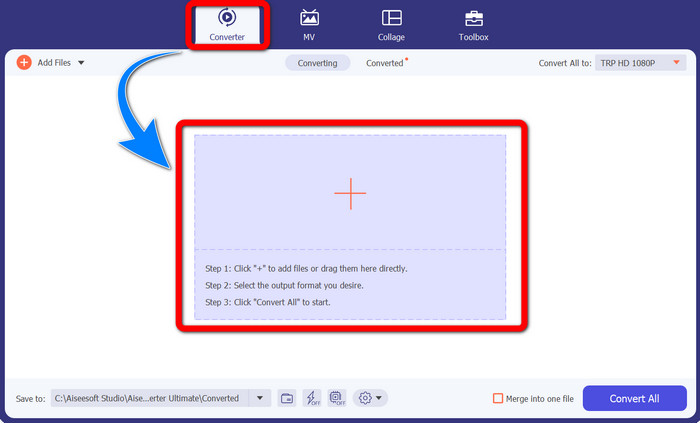
Trin 2: Når du har startet Video Converter Ultimate, skal du vælge Converter‑panelet. Klik derefter på +-ikonet for at importere din video i TRP‑format.
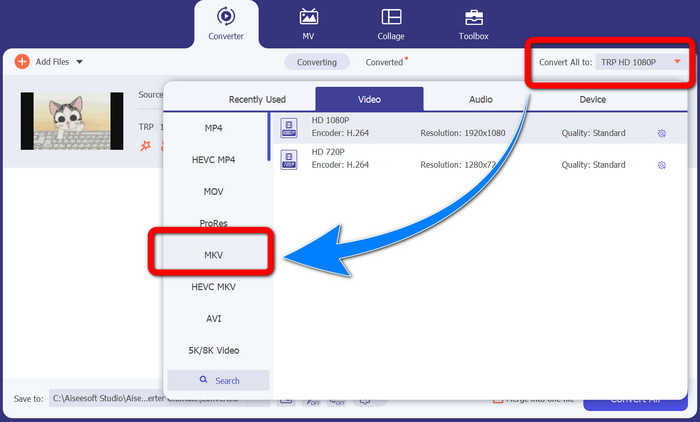
Trin 3: Når du har importeret din video, skal du klikke på ikonet Convert all to. Find MKV‑formatet i liste over formater, og klik på det.
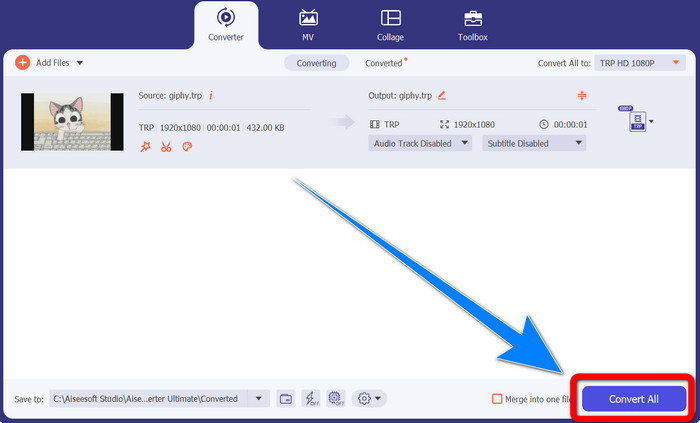
Trin 4: Klik derefter på knappen Convert All for at konvertere din TRP til MKV‑format.
Brug af Prism Video Converter
Prism er et andet program, du kan downloade til Windows og Mac. Dette program kan hjælpe dig med nemt at konvertere TRP til MKV. Derudover understøtter det forskellige filformater som AMV, MP4, DVD, VOB, MOV, DIVX, AVI, 3GP og flere. Programmet er dog meget langsomt, når det er installeret på Windows eller Mac. Konverteringsprocessen tager også lang tid. Og det har en kompliceret brugerflade, som kan forvirre begyndere, så du er nødt til at finde nogle tutorials eller søge hjælp hos mere erfarne brugere. Hvis du vil downloade og bruge dette program, skal du følge de enkle trin nedenfor.
Trin 1: Download Prism Video Converter på din Mac eller Windows‑computer.
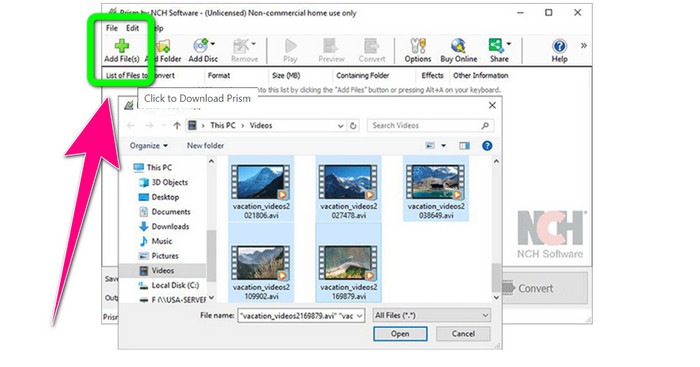
Trin 2: Klik på den grønne Add Files-knap, og indsæt din TRP‑fil.
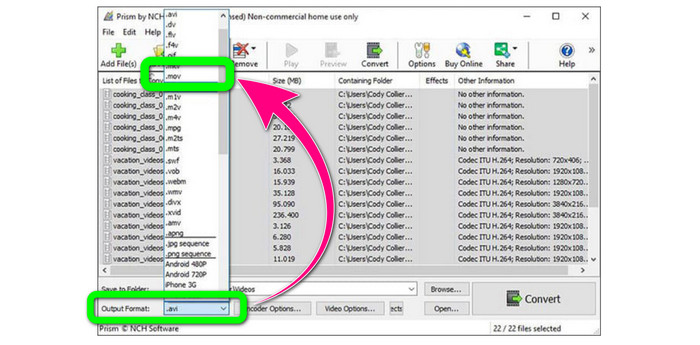
Trin 3: Angiv outputformatet. Klik på MKV‑filen i formatindstillingerne.
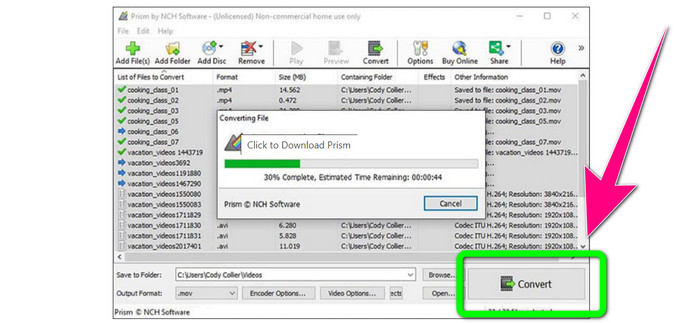
Trin 4: Vælg til sidst knappen Convert for at konvertere din TRP‑fil til MKV‑format.
Del 3: Online applikationer til at konvertere TRP til MKV
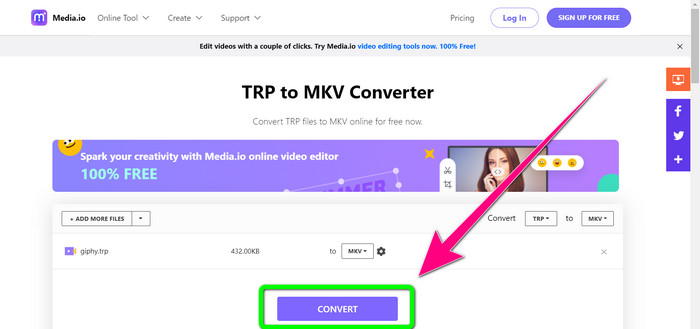
Er du interesseret i at konvertere TRP til MKV online? Så kan du bruge Media.io. Med hjælp fra dette værktøj kan du konvertere TRP til MKV. Derudover understøtter det mange andre formater som MP4, AVI, WMV, MOV, FLV, DIVX, XVID, 3GP osv. Det fungerer også som lyd‑ og billedkonverter.
Desuden er den også i stand til videoredigering. Du kan beskære, trimme, flette, sløjfe videoer og mere. Men når det kommer til konverteringsprocessen, er den langsom. Du skal vente lidt længere for at fuldføre processen. Det har også forstyrrende annoncer, der vises på skærmen. Det kræver også en hurtig internetforbindelse for at fungere godt. Hvis du vil konvertere TRP til MKV ved hjælp af Media.io, skal du følge trinene nedenfor.
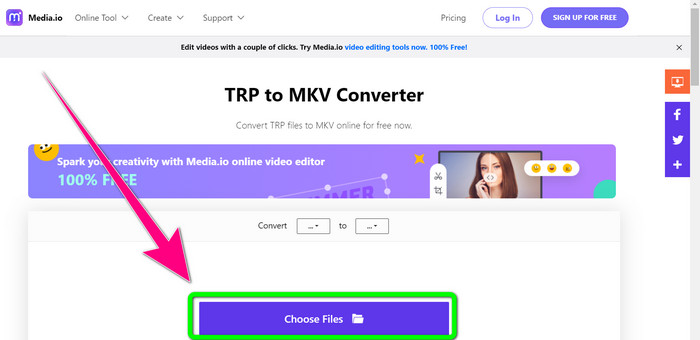
Trin 1: Gå til hjemmesiden for Media.io. Klik derefter på knappen Choose Files for at tilføje din video i TRP‑filformat.
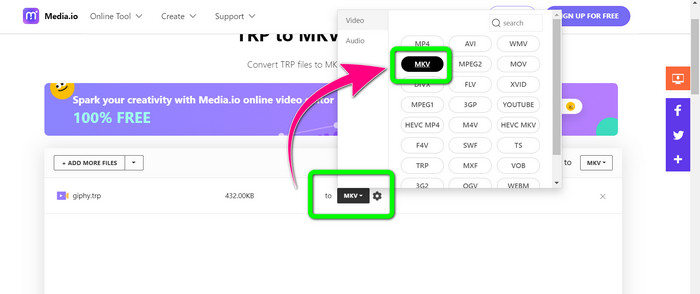
Trin 2: Når du har tilføjet din video, skal du gå til formatindstillingerne, finde MKV‑filen og vælge den.
Trin 3: Til sidst skal du klikke på knappen Convert. Vent på, at konverteringsprocessen afsluttes, og gem derefter din video i MKV‑filformat.
Yderligere læsning
De bedste fremgangsmåder til, hvordan du gratis konverterer AMV til MKV
Konvertér nemt MTV til MKV med disse ultimative konvertere
Del 4: Ofte stillede spørgsmål om konvertering af TRP til MKV
Hvorfor understøttes MKV-filen ikke på mit TV?
En MKV-fil er blot en videobeholder, der kan kodes med mange codecs, som HEVC, MPEG-4, VP9 osv. TV har dårlig kompatibilitet med disse codecs, derfor kan du ikke afspille MKV på dit TV.
Er MKV-filen god kvalitet?
MKV-filformat er populært i videoer i høj kvalitet. Den har også en større filstørrelse. Det betyder, at MKV er en beholder og ikke har nogen indflydelse på kvaliteten.
Er der en hurtig konverter, jeg kan bruge på min computer?
Helt klart, ja! Hvis du leder efter en hurtig softwarekonverter, så er Video Converter Ultimate den bedste applikation. Du kan konvertere dine filer mange gange hurtigere og nemmere.
Konklusion
Med alle de programmer og metoder til at konvertere TRP til MKV ovenfor anbefaler vi på det kraftigste at bruge Video Converter Ultimate. Det kan konvertere et stort antal filer på én gang med ultrahurtig konverteringshastighed. Hvad venter du på? Prøv det selv og udforsk endnu mere.
-
 2 af de mest imponerende tilgængelige software til at konvertere TRP til MOV
 Kunne du ikke konvertere TRP-filer til MOV? Følg derefter vejledningen i denne artikel. Mens vi udvælger de bedste værktøjer, du kan bruge til at konvertere dine TRP-filer.
- 2 af de mest imponerende tilgængelige software til at konvertere TRP til MOV
Kunne du ikke konvertere TRP-filer til MOV? Følg derefter vejledningen i denne artikel. Mens vi udvælger de bedste værktøjer, du kan bruge til at konvertere dine TRP-filer
-
 2 professionelle konvertere til at konvertere TRP til WMV-format [Guide]
 Er du en af brugerne, der har en kompliceret tid med TRP-filen? Hvis ja, lad os fortsætte med at læse denne artikel for at vide, hvordan man konverterer TRP til WMV og vide mere
