


 Video Converter Ultimate
 Skærmoptager
 Video reparation
[Bevist] Sådan redigeres egenskaber for WAV-filer på Windows 10/11 og Mac uden problemer
Hvis du vil gemme en lyd-bitstream på en pc, er WAV uden tvivl det standard-lydformat, du skal bruge. Som en efterligning af RIFF har WAV‑filer deres metadata i INFO‑chunks. Selvom formatet kan gemme mere end blot lyd, er dataene i WAV‑filer nogle gange unøjagtige. Så hvis oplysningerne i dine WAV‑filer er forkerte, skal du bruge denne vejledning for at lære, hvordan du redigerer egenskaberne for WAV‑filer på Windows 10/11 og Mac med letforståelige, detaljerede trin.

Del 1. Sådan redigeres egenskaber for WAV-filer med de bedste værktøjer på Windows
Bedste Metadata Editor på Windows og Mac - FVC Video Converter Ultimate
At lære at redigere egenskaber for WAV-filer på Windows 10/11 og Mac er ikke et stort problem ved hjælp af den bedste metadata-editor, du kan downloade på den nævnte platform. FVC Video Converter Ultimate præsenterer den bedste konverter og en af de førsteklasses metadata-editorer, du kan bruge og downloade på dit skrivebord. I modsætning til de andre værktøjer på markedet og denne liste, præsenterer dette værktøj en kraftfuld tag-editor på 1000+ mediefiler, inklusive WAV.
Ud over det, selv du har eller ikke har oplevet at redigere metadata-tags; du kan hurtigt finde ud af det hele ved at bruge den ultimative konverter. Intet kompliceret job kan hurtigt overgås med dette værktøj, hvilket gør softwaren unik og kraftfuld. Vil du vide, hvordan du bruger værktøjet? Du kan følge vejledningen, vi tilføjer nedenfor, og kopiere trinene for at afslutte opgaven med succes.
Trin 1. Klik på downloadknappen nedenfor, og vælg den passende downloadknap. Installer derefter værktøjet, gennemfør konfigurationen, og start det.
Gratis download til Windows 7 eller nyere Sikker download
Gratis download til MacOS 10.7 eller nyere Sikker download
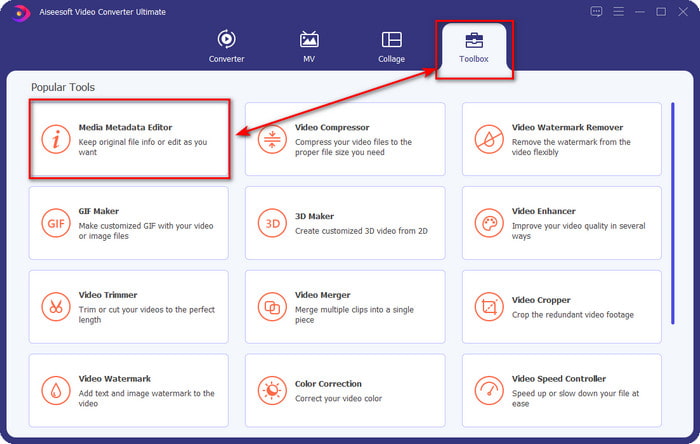
Trin 2. Når du har åbnet softwaren, skal du gå til sektionen Toolbox og derefter vælge Media Metadata Editor i listen nedenfor.
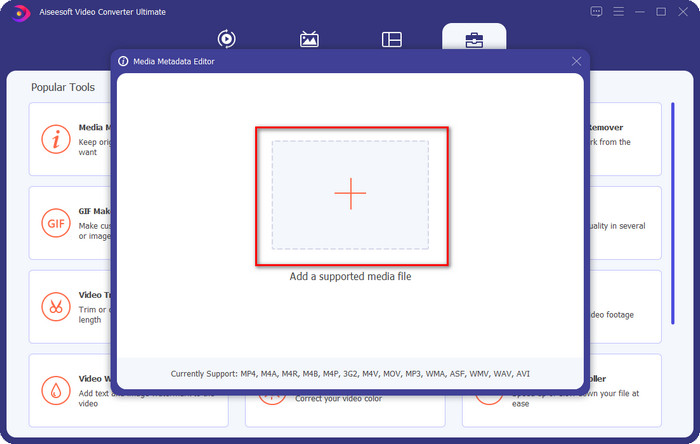
Trin 3. Tilføj filen ved at klikke på +-knappen på skærmen, find den WAV‑fil, du vil tilføje metadata til, i computerens mappe, og klik derefter på Open.
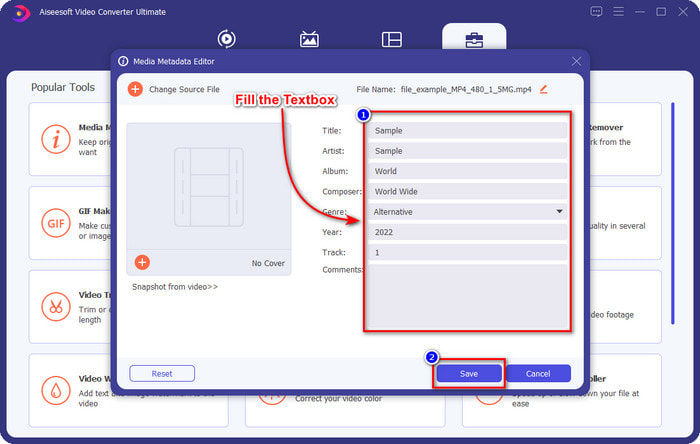
Trin 4. Rediger eller slet oplysningerne i tekstfeltet; når du har udfyldt dem alle, kan du klikke på Save for at anvende ændringerne. Dermed har du lært, hvordan du redigerer tags i WAV‑filer ved hjælp af det ultimative værktøj.
Frækhed
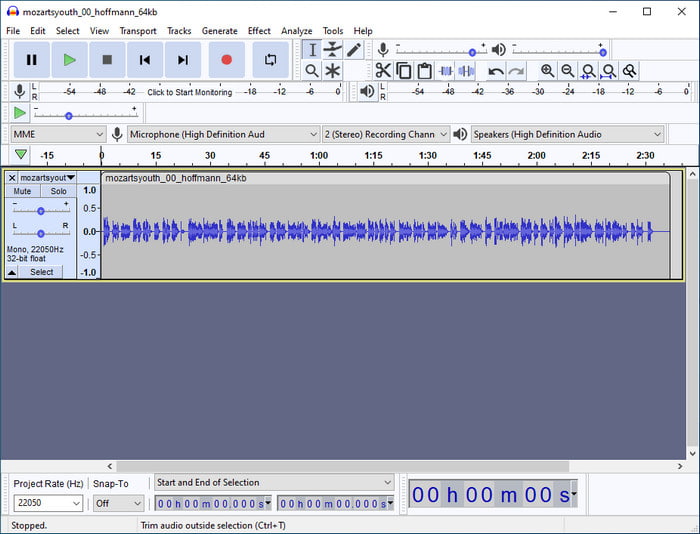
En af de bedste programmer, du kan bruge til at forbedre din lyd, er Audacity. Denne Windows‑software tilbyder en kraftig forbedrings- og redigeringsfunktion, som du vil kunne lide at bruge gratis. Ud over at forbedre din lydfil kan den også ændre tags i din lydfil, hvis du har brug for det. Følg vejledningen nedenfor, hvis du vil vide, hvordan du redigerer egenskaberne for WAV‑filer med værktøjet.
Trin 1. Download Audacity på Windows, og åbn det.
Trin 2. Træk og slip derefter den ønskede WAV‑fil, klik på Edit, og klik derefter på Metadata under denne menu.
Trin 3. Klik på hvert felt under Value for at redigere tags i din WAV‑fil, klik derefter på OK for at anvende ændringerne, klik på File og derefter Save Project.
Del 2. Sådan redigeres egenskaber for WAV-filer med Top Software på Mac
Music Tag Pro
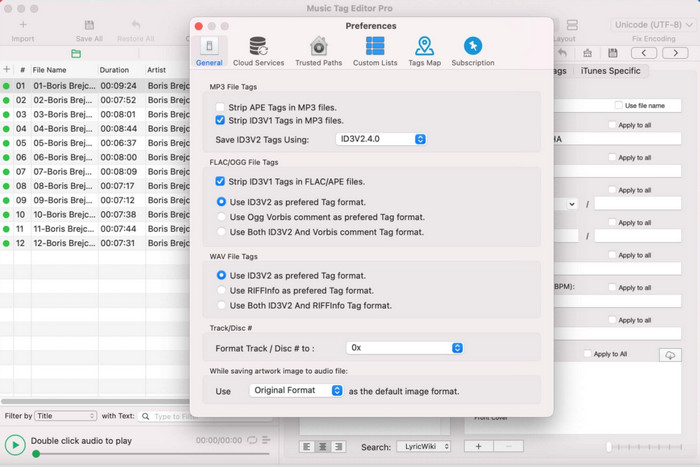
Music Tag Pro er et program, du kan downloade på din Mac for at redigere metadata i lyd- og videofiler. Det kan også masse-redigere metadata‑tags for effektivt at ændre filernes metadata. Med den samlede ydeevne for denne tag‑editor på Mac nyder mange brugere at anvende den og efterlader mange gode kommentarer i App Store, hvis du kigger efter. Oplysningerne i dine mediefiler er dog begrænsede, men det kan stadig lade sig gøre med værktøjet. Hvis du vil bruge det, vil denne vejledning lære dig, hvordan du redigerer egenskaberne for WAV‑filer på Mac.
Trin 1. Søg efter værktøjet i App Store, og download det.
Trin 2. Klik på knappen Import for at tilføje WAV‑filerne.
Trin 3. Klik på WAV‑filerne, rediger tags i hver kolonne, og klik på Save All, når du er færdig med at redigere WAV‑filen.
Tag Editor til Mac
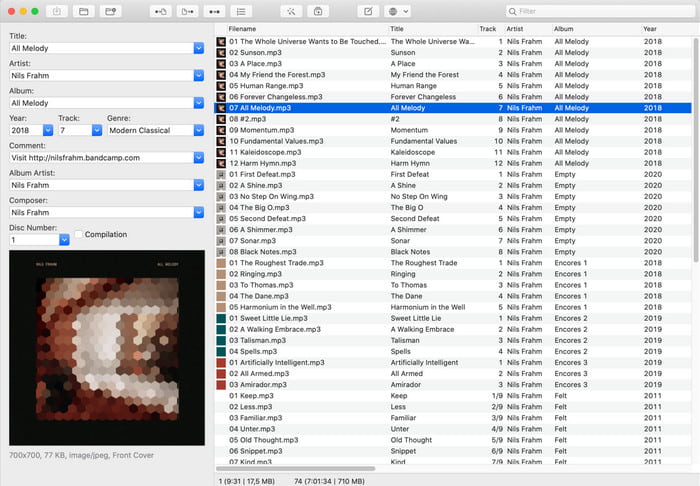
Tag Editor for Mac er et nyttigt program til at tilføje tags til dine lydfiler, såsom WAV. Med denne software kan du nemt tilføje metadata til enhver lydfil uden at forringe kvaliteten, præcis som det ultimative værktøj kan. Det bliver heller ikke kun rost af brugerne for sine tag‑redigeringsfunktioner, men også for den hurtige kundeservice, det tilbyder brugere, der har brug for hjælp. Hvis du har brug for en trinvis vejledning i, hvordan du redigerer egenskaberne for WAV‑filer med det, så læs videre nedenfor.
Trin 1. Åbn App Store, og download Tag Editor derfra, og åbn det derefter.
Trin 2. Klik på +-knappen øverst for at tilføje WAV‑filerne; de bliver automatisk placeret på listen nedenfor.
Trin 3. Klik på Edit for at ændre metadataene, og klik derefter på Save for at gemme ændringerne.
Del 3. Ofte stillede spørgsmål om redigering af egenskaber på WAV-filer
Hvorfor reduceres lydkvaliteten af WAV efter redigering af metadata?
Nogle værktøjer kan reducere lydkvaliteten af din WAV-fil; mange brugere klager over dette problem, selvom de ikke har redigeret kvaliteten af det. Så hvis du ikke er sikker på den software, du bruger, er det bedre at læse en pålidelig anmeldelse for at afgøre, om den vil miste lydkvaliteten, når du har eksporteret den.
Kan jeg se mine WAV-metadata?
Ja, det kan du helt sikkert. Klik på dette link, hvis du ikke ved, hvordan du ser metadataene for dine mediefiler på Windows, Mac og online‑tjenester.
Er metadata nødvendige på WAV?
Ja, helt sikkert. Metadata er vigtige for hver eneste mediefil, du har, uanset om det er lyd eller video. Så det at tilføje metadata til din WAV‑fil kan hjælpe dig, og biblioteket kan organisere hver WAV‑fil efter forfatternavn, titel, tid, dato, placering og meget mere. Hvis du stadig ikke er overbevist om at tilføje metadata til din WAV‑fil, anbefaler vi, at du læser denne artikel for at lære mere om metadata.
Konklusion
Med hjælp fra denne artikel ved vi nu, hvordan man redigerer egenskaberne for WAV‑filer på Windows 10/11 og Mac. Hvis du bruger begge systemer, kan du bruge dem gratis, men nogle løsninger er betalingsbaserede. Uanset hvad du vælger, mener vi, at det er let at redigere metadata. Men hvis du vil have en billig metadata‑editor ved hånden, som kan redigere WAV‑tags uden besvær, skal du vælge det ultimative værktøj. FVC Video Converter Ultimate er den budgetvenlige, professionelle metadata‑editor, du kan bruge på både Windows og Mac. Du kan se de fantastiske funktioner, værktøjet tilbyder, når du downloader det, så klik på downloadknappen og tag det i brug.
-
 Sådan redigeres og rettes MP4-metadata på en meget smart måde
 Vil du vide, hvordan man reparerer MP4-metadata? I så fald skal du læse hele indholdet af denne artikel for at kende trickene til, hvordan du nemt reparerer MP4-tags.
-
 4 bedste metoder til at rette og redigere MP3-metadata på Windows og Mac
 Vil du vide hemmelighederne ved at redigere MP3-metadata med lethed? Denne blog vil lære dig forskellige teknikker med de forskellige værktøjer, du nemt får adgang til.
-
 2 bedste måder at redigere OGG-metadata på, du bør prøve gratis
 Har du brug for at redigere OGG-metadata? Nå, du kan nemt håndtere redigering af tags ved at bruge den korrekte software. Hvis du ikke har én, er det et must at læse denne artikel.
