


 Video Converter Ultimate
 Skærmoptager
 Video reparation
 Sikker download
Sådan flettes 3GP-videoer fra mobiltelefon til en fil
Når du optager flere videoer under din rejse med din smartphone, vil du muligvis flette 3GP-filer til en video. Hvad er de bedste metoder til at kombinere videoklipene? Uanset om du blot tilmelder dig 3GP-videoer eller laver film med smartphone-filerne, kan du lære mere om de 2 hyppigst anvendte metoder fra artiklen.

Del 1: Sådan flettes 3GP gratis online
For at flette dine 3GP‑filer uden redigering skal du blot bruge et praktisk værktøj, der kan flette 3GP‑videoer gratis online. FVC Free Online Video Merger er en af de bedste 3GP‑videoflettere med en enkel grænseflade. Det gør det muligt at kombinere 3GP‑filer uden begrænsning på antal eller størrelse. Derudover kan du justere opløsningen og videoformatet.
Trin 1: Gå til Free Online Video Merger med en vilkårlig webbrowser. Du kan klikke på knappen Upload Videos to Merge for at indlæse én 3GP‑fil i det online videofletteværktøj. Du bliver derefter ført videre til en online videofletter‑grænseflade.
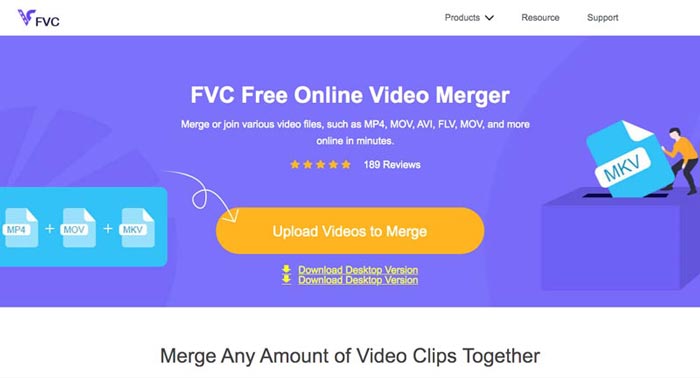
Trin 2: Upload flere 3GP‑filer, som du vil kombinere. Derefter kan du ændre opløsningen og formatet på din video ved at klikke på felterne Resolution og Format. Du kan flette dine 3GP‑filer til populære videoformater som MP4 eller MKV.
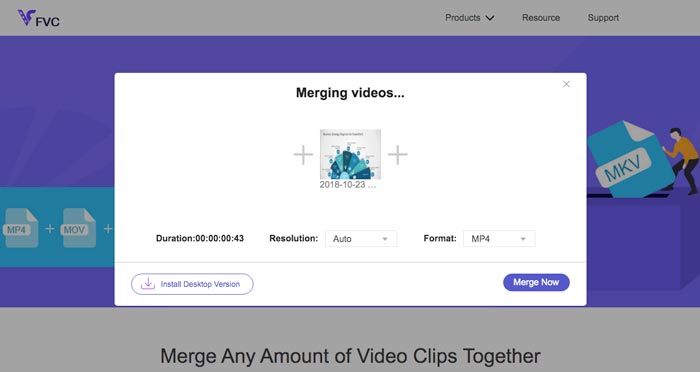
Trin 3: Når du er tilfreds med den resulterende video, kan du klikke på knappen Merge Now for at starte sammenfletningsprocessen. Når flettingen er færdig, bliver den sammenføjede video gemt på din harddisk.
Det er en nem måde at tilmelde sig 3GP-filer online gratis. Men hvis du vil gøre mere redigering af dine videofiler, har du brug for et mere professionelt værktøj.
Del 2. Sådan kombineres 3GP-videoer til en film
Uanset om du vil kombinere 3GP‑videoer til en film med imponerende filtre eller blot samle 3GP‑filer til én, er Video Converter Ultimate en alsidig videokonverter, du bør overveje. Den gør det muligt at opdele og flette videoklip, vælge videotemaer, tilføje vandmærker til videoer og endda konvertere 3GP‑videoer til andre videoformater til sociale medier direkte.
- 1. Gør det muligt for dig at skære de ønskede dele ud eller kombinere flere 3GP i en.
- 2. Giv grundlæggende videoredigeringsfunktioner, såsom trim, split, beskær og roter.
- 3. Deltag 3GP-videoklip i en film med forskellige filtre, temaer, musikfiler osv.
- 4. Tilføj undertekst, lydspor, 3D-effekter, vandmærke, komprimere video, og mere.
Gratis download til Windows 7 eller nyere Sikker download
Gratis download til MacOS 10.7 eller nyere Sikker download
Metode 1: Sådan kombineres flere 3GP-videoer direkte
Trin 1: Download og start Video Converter Ultimate fra den officielle hjemmeside. Vælg Converter-grænsefladen, og klik på knappen Add Files for at tilføje de 3GP‑filer, du vil flette. Derudover kan du også trække 3GP‑videoerne ind i programmet.

Trin 2: Når du har importeret 3GP‑filerne, skal du vælge formatet for outputfilen. Klik på saks‑ikonet for at klippe den ønskede del ud. Desuden kan du rotere/beskære videoerne, anvende filtre, tilføje et vandmærke eller justere lydsporene til den færdige video.

Trin 3: Gå nederst i brugergrænsefladen for at vælge destinationsmappen til de flettede 3GP‑filer. Derefter kan du klikke i boksen Merge into One File og klikke på Convert All for at begynde at flette 3GP‑filer.

Metode 2: Sådan sluttes 3GP-filer til en film
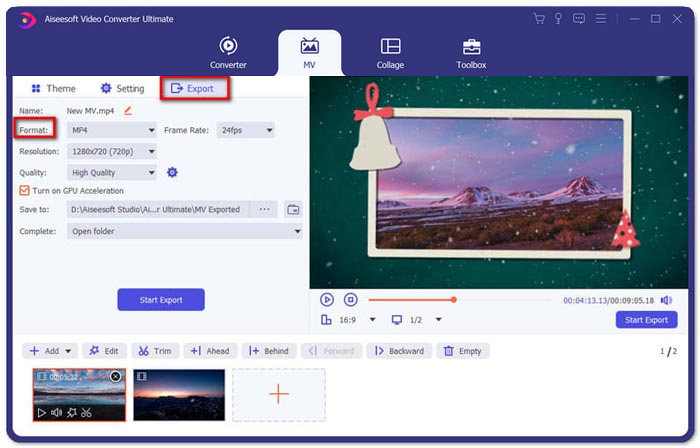
Trin 1: Når du vil samle 3GP‑filer til en film, kan du vælge MV‑menuen, hvorefter du kommer ind i MV-oprettelsesgrænsefladen. Klik på knappen Add nederst til venstre i vinduet for at importere dine 3GP‑videoer og billeder.
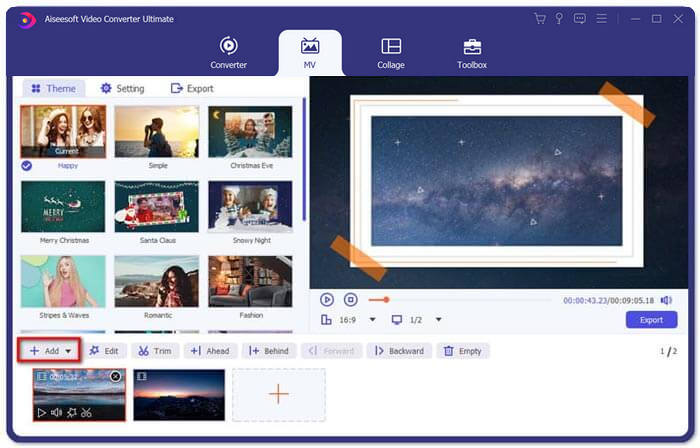
Trin 2: Derefter kan du klikke på knappen Edit for at anvende videoeffekter. Desuden kan du også vælge et tema til din MV‑film. I venstre sektion skal du klikke på fanen Theme og derefter vælge det ønskede tema til din MV.
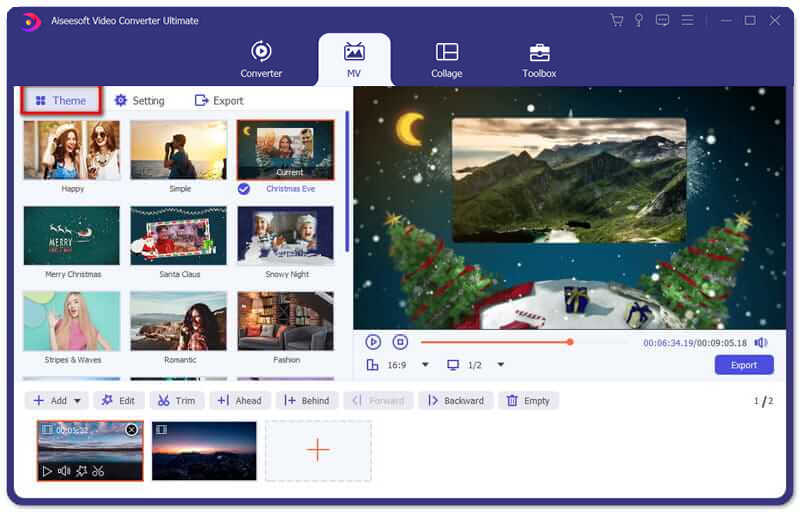
Trin 3: Hvis du er tilfreds med den kombinerede 3GP‑fil, kan du klikke på knappen Export for at gemme videofilen. Som standard er outputformatet MP4. Du kan naturligvis også vælge det foretrukne videoformat efter behov.
Del 3. Ofte stillede spørgsmål om, hvordan man fletter 3GP
1. Hvad er et 3GP-format?
3GP er et multimediefilformat designet til at gemme datalagring. Det bruges i vid udstrækning på mobile enheder. Når du tager billeder eller optager videoer med din mobiltelefon, gemmes filen normalt i 3GP-format. Normalt bruges 3GP på 3G-mobiltelefoner, og det kan også afspilles på nogle 2G- og 4G-telefoner.
2. Hvordan flettes 3GP-filer på en smartphone?
Når du vil flette 3GP-filer på en iPhone eller Android-telefon, kan du bruge Video Merger til en Android-telefon, VivaVideo til en iPhone eller downloade andre applikationer for at kombinere videoerne. Men når du har brug for at slutte dig til 3GP-filerne som en film, skal du stadig bruge en professionel videofusion.
3. Kan jeg kombinere 3GP-videoer med lydfiler?
Ja. Men du kan ikke bruge lydfilerne som baggrund for 3GP-video. Uanset om du har brug for at kombinere to filer eller bruge lyden som baggrund for en 3GP-video, skal den professionelle 3GP-combiner være dit valg.
Konklusion
Når du skal flette 3GP‑videofiler på dine mobile enheder til én videofil, kan du lære 2 effektive metoder i denne artikel. Du kan flette 3GP gratis online ved hjælp af Free Online Video Joiner. Hvis du har brug for at redigere og tilføje særlige effekter til din video, bør Video Converter Ultimate være et ideelt værktøj for dig. Hvis du har spørgsmål om at flette 3GP‑filer, er du velkommen til at kontakte os.
-
 Top 3 gratis måder at konvertere FLV til 3GP på Windows / Mac
 Kan ikke åbne FLV-filer på smartphone eller tablet? Bare rolig! Her deler vi tre metoder til at konvertere FLV til 3GP uden at miste kvalitet for at spille på mobil.
-
 3 metoder til at konvertere MP4 til 3GP problemfri
 Vil du konvertere MP4 til 3GP på en hurtig og nem måde? Her skal vi dele 3 MP4 til 3GP-konvertere for at ændre MP4 til 3GP til afspilning på forskellige mobiltelefoner.
-
 De 3 bedste gratis 3GP-afspillere til computere og mobiltelefoner, du bør kende
 Når du nemt vil afspille din 3GP-film uden installation eller konvertering af videokodec, kan du lære mere om de 3 bedste 3GP-afspillere på Windows, Mac, Android og iPhone i denne artikel.
