


 Video Converter Ultimate
 Skærmoptager
 Video reparation
[Komplet gennemgang] 5 seneste MP3-skærere tilgængelige på Windows/Mac/Online
Vi vil ofte gerne klippe det lydspor, vi lytter til, og sætte det som ringetone, fremhæve den vigtige del eller skære unødvendige detaljer i lyden væk. Selvom der findes en række klippeværktøjer, du kan bruge på alle platforme, er nogle stadig ikke til at stole på. Derfor præsenterer vi i dag de klippeværktøjer på markedet, som du kan have tillid til, fordi vi selv har afprøvet dem alle for at sikre, at de er fri for malware og pålidelige. Før vi udvalgte dem, fulgte vi en strengt høj standard for det publikum, der har brug for et stabilt og troværdigt klippeværktøj. For at gøre din søgning på internettet så effektiv som muligt præsenterer vi nedenfor de fem MP3‑klippere, vi fandt, som er klar til at påtage sig opgaven med at klippe enhver lydfil.

Del 1. 2 Offline MP3 Cutter-software Windows & Mac
1. Video Converter Ultimate – Bedste MP3 Cutter [anbefales stærkt]
Den bedste MP3‑lydklipper på denne liste er Video Converter Ultimate, som lader brugerne klippe enhver lydfil uden besvær. Med hjælp fra dette ultimative værktøj kan du trimme lyden for at fjerne uønskede dele, endda flette flere udklippede lydfiler til én fil og forstærke lyden, hvis du synes, den er lidt lav. Desuden leverer softwaren en ultrahurtig proces, samtidig med at den tager vare på den oprindelige lydkvalitet.
I modsætning til alle skærere understøtter dette værktøj et bredt spektrum af formater, ikke kun MP3, men også FLAC, M4R, M4A, OGG, MKA, WAV, WMA og mere, og din lydfil understøttes faktisk her for at blive klippet. Måske ved du ikke, hvordan du klipper din lydfil og bruger den til dine behov lige nu. I dag er din heldige dag, fordi vi vil lære dig, hvordan du bruger MP3-skæreren og ringetonemaskinen gratis ved at følge vejledningen nedenfor.
Trin 1. Download lydklipperen til din computer ved at klikke på downloadknappen nedenfor. Vælg om du bruger Windows eller Mac, installer softwaren med det samme, og start den. Husk, at du bør gøre dig bekendt med værktøjets brugerflade, så det bliver nemmere at følge de næste trin.
Gratis download til Windows 7 eller nyere Sikker download
Gratis download til MacOS 10.7 eller nyere Sikker download
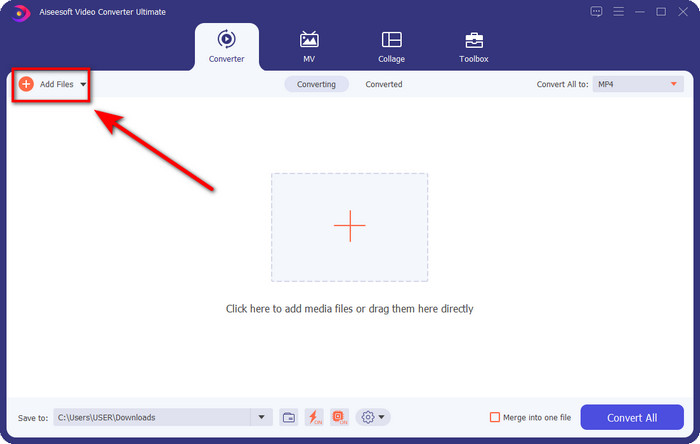
Trin 2. Træk den lydfil, du vil klippe, ind i brugerfladen, eller klik på Add Files, og find lydfilen i den mappe på computeren, der vises. Klik på Open for at gå videre til næste trin.
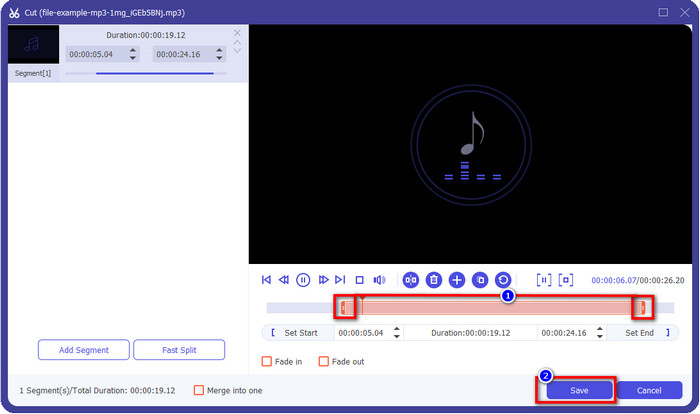
Trin 3. Når du har indsat lydfilen, er det tid til at klikke på knappen, der ligner en saks. Træk play in and out til den ønskede længde på den lyd, du vil beholde. Husk, at den markerede del af lyden mellem play in og out er den eneste lyd, der gemmes. Tryk derefter på Save for at klippe lyden.
Valgfrit. Har du brug for at forstærke lyden? Hvis det er tilfældet, skal du klikke på tryllestavs-knappen, justere volumenglideren ved at trække den opad og trykke på OK for at gemme.
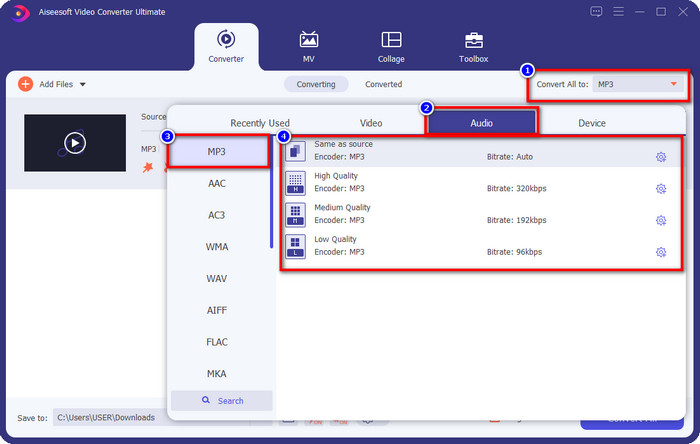
Trin 4. Gå til Convert All to, Audio, og sæt formatet til MP3. Selvom du ikke konverterer, skal du sikre dig, at navnet under Convert All to er MP3 og ikke et andet format for at undgå at ændre til et andet format.
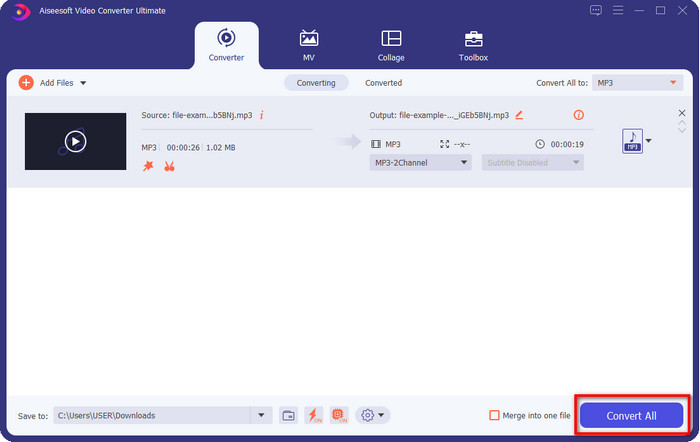
Trin 5. Ved at klikke på Convert All begynder gemningen af den klippede lydfil. Du har nu den klippede lydfil klar med den bedste gratis MP3‑klipper – så enkelt er det.
Fordele
- Den kan skære din lyd så hurtigt som muligt og behandle den på under et sekund.
- Avancerede funktioner er tilgængelige for at øge lydstyrken.
- Det understøtter alle operativsystemer såsom Windows eller Mac.
- Det er muligt at flette flere lydfiler med lydsammenlægningen af dette værktøj.
Ulemper
- Det er nødvendigt at købe værktøjet.
2. Frækhed
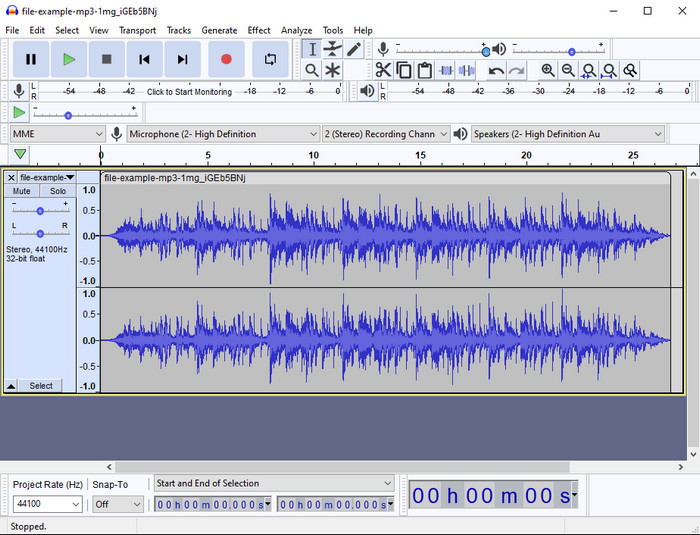
Audacity har i årevis leveret professionelle redigeringsfunktioner til dine lydfiler. Denne app er gratis at downloade og giver brugerne mulighed for at lave multisporsmiks. Den er kendt for at blive brugt af podcastere til nem redigering og optagelse af podcasts. Men nogle af dens funktioner er svære at forstå, især hvis du ikke er vant til at bruge specialiseret software som denne.
Selvom du stadig kan lære at bruge det, vil det tage tid at bruge det fulde potentiale af denne MP3-lydtrimmer, og til at skære lyd, er det rimeligt at sige, at det skærer øjeblikkeligt og ubesværet, hvis du har brug for det.
Fordele
- Gratis at downloade i alle programmer som Windows og Mac.
- Avancerede og professionelle lydredigerere er tilgængelige for at få din lyd til at lyde fantastisk.
- Den er bedst til at optage podcasts og mere.
Ulemper
- Mange konkurrenter giver en brugervenlig brugergrænseflade.
- Ikke det bedste valg for begyndere for et øjeblikkeligt resultat af klipning og andre redigeringsformål.
- Nogle rapporter viser, at dine data indsamles, hvis du bruger dette værktøj, men der er endnu ingen stærke beviser.
Del 2. 3 Tilgængelige online MP3-skærere på nettet
1. mp3cut.net
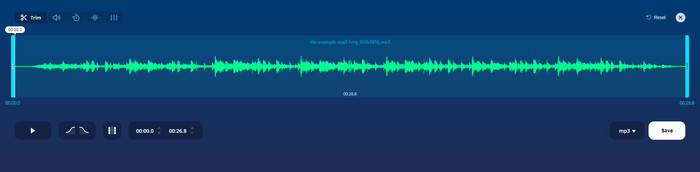
Du kan bruge mp3cut.net, hvis du har brug for en online MP3-skærer til jobbet. Efter at have uploadet filen i denne online cutter, kan du nu fjerne den lyd, du vil tegne på din lydfil. Desuden har værktøjet også nogle mindre redigeringsfunktioner til at ændre lydens hastighed og tonehøjde, hvis du har brug for det.
Selvom det har denne type evner, går værktøjet ned det meste af tiden og kan ikke afspille lyden for at lytte, hvis du klipper den korrekt. Så for at bruge det igen, skal du opdatere din browser og gentage den justering, du gjorde igen.
Fordele
- Brugervenlig og tilgængelig via internettet.
- På punkt, funktioner, der hjælper dig med at skære lyd.
- Grundlæggende redigeringsfunktioner er tilgængelige.
Ulemper
- Den har annoncer på webgrænsefladen.
- Nogle gange går den ned og skal genindlæses igen for at bruge den.
2. audiotrimmer.com
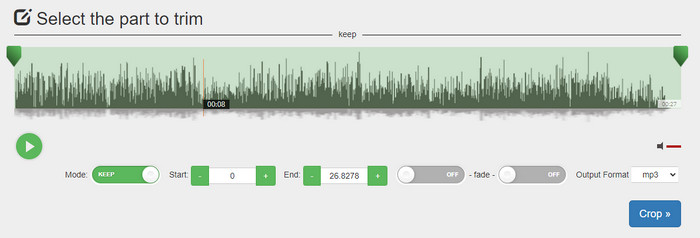
En anden gratis MP3‑klipper online er audiotrimmer.com. Dette værktøj tilbyder letforståelige og enkle trimmefunktioner – alle funktionerne i værktøjet er præcise og lige til. Med det kan du vælge, om du vil beholde lyden eller fjerne dele af lyden. Det har også fade‑ind‑ og fade‑ud‑effekter ligesom den anden klipper, der er nævnt her. Men da vi forsøgte at bruge fade‑ind og fade‑ud‑effekten, virkede den ikke; der blev ikke tilføjet nogen effekt til vores lyd. Hvis du blot vil foretage en enkel klipning, er dette dog et webværktøj, du bør prøve.
Fordele
- Gratis og tilgængelig i alle browsere.
- Nem at bruge til at trimme lyd.
- Det har fade-in og out-effekter.
Ulemper
- Ind- og udtoning fungerer ikke godt.
- Der er mange irriterende annoncer, hvis du får adgang til dem. Så pas på ikke at klikke på dem.
3. Clideo

Et af de bedste online MP3‑klippe- og sammenføjningsværktøjer, du kan bruge, er Clideo. De fleste brugere kan lide og foretrækker dette værktøj på grund af dets redigeringsmuligheder. Derudover kan du også tilføje fade‑ind og fade‑ud til din lydfil, hvis du har brug for det. Men efter at have eksporteret og lyttet til filen var der ingen fade‑ind eller fade‑ud tilføjet til vores lydfil. Vi stødte på et mindre problem med dette værktøj: upload og download af filer. I modsætning til det førstnævnte værktøj tager det tid at uploade lyd til dets klipper, og nogle gange mislykkedes det helt at uploade lydfilen her af ukendte årsager.
Selvom vi støder på nogle problemer, er det stadig den bedste kutter online, og den er også sikker at bruge.
Fordele
- Bedste online cutter online.
- Professionel brugergrænseflade.
- Let at bruge.
Ulemper
- Processen med at uploade og downloade vil tage for meget af din tid.
- Fade ind og ud virker, men ikke godt.
Del 3. Ofte stillede spørgsmål om MP3 Cutters
Hvad er den bedste MP3-trimmer på Mac?
FVC Video Converter Ultimate fås også til Mac. Så hvis du har brug for at trimme din lyd på Mac, bør du downloade dette ultimative værktøj til at håndtere dine lydfiler korrekt. Det ultimative værktøj er ikke kun fremragende til at klippe din lyd, men du kan også forbedre lyden ved at booste den. Desuden, hvis du har brug for hjælp til at konvertere, flette, synkronisere lyd osv., er det ultimative værktøj klar til at hjælpe. Hvis du vil vide mere om det ultimative værktøj, bør du læse oplysningerne ovenfor.
Reducerer trimning af lyden dens størrelse?
Filstørrelsen på lyden reduceres, når du trimmer den. Da vi sammenlignede den originale lydfil med den klippede fil, så vi nogle ændringer i højden. Så det betyder, at jo kortere lydfilen er, jo mindre er dens størrelse, men hvis din lydfil er meget lang, så forvent, at størrelsen også er betydelig.
Kan jeg bruge Audacity til at flette flere lyde?
Ja, det kan du; Audacity understøtter sammensmeltning af flere lydspor til én fil. Det er dog svært, især hvis du ikke har en passende vejledning at følge. Så hvis du har brug for at flette lyd i Audacity, kan du klikke på dette link og lære, hvordan du gør.
Konklusion
De MP3‑klippere, der præsenteres her, har allerede bestået de standarder, vi har sat, for kun at kunne tilbyde dig de bedste trimmingværktøjer. Denne artikel viser, hvor vigtigt det er at vælge den rigtige og passende klipper ud fra dine behov. Selvom klipperne her udfører den samme funktion, leverer FVC Video Converter Ultimate en langt mere effektiv lydklipning. Ifølge vores research overgår dette ultimative værktøj alle de standarder, vi har sat. Hvis du vil have en topklipper lige ved hånden, er dette det bedste valg blandt alle de andre værktøjer på markedet. For godt til at være sandt? Så bør du downloade værktøjet og selv prøve det af.
-
 Sådan klipper og fletter du sange online - 4 bedste måder, du bør kende
 Når du vil klippe og flette sange online for at oprette et stykke musik, kan du lære mere om de 4 bedste onlineværktøjer til at klippe sangene og kombinere filer fra artiklen.
-
 Oplev den bedste MP4 -trimmer med procedure og information
 Vil du lære at klippe videoer som de vloggere, du ser? Fortsæt derefter med at læse dette indlæg for at vide, hvilke MP4 -trimmere du kan bruge.
-
 MP3-afspiller download – 10 bedste gratis MP3-musikafspillere i 2025
 Hvad er den bedste MP3-musikafspiller? Hvordan lægger jeg musik på en MP3-afspiller? Hvordan downloades MP3-musikafspilleren? Dette indlæg giver dig en detaljeret gennemgang af de 10 bedste gratis MP3-afspillere til Windows PC og Mac.
