


 Video Converter Ultimate
 Skærmoptager
 Video reparation
4 af de bedste fotoanimationsmaskiner, du kan bruge til at lave animerede billeder
På nuværende tidspunkt bruger de fleste sociale medier allerede en GIF i stedet for det gamle stillbillede. GIF’er er nemlig mere iøjnefaldende for brugerne og formidler et langt klarere budskab end almindelige billeder. Hvis du derfor vil vide, hvilke tilgængelige fotoanimationsværktøjer du kan bruge, så se listen nedenfor. Her har vi undersøgt de bedste værktøjer, du kan bruge til at tilføje animerede bevægelser til dine billeder.

Del 1. Bedste Photo Animation Maker Software
I denne liste har vi allerede placeret dette som nummer ét, fordi det er den fænomenale editor, du kan bruge, nemlig Video Converter Ultimate. Hvis du vil lave animation ud fra fotos, kan du nemt gøre det her. Derudover kan dette desktopprogram give liv til ethvert billede med sine avancerede funktioner, som du kan bruge, uanset om du er professionel eller ej. Den samlede oplevelse, vi havde, da vi prøvede dette program, er indtil videre den bedste sammenlignet med andre online- og offlineværktøjer. Så hvis du nu vil vide, hvordan du giver dine simple billeder liv, skal du blot følge trinene herunder og gå i gang.
5 nemme trin til at give billeder liv med Video Converter Ultimate:
Trin 1. Klik først på download-knappen nedenfor, og vælg det operativsystem, du bruger. Installer derefter softwaren, gennemfør den hurtige opsætning, og klik på Start Now for at fortsætte.
Gratis download til Windows 7 eller nyere Sikker download
Gratis download til MacOS 10.7 eller nyere Sikker download
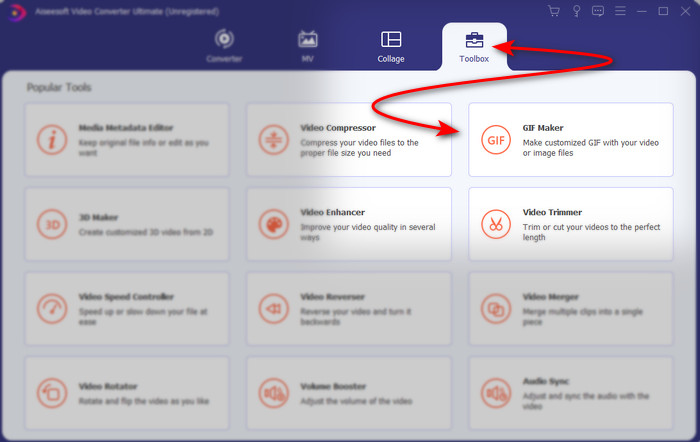
Trin 2. Åbn softwaren, og gå til Toolbox for at finde GIF Maker.
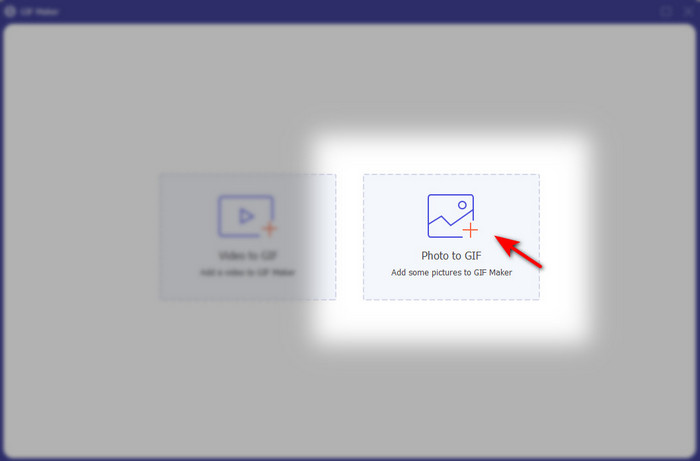
Trin 3. Klik på Photo to GIF-indstillingen, hvorefter der vises en dialogboks på skærmen. Vælg filen, og klik på Open for at indsætte den.
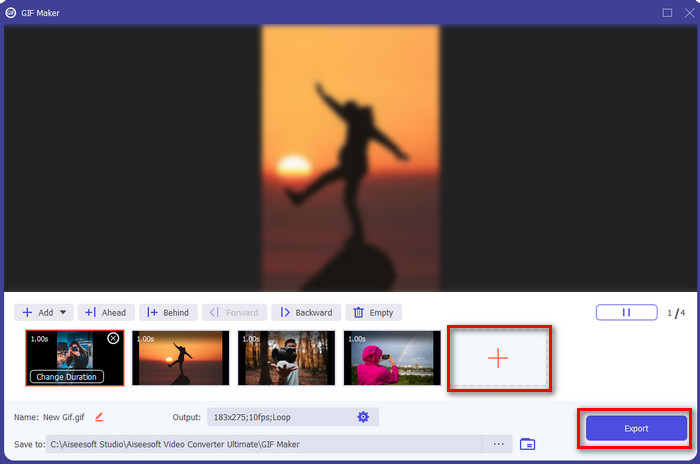
Trin 4. Klik på +-knappen for at indsætte flere billeder og lave animation ud fra fotos. Indstil derefter varigheden ved først at klikke på billedet og derefter på Change Duration button. Tryk derefter på Apply for at gemme ændringerne. For at downloade animationen skal du klikke på Generate GIF.
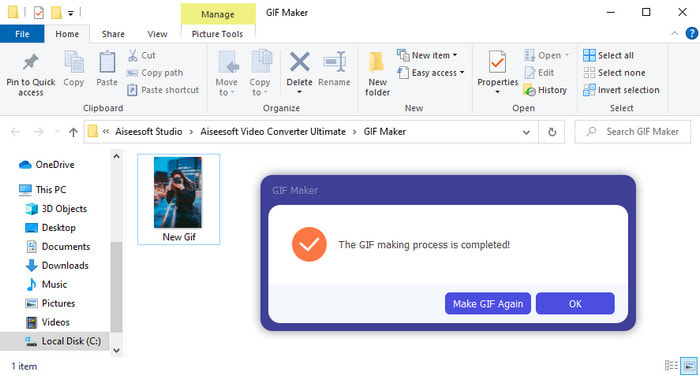
Trin 5. Når GIF’en er genereret, vises der en mappe med den animerede GIF-fil på skærmen. Klik på filen for at se den animation, du lavede tidligere.
Del 2. Top 3 Gratis Online Animeret Foto Maker
Top 1. Ezgif
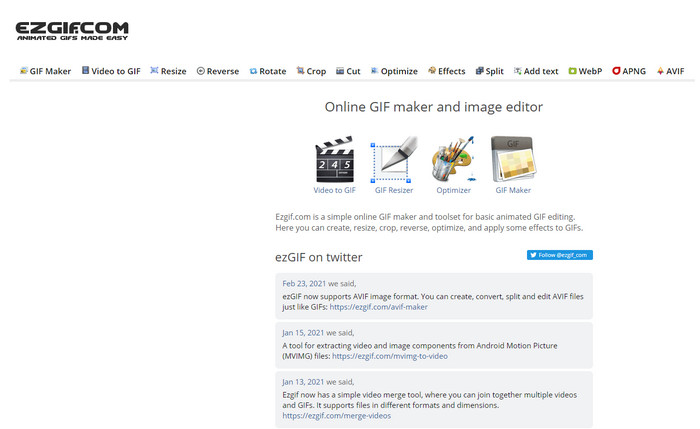
Hvis du leder efter en gratis online fotoanimationsgenerator, så er Ezgif et oplagt bud. Dette webværktøj er blandt de bedste til at lave flotte animerede billeder. Hvis du kan lide at skabe GIF’er, er der en god chance for, at du allerede har brugt dette onlineværktøj – og hvis ikke, bør du helt klart prøve det. Nogle brugere synes dog, at værktøjet mangler nogle af de mere avancerede, moderne redigeringsfunktioner, de gerne ville have. Så er du på et stramt budget, er dette et fornuftigt valg, men husk, at værktøjet ikke er det bedste valg for professionelle – til begyndere er det derimod glimrende.
Fordele
- Let at komme til og det er sikkert.
- Perfekt værktøj til begyndere, der vil prøve at lave simple GIF'er.
- Semi pro editor online værktøj.
Ulemper
- Det begrænser sin bruger til at opleve storhed.
- Internetafhængigt værktøj. Så hvis du ikke har internet, så forvent, at du ikke kan bruge dette online værktøj.
Top 2. Kapwing
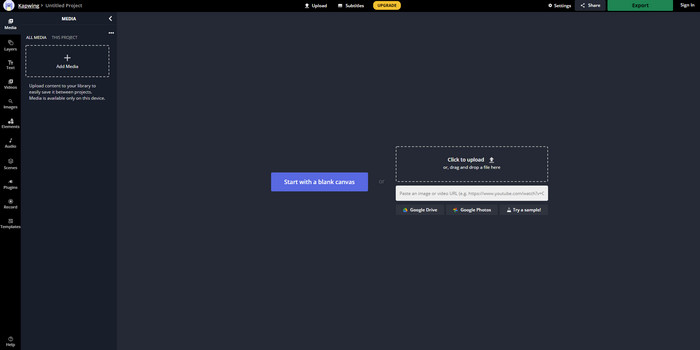
I modsætning til Ezgif er Kapwing bedst til at forbedre det visuelle udtryk i billeder. Hvis du har tænkt dig at bruge dette onlineværktøj, vil det helt sikkert hjælpe dig at lære at lave animerede GIF’er ud fra fotos. Ydelsen, tilgængeligheden og fleksibiliteten i dette onlineværktøj gør det velegnet til alle, der har bare en smule kendskab til redigering. Dog tager upload og download af billedfiler her længere tid end i andre webværktøjer. Desuden er der vandmærke på det endelige resultat, selv om du kan fjerne det ved at logge ind på værktøjet.
Fordele
- Den har en masse store redigeringsfunktioner sammenlignet med Ezgif.
- Gratis online værktøj, der kan tilgås af alle, der har internettet.
- Grænsefladen til onlineværktøjet ser elegant og pæn ud.
Ulemper
- Det endelige output vil altid have et vandmærke i nederste venstre side.
- Ikke det bedste valg for dem, der lige er begyndt at redigere GIF'er.
Top 3. GIFMaker.me
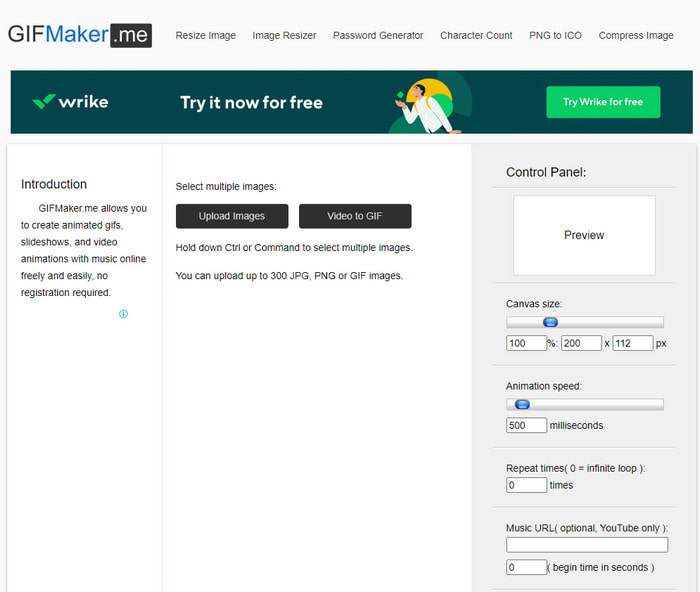
Et andet online fotoanimationsværktøj, som du kan bruge gratis, er GIFMaker.me. Dette webværktøj er meget praktisk for dem, der ikke har erfaring med at lave GIF’er. Her kan du nemlig blot indsætte en bunke billeder, og værktøjet omdanner dem til en overgangs-GIF. Dette værktøj er dog det mindst foretrukne i denne artikel, fordi det mangler redigeringsfunktioner til at lave imponerende GIF’er. Selvom det mangler redigeringsmuligheder, er det dog et godt valg, hvis du blot vil lave en billedslideshow.
Fordele
- Gratis GIF maker du kan bruge på nettet.
- Makerens grænseflade er enkel og let at forstå.
- Enkelt kontrolpanel er tilgængeligt i højre side af onlineværktøjet.
Ulemper
- Der er irriterende annoncer på webgrænsefladen.
- Den mangler de fleste af de redigeringsfunktioner, du ville elske at bruge.
Del 3. Ofte stillede spørgsmål om Photo Animation Maker
Kan jeg bruge animerede GIF'er som tapet?
Du kan ikke bruge en rå animeret GIF og bruge den som baggrund på din telefon eller computer. Du kan dog bruge et tredjepartsværktøj til at få det til at fungere. Så hvis du vil vide, hvordan du gør det, så klik på dette link for at fortsætte.
Hvorfor kan jeg ikke dele GIF'er på Instagram?
Selv om GIF’er er det mest brugte format på nettet, er der stadig nogle platforme, der ikke understøtter GIF. Instagram understøtter for eksempel kun PNG- og MP4-format. Så der er to forskellige måder at dele GIF’er på Instagram: den første er at konvertere GIF til MP4. På den anden side kan du lære forskellige metoder til at poste GIF’er på Instagram ved at klikke på disse links.
Hvad er formålet med GIF?
GIF’er er lavet til at animere billeder, men i en mindre filstørrelse end andre videoformater. Selv om de er animerede, betragtes GIF’er (Graphics Interchange Format) ikke som et egentligt videoformat. I den forbindelse kan du lære meget mere om GIF’er, hvis du klikker på og læser denne artikel grundigt.
Konklusion
For at opsummere alle oplysningerne ovenfor er det nu lettere for os begge at vide, hvilke tilgængelige animationsværktøjer vi kan bruge til at lave animation ud fra fotos. Selvom de værktøjer, der er præsenteret ovenfor, er en stor hjælp, er Video Converter Ultimate stadig den dominerende GIF-editor, du vil komme til at holde af at bruge. Den er nemlig meget nem at bruge, har en flot brugerflade, rummer alle de avancerede funktioner og mere til. Hvis du er i tvivl om dette værktøj, så prøv det selv ved først at downloade det og derefter følge trinene ovenfor.
Gratis download til Windows 7 eller nyere Sikker download
Gratis download til MacOS 10.7 eller nyere Sikker download
-
 Fantastisk GIF til videoapps til Android og iOS -enheder
 Vidste du, at du kan konvertere GIF'er til et hvilket som helst videoformat, du vil bruge din telefon? Vælg de bedste apps på din Android eller iOS.
-
 En simpel guide til, hvordan du gør din GIF til WMV på Windows/Mac
 Vil du vide, hvordan du konverterer GIF til WMV -format? Følg derefter denne artikel, da den viser forskellige løsninger, du kan vælge.
-
 TS til GIF: Sådan gør du TS -fil til animerede GIF'er
 Lær hvordan du ændrer TS -filerne til et GIF -format ved hjælp af denne opskrivning. Listen nedenfor angiver forskellige ideer om TS og GIF og hvordan man konverterer TS til GIF.
