


 Video Converter Ultimate
 Skærmoptager
 Video reparation
 Sikker download
Gennemgang af Pitch Changer på Windows, Mac, Online og telefoner
Ofte kan vi med en pitch changer hurtigt hæve eller sænke den oprindelige tonehøjde. De fleste producere bruger en pitch shifter til at tilføje melodiske effekter, så sangen bliver endnu bedre end den rå version. På den anden side koster det mange penge at købe et sæt værktøjer til at ændre tonehøjde, og det tager tid at lære at bruge dem. Dyrt og svært at forstå. I stedet for at bruge penge på sådanne sæt, hvorfor så ikke prøve software, der kan hjælpe dig med at ændre tonehøjden på den video eller lyd, du allerede har?.
Med denne anmeldelse har vi samlet fire af de bedste apps og programmer, du kan bruge til at ændre lydhøjden uden at bruge enorme penge. Fortsæt med at læse denne artikel for at vide, hvad vi taler om.

Del 1. Top 4 Pitch Changers tilgængelige på desktop, online og mobile enheder
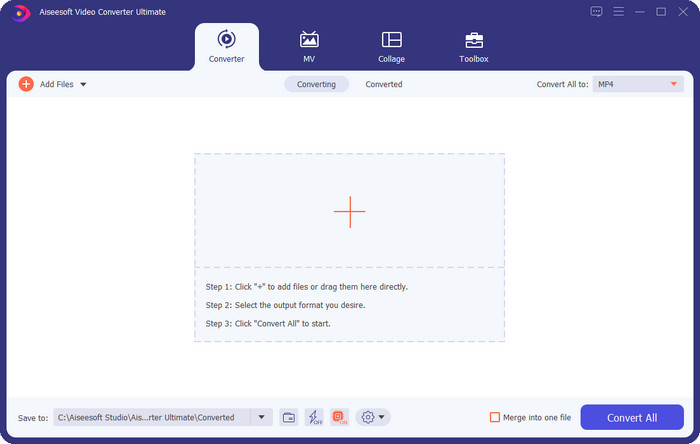
Video Converter Ultimate – Bedste Video Pitch Changer på Windows og Mac
Gratis download til Windows 7 eller nyere Sikker download
Gratis download til MacOS 10.7 eller nyere Sikker download
Tilgængeligt program: Windows og Mac
Først på vores liste er den bedste video‑pitch‑changer til Windows‑ og Mac‑operativsystemer. Video Converter Ultimate er et kraftfuldt værktøj, du kan bruge til at manipulere tonehøjden i din lyd ved at øge eller sænke hastigheden på den video, du har. I modsætning til anden software, du kan downloade til din computer, som kan gøre det samme, vil dette værktøj ikke tage meget af din tid at lære, for det er meget brugervenligt. Du kan forbedre lydens tonehøjde på under et minut, så den lyder bedre end den originale version, du har optaget.
Udover muligheden for at ændre tonehøjde, kan du også udvide lydstyrken til dets maksimale potentiale ved at bruge Volume Booster under Værktøjskassen. I denne funktion kan du hurtigt øge eller mindske amplituden eller forstærkningen af lyden i din video ved at bruge skyderne. Selvom du ikke er en producent, der gerne vil lave denne type ting, er det stadig sjovt og hurtigt gjort ved hjælp af dette ultimative værktøj, der er tilgængeligt på Windows og macOS. Så hvis du vil bruge dette ultimative værktøj, viser vi i del to, hvordan du bruger dette værktøj med detaljerede trin, som du kan følge for at afslutte det på mindre end et minut.
Vocal Remover.org
Tilgængeligt program: Online
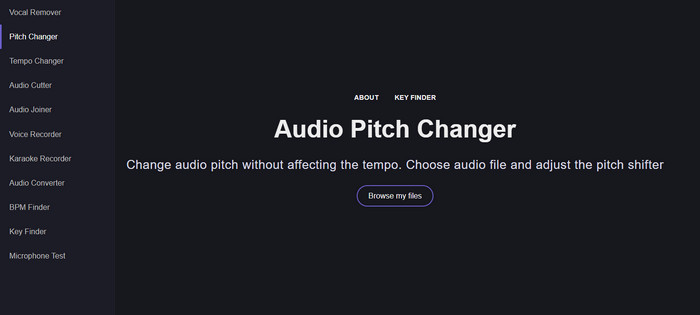
Har du brug for en pitch changer online, er der ingen tvivl om, at Vocal Remover.org er det perfekte værktøj til denne opgave. I modsætning til det første værktøj er dette bedst til lydforbedring. Med dette værktøj kan du nemt ændre lydens tonehøjde og finde ud af, hvilken toneart sangen bruger. Der er også en indikator, der kan hjælpe dig med at vælge lydens halvtoner. Du kan enten justere det manuelt eller gå et trin ad gangen ved at flytte skyderen. De fleste brugere, der allerede har prøvet det, er glade for værktøjet og tilfredse med resultatet af pitch‑effekten.
Værktøjet fungerer fint på dette, men du kan kun uploade en begrænset lydformatfil her, og videoformatet understøttes ikke. At uploade filen kan være lidt hårdt for værktøjet, for det understøtter kun nogle få lydformater. Selvom dette kan være et problem for alle, betragter vi dette stadig som et af de bedste onlineværktøjer, du kan få adgang til på nettet. Men sørg for at få adgang til den korrekte hjemmeside for at undgå komplikationer og andre problemer. Husk også at have en stabil internetforbindelse, fordi værktøjet fungerer bedst, hvis dit internet er stærkt.
Tempo op: Pitch, Speed Changer
Tilgængeligt program: Android
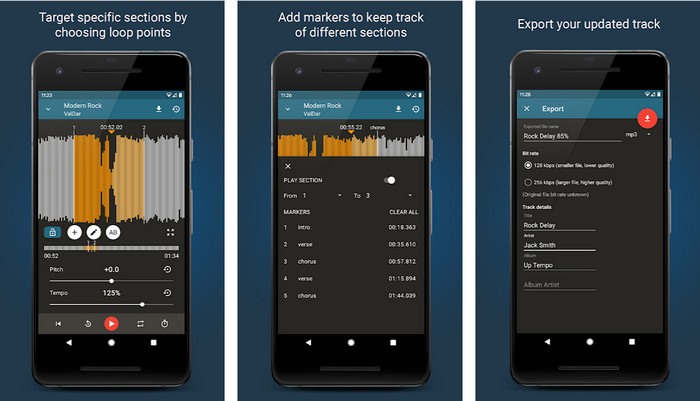
Du kan downloade denne audio‑pitch‑changer til Android‑brugere, så du kan udføre opgaven, selv om du ikke har en computer ved hånden. Med Up Tempo: Pitch, Speed Changer er arbejdet med at ændre afspilningshastighed og tonehøjde blevet hurtigt og muligt for alle at håndtere. Dets brugerflade understøtter bølgeformvisning, som kan hjælpe dig med at se, hvilken del du vil forbedre eller ændre. Ligesom onlineværktøjet kan denne app håndtere musik, men den er også praktisk at have, når du får brug for den.
Selvom appen er gratis at downloade, er der ting du skal overveje, hvis du vil bruge denne app. De fleste brugere oplever, at appen ikke kan registrere de nye lydfiler, der er downloadet på din telefon. Hvis du støder på dette problem, understøtter den muligvis ikke lydfilen i denne app, eller der kan opstå en fejl. Ikke desto mindre, hvis du har en Android-telefon ved hånden, skal du downloade denne app for at prøve at se, om det er appen til at løse problemet.
TimePitch-Pitch, Speed Changer 4+
Tilgængeligt program: iOS
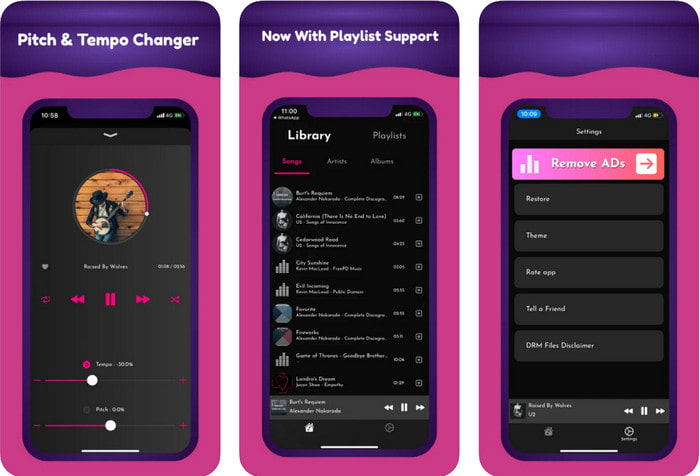
Hvis du er iOS‑bruger, bør du vide, at denne pitch‑changer‑app kan give dig en løsning på dette problem. TimePitch‑Pitch, Speed Changer 4+ er en musikafspiller, et bibliotek og en changer, du kan bruge på din iOS‑enhed, når du har brug for det. Denne app fungerer anderledes end de andre, fordi du kan ændre tonehøjden på den lyd, du lytter til, i realtid, hvilket betyder, at ændringen ikke gemmes, når du justerer den. Men det kan være en styrke ved appen, for du behøver ikke at vente på, at den behandler filen; ved blot at justere kan du nemt ændre tonehøjden, så den passer til din smag.
Dette kunne dog også være dens svaghed; hvis du overfører filen til andre enheder, vil den tonehøjde, du har ændret ved hjælp af denne app, ikke gælde for modtageren. Du skal også huske, at hvis du køber musikken på iTunes eller Apple Music, kan du ikke bruge denne app til at ændre tonehøjden. Hvorfor? Fordi de beskyttede filer ikke tillader nogen tredjepartsapp som denne at have adgang til filen. Uanset upload af musikfilen inkluderer vi stadig denne app i denne artikel, fordi den fungerer bedst på alle iOS-enheder.
Del 2. Sådan ændres tonehøjden for en video ved hjælp af Ultimate Pitch Changer-softwaren
Følg trinene nedenfor for at vide, hvordan du bruger denne musik-pitch- og hastighedsskifter, du kan have på dit skrivebord. Så fortsæt med at læse følgende detaljer, hvis du har brug for en enkel, men effektiv tutorial om at bruge den ultimative software.
Trin 1. Tryk på download‑knappen for at få den ultimative software på din computer, og vælg, om du bruger Windows eller Mac. Vent på, at downloadprocessen bliver færdig, klik derefter på filen, du har hentet, og installer den. Når hele opsætnings‑ og installationsprocessen er gennemført, skal du starte softwaren for at begynde at bruge dette ultimative værktøj.
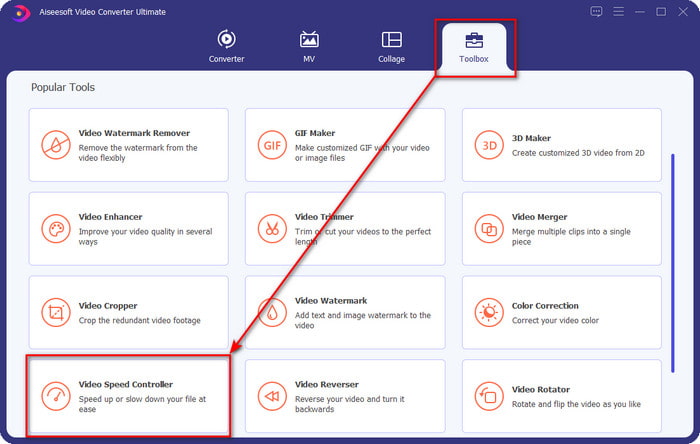
Trin 2. Åbn menuen Værktøjskasse, og find Video Speed Controller under den; klik på den for at åbne den. Rul ned til funktionerne, som ligger nær bunden.
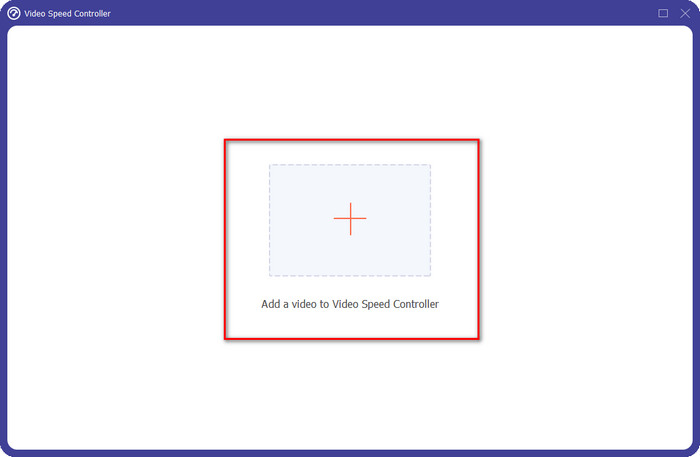
Trin 3. Et nyt mini‑vindue vises på skærmen; klik på +-knappen, find den videofil, du vil ændre tonehøjden på, og klik derefter på Åbn for at uploade videofilen.
Trin 4. Her kan du nu ændre lydhastigheden. Du vil bemærke, at tonehøjden i lyden også ændrer sig, når du justerer hastigheden. Du kan automatisk høre og se forhåndsvisningen på forhåndsvisningsskærmen.
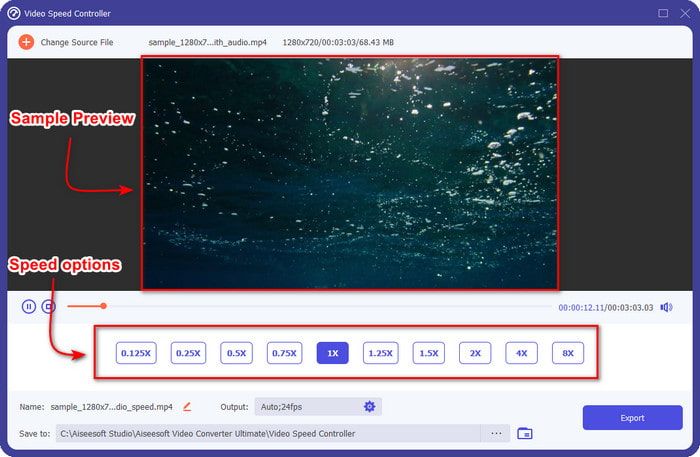
Du kan kun afspille forhåndsvisningen af videoen under 2x hastighed; du vil bemærke, at 4x og 8x ikke giver dig mulighed for at forhåndsvise videoen for at undgå konflikt, men det vil ikke forringe kvaliteten af videoen og lyden.
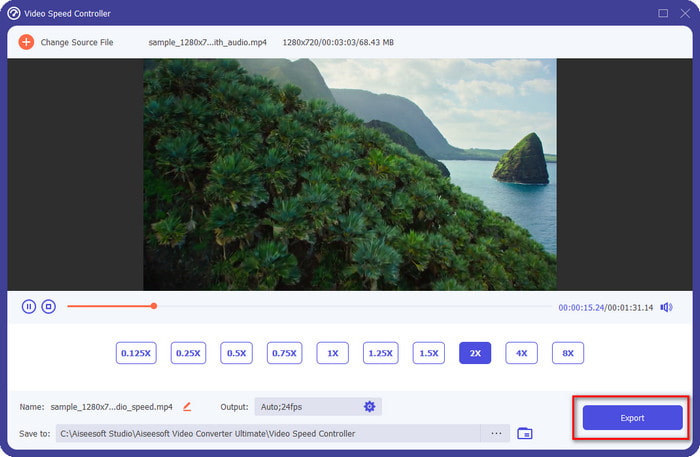
Trin 5. Hvis du er tilfreds med den tonehøjde, du har opnået, skal du nu klikke på knappen Eksportér. Nemt, er det ikke? Med hjælp fra sådan en software kan du hurtigt løse forskellige video‑ og lydproblemer på få minutter.
Relateret:
Sådan speeder du video op online
Sådan speeder du MP4‑videoer op
Del 3. Ofte stillede spørgsmål om Pitch Changer
Hvad er pitch?
Den evaluerer den kvalitet, der giver genlyd med din lyd, ved at måle dem i rækkevidde, uanset om de er højere eller lavere. Det er en lydbølge beslægtet med frekvens, men de er ikke ens.
Hvor højt kan et menneskes tonehøjde høre?
Jo lavere Hz, du kan stadig høre det bevidst, men nogle få mennesker hører det kun, når Hz bliver højt. Ifølge forskere kan alle lytte til en 8000 Hz, og hvis du kan høre 12.000 Hz, så er dine ører lige så gode som folk under 50 år. Og under 40 kan du stadig høre en 15.000 Hz, men for under 30 år gammel, 16.000 Hz, du kan stadig lytte til den. For hver 25 år og derunder kan du stadig høre 17.000 Hz, og for under 20 kan du høre 20.000 Hz. Jo ældre vi bliver, bliver den tonehøjde, vi hører, fra tid til anden mindre effektiv. Så hvis du ikke kan høre den frekvens, vi nævner, skal du søge læge for at tjekke, om der er et problem.
Hvordan kan vi beregne tonehøjden?
Tonehøjdeområdet bruger oktaver til at beregne, hvilket gør det muligt for sangeren og instrumentalen at afgøre, om det er den rigtige tonehøjde på sangen. Med vibrationen kan du mærke den høje og lave frekvens, som en lydbølge opbygger.
Konklusion
Med video‑ og stemme‑pitch‑changerne ovenfor kan vi nu nemt justere tonehøjden på den lyd, vi har ved hånden. I stedet for at købe særlig hardware til opgaven kan du bruge softwaren ovenfor. Selvom de adskiller sig i funktioner og egenskaber, kan vi stadig se, hvad der gør hver af dem god på sin egen måde. Men hvis du bruger en computer, bør du downloade Video Converter Ultimate til din desktop, for dette værktøj hjælper dig med at ændre tonehøjden og lave andre magiske ting, der gør din video og lyd endnu bedre. Vil du vide, hvad det er for magiske funktioner, værktøjet har? Så download det med det samme ved at klikke på download‑knappen ovenfor.
-
 3 måder at fremskynde video på iPhone [Bevist]
 Har du problemer med at justere afspilningshastigheden på din video, fordi du bruger en iPhone? Dette er en fremragende artikel til at hjælpe dig med dit problem.
-
 Windows Media Player | Lær hvordan du fremskynder videoer [Bevist]
 Du vil sænke dit videoklip ved hjælp af din Windows Media Player, men du har problemer med, hvordan du gør det? Denne artikel er ideel til læsning og kan oplyse dit synspunkt om, hvordan du kan fremskynde videoer ved hjælp af Windows Media Player.
-
 Sådan ændres slowmotion-video til normal hastighed [Easy Steps]
 Vil du vide, hvordan du gendanne en slowmotion-video, du har downloadet fra internettet eller ved et uheld optaget i slowmotion? Lær, hvordan du konverterer slowmotion-video til normal hastighed på Mac, Windows, iOS og Android.
