


 Video Converter Ultimate
 Skærmoptager
 Video reparation
 Sikker download
Uudfordrende metoder til, hvordan man fjerner iSkysoft-logoet fra video
iSkysoft er et fremragende program med mange fantastiske funktioner, som får det til at skille sig ud fra andre programmer. Det er et enkelt program, der lader dig konvertere videoformat til et andet format og udføre grundlæggende videoredigering. Den tristeste del ved denne software er dog, at du får et stort iSkysoft-vandmærke på dine videoer, efter du har brugt programmet. At have et stort vandmærke/logo på din video er slet ikke tilfredsstillende at se på. Heldigvis findes der pålidelige programmer, du kan bruge til at fjerne forstyrrende elementer som iSkysoft-logoet/vandmærket. Du bør læse dette indlæg, hvis du er ivrig efter at finde de bedste metoder til at fjerne iSkysoft-logoet fra din video.

Del 1: Fjern iSkysoft-logoet fra video på skrivebordet
iSkysoft-logoet på skærmen er virkelig irriterende, især når du ser dine yndlingsvideoer. Men du behøver ikke bekymre dig længere. Du kan slippe af med logoet ved hjælp af Video Converter Ultimate. Denne pålidelige software kan hjælpe dig med at fjerne iSkysoft-logoet fra dine videoer på to nemme måder: værktøjet Video Watermark Remover og værktøjet Video Cropper. Med disse værktøjer kan du nemt fjerne iSkysoft-logoet fra din video. Hvis et iSkysoft-logo sidder i hjørnet af din video, anbefales det at bruge værktøjet Video Cropper. Men hvis logoet er placeret midt i billedet, kan du bruge værktøjet Video Watermark Remover. På den måde kan du se dine yndlingsfilm eller -videoer uden at blive irriteret over logoet.
Udover at fjerne vandmærker fra dine videoer, har Video Converter Ultimate desuden flere funktioner. Den har en videoforstærker, videofusion, cropper, trimmer, rotator, konverter og mere. Derudover er en af hovedfunktionerne i denne applikation at konvertere forskellige videofilformater. Ikke-professionelle brugere kan også bruge denne applikation, fordi den har en enkel grænseflade. Hvis du ønsker at lære, hvordan du fjerner iSkysoft-logoet fra din video, vil vi vise dig de to nemme måder, som denne applikation tilbyder.
Brug af Video Watermark Remover
Trin 1: Du skal først downloade Video Converter Ultimate på din computer for at bruge denne fremragende software. Når du har downloadet den, skal du følge installationsprocessen og starte programmet.
Gratis download til Windows 7 eller nyere Sikker download
Gratis download til MacOS 10.7 eller nyere Sikker download
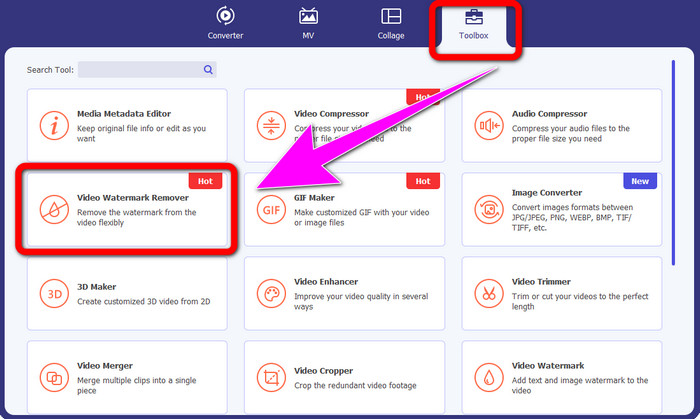
Trin 2: Når du allerede har åbnet softwaren, skal du gå til panelet Toolbox og vælge værktøjet Video Watermark Remover. Forvent, at der dukker et nyt vindue op på skærmen.
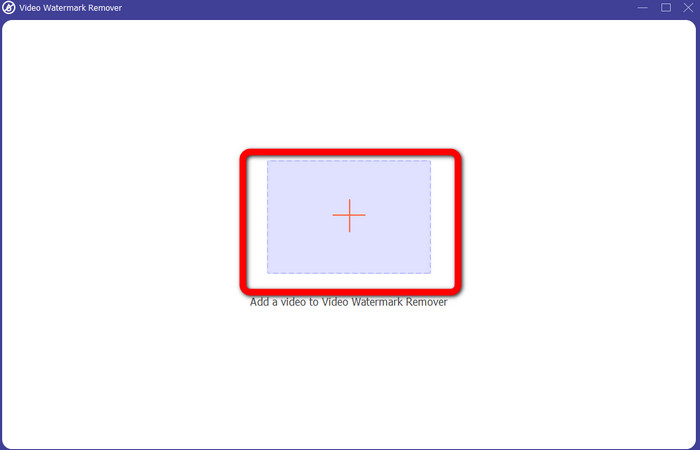
Trin 3: Når du ser det nye vindue, skal du klikke på plus-ikonet og tilføje din video med iSkysoft-logoet, du vil fjerne.
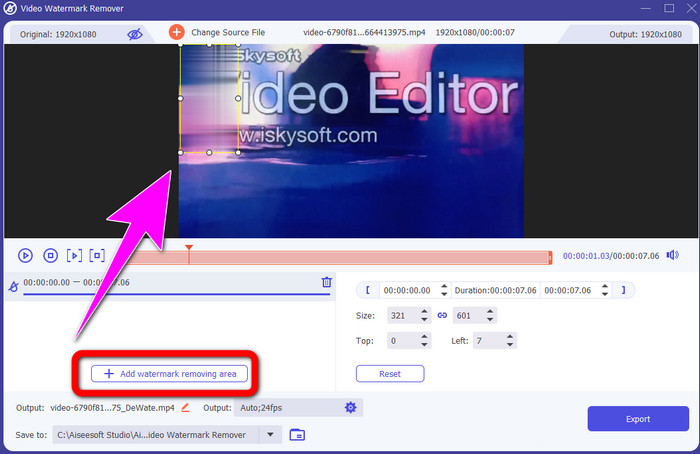
Trin 4: Klik derefter på knappen Add Watermark Removing Area. Flyt boksen hen over din video og dæk iSkysoft-logoet.
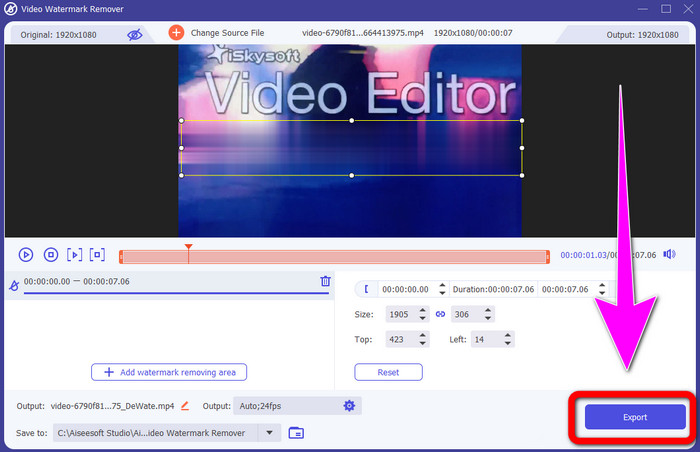
Trin 5: Klik til sidst på knappen Export for at gemme din færdige video.
Brug af Video Cropper
I denne del vil vi vise dig, hvordan du fjerner iSkysoft-logoet fra din video ved hjælp af Video Cropper-værktøjet.
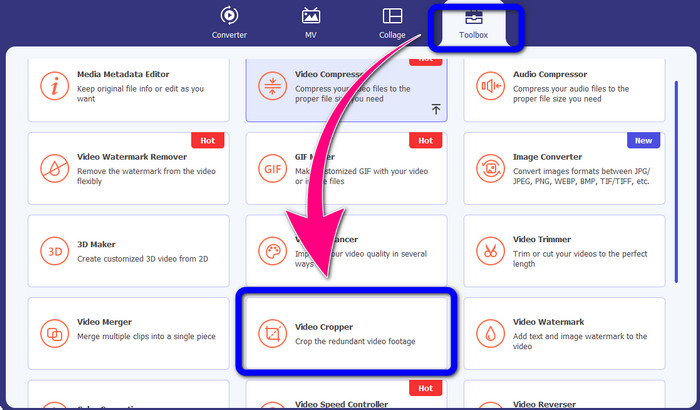
Trin 1: Kør programmet på din computer. Under panelet Toolbox skal du klikke på værktøjet Video Cropper. Ligesom med værktøjet ovenfor kan du forvente, at der vises et nyt vindue på skærmen.
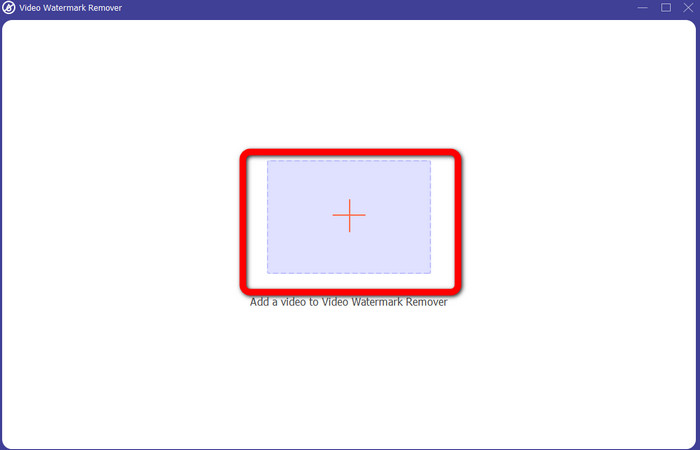
Trin 2: Klik på knappen Plus for at importere din video med iSkysoft-logoet.
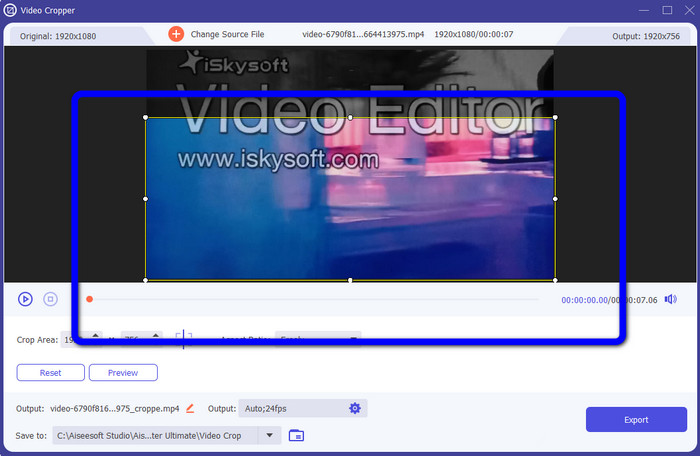
Trin 3: I denne del kan du nu beskære videoen for at fjerne iSkysoft-logoet fra din video. Brug musen til at flytte kanten af videoen.
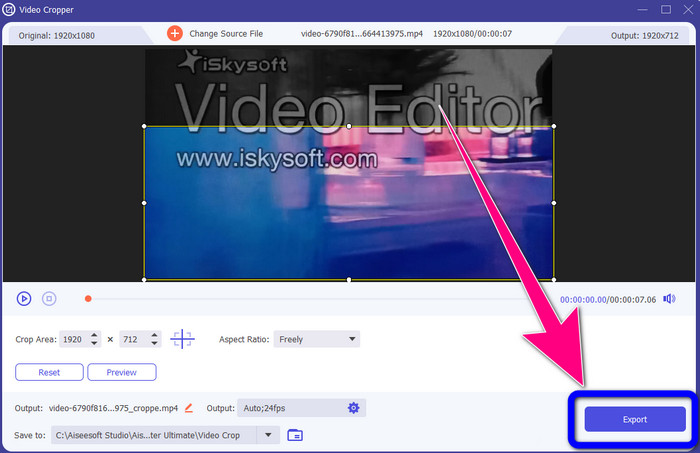
Trin 4: Som sidste trin skal du klikke på knappen Export og gemme dit resultat på computeren.
Del 2: Sådan fjerner du iSkysoft-logoet fra video online
Brug af HitPaw
Du kan også fjerne iSkysoft-logoet online. Et af de bedste værktøjer, du kan bruge, er HitPaw. Denne onlineapplikation kan nemt fjerne logoet fra din video. Du kan bruge den både på desktop og online, hvilket er praktisk for alle. Desuden er HitPaw sikker at bruge. Den sikrer, at videoer kun kan redigeres og ses af dig selv. Derudover behøver du ikke bekymre dig om begrænsninger i denne software. Der er ingen begrænsninger med hensyn til at fjerne logoer fra dine videoer. Du behøver ikke købe denne applikation, fordi den er gratis. Men hvis du fjerner logoet eller et hvilket som helst
unødvendige elementer fra din video, skal du vente lidt længere. Denne applikation har en langsom fjernelsesprocedure, som er tidskrævende for brugerne. Det afhænger også af din internetforbindelse. Det vil fungere godt, hvis du har en hurtig forbindelse. Men hvis du har en langsom forbindelse, så forvent en forsinkelse. Følg de enkle trin nedenfor for at fjerne iSkysoft-logoet fra dine videoer.
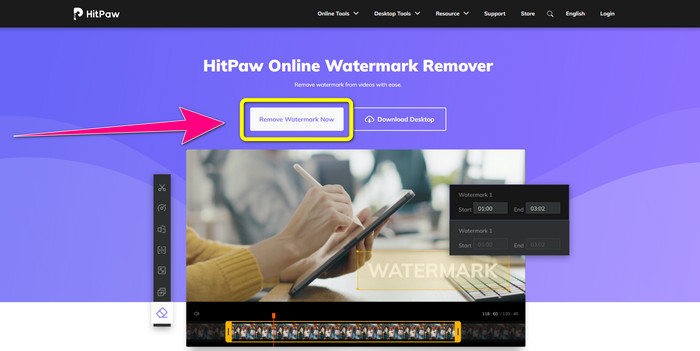
Trin 1: Gå ind på HitPaw-websitet. Klik på knappen Remove Watermark Now - Choose File for at indsætte din video med iSkysoft-logoet, du vil fjerne.
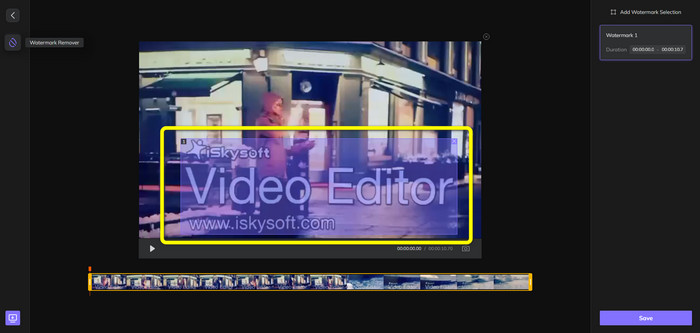
Trin 2: Når du har tilføjet din videofil, vises en blå boks på skærmen. Brug denne boks til at dække iSkysoft-logoet. Du kan ændre størrelsen på boksen.
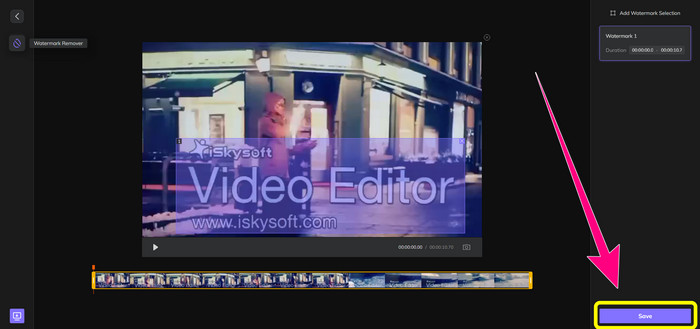
Trin 3: Når du er færdig med at dække iSkysoft-logoet i din video, skal du klikke på knappen Save. Vent på fjernelsesprocessen, og gem derefter din video.
Brug af Video Watermark Remover Online
Et andet onlineværktøj, du kan bruge, er Video Watermark Remover Online. Med denne applikation kan du fjerne iSkysoft-logoet fra dine videoer. Det er også et brugervenligt program, som er velegnet til ikke-professionelle brugere. Du kan også fjerne alle irriterende elementer fra dine videoer uden at miste videokvaliteten. Men når du bruger gratisversionen, er der en begrænsning på, hvor mange logoer du kan fjerne fra dine videoer. Du kan kun fjerne logoer eller vandmærker fra 5 videoer. Du skal købe et abonnement, hvis du vil tilføje flere videoer med Video Watermark Remover Online. Du kan heller ikke gemme dit resultat i et andet format. Du kan kun gemme det i samme format, hvilket ikke er optimalt. Endelig har det en langsom filbehandling. Følg de enkle vejledninger nedenfor for at fjerne iSkysoft-logoet fra dine videoer.
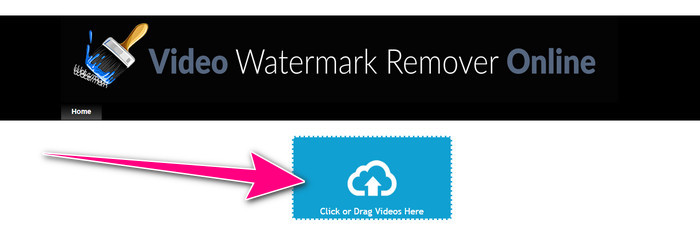
Trin 1: Gå til websiden for Video Watermark Remover Online. Vælg knappen Click or Drag Videos Here for at importere din videofil med iSkysoft-logoet, du vil fjerne.
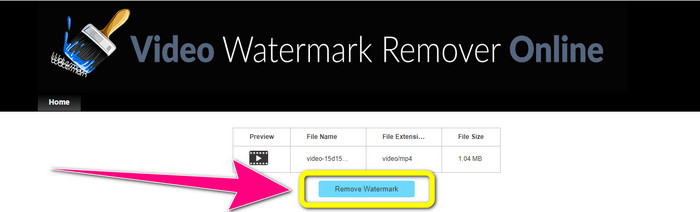
Trin 2: Klik derefter på knappen Remove Watermark og vent på fjernelsesprocessen.
Relateret til:
Hurtigste måde at fjerne logo fra video i Adobe Premiere Pro
Sådan fjerner du logo fra en video med Windows Movie Maker
Del 3: Ofte stillede spørgsmål om fjernelse af iSkysoft-logoet
Kan du fjerne et logo fra et billede?
Ja, du kan bruge FVC Free Watermark Remover til nemt og hurtigt at fjerne logoet fra dit billede.
Er det ulovligt at fjerne vandmærket?
Ifølge US Copyright Act, paragraf 1202, er det ulovligt at fjerne vandmærker uden ejerens tilladelse.
Hvordan fjerner jeg logoet gratis?
Du kan bruge den gratis prøveversion af Video Converter Ultimate til at fjerne et logo fra din video gratis.
Konklusion
Denne artikel gav fremragende metoder til at fjerne iSkysoft-logoet fra din video ved hjælp af værktøjer til både desktop og online. Men hvis du vil finde en fremragende logofjerner, du kan bruge, kan du downloade Video Converter Ultimate. Denne applikation tilbyder en hurtig fjernelsesproces. Den er også tilgængelig for alle brugere.
-
 8 fremragende videovandmærkefjernere online og offline
 Hvis du leder efter den bedste gratis software til fjernelse af videovandmærke, du kan bruge på dine Windows-, Mac-, iPhone- og Android-telefoner, er denne artikel til dig
-
 Bedste metoder til, hvordan man fjerner bideligt vandmærke fra video
 Denne artikel vil vise dig en mest pålidelig og fantastisk bidedygtig vandmærkefjerner. Disse vidunderlige applikationer vil hjælpe dig med at løse denne form for problem
-
 Procedurer, der er nemme at lære for at fjerne logo fra video
 Leder du efter den bedste og nemme fjernelse af videologo? Så er denne artikel god for dig. Benyt lejligheden til at lære om fjernelse af et logo fra en video.
