


 Video Converter Ultimate
 Skærmoptager
 Video reparation
Sådan fjerner du vandmærke fra videoer hurtigt
Har du brug for på en nem måde at fjerne et vandmærke fra en video? Så skal du bruge det rette værktøj. For eksempel vil brugere ofte fjerne en vandmærketekst eller et logo for at kunne se en video i fuldt omfang. Denne opgave er dog kompliceret for nogle redigeringsprogrammer, fordi ikke alle tilbyder en effektiv vandmærkefjerner i deres værktøjssæt. Ideelt set skal du købe et dyrt redigeringsprogram til denne opgave, og alligevel leverer de ikke altid gode resultater. Men i dag præsenterer vi den bedste løsning på dit problem, uanset om du bruger en computer eller en iOS‑enhed. Desuden er al den software, vi anbefaler, omhyggeligt udvalgt. Så uden videre, lad os dykke ned i denne artikel og se, hvordan man fjerner vandmærket fra en hvilken som helst video.

Del 1. Ultimativ løsning til at fjerne vandmærke fra alle videoer på Windows og Mac
At lære at fjerne et vandmærke fra en video er en enkel opgave med den bedste videoredigerer, Video Converter Ultimate. Du behøver ikke have stor erfaring med redigering, fordi dette værktøj har en interaktiv og letforståelig brugerflade. Derudover tilbyder det også adskillige avancerede funktioner, du kan bruge, såsom sammenfletning, klipning, farvekorrektion, omvendt afspilning, forbedring og meget mere.
Hvad angår i dag, har mange brugere allerede downloadet dette værktøj, og alle er tilfredse, fordi de gjorde det. Imponerende ikke? Vil du prøve at bruge dette værktøj? I så fald, lad os tjekke nedenstående trin og se, om dette værktøj er den bedste løsning på vores problem på vandmærket.

FVC Video Converter Ultimate
5.689.200+ downloads- Det er det bedste valg for alle, der ønsker at fjerne deres vandmærke på alle videoer.
- Dette ultimative værktøj er det eneste, der fungerer som en konverter, cropper, fusion, cutter.
- Tilgængelig på alle desktopplatforme til downloads, såsom Windows og Mac.
- Det er nemt at bruge, men det er det mest udvalgte angående problemet på deres video.
Gratis download til Windows 7 eller nyere Sikker download
Gratis download til MacOS 10.7 eller nyere Sikker download
Trin 1. Download dette ultimative værktøj på din computer, og vælg om du bruger Windows eller Mac. Når downloadprocessen er færdig, følger du installationsprocessen og klikker på Start Now for at køre programmet på dit system.
Gratis download til Windows 7 eller nyere Sikker download
Gratis download til MacOS 10.7 eller nyere Sikker download
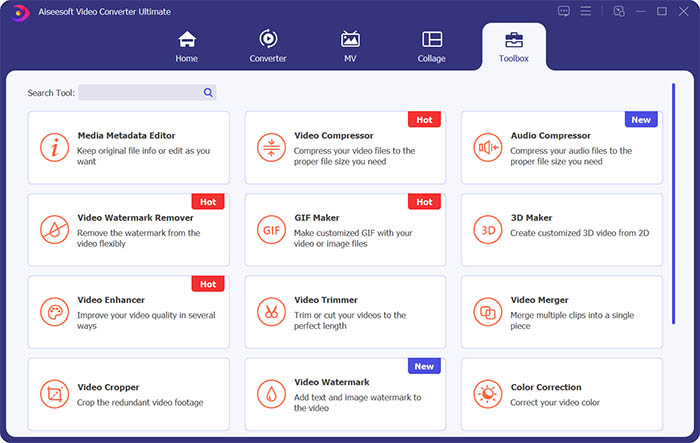
Trin 2. Gå til sektionen Toolbox, og klik på Video Watermark Remover for at fjerne vandmærket fra videoen.
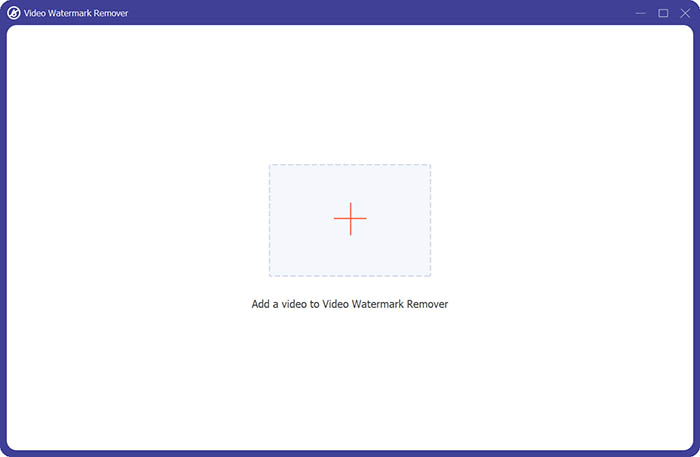
Trin 3. Klik derefter på plus‑tegnet i midten for at importere den video, du vil fjerne vandmærket fra.
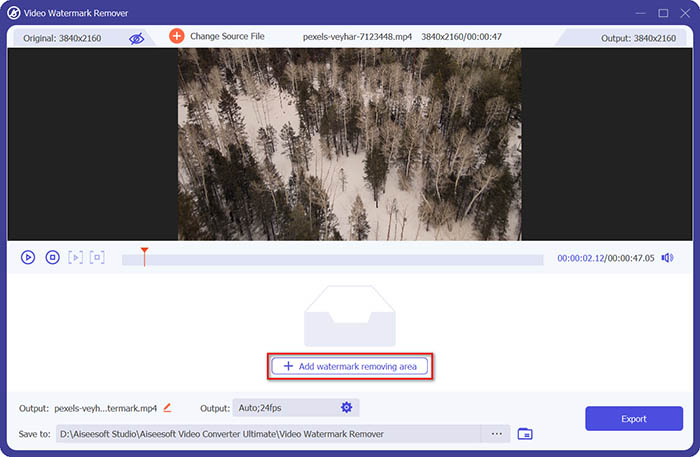
Trin 4. Når du har tilføjet videoen i vandmærkefjerneren, skal du klikke på knappen Add watermark removing area for at vælge området med vandmærket.
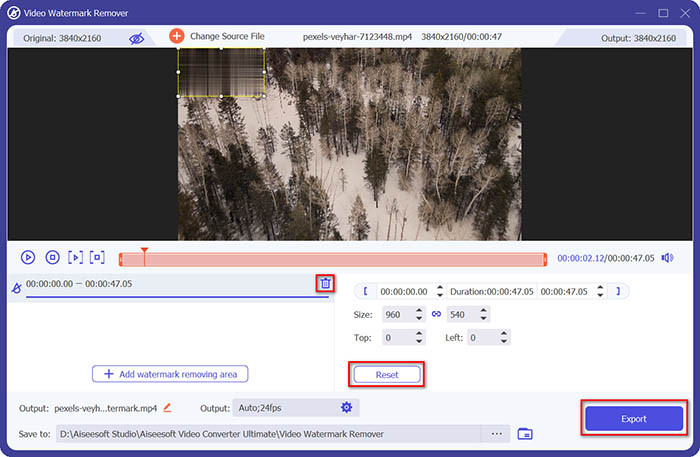
Trin 5. Til sidst kan du klikke på knappen Export for at få videoen uden vandmærket.
Del 2. Sådan fjerner du vandmærket fra enhver video på iPhone
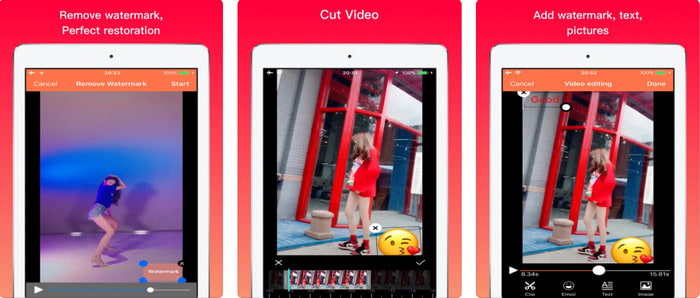
Video Eraser - Remove Logo 4+ har allerede hjulpet mange iOS‑brugere med deres problemer i forhold til vandmærker. Denne app er gratis at downloade i App Store, men den tilbyder også køb i appen til at opgradere til pro‑versionen. Selvom værktøjet giver en effektiv måde at fjerne vandmærker på, opstår der stadig nogle problemer, for eksempel bliver videokvaliteten ikke den samme, når du eksporterer den herfra. Vandmærket bliver sløret i stedet for helt fjernet. Derudover kan det være et problem at uploade filen hertil, fordi det tager lang tid, selv om videoen er under 30 sekunder. Men hvis du vil lære, hvordan man fjerner vandmærke fra video på iPhone, skal du følge trinene herunder.
Trin 1. Download værktøjet i App Store, åbn det, og tryk på + for at importere videoen med vandmærke.
Trin 2. Klik på knappen information, og klik på Remove Watermark, tryk på vandmærket, og tryk derefter på Start.
Trin 3. Når processen er færdig, er vandmærket fjernet fra videoen.
Del 3. Sådan slipper du af med vandmærket på alle videoer på nettet
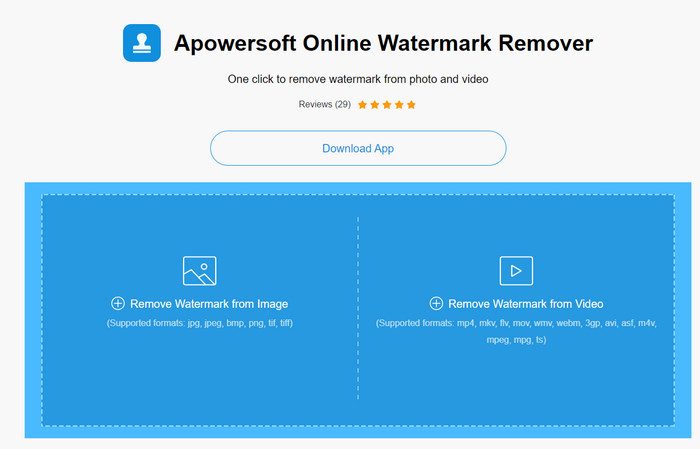
Apowersoft Online Watermark Remover er et gratis og tilgængeligt webværktøj, du kan bruge til at fjerne vandmærker. Dette online‑værktøj giver en effektiv måde at fjerne vandmærker på, selvom du ikke downloader noget, fordi det er webbaseret. Selv om det er en effektiv vandmærkefjerner, har du brug for en stabil internetforbindelse for at gennemføre processen, ellers bliver du nødt til at starte forfra. Så hvis du har et stramt budget og vil lære, hvordan man fjerner vandmærke fra video online, er dette værktøjet for dig.
Trin 1. Søg efter Apowersoft Online Watermark Remover i din foretrukne webbrowser, og åbn det.
Trin 2. Tryk på Remove Watermark from Video for at uploade filen med vandmærke på. Vent, mens uploadprocessen gennemføres.
Trin 3. På videoen skal du holde venstreklik med musen nede og trække hen over vandmærket; når det er inden for den stiplede linje, kan du slippe. Tryk på Erase for at starte fjernelsesprocessen, og klik på Download for at gemme den på din computer.
Del 4. Ofte stillede spørgsmål om fjernelse af vandmærker fra videoer
Hvorfor skal jeg slippe af med vandmærket på videoen?
Vi er nødt til at fjerne det irriterende vandmærke for at nyde videoen som en hel oplevelse. Det gælder kun til personlig brug, men det kan være en konsekvens, hvis du bruger det til at drage fordel af, hvis du lægger det ud på nettet og tjener på den andens arbejde.
Hvad er de andre måder at fjerne vandmærker på?
Du kan dække over vandmærket eller erstatte det med dit vandmærke, hvis du vil. Denne proces er overlejrende; det fungerer kun bedst, hvis vandmærket er lille eller på siden af videoen. Eller du kan klippe videoen med et vandmærke på den og derefter flette den med den anden video. Denne skæreproces fungerer kun bedst, hvis vandmærket er pop-up. Der er to forskellige måder at fjerne vandmærker på: sløring og beskæring af videoen. Disse to arbejder med de værktøjer, vi præsenterede ovenfor.
Hvordan tilføjer man et vandmærke i Photoshop?
Hvis du vil tilføje et vandmærke i Photoshop, skal du klikke på dette link og læse det grundigt for at få hele ideen.
Konklusion
Med de værktøjer, der er præsenteret i denne artikel, kan du nemt fjerne vandmærket fra videoen gratis, eller du kan bruge det ultimative værktøj og købe det. Selvom vandmærkefjernerne i denne artikel er nemme at bruge, mener vi stadig, at Video Converter Ultimate tilbyder den mest enkle, men samtidig mest effektive brugerflade. Så hvis du vil have det, kan du klikke på downloadknappen ovenfor for at prøve det af og se, om det passer til dine behov.
-
 Top 2 måder at konvertere DivX til MKV-format [Løst]
 Hvorfor skal jeg konvertere DivX til MKV? Hvilke konvertere kan jeg bruge? Har du samme tanke? Så vil denne artikel hjælpe dig med at vide mere om DivX og MKV.
-
 2 ultimative MPG-konvertere til at konvertere MPG til WMV gratis
 Vil du konvertere MPG til WMV gratis? I så fald er du heldig, fordi vi fandt ud af, at der er to værktøjer, du kan bruge til at konvertere dine MPG-filer.
-
 Sådan ændres iTunes M4V til MKV på Mac og Windows [hurtigste måde]
 Hvis du har brug for at konvertere M4V til MKV på Mac, skal du læse denne artikel. Da vi giver fakta om konverterne, der vil hjælpe dig med din konverteringsproces.
