


 Video Converter Ultimate
 Skærmoptager
 Video reparation
 Sikker download
Bedste metoder til, hvordan man fjerner VideoScribe-logo fra en video
Ønsker du at lære, hvordan du fjerner VideoScribe-logoet fra dine videoer? Der er situationer, hvor du støder på et logo i dine videoer. Du kan ikke undgå det, især når ejeren vil beskytte sine videoer og promovere sit brand. Du kan også støde på et logo, når du bruger gratisversionen af et bestemt program. Det bedste eksempel er VideoScribe-applikationen. Hvis du bruger gratisversionen af dette program, vil din video få et VideoScribe-logo, medmindre du køber programmet. Men før du gør det, kan du bruge andre gratis programmer til at fjerne logoet fra dine videoer. Du bør læse denne artikel for at finde ud af, hvordan du fjerner et logo uden at købe noget.

Del 1: Sådan fjerner du VideScribe-logoet fra video offline
Hvis du vil fjerne et VideoScribe-logo fra dine videoer offline, kan du bruge Video Converter Ultimate. Dette program kan hjælpe dig med nemt og hurtigt at fjerne VideoScribe-logoet fra dine videoer. Du kan også bruge softwaren til at redigere videoer uden kvalitetstab. Derudover har den en enkel brugerflade, der giver uddata i høj kvalitet. Video Converter Ultimate fås både til Mac og Windows. Selvom den har mange funktioner, er den stadig god til begyndere. Dette program understøtter mange filformater som FLV, MOV, MP4, MTS, DivX, XviD og mange flere. Derudover har programmet mange redigeringsværktøjer, du kan bruge til at forbedre dine videoer, som f.eks. forbedring, trimning, beskæring, farvekorrektion, rotation af videoer og meget mere. Video Converter Ultimate kan også give dig to måder at fjerne VideoScribe-logoet fra dine videoer på.
Brug af Video Watermark Remover
Trin 1: Klik på download-knappen nedenfor for at downloade Video Converter Ultimate på din Windows eller Mac. Installer derefter softwaren på din enhed, og kør programmet.
Gratis download til Windows 7 eller nyere Sikker download
Gratis download til MacOS 10.7 eller nyere Sikker download
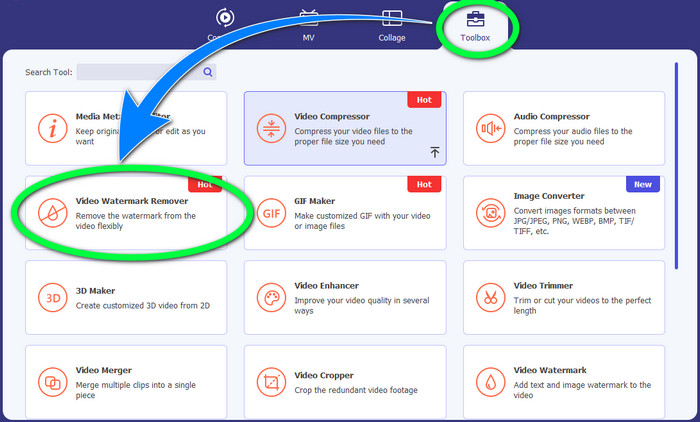
Trin 2: Gå derefter videre til panelet Værktøjskasse, og klik på knappen Video Watermark Remover. Et nyt vindue dukker op på skærmen.
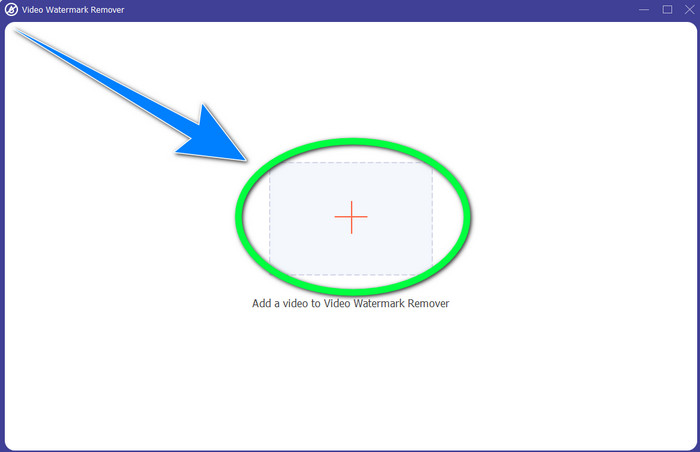
Trin 3: Klik på +-knappen for at importere videofilen med det VideoScribe-logo, du vil fjerne.
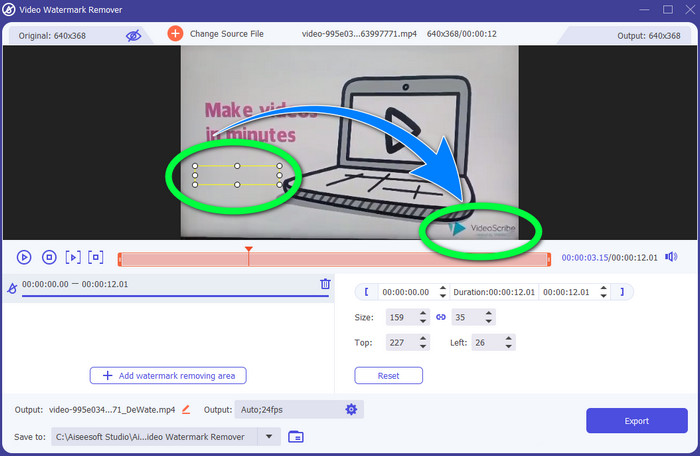
Trin 4: Når du er færdig med at importere videoen, skal du klikke på Add Watermark Removing Area og placere den lille markeringsboks over logoet. Du kan justere størrelsen på boksen.
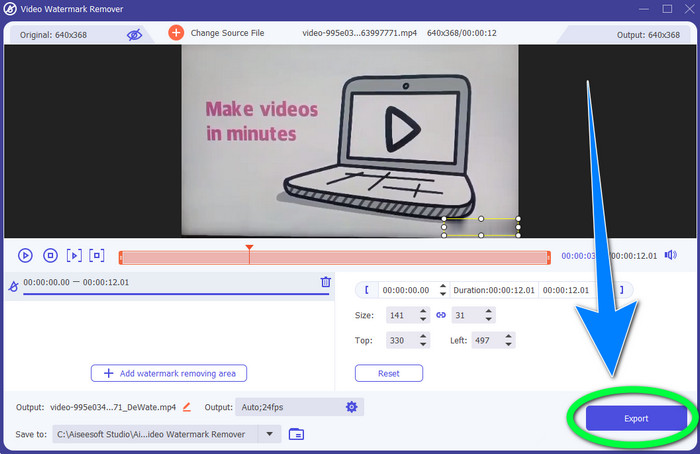
Trin 5: Som sidste trin kan du klikke på knappen Export, så du kan gemme videoen uden logoet.
Brug af videobeskæringsfunktionen
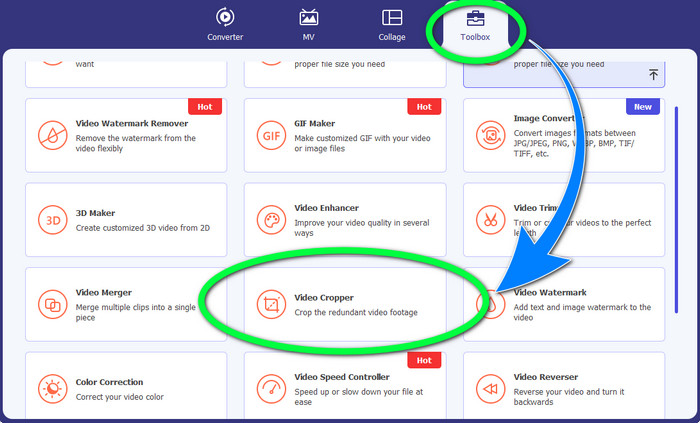
Trin 1: Beskæringsværktøjet er en anden måde at fjerne VideoScribe-logoet på. Under Værktøjskasse skal du klikke på knappen Video Cropper.
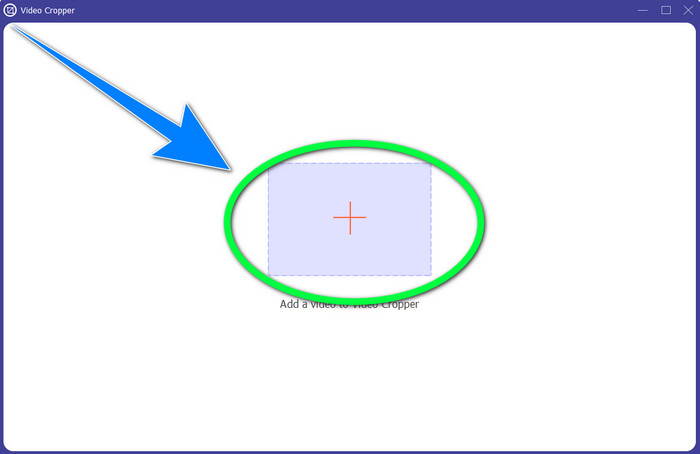
Trin 2: Et nyt vindue vises på skærmen. Vælg knappen med +-tegnet, og indsæt din video med VideoScribe-logoet.
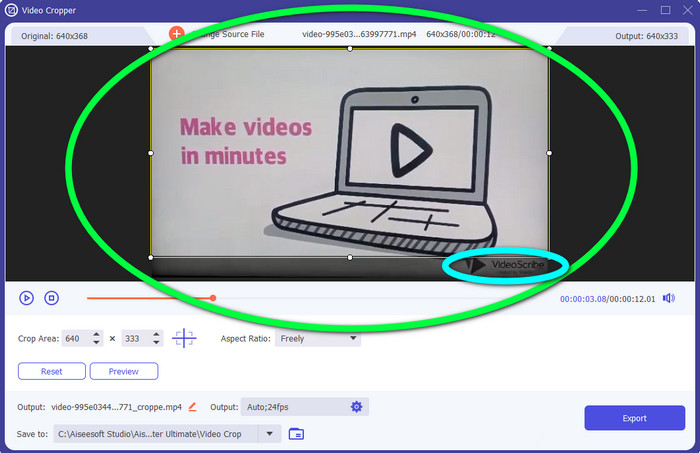
Trin 3: Beskæringsværktøjet lader dig beskære kanten af din video. Hvis logoet sidder i kanten af din video, kan du skære det væk for at fjerne logoet.
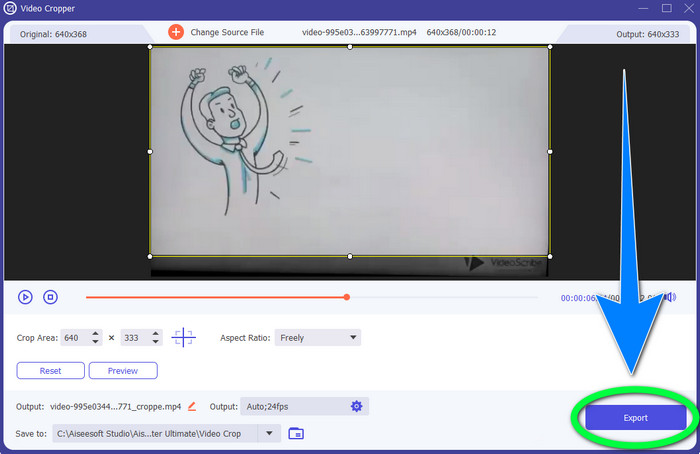
Trin 4: Når du mener, at du har fjernet VideoScribe-logoet, kan du klikke på knappen Export og gemme din færdige video på din enhed.
Del 2: Sådan fjerner du VideoScribe-logoet fra video online
Brug af BeeCut-Online Watermark Remover
Vil du fjerne VideoScribe-logoet fra dine videoer online? BeeCut-Online Watermark Remover er et af de fremragende og nyttige onlineværktøjer, du kan bruge. Dette onlineværktøj kan hjælpe dig med at fjerne irriterende elementer fra dine videoer, såsom logoer, vandmærker, tekst, datostempler og mere. Derfor kan du uden besvær fjerne VideoScribe-logoet fra dine videoer på grund af dets enkle grænseflade. BeeCut-Online Watermark Remover understøtter også adskillige filformater, såsom FLV, MOV, MP4, WebM, ASF, AVI, 3GP, MPG og flere. Desuden kan du også fjerne forstyrrende elementer fra dine billeder med dette værktøj. Desværre er dette program afhængigt af internetadgang, hvilket betyder, at du ikke kan bruge onlineværktøjet, hvis du ikke har internetadgang eller -forbindelse. Hvad angår selve fjernelsesprocessen, kan den nogle gange være tidskrævende, afhængigt af om du har en hurtig eller langsom internetforbindelse. Vi har leveret trinnene nedenfor i korrekt rækkefølge.
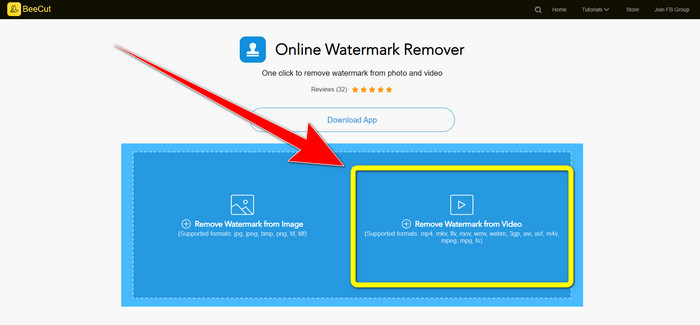
Trin 1: Gå til websitet for BeeCut-Online Watermark Remover. Klik på knappen Remove Watermark from Video, og vedhæft din video med et VideoScribe-logo.
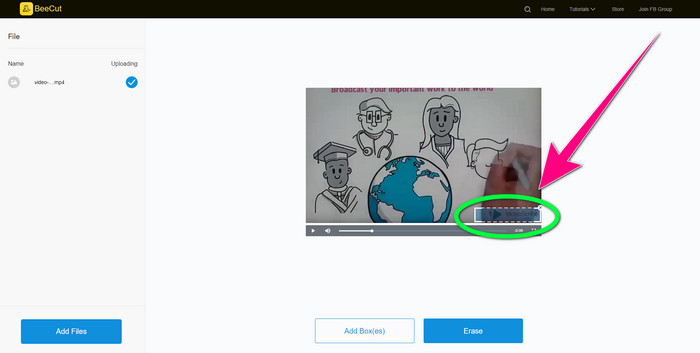
Trin 2: Når du har tilføjet din video, skal du bruge den lille boks, du kan se på din video, og trække den hen over logoet, så det dækkes.
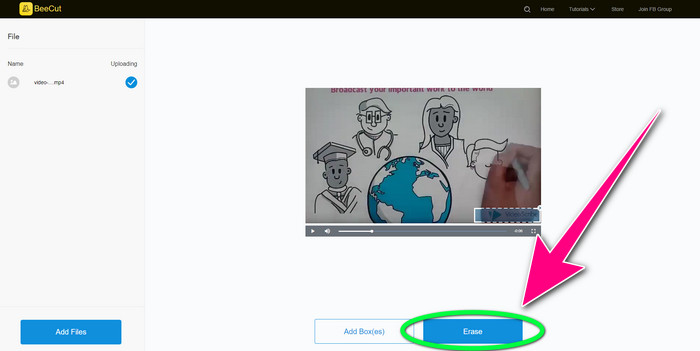
Trin 3: Når du er færdig med at dække logoet med den lille boks, skal du vælge knappen Erase for at gemme og downloade din video uden VideoScribe-logoet.
Brug af Video Watermark Remover Online
Video Watermark Remover Online er et andet onlineværktøj, du kan bruge til at fjerne VideoScribe-logoet fra dine videoer. Det har en enkel grænseflade og er velegnet til begyndere. Derudover kan du fjerne logoer fra dine videoer uden kvalitetstab, hvilket er fremragende. Men dette onlineværktøj har begrænsede funktioner i gratisversionen. Du kan kun fjerne logoer fra 5 videoer og kan ikke eksportere dem til andre filformater. Og da dette er et onlineprogram, kan du ikke bruge det uden internetforbindelse. Derudover fungerer værktøjet nogle gange ikke særlig godt. Hvis du vil lære at fjerne logoer fra dine videoer, kan du følge de enkle trin nedenfor.
Trin 1: Gå til websitet for Video Watermark Remover Online. Klik på knappen Click or Drag Videos Here for at indsætte din video med et VideoScribe-logo.

Trin 2: Klik på knappen Remove Watermark, og vent på, at fjernelsesprocessen bliver færdig. Derefter kan du gemme din video.
Del 3: Ofte stillede spørgsmål om fjernelse af VideoScribe-logo fra video
Kan jeg stole på onlineværktøjer til at fjerne logoer fra mine videoer?
Ja du kan. Onlineværktøjer er sikre og kan sikre din videofil. Nogle værktøjer kan automatisk slette dine filer efter processen, så du ikke behøver at bekymre dig. Det er dog ikke alle onlineværktøjer, der er ens, så du skal stadig kigge efter anmeldelser for at vide, om du kan stole på et bestemt værktøj.
Hvordan slipper du af med logoerne fra en video?
Hvis du vil af med logoet, skal du downloade Video Converter Ultimate på din computer eller Mac. Du kan bruge videovandmærkefjerneren eller videobeskæringsværktøjet. Disse to måder kan hjælpe dig med at slippe af med logoet fra din video.
Kan jeg fjerne VideoScribe-logoet uden et abonnement?
Ja selvfølgelig! Du kan fjerne VideoScribe-logoet ved hjælp af Video Converter Ultimate. Du behøver ikke købe denne applikation for at fjerne logoet, da det er gratis.
Konklusion
Denne artikel gav dig information om at fjerne VideoScribe-logoet fra en video ved hjælp af et program, du kan downloade, og onlineværktøjer. Men hvis du vil fjerne et logo fra dine videoer hurtigt og uden besvær, kan du bruge Video Converter Ultimate.
-
 3 af de nyeste Shutterstock-vandmærkefjernere, du nogensinde får brug for
 Kan du ikke lide Shutterstock-vandmærket knyttet til eksporteret video? Du kan bruge en Shutterstock vandmærkefjerner til at slette det effektivt.
-
 Sådan fjerner du Powtoon-vandmærket ved hjælp af 4 effektive metoder
 Læs denne artikel for at lære, hvordan du fjerner Powtoon-vandmærket ved hjælp af de bedste værktøjer, vi inkluderede her og en tutorial.
-
 Apowersoft Watermark Remover Review – Funktioner, fordele og ulemper og priser
 Apowersoft Watermark Remover er et af de bedste fjernelse af vandmærker, der understøtter online og offline, klik her for at vide mere!
