


 Video Converter Ultimate
 Skærmoptager
 Video reparation
VLC Metadata Editor og dets bedste alternativer til nem redigering af metadata
VLC Media Player er blevet en af de kendte videoafspillere, du kan downloade på enhver enhed, såsom Windows, Mac, Android og iOS. Med de formater og codecs, den understøtter, bliver det hurtigt og problemfrit at afspille videoer her. Ud over dens evne til at afspille flere formater har værktøjet også forskellige funktioner og muligheder, som du vil kunne lide at bruge. En af dem er redigering af metadata. Læs videre i denne artikel for at lære mere om VLC‑metadataeditoren og dens andre konkurrencedygtige alternativer.

Del 1. Gennemgang af VLC Metadata Editor/Fordele og ulemper/ Bedste alternativer til VLC Metadata Editor
Introduktion til metadataredigeringsfunktionen i VLC Media Player
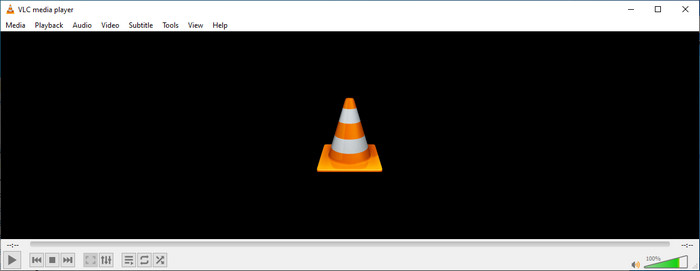
Det primære formål med VLC-metadataeditoren er ikke som redaktør, men som spiller. Dette værktøj afspiller et bredt format, som vores indbyggede medieafspiller ikke understøttes. I stedet for at downloade codecs på din fil, gør dette værktøj jobbet problemfrit ved at tilføje filen og nyde at se den. Efter den første udgivelse i 2001 forbedrede dens udvikler den overordnede medieafspillerfunktion og -funktioner for at konkurrere med den anden software. Selvom mange funktioner og funktioner er tilføjet til værktøjet, er det stadig ikke nok til at konkurrere med den anden dedikerede metadata-editor.
For og imod
Nu hvor vi har en idé om metadataredigeringsevnen i VLC, lad os se, om det er en ideel tag-editor, som du bør bruge. Hvis du vil vide mere om VLC-metadataeditoren på Android, iOS, Windows og macOS, er det bedst at blive ved med at læse dens fordele og ulemper.
Fordele
- Det er et freeware, hvilket betyder, at du ikke behøver at købe værktøjet for at downloade det.
- Det understøtter et bredt format, så du nemt kan redigere dine metadata.
- Det kan optimere afspilning til video og lyd fra din valgte enhed.
- Kan udvides med plug-ins, hvis du må.
Ulemper
- VLC video metadata editor er ikke den bedste til at redigere din fils metadata.
- Værktøjet er ikke lavet til redigering, så du kan ikke specielt betragte det som en professionel videoredigerer.
- Nedbrud og frysning sker ofte, mens du bruger softwaren.
- Dårlig opdatering på dens GUI.
Selvom det ikke er det bedste valg til redigering af metadata, mener vi stadig, at dette er den bedste medieafspiller, som du kan downloade gratis, som kan udkonkurrere de andre indbyggede medieafspillere på din enhed. De efterfølgende detaljer hjælper dig med at bestemme de bedste alternativer til redigering af tags end VLC.
Del 2. 3 af Competitive & Best Alternatives for VLC Metadata Editor
Video Converter Ultimate
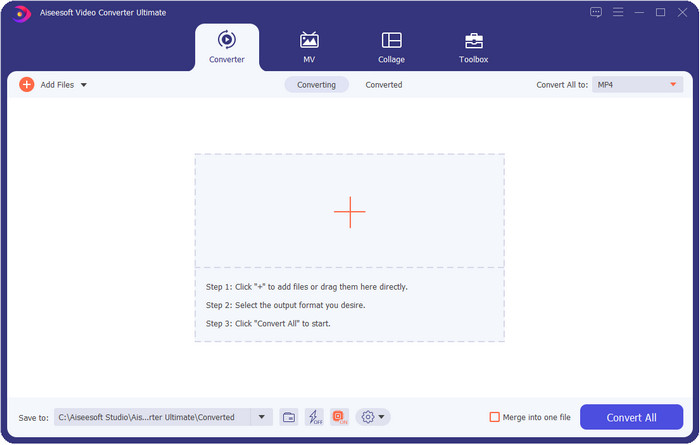
Video Converter Ultimate er det mest konkurrencedygtige værktøj til at redigere tags; det er bedre end det, VLC‑metadataeditoren kan tilbyde. Med dette værktøj kan du nemt ændre alle tags på dine MP4, MOV, M4V, AVI, WMV og mere end 1000 andre formater, du har. For de fleste af os har det aldrig været let at tilføje tags, men hvis du bruger dette værktøj, kan du tilføje titler, kunstnernavn, album, kommentarer, anden information og endda billeder til filen som en del af metadataene. Selvom du kan foretage basal redigering af tags i VLC, er det ikke nok, og hvis du vil gøre mere, skal du vælge det ultimative værktøj. For at hjælpe dig med nemt at tilføje de nødvendige tags, som VLC eller andre metadataeditorer på markedet ikke kan levere. Hvis du vil vide, hvad du kan få ved at downloade det ultimative værktøj, omtaler vi nogle af de funktioner, du kan få med værktøjet.

Video Converter Ultimate
5.689.200+ downloads- Det kan redigere tags på dine mediefiler såsom MP4, AVI, FLV, RMVB og mere.
- Den har en ultrahurtig konverteringsproces og hardwareacceleration.
- Yderligere avancerede funktioner og funktioner findes på Toolbox.
- Det understøtter batchkonvertering for at afslutte opgaven samtidigt
- Tilgængelig på både Windows og macOS til download.
Gratis download til Windows 7 eller nyere Sikker download
Gratis download til MacOS 10.7 eller nyere Sikker download
MetaZ
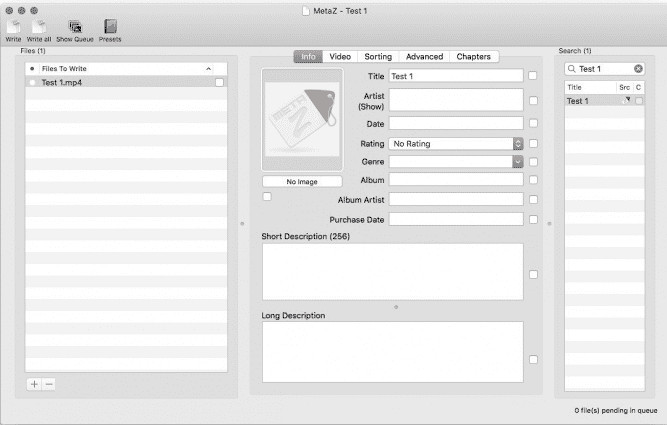
Hvis du vil have en gratis VLC‑videometadataeditor på Mac, er MetaZ et værktøj, du bør bruge. Dette værktøj er en dedikeret metatagger, du kan downloade på Mac, og dets primære formål er at tilføje eller redigere tags i mediefiler. Hvis du vil, kan du også automatisk søge efter tags og tilføje dem, når du har internetforbindelse. Med dette værktøj kan du desuden overføre tags ved hjælp af funktionen til eksport af arkiver, som kun findes i MetaZ. Selvom værktøjet virker lovende, er det et problem, at dets kompatibilitet med andre operativsystemer, såsom Windows, er begrænset. Derudover understøtter det et gennemsnitligt antal formater, så før du bruger det, skal du vide, at der er begrænsninger for, hvilke filer du kan tilføje her. Udover det er der ingen andre problemer ved at bruge værktøjet.
Tag scanner
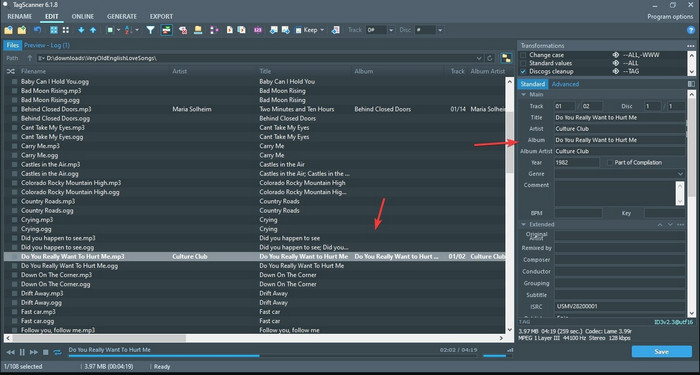
Tag Scanner er en bedre version af MKV‑metadataeditoren i VLC. Dette værktøj kan nemt redigere og organisere mediefilernes tags. Når du bruger værktøjet, vil du bemærke, at det har en mere detaljeret brugerflade end VLC, når det gælder redigering af tags, hvilket betyder, at du kan tilføje flere detaljer til dine fildata. Ligesom MetaZ kan dette værktøj finde de tags, du skal bruge til din fil, ved at søge i forskellige databaser. Med den tunge brugerflade, det tilbyder, er det en smule anderledes at bruge end en almindelig metadataeditor, hvilket betyder, at du skal bruge lidt tid på at vænne dig til det. Ikke desto mindre kan vi nemt se, at dette værktøj er langt bedre end VLC og andre konkurrenter, men det er ikke lige så brugervenligt som de andre på markedet.
Del 3. Ofte stillede spørgsmål om VLC Metadata Editor
Hvor kan jeg downloade VLC?
Du kan downloade den officielle VLC på videolan.org. Sørg for, at du downloader det på det officielle websted for at undgå omstændigheder såsom virus på dit skrivebord.
Kan jeg redigere videoen ved hjælp af VLC?
Ja, du kan godt redigere i VLC. Men det er ikke en professionel editor, som du har brug for til mere avanceret videoredigering. Hvis du er en spirende vlogger eller indholdsskaber og leder efter den bedste videoredigerer til Windows, så klik på dette link, men hvis du er Mac‑bruger, så klik på dette link for at se den bedste videoredigerer til Mac.
Hvordan rettes lydforsinkelse på VLC?
Klik på dette link for at se den bedste løsning til at rette lydforsinkelse i VLC med detaljerede trin.
Konklusion
VLC er et fantastisk værktøj, som du kan få gratis. Med dette værktøj kan du afspille enhver type video og lyd og endda redigere deres tags. Men når det gælder redigering af tags i VLC, må vi sige, at det ikke er lige så godt som de andre dedikerede tageditorer, der findes på markedet, selvom det kan klare opgaven. Hvis din opgave er at redigere eller rette mediefilernes tags, er VLC et valg, men ikke det bedste. Så hvad skal du gøre nu? Vi har lavet en liste over de bedste alternativer, du kan bruge til at redigere tags, som er bedre end VLC, og et af dem er Video Converter Ultimate. I modsætning til de andre alternativer og VLC‑metadataeditoren har dette værktøj mange avancerede funktioner at byde på, så download det nu for at få det hele.
-
 Sådan redigeres og rettes MP4-metadata på en meget smart måde
 Vil du vide, hvordan man reparerer MP4-metadata? I så fald skal du læse hele indholdet af denne artikel for at kende trickene til, hvordan du nemt reparerer MP4-tags.
-
 4 bedste metoder til at rette og redigere MP3-metadata på Windows og Mac
 Vil du vide hemmelighederne ved at redigere MP3-metadata med lethed? Denne blog vil lære dig forskellige teknikker med de forskellige værktøjer, du nemt får adgang til.
-
 2 bedste måder at redigere OGG-metadata på, du bør prøve gratis
 Har du brug for at redigere OGG-metadata? Nå, du kan nemt håndtere redigering af tags ved at bruge den korrekte software. Hvis du ikke har en, er det et must at læse denne artikel.
