


 Video Converter Ultimate
 Skærmoptager
 Video reparation
Omfattende gennemgang af WAV Metadata Editor på Window, Mac og Online
Jeg har et problem med min WAV-fil; Jeg fandt ud af, at mærkerne er forkerte. Jeg prøvede at bruge forskellige WAV-metadata-editorer til at løse problemet, men desværre fik det ikke løst det. Har du nogen ide om, hvordan man fikser det? Det ville være en stor hjælp. Tak.
Har du det samme problem? Det er helt naturligt, for efterspørgslen efter den bedste WAV‑metadataeditor til Windows og Mac på markedet er enorm. Selvom der findes mange valgmuligheder, er det stadig vildt irriterende at finde ud af, om de faktisk klarer denne opgave godt. Træk derfor vejret dybt, for vi kan løse problemet hurtigt med de værktøjer, vi omhyggeligt har udvalgt til at hjælpe dig med at redigere tags i dine WAV‑filer. Med grundig research og denne artikel har vi indsnævret det til tre forskellige muligheder, og vi hjælper dig med at vælge den bedste WAV‑editor, der findes både online og offline.

Del 1. Bedste WAV Metadata Editor til Windows og Mac [Brugers valg]
FVC Video Converter Ultimate er en af de WAV‑tageditorer, der helt sikkert vil hjælpe dig med denne opgave og gøre den færdig med få klik. Med millioner af downloads har dette værktøj allerede opfyldt sin opgave med at redigere brugernes metadata og andre formål som konvertering, redigering osv. Det er blevet populært blandt brugerne. I modsætning til andre tageditorer, du kan finde på markedet, er dette værktøj helt anderledes, når det gælder redigering og meget mere, fordi det er et professionelt, men stadig let anvendeligt værktøj – er du stadig i tvivl om, hvorvidt det er det bedste valg som metadataeditor? I så fald oplister vi de funktioner, du får, hvis du installerer denne konverter på din computer.

FVC Video Converter Ultimate
5.689.200+ downloads- Det er det hurtigste værktøj til at tilføje metadata til din mediefil inden for et par klik.
- Det understøtter en bred vifte af lydformater fra WAV, WMV, MP3 og 1000+ tilgængelige.
- Det er det bedste valg for enhver nybegynder, der har hårdt brug for en metadata-editor på et skrivebord.
- Det har ingen filstørrelsesbegrænsning og tilbyder en batchkonverteringsproces for flere filer.
- Dens værktøjskasse har mange avancerede funktioner, som du ville elske at bruge.
Gratis download til Windows 7 eller nyere Sikker download
Gratis download til MacOS 10.7 eller nyere Sikker download
Er du overrasket over værktøjets funktioner og hvad det kan? Hvis ja, så læs følgende detaljer, mens vi lærer dig, hvordan du redigerer WAV-tags med det ultimative værktøj. Før noget andet skal du downloade softwaren på dit system og vælge hvilket operativsystem du bruger. Følg installationsprocessen, og klik på Start nu for at begynde.
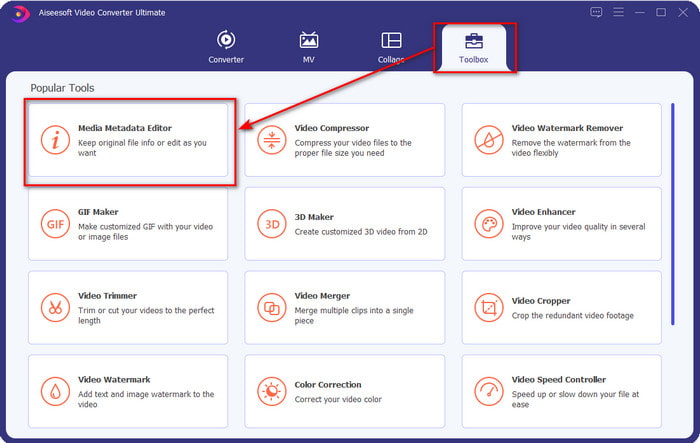
Trin 1. Når du har downloadet softwaren, skal du klikke på Toolbox og finde Media Metadata Editor.
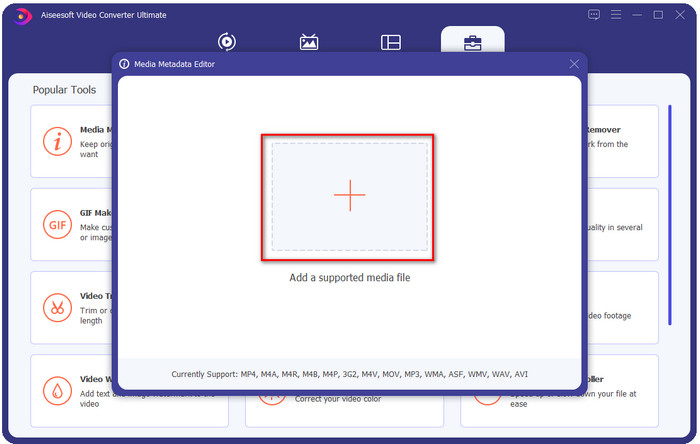
Trin 2. Tilføj WMA‑filen ved at trykke på +-knappen, find WMA‑filen i din computer-mappe, og når du har fundet den, skal du klikke på Open.
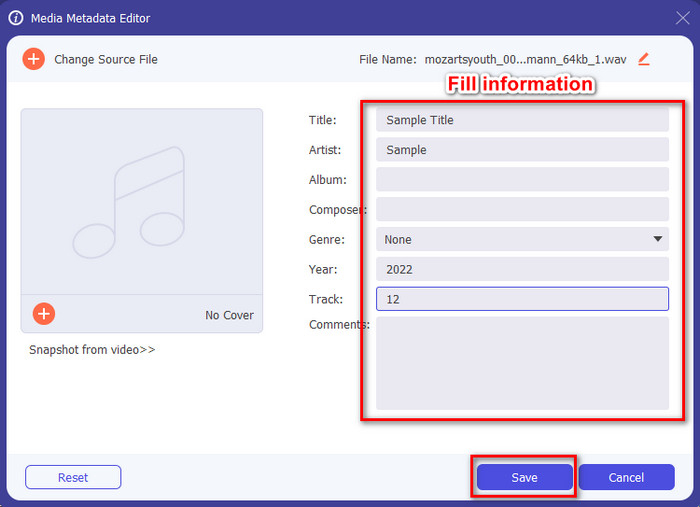
Trin 3. Tilføj de oplysninger, du vil tilføje, udfyld de tilgængelige tekstfelter, og tryk på knappen Save, når du er færdig. Nemt, ikke? Ja, succes er mellemnavnet på vores konverter.
Relateret:
Sådan konverterer du MP3 til WAV
Sådan konverterer du M4A til WAV
Del 2. Top 2 WAV Metadata Viewers tilgængelige på nettet
Antag, at du ikke kan se hele tags på WAV; hvad skulle du gøre? I dette tilfælde er det ideelt at bruge en tag-fremviser på WAV. Hvis du ikke ønsker at downloade et værktøj, kan du bruge denne metaviewer, der er tilgængelig på nettet. Disse to værktøjer kan dog ikke redigere WAV-filmetadata, fordi de har til hensigt at se metadataene.
Gratis online EXIF & Metadata Viewer
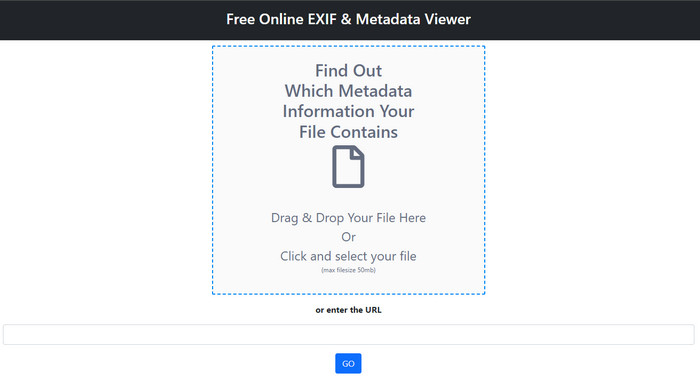
Free online EXIF & Metadata Viewer er en gratis online metadatafremviser, du kan bruge til at se tags i mediefilen. Med dette webværktøj kan du se de forskellige strukturer i filen, du har uploadet, såsom RAW, FILE, RIFF og COMPOSITE. Dette værktøj er en af de metadatafremvisere, du kan få adgang til, som gratis understøtter så mange detaljer. Nogle tagvisere skal købes, hvis du vil se så mange detaljer i en fil. Selvom redigering ikke er mulig i værktøjet, er det stadig den bedste detaljerede metafremviser, du kan bruge, og bagefter kan du tilføje, fjerne eller ændre WAV‑metadata med det ultimative værktøj, vi har præsenteret ovenfor.
Metadata2Go
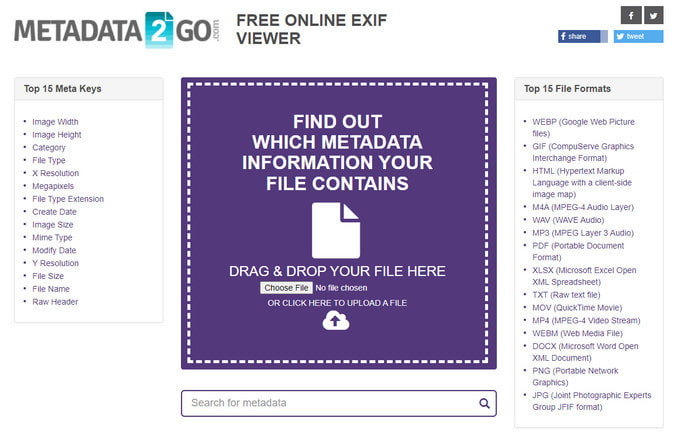
Ligesom det første er Metadata2Go en gratis tagviser og -udtrækker til dine filer, som du frit kan tilgå på nettet. Dette værktøj giver dig mulighed for at se den skjulte metadata, du aldrig tidligere har set i din fil. Hvis du har brug for at se metadata i din mediefil, er dette din alt‑i‑én‑fremviser på nettet. I modsætning til det første værktøj understøtter dette også billedmetadata, som du kan se, og det kan udtrække data fra filen, hvis det er nødvendigt. Afhængigt af filen kan det vise oplysninger om din fil. Ligesom den første metafremviser ovenfor kan det ikke redigere tags i din mediefil, heller ikke i WAV. Så hvis du føler, at den første tagviser ikke dækker dine behov, så prøv dette værktøj. Brug derefter det ultimative værktøj og lær, hvordan du tilføjer ID3‑tags til WAV‑filer, hvis du skal rette dem.
Del 3. Ofte stillede spørgsmål om WAV Metadata Editor
Hvorfor kan jeg ikke få adgang til metadataene på WAV?
Der er mange grunde til, at du ikke kan få adgang til dem, men der er to hovedårsager, vi støder på, hvorfor du ikke kan få adgang til dem. Den første grund er, at filen er beskadiget; selvfølgelig vil metadataene på WAV også forsvinde, hvis filen er korrupt. Den anden er, at filen ikke har nogen metadata i første omgang. Ikke alle mediefiler som WAV har metadata. Hvis du har downloadet filen på nettet, så er der en chance for, at forfatteren eller makeren sletter disse metadata for ikke at afsløre information.
Er WAV-metadataene det samme som MP3'en?
Ja, i dette lydformat vil du se forfatterens navn, titel, albumnummer, genre, bedømmelser og mange flere. Men du kan også tilføje dem ved at bruge en metadata-editor, der er tilgængelig på MP3 eller WAV, som FVC Video Converter Ultimate.
Er det okay at uploade WAV på nettet?
Det er ikke fordi formatet er ukomprimeret, og det vil tage meget tid at uploade filen på nettet. Selvom du kan konvertere formatet til et internetvenligt delingsformat, vil dets kvalitet ikke være den samme som WAV, især hvis det er komprimeret.
Konklusion
Endelig har vi fundet den bedste WAV‑metadataeditor, du kan downloade gratis, og det er FVC Video Converter Ultimate. Med dette værktøj kan du afslutte opgaven når som helst, og selv hvis dit filformat er anderledes, understøttes her alle de 1000+ formater. Vil du downloade et værktøj på din Mac? Så skal du ikke vende dig om og lede efter et andet, for du kan bruge det ultimative værktøj, selvom du er Mac‑bruger.
-
 Hvad er metadata: Lær de grundlæggende oplysninger om metadata
 Hvad er metadata? Er dette vigtigt? Hvad er delene af metadata? Har du det samme spørgsmål? I denne artikel lærer du de grundlæggende oplysninger om metadata.
-
 4 af de bedste metadatafremvisere online og offline [Opdateret 2022]
 Kan jeg tjekke metadataene for min fil? Ja, det kan du, ved hjælp af dette indlæg vil vi introducere dig til de forskellige metadatafremvisere, du kan bruge.
-
 6 favoritvalg Snapchat-animerede Snapchat-filtre på Snapchat
 Vil du vide de bedste måder at tilføje filtre på Snapchat-videoer? Nå, du kan klikke på dette og lære de forskellige filtre, du kan bruge til at anvende på Snapchat-videoer.
