


 Video Converter Ultimate
 Grabador de pantalla
 Reparación de vídeo
Conozca las 7 mejores aplicaciones para aumentar el volumen que puede usar en su escritorio y teléfonos
¿No es irritante cuando el volumen de un vídeo es tan bajo que, aunque subas el volumen al máximo, no cambia nada? Hay varias razones por las que el volumen del audio se vuelve bajo. En lugar de agobiarte por el vídeo, ¿por qué no intentas usar un amplificador para hacer que tu audio suene más alto y claro? Hoy es tu día de suerte, porque te presentamos distintos amplificadores de volumen entre los que puedes elegir. Todas las herramientas que aquí se presentan han sido usadas por el autor de este artículo, para exponer datos objetivos sobre ellas según la plataforma que estés utilizando. Y, para continuar, empecemos nuestro recorrido por los diferentes amplificadores de sonido que puedes usar en Windows, Mac, iPhone y Android.

Parte 1. 4 de los mejores potenciadores de volumen para PC con Windows, Mac y en línea
1.Video Converter Ultimate
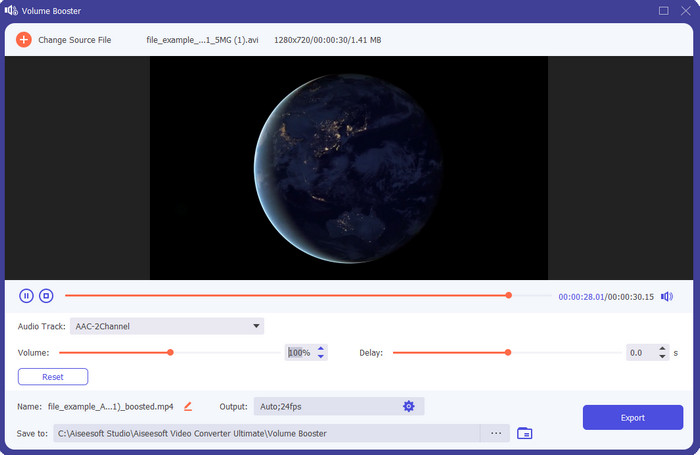
Si estás buscando la mejor app para amplificar el volumen, entonces Video Converter Ultimate puede ser la ideal. Esta herramienta puede mejorar la calidad de tu audio sin dañar tus altavoces. Así que, si ajustas el volumen del audio con esta herramienta, no esperes chasquidos ni crujidos en tus altavoces. Además, si tienes problemas con audio de baja calidad, puedes usarla para mejorarlo. Incluso si no eres un profesional, podrás aumentar el volumen del audio con esta herramienta sin dificultad. Y no solo eso: este software incluye muchas funciones que te pueden resultar útiles una vez lo descargues. A diferencia de otros amplificadores de audio de la lista, esta herramienta ofrece muchos potenciadores para que tu audio suene mejor. Asimismo, si tienes problemas de desajuste entre audio y vídeo, también puedes usarla. Sinceramente, es la herramienta más sobresaliente de esta lista si comparamos todas las opciones. Así que, si quieres disfrutar de audio 8D o 16D a todo volumen, descarga esta herramienta ahora mismo.
Descarga gratuitaPara Windows 7 o posteriorDescarga segura
Descarga gratuitaPara macOS 10.7 o posteriorDescarga segura
Pros
- Realice automáticamente el ajuste de ecualizadores y preajustes para que su trabajo sea más fácil y mejor.
- La salida final del audio se volvió mucho mejor que antes y sin destruir su audición o incluso los altavoces.
- Es muy intuitivo que incluso los usuarios que no tienen experiencia en impulsar pueden hacerlo.
Contras
- Solo está disponible en la versión de escritorio y no en el teléfono.
- Compre antes de poder acceder a él, pero no es tan caro.
2.Reproductor multimedia VLC
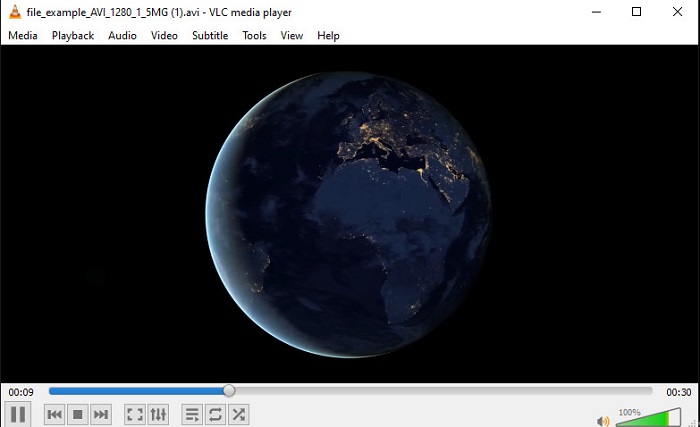
VLC Media Player es uno de los mejores reproductores multimedia que puedes descargar en la web. Esta herramienta ya incluye en su interfaz un amplificador de volumen gratuito integrado y el audio puede llegar hasta el 125% por ciento si lo deseas. Sin embargo, esta aplicación de escritorio no controla hasta qué punto pueden soportar tus altavoces, lo que significa que, si abusas y reproduces el audio al máximo nivel, existe la posibilidad de que, con el tiempo, los altavoces empiecen a crujir ligeramente, especialmente los integrados. Pero esta herramienta es la única aplicación aquí presentada que combina amplificador y reproductor en uno. Por tanto, si quieres ver vídeos y aumentar el volumen del audio al mismo tiempo, prueba esta herramienta. Aunque sube el volumen, no puede garantizarte una gran calidad de sonido, porque únicamente incrementa el nivel de audio.
Pros
- Amplificador de audio integrado.
- Aumente su audio hasta 125% para que suene más fuerte.
- Gratis para descargar en PC o Mac.
Contras
- La herramienta no tiene un ecualizador incorporado para mejorar la calidad del audio.
- No supervisa el volumen que debe tener el audio.
Relacionado:
Cómo solucionar que VLC no reproduzca archivos MKV
Cómo solucionar que VLC no reproduzca DVDs
3. Auge 3D
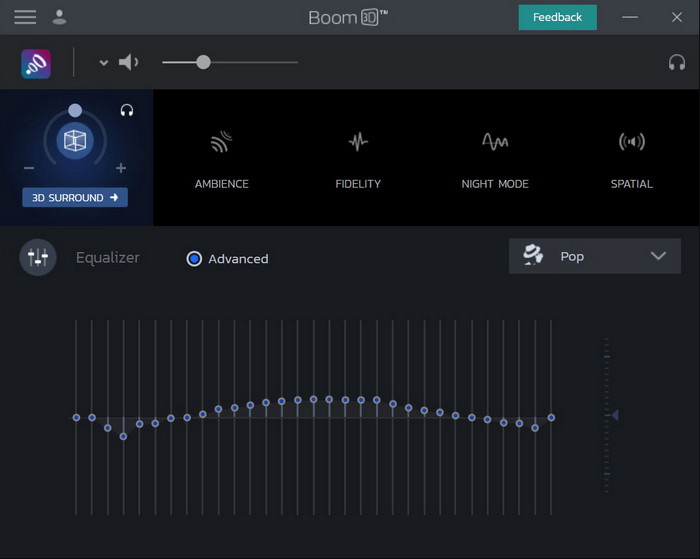
Boom 3D es la opción más avanzada dentro de la mejora de audio. Este amplificador de volumen para Windows 10 y Mac incorpora numerosos potenciadores de sonido que puedes utilizar. Además, puedes ajustar manualmente los ecualizadores y preajustes; a diferencia de Video Converter Ultimate, esta herramienta se encarga de hacerlo automáticamente por ti. Aunque la herramienta resulta impresionante, también presenta algunas desventajas cuando empiezas a usarla. En especial si eres principiante: necesita cierta configuración y, dicho de otro modo, puede resultar algo compleja de manejar al inicio. No obstante, aprender a utilizarla te llevará tiempo, pero será un tiempo bien invertido.
Pros
- Anula manualmente el ecualizador y el preajuste.
- No se necesita Internet para acceder a la herramienta.
- Es genial para ser utilizado por el profesional que quiere tener un audio de buena calidad.
Contras
- No es la mejor opción para los principiantes que no tienen idea de qué son los ecualizadores y los ajustes preestablecidos.
- Necesita mucho tiempo para estudiar cómo usar esta herramienta.
4. Amplificador de volumen
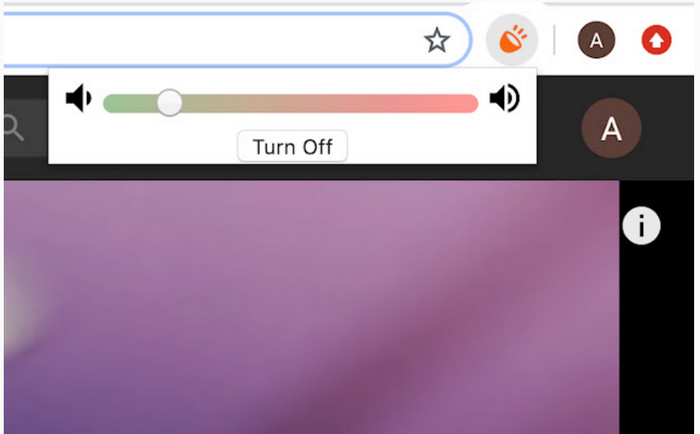
Volume Booster es una extensión amplificador de volumen para Chrome a la que puedes acceder fácilmente si tienes conexión a Internet. Cualquiera puede utilizar esta herramienta de forma gratuita y, además, es segura porque procede de Chrome. Si decides usarla, puedes esperar un aumento considerable del volumen del audio que vayas a escuchar. Sin embargo, no puedes usar esta extensión fuera del propio navegador Chrome. Así que, si quieres escuchar audio guardado en tu disco, no podrás emplearla para mejorarlo. Además, cuando intentamos subir el volumen al máximo, notamos algunos crujidos; para evitarlos, asegúrate de dejar el ajuste en un nivel apenas superior al mínimo.
Pros
- La herramienta es segura porque es una extensión de Chrome.
- Fácil de usar.
Contras
- No se puede utilizar fuera del cromo.
- Se escucharán algunos crujidos de audio si lo gira al máximo.
- No admite ecualizadores.
Parte 2. Las 3 mejores aplicaciones para aumentar el volumen de iPhone y Android
1. Amplificador de volumen - Efectos de ecualizador
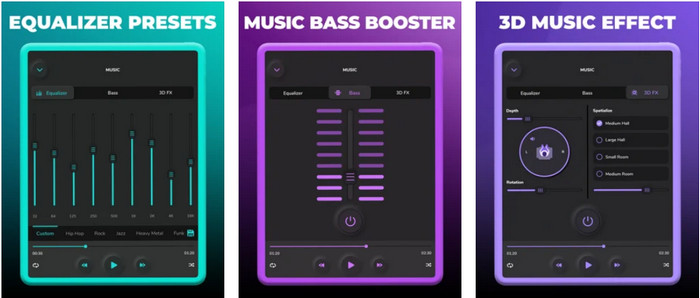
Volume Booster – Equalizer FX lleva al máximo el límite de volumen del audio en tu iPhone para que suene más alto y mejor. Este amplificador de volumen para iPhone ha sido utilizado por muchos usuarios de iOS para crear su propia ecualización del audio. La app ya ha obtenido una valoración aceptable de 3,9 estrellas: no es mala, pero tampoco excelente. Además, esta herramienta no puede aumentar el volumen del audio en las retransmisiones en línea y los anuncios perjudican bastante la experiencia de uso. Asimismo, siguen produciéndose cierres inesperados, fallos y otros problemas. Sin embargo, si quieres potenciar los graves en un iPhone, merece la pena probarla.
Pros
- Es un buen refuerzo para los usuarios de iPhone.
- Puede realizar la ecualización básica y el ajuste de audio.
Contras
- La mayoría de las veces la herramienta falla.
- Tiene una limitación sobre dónde puede usar el refuerzo de audio.
2.AmpMe – Altavoz y sincronización de música
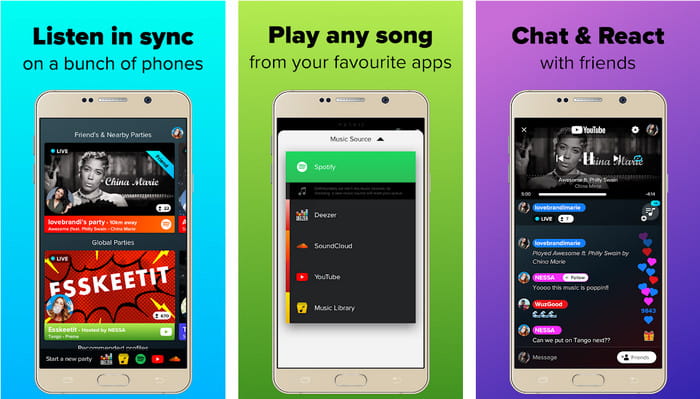
AmpMe - Speaker & Music Sync es un excelente amplificador de volumen para dispositivos Android descargable. Es mucho más que un simple amplificador, porque puedes ser anfitrión y reproducir tu propia lista de reproducción o unirte a una fiesta en directo con la app. En pocas palabras, con esta aplicación puedes interactuar con otras personas mientras escuchas música y chateas al mismo tiempo. Aunque la herramienta es impresionante, seguirás encontrando algunos errores y cierres inesperados mientras la usas. Además, algunos usuarios tienen dificultades para añadir música a su lista de reproducción, lo que resulta bastante molesto. Y la aplicación puede ser algo complicada de manejar, especialmente si no conoces bien sus funciones. Pero, en conjunto, es una gran opción para usuarios de Android.
Pros
- Puedes ser tu propio DJ con AmpMe y compartirlo con otras personas cercanas con la misma aplicación.
- Escucha y chatea al mismo tiempo.
- Produce audio de alta calidad.
Contras
- La cuota de suscripción es demasiado para pagar si quieres ir más barato.
- Es difícil cancelar la suscripción incluso cuando eliminó la cuenta.
- A veces, cuando te unes a una fiesta en vivo, la aplicación se desconectará automáticamente.
3. Amplificador de volumen GOODEV
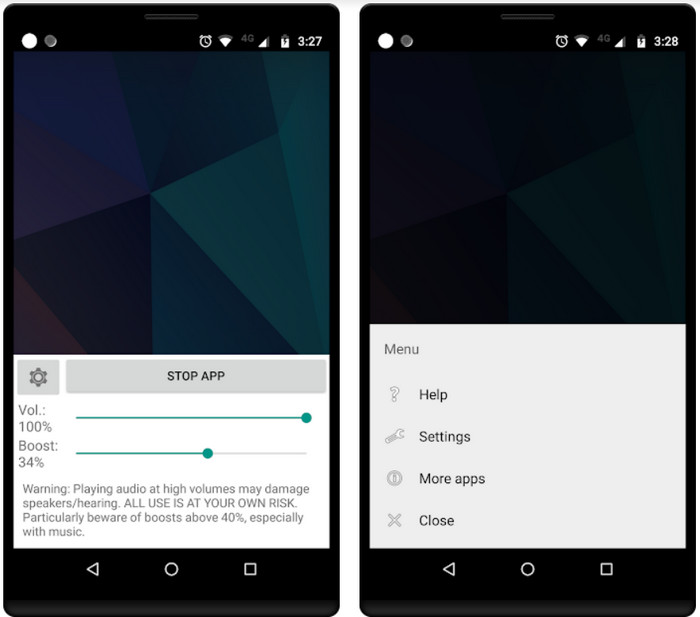
Volume Booster GOODEV tiene una interfaz sencilla y fácil de manejar. Este amplificador de volumen ya ha recibido una excelente valoración de 4,4 estrellas por parte de sus usuarios. Muchos comentarios indican que esta herramienta es la mejor en lo que hace. Pero actualmente se están produciendo algunos fallos al utilizarla y, la mayoría de las veces, la aplicación deja de aumentar el volumen del audio incluso después de abrirla. Para reactivarla, es necesario reiniciar el teléfono o volver a abrir la app; de este modo suele solucionarse el problema.
Pros
- Amplificador de audio fácil de entender que se puede descargar fácilmente en su teléfono móvil Android.
- Fácil de usar.
Contras
- Los anuncios se muestran de la nada.
- La mayoría de las veces, la aplicación falla por sí sola sin motivo desconocido.
- La versión anterior de esta aplicación es mucho mejor que la versión actualizada.
Parte 3. ¿Cuál es el mejor potenciador de volumen?
Aquí se le presenta un cuadro de comparación para comparar cuáles son las características de la herramienta que puede usar con la herramienta que la otra herramienta no tiene.
| Característica/s de la herramienta | Video Converter Ultimate | Reproductor de multimedia VLC | Auge 3D | Amplificador de volumen | Amplificador de volumen - Efectos de ecualizador | AmpMe – Altavoz y sincronización de música | Amplificador de volumen GOODEV |
| Amplificadores de audio |  | | | | | | |
| Mejorador de audio | |  | | | | | |
| Función de sincronización de audio y video | | | | | | | |
| Fácil de usar | | | | | | | |
| Plataformas compatibles | Herramienta basada en escritorio | Herramienta basada en escritorio | Herramienta basada en escritorio | Herramienta de extensión de Chrome | Herramienta basada en iOS descargable | Herramienta basada en Android descargable | Herramienta basada en Android descargable |
| Rango de precios | 1 mes: $25.00 Licencia de por vida: $55.20 Licencia multiusuario de por vida / 5 PC: $119.00 | Gratis para descargar | $11.99 y $23.99 | Gratis | 3 a 20 $ | $0.99 – $99.99 por artículo | Gratis |
Parte 4. Preguntas frecuentes sobre Volume Booster
¿Aumentar el volumen del audio daña la audición?
De hecho, si. Especialmente si está usando auriculares o auriculares y pone el volumen del audio al máximo, luego agregue un amplificador de volumen. Luego espere que, a la larga, su audición se destruya lentamente a la larga. Entonces, para evitar esto, puedes hacerlo. Nuestra sugerencia es que debe limitarlo a medio o bajo y no buscar el máximo.
¿Cuáles son las otras desventajas del refuerzo de audio en los altavoces?
Usamos un amplificador de audio para escuchar el audio mucho mejor si los sonidos son bajos. Pero poco sabías que los altavoces también tienen un límite de Hertz del que son capaces. Cuanto más alto sea el hercio, más alto podrá ser, pero en algunos altavoces incorporados no pueden manejar un sonido súper fuerte. Por lo tanto, hay posibilidades de que el altavoz cruje, lo que significa que el altavoz no puede manejar el audio.
¿Cuáles son las diferencias de graves y agudos de los altavoces?
Estos dos son los parlantes incorporados más conocidos, pero tienen su propio propósito por el cual están en los parlantes. Para el bajo, puede manejar una baja frecuencia de audio y no puede manejar una alta frecuencia, además se especializa en hacernos sentir el boom de la música. Mientras que los agudos se enfocan en frecuencias de tono alto que los bajos no pueden manejar.
Conclusión
En conclusión, puedes dejar de sufrir por tu audio de mala calidad si lo potencias con la ayuda de un amplificador de volumen en PC, Mac, en línea y en dispositivos móviles. Las herramientas presentadas aquí son ideales para cualquiera que quiera disfrutar de la música a otro nivel. Pero hay una herramienta que ayuda a sus usuarios a simplificar y mejorar aún más el proceso de amplificación del audio. En lugar de aprender a ajustar el ecualizador y los preajustes, Video Converter Ultimate ya lo hace por ti. Y, para comprobar lo brillante que es esta herramienta, pruébala tú mismo y descárgala en tu dispositivo.
-
 Cómo agregar audio y música a videos gratis en su computadora / teléfono
 Este artículo muestra 4 formas sencillas de agregar audio a un video de forma gratuita. No importa qué pista de audio desee agregar a su video, aquí puede obtener resultados satisfactorios.
-
 El grabador de audio imparcial Cinch Review y la mejor alternativa
 Cinch Audio Recorder es la mejor manera de descargar música desde sitios de transmisión. Aprenda más sobre la revisión imparcial y la mejor alternativa del artículo.
-
 Maneras viables sobre cómo puede grabar audio con VLC Player
 Aprenda las mejores formas de grabar audio con el reproductor VLC y otras herramientas prácticas leyendo el artículo.
