


 Video Converter Ultimate
 Grabador de pantalla
 Reparación de vídeo
4 de los mejores creadores de animación fotográfica que puedes usar para crear imágenes animadas
Hoy en día, la mayoría de las redes sociales ya utilizan un GIF en lugar de la antigua imagen fija. Porque los GIF resultan más atractivos a los ojos de los usuarios y transmiten un mensaje mucho mejor en comparación con las imágenes. Así que, si quieres saber cuáles son los accesibles creadores de fotos animadas que puedes usar, continúa con la siguiente lista. Hemos buscado el mejor creador que puedas usar para añadir movimiento animado a tus imágenes.

Parte 1. El mejor software para crear animaciones fotográficas
En esta lista lo hemos puesto en primer lugar porque es el editor más destacado que puedes usar, Video Converter Ultimate. Así que, si quieres crear animaciones a partir de fotos, aquí podrás hacerlo fácilmente. Además, este software de escritorio puede dar vida a cualquier imagen con sus funciones avanzadas, que puedes usar tanto si eres profesional como si no. La experiencia general cuando probamos este software hasta ahora es la mejor en comparación con otros, ya sean en línea u offline. Así que ahora, si quieres saber cómo dar vida a tus imágenes sencillas, sigue los pasos que se indican a continuación y continúa.
5 pasos sencillos para dar vida a tus imágenes con Video Converter Ultimate:
Paso 1. En primer lugar, haz clic en el botón de descarga que aparece a continuación y elige el sistema operativo que estés utilizando actualmente. A continuación, instala el software, realiza la configuración rápidamente y haz clic en Start Now para continuar.
Descarga gratuitaPara Windows 7 o posteriorDescarga segura
Descarga gratuitaPara macOS 10.7 o posteriorDescarga segura
Paso 2. Abre el software y ve a la Toolbox para localizar el GIF Maker.
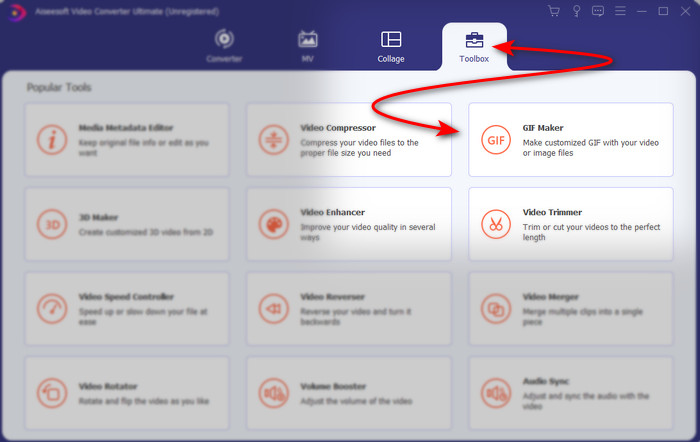
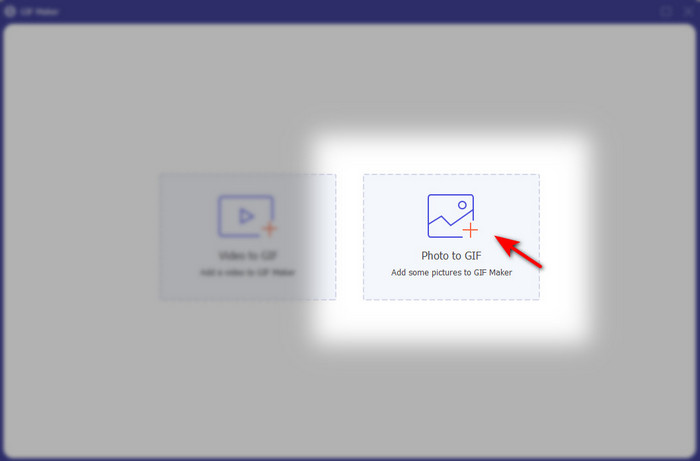
Paso 3. Haz clic en la opción Photo to GIF y, a continuación, aparecerá una carpeta de archivos en tu pantalla. Elige el archivo y haz clic en Open para insertarlo.
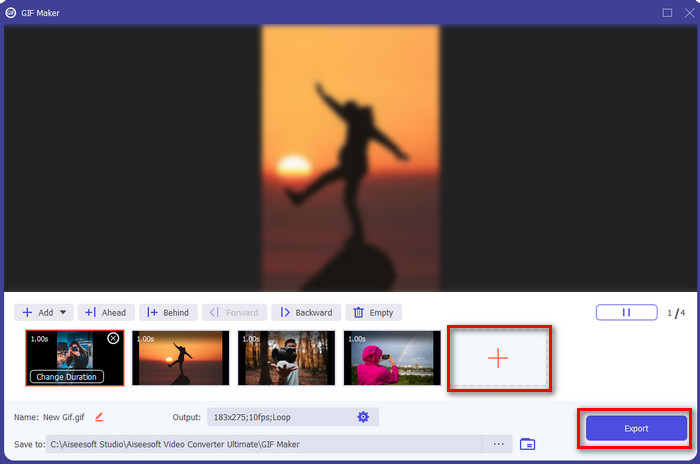
Paso 4. Haz clic en el botón + para insertar más imágenes y crear animaciones a partir de fotos. Luego ajusta la duración haciendo clic primero en la imagen y después en el Change Duration button. Después, pulsa Apply para guardar los cambios. Para descargar la animación, haz clic en Generate GIF.
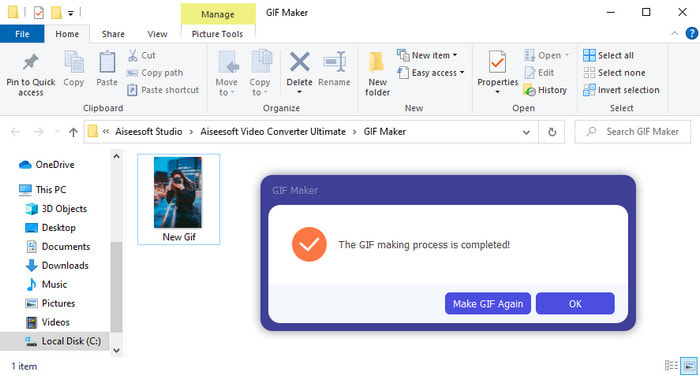
Paso 5. Después de generar el GIF, aparecerá en tu pantalla una carpeta con el archivo GIF animado. Haz clic en el archivo para ver la animación que creaste antes.
Parte 2. Los 3 mejores creadores de fotos animadas en línea gratis
Arriba 1. Ezgif
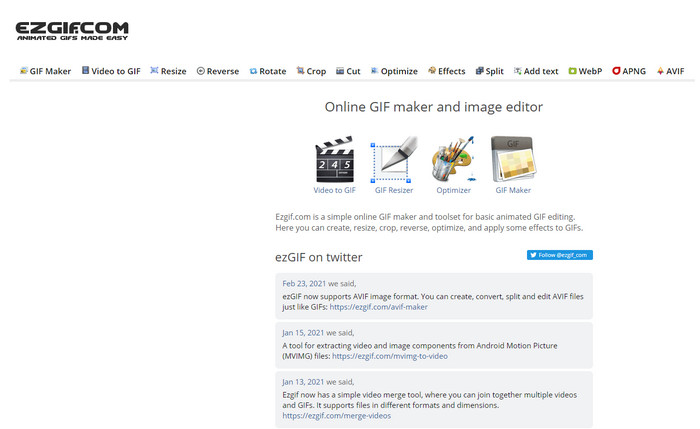
Si estás buscando un creador de fotos animadas online y gratis, entonces Ezgif puede ser la opción. Esta herramienta web es de las mejores a la hora de crear fotos animadas magníficas. Y si te gusta crear este tipo de contenido, es probable que ya hayas usado esta herramienta online; si aún no la has probado, es muy recomendable. Sin embargo, algunos usuarios consideran que a esta herramienta le faltan algunas funciones de edición más avanzadas que les gustaría utilizar. Así que, si tienes un presupuesto ajustado, esta es una buena opción, pero recuerda que no es la mejor para profesionales, aunque para principiantes está muy bien.
Pros
- De fácil acceso y es seguro.
- Herramienta perfecta para principiantes que quieran intentar hacer GIF simples.
- Herramienta en línea de edición semiprofesional.
Contras
- Limita a su usuario a experimentar la grandeza.
- Herramienta dependiente de Internet. Entonces, si no tiene Internet, espere que no pueda usar esta herramienta en línea.
Top 2. Kapwing
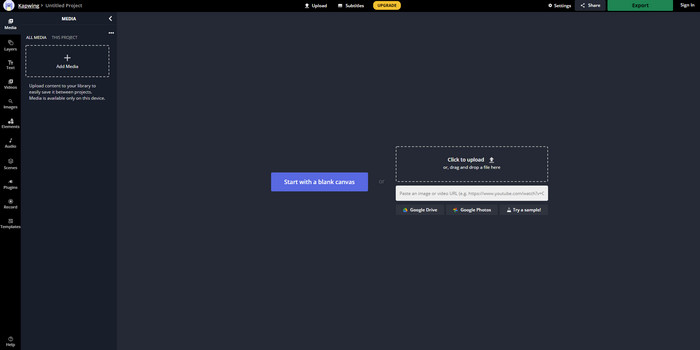
A diferencia de Ezgif, Kapwing es excelente para mejorar el aspecto visual de las imágenes. Por lo tanto, si piensas usar esta herramienta online, aprender cómo hacer GIF animados a partir de fotos sin duda te ayudará. El rendimiento, la accesibilidad y la flexibilidad de esta herramienta online la hacen ideal para cualquiera que tenga un conocimiento básico de edición. No obstante, subir y descargar archivos de imagen aquí llevará más tiempo que con otras herramientas web. Además, el resultado final incluye una marca de agua, aunque puedes eliminarla iniciando sesión en la herramienta.
Pros
- Tiene muchas funciones de edición importantes en comparación con Ezgif.
- Herramienta en línea gratuita a la que puede acceder cualquier persona que tenga Internet.
- La interfaz de la herramienta en línea se ve elegante y ordenada.
Contras
- La salida final siempre tendrá una marca de agua en el lado inferior izquierdo.
- No es la mejor opción para quienes acaban de empezar a editar GIF.
Top 3. GIFMaker.me
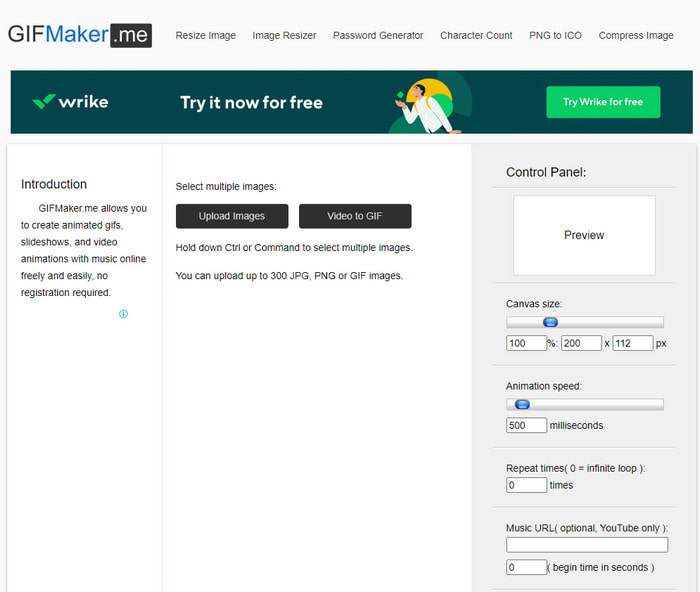
Otro creador de fotos animadas online al que puedes acceder gratis es GIFMaker.me. Esta herramienta web resulta muy práctica para quienes no tienen experiencia creando GIF. Porque aquí simplemente puedes insertar un conjunto de imágenes y se convertirán en un GIF con transición. Sin embargo, esta herramienta es la menos destacada en este artículo debido a la falta de funciones de edición para crear GIF impresionantes. Aunque carece de opciones avanzadas, si solo quieres crear una presentación de diapositivas con imágenes, puede convertirse en tu opción habitual.
Pros
- Creador de GIF sin costo que puede usar en la web.
- La interfaz del fabricante es simple y fácil de entender.
- El panel de control simple está disponible en el lado derecho de la herramienta en línea.
Contras
- Los anuncios molestos están en la interfaz web.
- Carece de la mayoría de las funciones de edición que le encantaría usar.
Parte 3. Preguntas frecuentes sobre Photo Animation Maker
¿Puedo usar GIF animados como fondo de pantalla?
No puede usar un GIF animado sin procesar y usarlo como fondo en su teléfono o computadora. Sin embargo, puede utilizar una herramienta de terceros para que funcione. Entonces, si desea saber cómo hacerlo, haga clic en este enlace para continuar.
¿Por qué no puedo compartir GIF en Instagram?
Aunque los GIF son el formato más utilizado en toda la web, aún hay algunas plataformas que no los admiten. Por ejemplo, Instagram solo admite los formatos PNG y MP4. Así que hay dos formas distintas de compartir GIF en Instagram: la primera es convertir un GIF a MP4. Por otro lado, puedes aprender diferentes métodos sobre cómo publicar GIF en Instagram haciendo clic en estos enlaces.
¿Cuál es el propósito del GIF?
Los GIF se crearon para animar imágenes pero con un tamaño de archivo más pequeño en comparación con otros formatos de vídeo. Aunque están animados, los GIF o Graphics Interchange Format no se consideran un formato de vídeo. Y, en ese caso, puedes aprender mucho más sobre los GIF si haces clic y lees detenidamente este artículo.
Conclusión
Para resumir todos los detalles anteriores, ahora es más fácil para ambos saber cuáles son los creadores de animaciones disponibles que podemos usar para crear animaciones a partir de fotos. Aunque las herramientas presentadas arriba son de gran ayuda, Video Converter Ultimate sigue siendo el editor de GIF dominante que te encantará usar. Porque es muy fácil de manejar, tiene una interfaz excelente, todas las funciones avanzadas están disponibles y mucho más. Así que, si tienes alguna duda sobre esta herramienta, compruébalo por ti mismo descargándola primero y siguiendo los pasos indicados arriba.
Descarga gratuitaPara Windows 7 o posteriorDescarga segura
Descarga gratuitaPara macOS 10.7 o posteriorDescarga segura
-
 Maravillosas aplicaciones GIF a video para dispositivos Android e iOS
 ¿Sabías que puedes convertir GIF a cualquier formato de video que te guste usando tu teléfono? Elija las mejores aplicaciones en su Android o iOS.
-
 Una guía simple sobre cómo convertir su GIF a WMV en Windows / Mac
 ¿Quieres saber cómo convertir GIF a formato WMV? Luego, siga este artículo, ya que muestra diferentes soluciones entre las que puede elegir.
-
 TS a GIF: Cómo convertir un archivo TS en GIF animados
 Aprenda cómo cambiar los archivos TS a un formato GIF con la ayuda de este artículo. La siguiente lista indica diferentes ideas sobre TS y GIF y cómo convertir TS a GIF.
