


 Video Converter Ultimate
 Grabador de pantalla
 Reparación de vídeo
Tutorial simplificado sobre cómo sincronizar audio y video en Adobe Premiere Pro
Si eres un profesional, entonces seguramente ya has utilizado Adobe Premiere Pro como tu software de edición de vídeo, que ofrece un rendimiento excelente. Muchos usuarios de Adobe adoran este programa porque proporciona el mejor resultado que querrás insertar en tu vídeo. Pero ¿sabías que también puedes usar esta herramienta para sincronizar tu audio con el vídeo? Así que, si no tienes idea de cómo hacerlo, este es uno de tus días de suerte. Lo probaremos contigo para que veas cómo sincronizarlo fácilmente. Ahora ya no necesitarás leer un manual, porque este artículo te explica de forma sencilla cómo sincronizar el audio en Premiere fácilmente y de manera eficaz, además de presentarte otra herramienta alternativa.

Parte 1. Cómo sincronizar audio y video en Adobe Premiere Pro
Antes de empezar, hagamos una breve introducción a Adobe Premiere Pro. Como indicamos arriba, esta herramienta ya ha sido utilizada mucho por editores profesionales a los que les encanta crear vídeos increíbles. Sin embargo, esta herramienta te llevará bastante tiempo aprender a usarla, porque ofrece muchas funciones avanzadas que los principiantes no entenderán. Aunque aprender a utilizarla seguramente te tomará bastante tiempo, merece la pena si dispones de tiempo libre. Además, los pasos indicados a continuación son más sencillos para que puedas entender y aprender cómo sincronizar audio y vídeo en Premiere si sigues las instrucciones que vienen abajo.
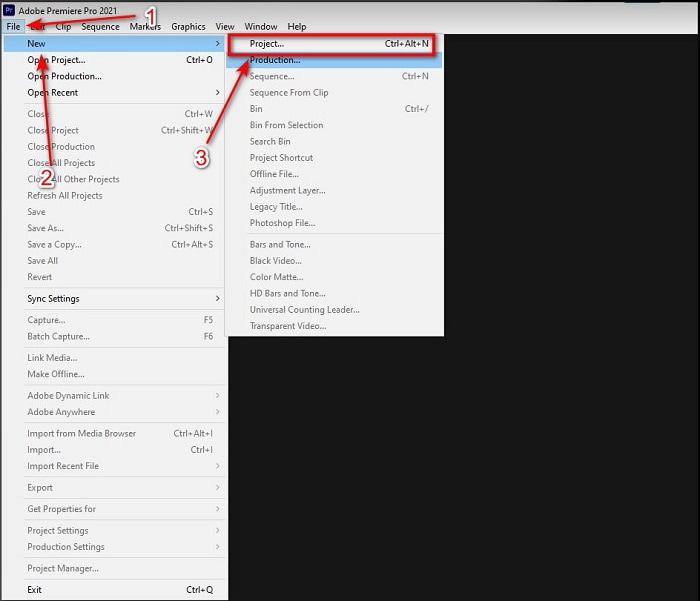
Paso 1. Primero, debes comprar el programa y descargarlo en el disco de tu ordenador. Inícialo cuando el proceso de descarga haya finalizado. Luego haz clic en Archivo y, dentro de este menú, en Nuevo, después pulsa en Proyecto para continuar y haz clic en Aceptar en la nueva interfaz que aparecerá.
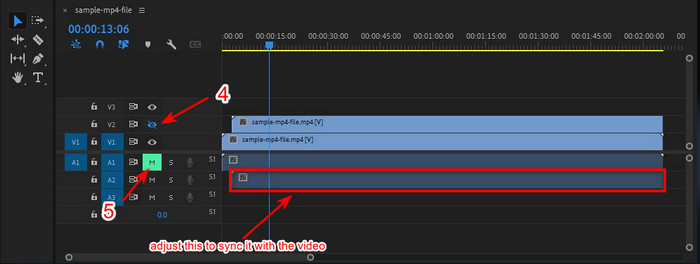
Paso 2. Añade el mismo vídeo y audio a la Línea de tiempo dos veces. Después haz clic en Alternar salida de pista de la segunda pista de vídeo y silencia la segunda pista haciendo clic en Silenciar pista. Ajusta la pista de audio para asegurarte de que quede sincronizada con el vídeo.
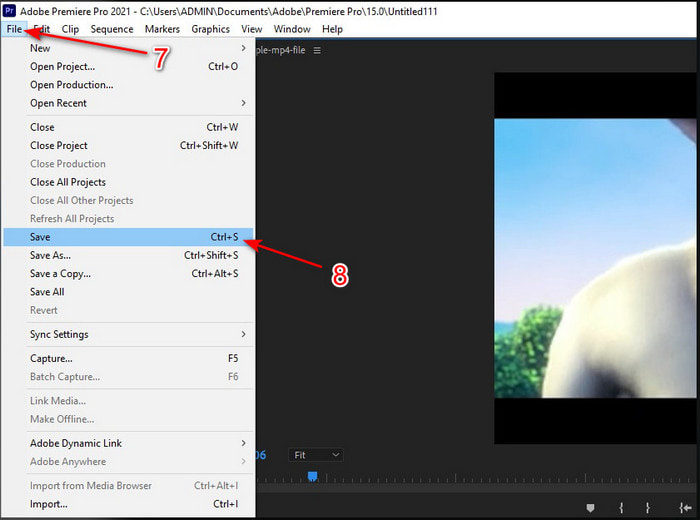
Paso 3. Vuelve a hacer clic en Archivo en la parte superior y busca la opción Guardar para exportar finalmente el archivo multimedia al disco de tu ordenador.
Pros
- Esta herramienta proporciona una función de edición avanzada.
- Editor de primera línea que puedes descargar.
- La mejor opción para tener una salida profesional.
Contras
- No es la mejor opción para el principiante que no tiene ni idea de cómo editar.
- El software es totalmente caro en comparación con otros editores que ofrecen casi la misma función.
Parte 2. El método más fácil para sincronizar audio para principiantes y profesionales con Video Converter Ultimate
Al igual que Adobe Premiere Pro, este extraordinario conversor también ofrece funciones de edición avanzadas y de alta calidad que te encantará utilizar. Pero es mucho más fácil de usar que Premiere Pro. Video Converter Ultimate es el mejor aliado de los editores a los que les gusta crear vídeos, mejorar, potenciar, crear GIF y mucho más. Este software está especializado en resolver casi todos los problemas que tienen los usuarios de internet, incluso los relacionados con la sincronización. Y debido a lo fácil que es de usar, más de un millón de usuarios ya lo han descargado y se han enamorado de él. Así que, si quieres hacer tu vida más sencilla en lugar de usar la sincronización de audio de Premiere Pro, ¿por qué no utilizas este programa? Sigue el paso siguiente.
Pasos sobre cómo sincronizar audio y vídeo con Video Converter Ultimate:
Paso 1. Descarga el software en tu ordenador y elige si es para PC o Mac. Después instálalo, realiza la configuración y haz clic en Empezar ahora para continuar.
Descarga gratuitaPara Windows 7 o posteriorDescarga segura
Descarga gratuitaPara macOS 10.7 o posteriorDescarga segura
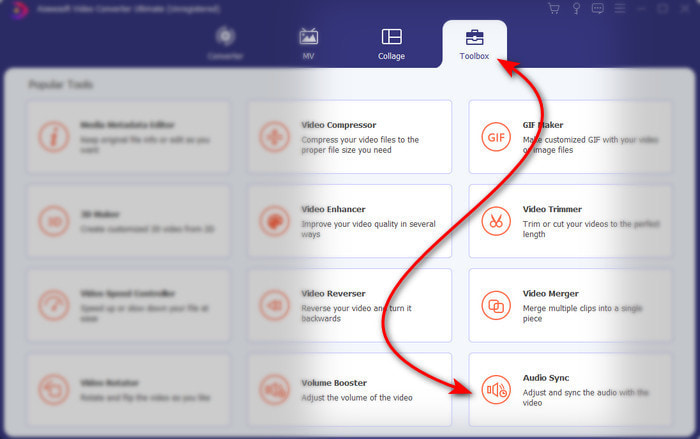
Paso 2. Inicia la herramienta después del primer paso, ve a la sección Caja de herramientas y pulsa en Sincronización de audio en la parte inferior.
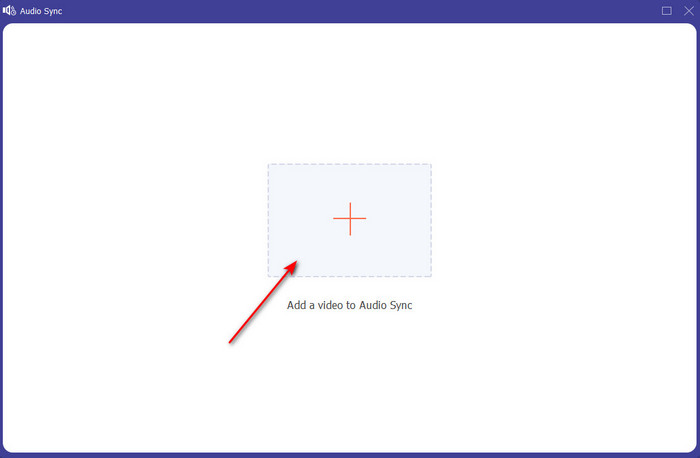
Paso 3. Pulsa el botón + para insertar el vídeo y el audio que quieres sincronizar. Después de localizarlo en la carpeta, haz clic en Abrir para continuar.
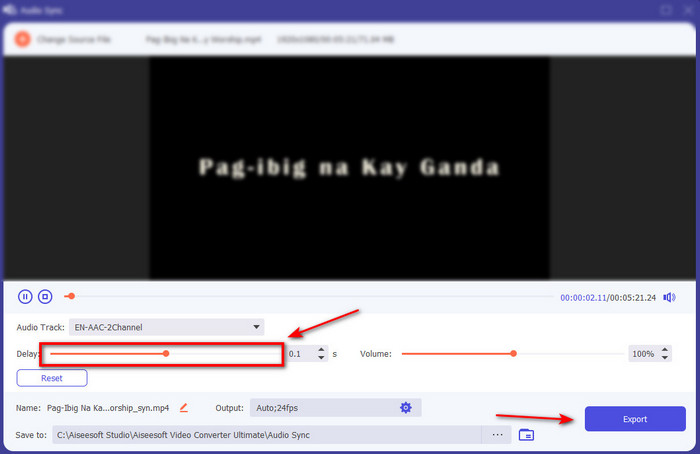
Paso 4. Para sincronizar el audio, ajusta el control deslizante de Retardo para que coincida con el vídeo. Además, también puedes potenciar el audio ajustando el control deslizante de volumen. Cuando termines, haz clic en Exportar para guardar el resultado final.
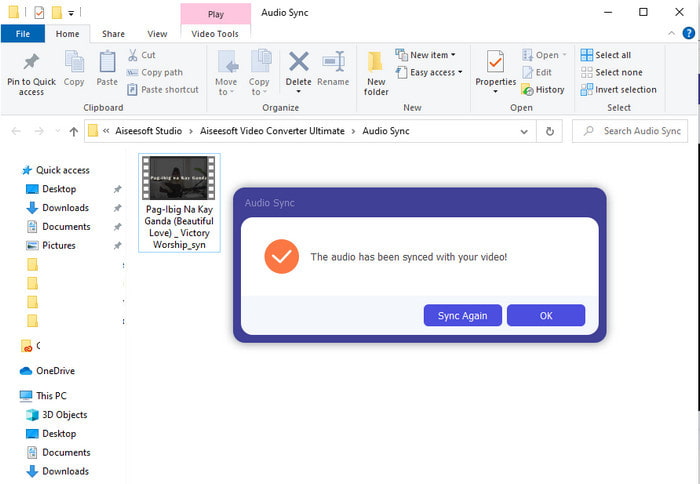
Paso 5. Cuando haya terminado, aparecerá en tu pantalla una carpeta con el audio y el vídeo sincronizados que has creado. Haz clic en el archivo para verlo, reproducirlo y disfrutar del audio y vídeo en perfecta sincronía.
Pros
- La mejor opción para hacer que su video se vea fenomenal.
- La experiencia general al usar esta herramienta es literalmente definitiva y, sin embargo, fácil de usar.
- Está disponible en todas las plataformas, ya sea PC o Mac.
Contras
- Al igual que Premiere Pro, esta herramienta es de pago, sin embargo, es mucho más barata que la Premiere Pro.
- Primero debe descargarlo en su disco antes de poder acceder a él.
Parte 3. Preguntas frecuentes sobre la sincronización de audio y video en Premiere
¿Puedo usar Premiere como grabador de pantalla?
Si estás intentando grabar la pantalla en Premiere Pro, tendrás que rendirte, porque no puedes hacerlo ahí. Sin embargo, podemos contarte un secreto: hay un grabador de pantalla que puedes elegir. Si quieres saber cuáles son las 5 mejores herramientas de screencast que puedes usar en PC, Mac, online, iOS y Android, consúltalas.
¿Adobe Premiere Pro es gratuito?
En realidad, es un sí, puedes descargar esta herramienta gratis pero solo puedes acceder a esta herramienta durante 7 días de prueba. Por lo tanto, si la versión de prueba ha finalizado, debe suscribirse nuevamente a Adobe Premiere Pro para disfrutar de la capacidad total de las funciones de edición que ofrece este profesional de estreno.
¿Puedo usar otro sitio web para descargar premiere pro?
No, porque es ilegal descargar todas las aplicaciones con el otro sitio web. Además, si utiliza otro sitio web para descargar el Premiere Pro, existe la posibilidad de que contenga software espía, virus o incluso algo mucho peor. Por lo tanto, si desea garantizar su seguridad, descargue el software solo en los sitios web principales oficiales.
¿Puedo comprar un acceso de por vida en Adobe Premiere Pro?
Aunque puede comprar un acceso mensual en Adobe Premiere Pro, todavía no puede comprar un acceso de por vida. Pero puede comprarlo en otro sitio web, sin embargo, eso es ilegal y existe la posibilidad de que el archivo que va a descargar esté dañado, tenga un virus o sea una estafa. Entonces, si desea usar y comprar Adobe Premiere Pro, sugerimos a todos que lo compren en su sitio web principal.
Conclusión
Después de 5 minutos de leer este artículo, ya sabemos cómo usar Adobe Premiere pro para sincronizar el audio con el video. Sin embargo, existe una forma más sencilla de sincronizarlo utilizando Video Converter Ultimate. Dado que esta herramienta ofrece un ajuste mucho más rápido de la desincronización de video y audio, al mismo tiempo tiene la mejor calidad. Entonces, ahora, si tiene mucho dinero, elija Adobe Premiere Pro, pero si desea ahorrar mucho mientras tiene la misma función, entonces debe usar Video Converter Ultimate.
-
 Cómo ralentizar un video: consejos perfectos [computadora de escritorio / teléfono móvil]
 ¿Está cansado de buscar las mejores herramientas que ayuden a ralentizar un video en línea? Lea este artículo en particular para que se ilumine con la información que se enumera a continuación.
-
 Reproductor de Windows Media | Aprenda a acelerar los videos [comprobado]
 ¿Quiere ralentizar su videoclip con su Windows Media Player, pero tiene problemas para hacerlo? Este artículo es ideal para leer y puede aclarar su punto de vista sobre cómo acelerar los videos con Windows Media Player.
-
 Cómo cambiar el video en cámara lenta a velocidad normal [Pasos sencillos]
 ¿Quiere saber cómo revertir un video en cámara lenta que descargó de Internet o que grabó accidentalmente en cámara lenta? Aprenda a convertir videos en cámara lenta a velocidad normal en Mac, Windows, iOS y Android.
