


 Video Converter Ultimate
 Grabador de pantalla
 Reparación de vídeo
Aprenda las 3 formas de convertir VOB a AVI en línea y fuera de línea
Los archivos VOB se utilizan para almacenar transmisiones privadas y utiliza compresión de video con pérdida como el MPEG-2. Además, tienen casi la misma estructura si tuviéramos que comparar los dos. Sin embargo, los archivos .vob tienen una limitación y especificación antes de que pueda usarlos. Y debido a eso, no puede reproducir fácilmente un archivo VOB en su reproductor multimedia local. Entonces, ahora, para ahorrar tiempo en la búsqueda de cómo abrirlo, le sugerimos que lo convierta eligiendo un convertidor a continuación. En ese caso, te presentamos el mejor conversor que se nos ocurrió y aprendemos cómo convertir VOB a AVI en línea o fuera de línea con las herramientas que están en la lista.
Parte 1. Cómo convertir VOB a AVI en línea
Si tienes un presupuesto ajustado, te sugerimos que utilices una herramienta gratuita. Al buscar en Internet, descubrimos que existe una herramienta considerada como el mejor conversor online, que es FVC Free Video Converter. Además, esta herramienta ofrece sencillez a cada usuario que la ha utilizado y todos se sienten impresionados por lo bien que funciona. Así que, si tú también quieres sorprenderte con lo bueno que es este conversor, intenta convertir un archivo VOB a formato AVI siguiendo los pasos indicados a continuación.
Paso 1. Para ir directamente a la página web del conversor, haz clic en este enlace.
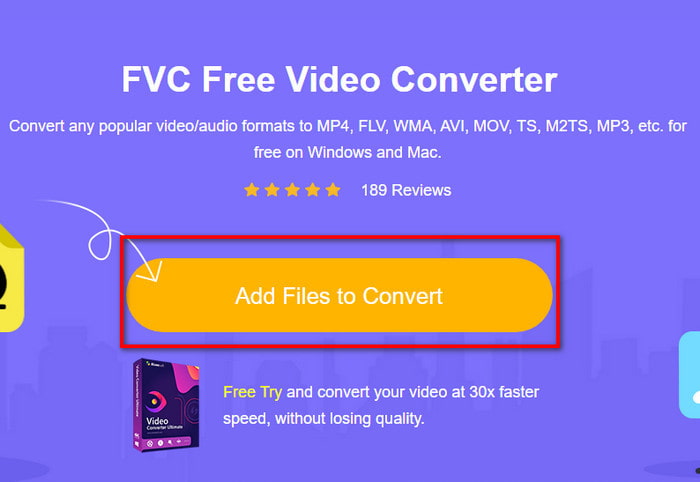
Paso 2. En la página web, haz clic en Add Files to Convert para descargar el instalador. No te preocupes, solo ocupa unos pocos KB. Después, haz clic de nuevo para iniciar la herramienta y localiza el archivo en la carpeta; una vez lo encuentres, haz clic en Open.
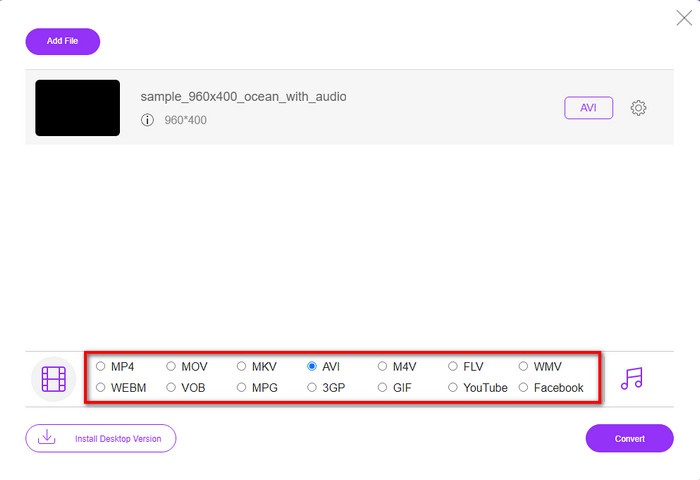
Paso 3. Aparecerá en tu pantalla una nueva interfaz de FVC. En la lista inferior, elige el formato AVI o cualquier otro formato al que quieras convertir.
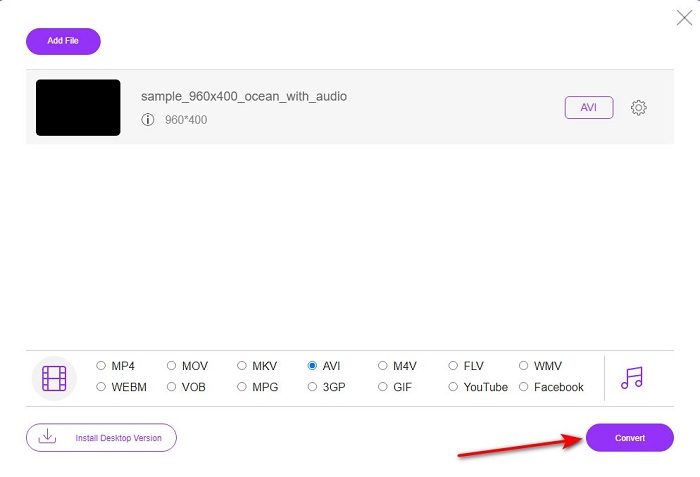
Paso 4. Una vez hayas elegido el formato, comienza la conversión del archivo haciendo clic en Convert.
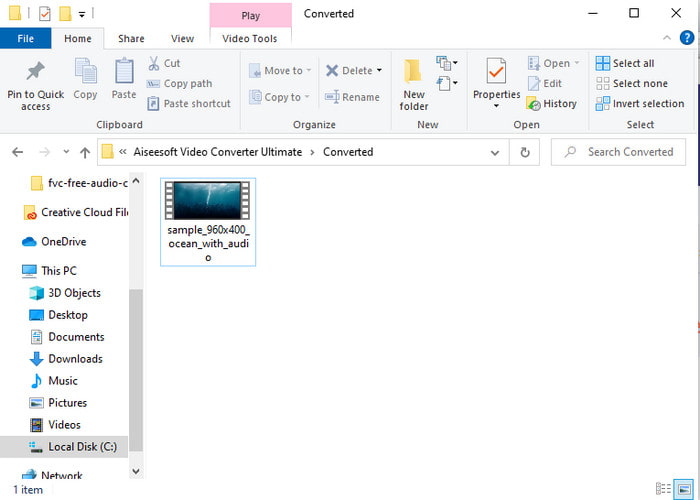
Paso 5. Esto tardará aproximadamente menos de un minuto; cuando el proceso de conversión finalice, se abrirá una carpeta con el archivo recién convertido.
Parte 2. Cómo convertir VOB a AVI en Windows y Mac
Use el convertidor fenomenal: FVC Video Converter Ultimate
Si está buscando descargar un convertidor de VOB a AVI, entonces esta debe ser la mejor de las mejores opciones que le encantaría hacer. FVC Video Converter Ultimate siempre hace honor a su nombre como la herramienta definitiva que resuelve cada situación definitiva que se te ocurra, especialmente en la conversión. Este software es muy diferente de las dos herramientas que se mencionan. Tal vez esté pensando por qué, y es solo porque se adapta perfectamente a cualquier persona, ya sea un profesional o un principiante. El rendimiento general que experimentamos cuando probamos esta herramienta ya es asombroso y estamos impresionados de lo rápido que se puede realizar la conversión. Y ahora, si desea experimentar la conversión fenomenal de la que estamos hablando, siga los pasos indicados a continuación.
Paso 1. Antes de poder usarlo, primero tendrás que descargarlo. Después de que termine la descarga, instálalo, realiza la configuración y haz clic en Start Now.
Descarga gratuitaPara Windows 7 o posteriorDescarga segura
Descarga gratuitaPara macOS 10.7 o posteriorDescarga segura
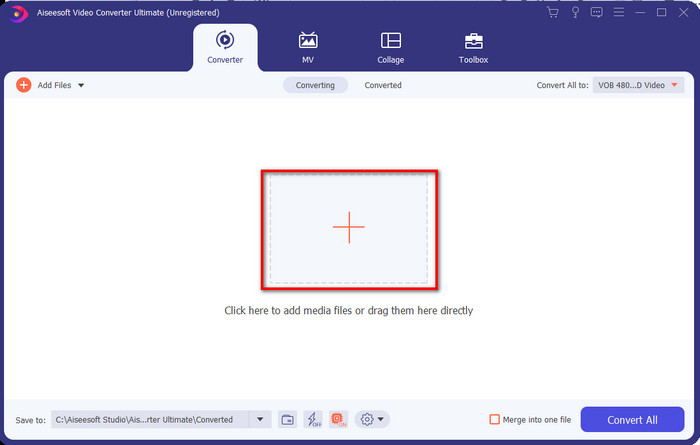
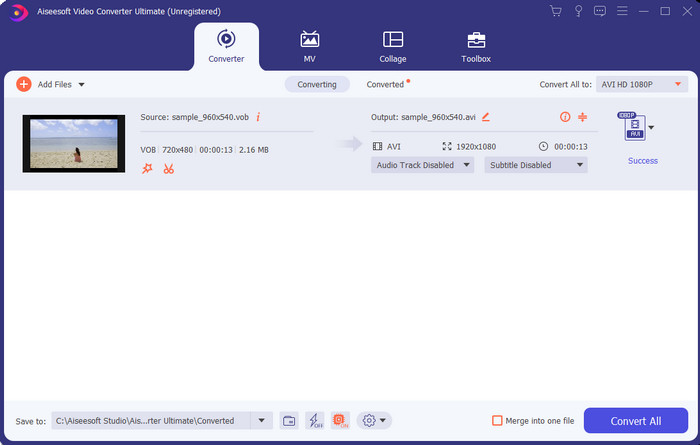
Paso 2. Una vez finalizada la instalación, abre el software. Aparecerá una interfaz como esta en tu pantalla. En la parte central de la interfaz haz clic en el botón + y se abrirá una carpeta en tu pantalla. Haz clic en Open para continuar con el siguiente paso del proceso.
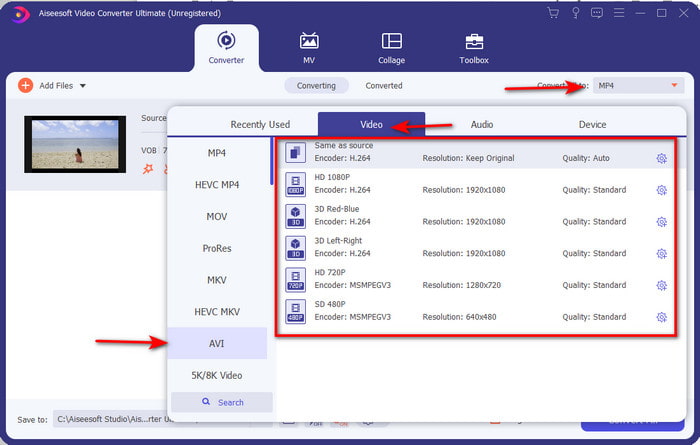
Paso 3. Haz clic en el botón Convert All en la parte superior izquierda de la interfaz y elige el formato AVI de la lista de categorías de vídeo.
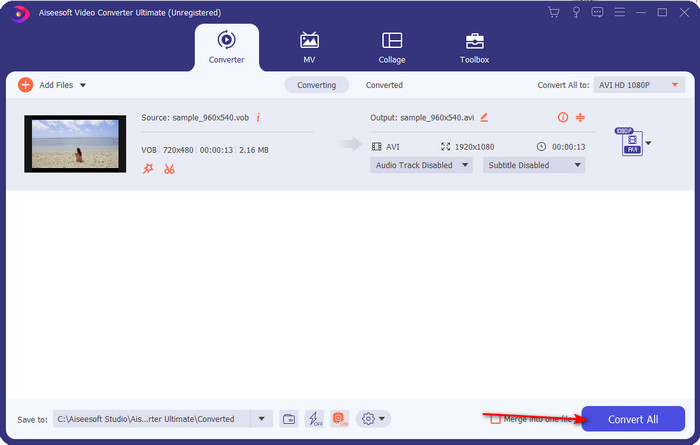
Paso 4. Cuando termines de elegir el formato, pulsa Convert All para iniciar la conversión.
Paso 5. No hace falta preocuparse por largas esperas, ya que el proceso puede completarse en pocos segundos. A continuación, se abrirá automáticamente en tu pantalla una carpeta con el archivo multimedia convertido que acabas de crear. Haz clic en él para verlo y disfrutar de la nueva versión de tu archivo .vob.
Utilice la herramienta gratuita: freno de mano
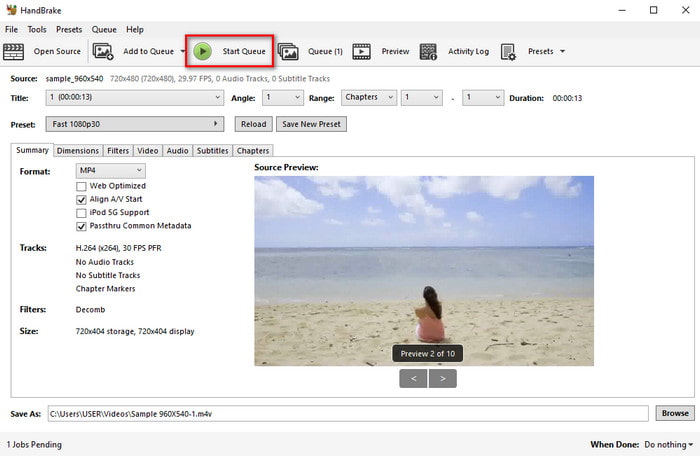
Si buscas una herramienta gratuita, entonces HandBrake te será de ayuda y no necesita conexión a Internet para funcionar, igual que FVC Video Converter Ultimate. Además, es gratuita para descargar y usar por cualquiera que tenga un ordenador en casa, en el trabajo o en cualquier otro lugar. Sin embargo, si descargas la herramienta, tendrás que descargar primero un archivo adicional conocido como .NET 5.0 antes de poder utilizarla. Algunos usuarios consideran esto un poco molesto porque, después de descargar la herramienta, tienen que descargar otro archivo más. Pero si quieres realizar una conversión eficaz y gratuita, prueba a usar HandBrake para convertir VOB a AVI y sigue los pasos que aparecen a continuación.
Paso 1. Instala primero la herramienta en el disco de tu ordenador.
Paso 2. Haz clic en File y localiza el archivo .vob en tu carpeta.
Paso 3. Haz clic en Format y elige uno de la lista disponible, luego haz clic en Start Queue.
Parte 3. ¿Cuál es el mejor convertidor para convertir archivos VOB a formato AVI?
| Características | Convertidor de video gratuito FVC | FVC Video Converter Ultimate | Freno de mano |
| Formato de conversión |  | | |
| Hardware y aceleración de conversión |  | | |
| Conectividad a Internet | | | |
| Video Enhancer o Edición | | | |
| Programa apoyado | Herramienta basada en web | Herramienta basada en escritorio | Herramienta basada en escritorio |
Parte 4. Preguntas frecuentes sobre VOB y AVI
¿Cuáles son los otros archivos que puede contener VOB?
VOB es un formato de DVD multiplex y, por eso, puede contener no solo videos y audio, sino también subtítulos, contenidos de navegación y menús.
¿Por qué no puedo reproducir archivos VOB en mi reproductor multimedia?
Una de las razones por las que VOB no se puede reproducir en tu reproductor multimedia es que este formato solo cuenta con un grado reducido de compatibilidad. Puedes hacer clic aquí para obtener reproductores de VOB disponibles. Si aún sigues teniendo este problema, una solución viable es convertirlo con los conversores mencionados arriba.
¿Por qué los archivos VOB son demasiado grandes?
La única razón por la que este formato es tan grande es que contiene diferentes datos que debería tener un DVD. Además, no podemos dejar de lado la posibilidad de la duración del video. O haga clic aquí para aprender a comprimir archivos VOB.
Conclusión
Entonces, si desea convertir el archivo VOB, puede hacerlo fácilmente con la ayuda de las herramientas disponibles anteriormente. Aparte de eso, FVC Video Converter Ultimate es el convertidor que realmente se destaca entre las otras herramientas en línea y fuera de línea mencionadas. Porque puedes convertir VOB a AVI en Windows e incluso en Mac fácilmente. Si aún no tiene idea de qué usar, le sugerimos que descargue la herramienta fenomenal para experimentar un resultado explícito y sorprenderse.
-
 VOB a MP4: 3 formas de convertir archivos VOB a MP4 gratis a granel
 Este artículo presenta 3 convertidores VOB a MP4 gratuitos y los tutoriales relacionados. Puede convertir archivos VOB a MP4 de forma gratuita en Windows / Mac / en línea con facilidad.
-
 Mejores formas de convertir VOB a FLV [Gratis y en línea incluido]
 ¿Quiere convertir un archivo VOB en un archivo FLV? Puede completar fácilmente la tarea con convertidores de escritorio o en línea. Lea esta guía y aprenda cómo transformar VOB a FLV de forma fácil y rápida.
-
 ¿Qué es el archivo VOB y cómo convertir el archivo VOB en GIF de forma gratuita?
 ¿Quiere saber más sobre los archivos VOB y cómo compartirlos después de haberlos copiado? o ¿Por qué necesita convertir VOB a GIF? Entonces lee atentamente este artículo.
