


 Video Converter Ultimate
 Grabador de pantalla
 Reparación de vídeo
2 de los mejores convertidores de M4V a FLV para Windows / Mac / Online
Un contenedor de vídeo y audio creado principalmente para usarse en todo el ecosistema de Apple iTunes, M4V. Este formato está protegido por DRM para evitar problemas de derechos de autor. En este caso, el archivo es difícil de reproducir si no tienes tu cuenta de iTunes con las credenciales correspondientes. Así que, si quieres ver los vídeos en tu PC o en un teléfono Android, es imprescindible convertirlos a un FLV reproducible. Para saber cómo convertir M4V a FLV, lee este artículo y obtén una breve idea sobre M4V y FLV.

Parte 1. Primera opción para convertir M4V a FLV en Mac y PC
Es el conversor más eficiente que te encantará usar, especialmente si vas a convertir M4V a FLV en Mac o en PC. FVC Video Converter Ultimate es el conversor preferido en el que muchos usuarios ya confían. Además, si quieres tener una herramienta multipropósito que proporcione un resultado fenomenal, esta es imprescindible. También puedes convertir cualquier archivo multimedia aquí y establecer la calidad en SD, HD, 1080 e incluso vídeos 4K. No esperes menos si descargas esta herramienta en tu unidad, porque, como indica su nombre, es “ultimate”. Asimismo, sigue el tutorial que se indica a continuación si quieres experimentar la máxima capacidad de conversión de esta herramienta.
Cómo convertir M4V a FLV con la ayuda de FVC Video Converter Ultimate:
Paso 1. Haz clic en el botón de descarga que aparece a continuación y elige el sistema operativo que estás utilizando. Después de la descarga, haz clic en Instalar, aparecerá una interfaz de bienvenida y, a continuación, pulsa Empezar ahora.
Descarga gratuitaPara Windows 7 o posteriorDescarga segura
Descarga gratuitaPara macOS 10.7 o posteriorDescarga segura
Paso 2. Inicia la herramienta, haz clic en el signo + en el centro de la interfaz y selecciona el archivo .m4v en la carpeta que se mostrará, haz clic en él y pulsa Abrir.
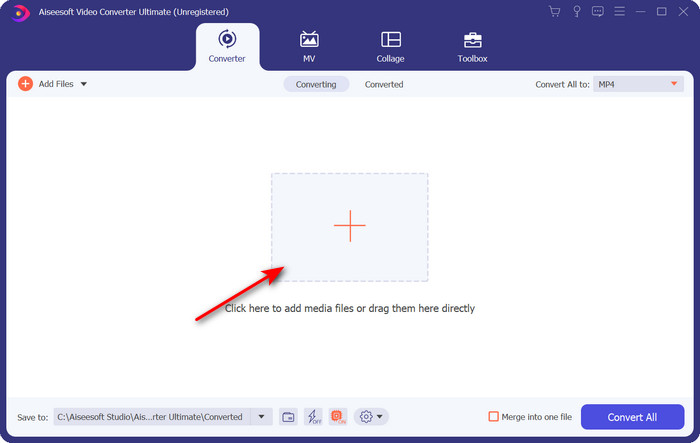
Paso 3. Una vez que el archivo .m4v esté en la interfaz, haz clic en Convertir todo a y busca el formato FLV.
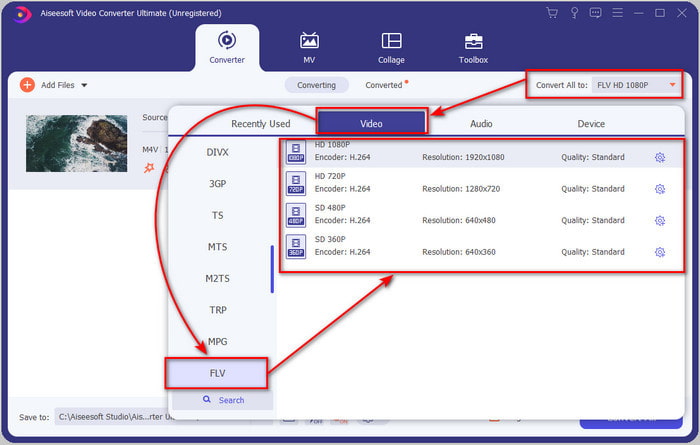
Paso 4. A continuación, haz clic en Convertir todo para comenzar a cambiar M4V a FLV.
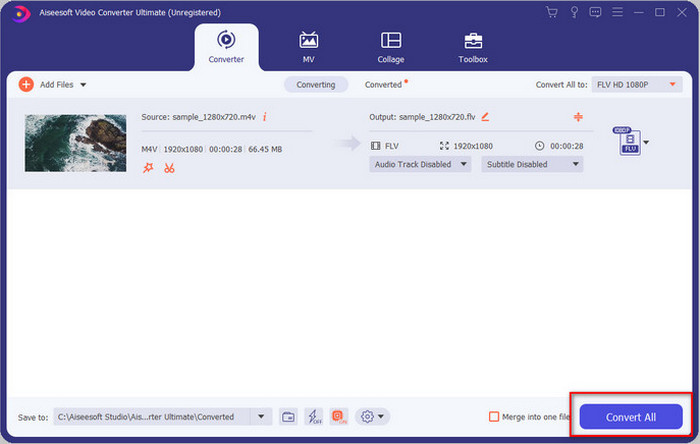
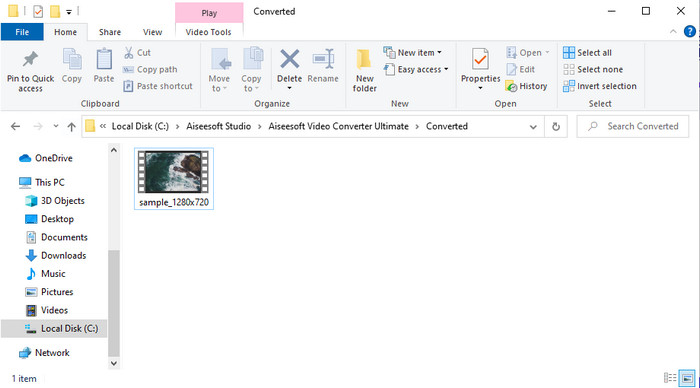
Paso 5. La conversión del archivo tardará menos de un minuto gracias a la rápida velocidad de conversión que ofrece esta herramienta. Se abrirá una carpeta que mostrará tu archivo convertido; haz clic en el archivo para verlo o compartirlo en línea.
Pros
- La conversión rápida y la aceleración de hardware están disponibles para la mejor experiencia.
- Disponible en todas las plataformas como PC o Mac.
- Aquí se puede superar la edición de videos para hacerlos sobresalientes.
Contras
- Pago antes de usar pero el precio es asequible.
- Descargue el software antes de usarlo.
Parte 2. Segunda opción para convertir M4V a FLV gratis a través de Internet
Convertir tus archivos en línea puede hacerse de forma eficiente si utilizas un conversor adecuado de M4V a FLV online con la ayuda de FVC Free Video Converter Online. Esta herramienta online es el mejor conversor al que puedes acceder desde cualquier navegador web si dispones de conexión a Internet. Además, aquí puedes convertir sin límite de tamaño, aunque no puedes realizar conversiones por lotes. Aunque el software online es excelente, sigue siendo necesaria la conectividad a Internet, así que si no la tienes, esta no es una opción, igual que ocurre con otros conversores web disponibles. Pero, si tienes conexión a Internet y quieres disfrutar de una conversión online gratuita y bien hecha, debes seguir los pasos que se indican a continuación.
Cómo convertir M4V a FLV con la ayuda de FVC Free Video Converter Online:
Paso 1. Haz clic en este enlace para ir al conversor online gratuito que FVC pone a tu disposición.
Paso 2. En la interfaz web, haz clic en Add Files to Convert para descargar el instalador. Una vez finalizada la descarga del instalador, pulsa de nuevo Add Files to Convert y, en la carpeta que se abrirá, selecciona el archivo M4V.
Descarga la versión de escritorio para convertir archivos por lotes.
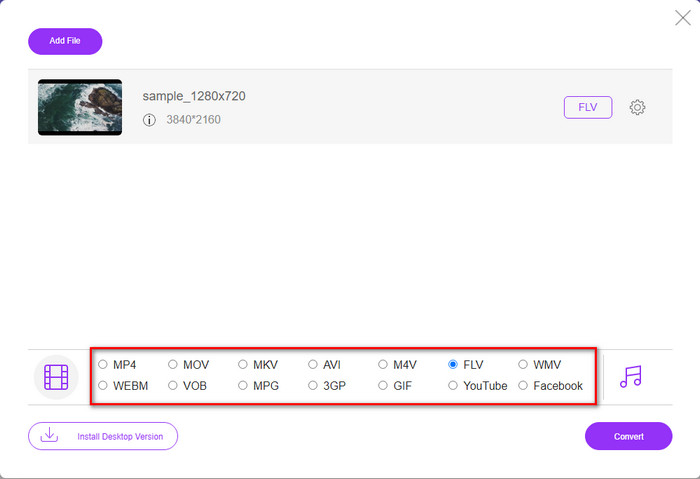
Paso 3. Aparecerá una nueva interfaz web; en la parte inferior, elige el formato FLV haciendo clic en él.
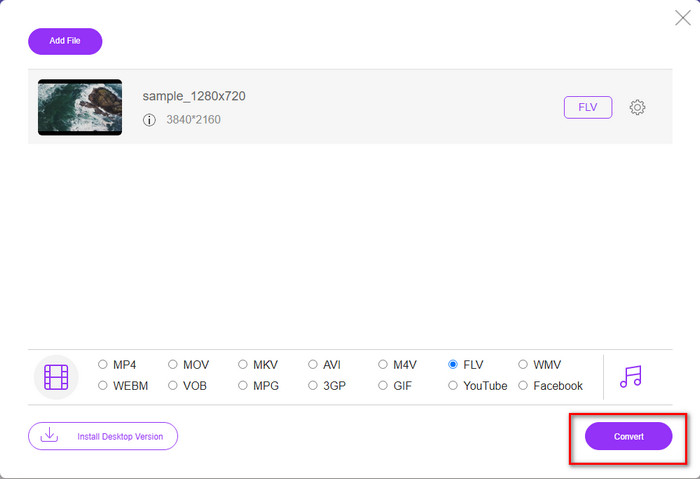
Paso 4. Para empezar a convertir M4V a FLV gratis, haz clic en Convert.
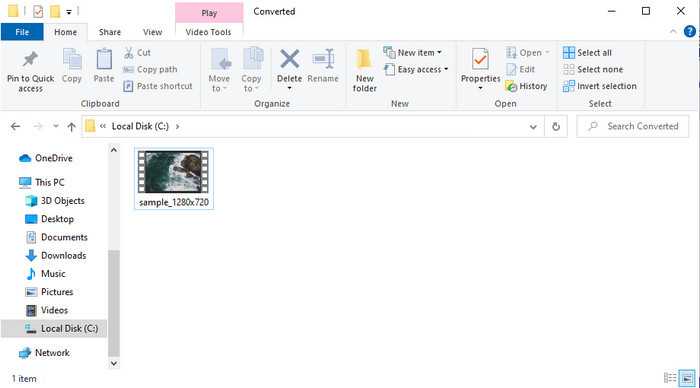
Paso 5. Después de la conversión, aparecerá una carpeta en la interfaz; haz clic en el archivo para reproducirlo en tu reproductor multimedia local.
Pros
- Gratis y compatible en todos los navegadores web.
- Conversión y tamaño de archivo ilimitados.
- Seguro y sin anuncios en la herramienta web principal.
Contras
- Necesita conectividad a Internet para usar la herramienta.
- Formato menos compatible para cargar y convertir.
Parte 3. Diferencias entre los formatos M4V y FLV
M4V almacena la calidad de video más alta descargada en su tienda iTunes de Apple. Este formato es similar al MP4 porque utilizan el códec MPEG-4 como compresor. Pero los videos de M4V están protegidos por la protección de derechos de autor de Apple FairPlay DRM. Por lo tanto, reproducir videos en este formato es complicado porque no se reproducirá de inmediato si los inserta en un reproductor multimedia que no sea iTunes o Quicktime Player. Se puede acceder a los archivos M4V desprotegidos en su reproductor multimedia cambiando la extensión del archivo a .mp4.
Por el contrario, FLV se utiliza para transferir datos de audio y video a través de la web lo más rápido posible. Flash Video es el formato más favorable que se encuentra en todos los sitios web HTML 5. Sin embargo, este formato se suspendió porque Adobe Flash ya se había retirado. Sin embargo, aún puede reproducirlo en los complementos de su reproductor multimedia necesarios una vez que lo descargue o convierta.
M4V frente a FLV
El M4V es desarrollado por Apple, que también usa MPEG 4. Los archivos M4V se usan a menudo para almacenar los videos descargados de la tienda iTunes de Apple, como videos musicales, episodios de TV, etc. Es posible que encuentre algunos archivos M4V protegidos contra copia ya que usa Protección de derechos de autor FairPlay DRM de Apple.
Adobe Flash Player usó FLV para entregar contenido de video como películas y programas de televisión. En la actualidad, Adobe ya no desarrolla el reproductor y recomienda a los usuarios que lo desinstalen por motivos de seguridad. Sin embargo, aún puede usar el formato FLV en muchos programas que no son de Adobe/Macromedia.
Parte 4. Preguntas frecuentes sobre la conversión de M4V a FLV
Cual es mejor; ¿MP4 o M4V?
Si desea proteger su archivo, entonces M4V es el formato que debe usar porque está disponible solo en Apple y está protegido. Pero suponga que desea un formato compatible con todos los reproductores multimedia, el editor y más. En ese caso, MP4 es el formato multimedia universal que le encantaría usar.
¿Puedo jugar M4V en VLC?
VLC es gratuito y compatible con todas las plataformas; además, puede reproducir casi todos los formatos multimedia. Pero el M4V protegido no se puede reproducir aquí porque está protegido. Así que, si quieres ver un archivo .m4v en VLC, es imprescindible convertir el archivo M4V a MP4 o AVI.
¿Pierdo la calidad después de convertir M4V?
Después de convertir M4V, su calidad debería conservar la tasa estándar de la calidad original de M4V. Sin embargo, algunos convertidores no admiten la conversión de video a HD, 1080 o 4k. Por lo tanto, es mejor que elija la herramienta perfecta y no la herramienta adecuada que satisfaga sus necesidades de conversión sin perder su calidad.
Conclusión
En definitiva, las dos herramientas online y offline que aquí se presentan tienen un gran potencial, sobre todo si quieres convertir M4V a FLV. Además, hemos obtenido información sobre ambos formatos, M4V y FLV. Aunque modificar el M4V es necesario para ver el archivo protegido, elegir la herramienta adecuada para cada tarea puede ser complicado. Por eso, presentamos dos herramientas que puedes usar para convertir el formato de forma gratuita mediante FVC Free Video Converter Online. O bien, puedes experimentar un nivel superior de conversión utilizando FVC Video Converter Ultimate. Y ahora, ¿a qué esperas si quieres ver tu M4V gratis? Elige una de las herramientas anteriores, sigue los pasos rápidos y sencillos que hemos presentado y voilà, disfruta del vídeo.
-
 [Guía] Cómo convertir videos M4V a GIF animados en Windows / Mac
 Si desea crear archivos GIF animados a partir de sus videos M4V favoritos, puede aprender sobre 2 formas fáciles y eficientes de convertir videos M4V a GIF con configuraciones personalizadas.
-
 3 Programa de conversión de video utilizado para convertir iTunes M4V a AVI en Mac
 ¿No tienes idea de cómo convertir MKV a formato AVI? A medida que continuemos leyendo este artículo, conoceremos las 3 herramientas que pueden ayudarlo a convertir este formato de archivo.
-
 Convertidor gratuito de M4V a MOV - Cómo convertir M4V a MOV
 Si su reproductor multimedia no es compatible con M4V, ¿alguna vez ha tenido problemas para ver una película en su iPhone? El tema principal de este artículo es convertirlo en un archivo de video MOV.

