


 Video Converter Ultimate
 Grabador de pantalla
 Reparación de vídeo
Métodos ventajosos para convertir DV a FLV fácilmente
El archivo DV es un archivo que contiene un vídeo digital. Nuestro análisis de los archivos DV ha revelado que el vídeo digital es uno de los usos de este formato. Aún no hemos explicado por completo qué contienen estos archivos ni cómo los utilizan los usuarios, pero nuestro equipo trabaja con miles de tipos de archivos. Si tienes información sobre el formato, nos encantaría saber de ti. Sin embargo, la extensión de archivo .flv designa archivos FLV (Flash Video). Los usuarios pueden usar Adobe Flash Player o Adobe Air para retransmitir contenido de audio y vídeo por Internet utilizando FLV. Los archivos FLV codifican sus datos del mismo modo que lo hacen los archivos SWF. A la hora de resolver el problema del formato de vídeo DV, es más probable que los usuarios lo conviertan a formato FLV, que es compatible con una amplia gama de reproductores multimedia. Así que, si estás buscando herramientas que puedan convertir DV a FLV, sigue leyendo este artículo.

Parte 1. La mejor manera de convertir DV a FLV sin conexión
Video Converter Ultimate es uno de los excelentes programas que puede ayudarte a convertir el formato de vídeo DV a FLV. Gracias a su sistema de aceleración ultrarrápido, puedes convertir DV a FLV en cuestión de un segundo, algo que otras herramientas no pueden superar. Gracias a este software, no tendrás que preocuparte por convertir DV a otros formatos, porque es compatible con numerosos formatos que ni siquiera imaginas, como MP4, MOV, 3GP, FLV, WMV, WEBM, MPEG, etc. Además de convertir archivos, este programa dispone de otras funciones destacadas: puede recortar, mejorar, unir, acelerar y ofrece otras herramientas útiles que pueden llevar tu vídeo al siguiente nivel.

Video Converter Ultimate
6,357,200+ Descargas- Admite más de 1000 formatos diferentes de video y audio.
- Convierta 30 veces más rápido que otros convertidores.
- Puede convertir videos de hasta calidad 4K HD.
- Ofrece muchas otras herramientas destacadas que ayudan a mejorar su video.
- No requiere hardware de mantenimiento pesado para operar.
Descarga gratuitaPara Windows 7 o posteriorDescarga segura
Descarga gratuitaPara macOS 10.7 o posteriorDescarga segura
Paso 1: Descarga el programa haciendo clic en el botón Descarga gratuita situado arriba. Después, tendrás que instalar el software en tu ordenador y ejecutarlo haciendo clic en Empezar ahora cuando finalice la instalación.
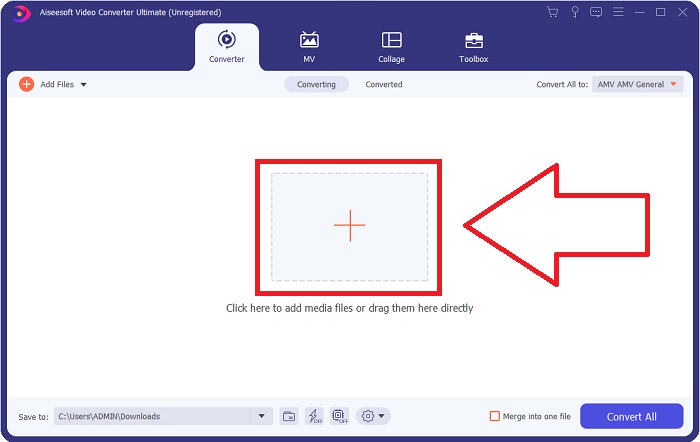
Paso 2: A continuación, verás que se abre una ventana en tu pantalla. El programa mostrará la función Convertidor. Para importar un archivo desde tu ordenador, haz clic en el botón + del centro o simplemente arrastra cualquier archivo de vídeo en formato DV a la parte central.
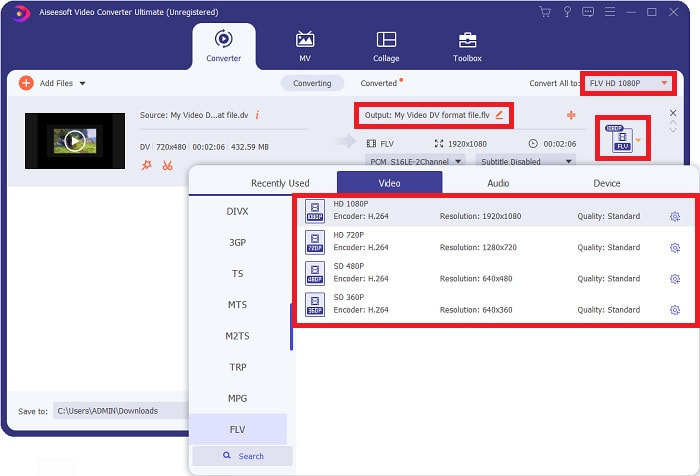
Paso 3: Ya estás a mitad del proceso. Haz clic en el icono de selección de formato que está justo al lado de la salida de tu vídeo y elige el formato de vídeo FLV. Después, también podrás seleccionar las diferentes calidades de vídeo que ofrece el programa.
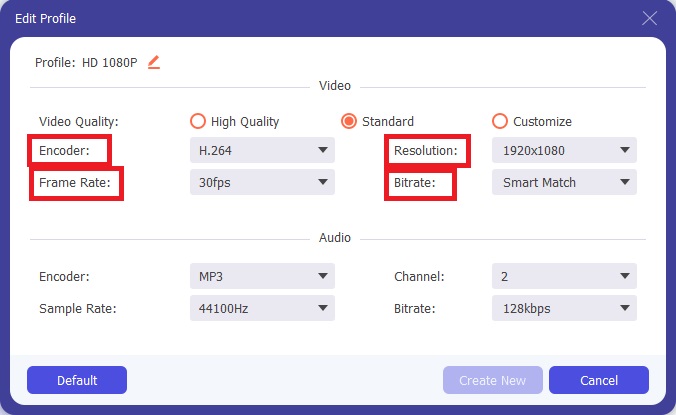
Paso 4: Falta muy poco para terminar. Si ninguna de las calidades de vídeo satisface tus necesidades, puedes personalizar la calidad de salida del vídeo haciendo clic en el icono de engranaje situado junto a la selección de calidades de vídeo.
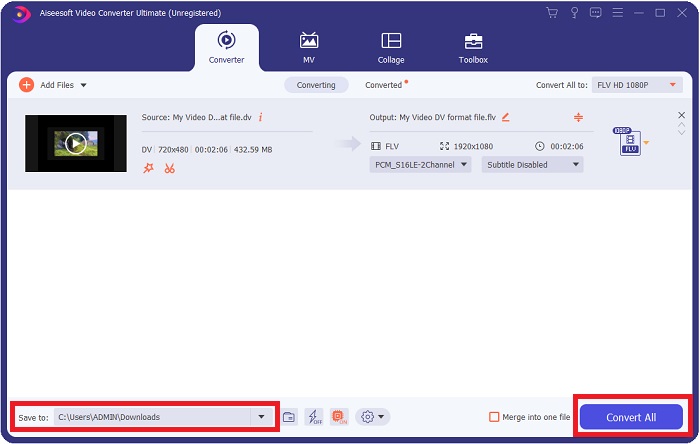
Paso 5: Ya estás en la recta final. Ve al campo Guardar en situado en la otra esquina para elegir la ubicación donde se guardará tu archivo convertido. Ahora ya puedes convertir tu archivo haciendo clic en el botón Convertir todo que se encuentra en la esquina inferior derecha de la pantalla.
Parte 2. Cómo convertir DV a FLV en línea
Internet produce y presenta diferentes herramientas en línea que pueden ayudarte a convertir DV a FLV. Pero esta herramienta en línea llamada Free Video Converter Online es diferente de las demás por su proceso de conversión ultrarrápido, ya que puede convertir un archivo en solo un segundo. También admite formatos como MP4, FLV, MOV, M4A, TS, WMV, ASF, VOB, AAC, WMA y muchos más. Asimismo, convierte vídeos en vídeos HD sin pérdida de calidad. Esta herramienta gratuita de conversión de vídeo es muy conocida porque permite convertir y, al mismo tiempo, ofrece a los usuarios la posibilidad de afinar sus trabajos de vídeo sin complicaciones. Ahora veamos todos los pasos que te ayudarán a usar este conversor en línea.
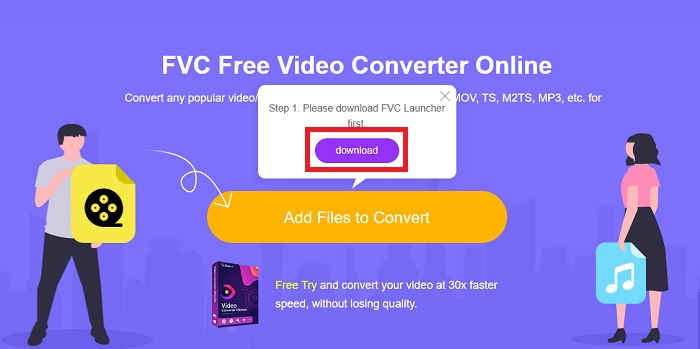
Paso 1: Para acceder a la página principal de esta herramienta en línea, haz clic en este enlace y continúa. Haz clic en el botón Añadir archivos para convertir en la pantalla principal de tu ordenador para descargar el lanzador que te permitirá utilizar esta herramienta en línea. Después, haz clic de nuevo para proceder a subir un archivo.
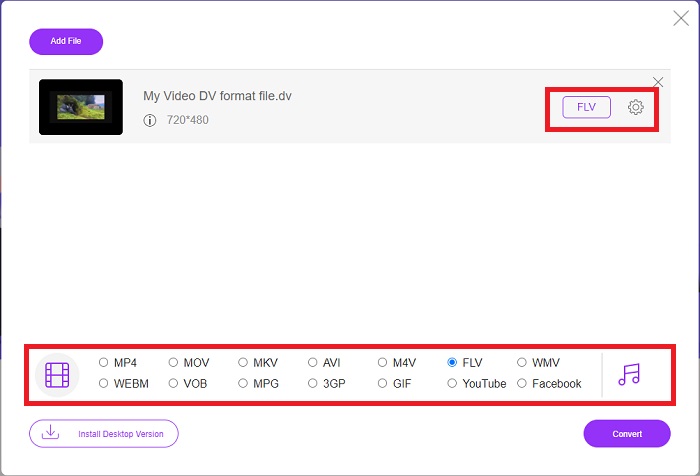
Paso 2: Ahora que ya tienes el archivo que quieres convertir, debes elegir el formato de vídeo FLV en la selección de formatos de vídeo situada en la parte inferior de la pantalla. También puedes ajustar algunas especificaciones de tu vídeo modificando ciertos parámetros, como la resolución, la tasa de fotogramas, etc., haciendo clic en el icono de engranaje.
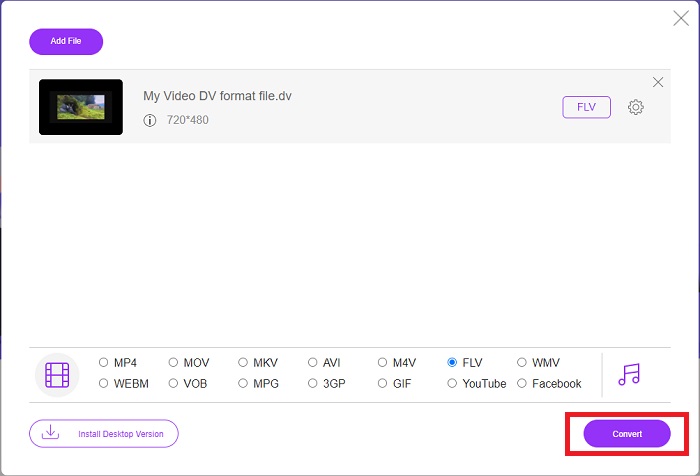
Paso 3: Después de eso, ya puedes convertir el archivo haciendo clic en el botón Convertir situado en la parte inferior izquierda de la ventana.
Parte 3. Cuadro comparativo: DV vs. FLV
Una cámara digital crea un archivo de video digital (DV) y lo guarda en el formato sin procesar que los usuarios siempre usan. Un archivo de video digital (DV) consta de bloques de interfaz digital (DIF), cada uno de los cuales contiene 80 bytes. El audio, el video y los metadatos se pueden incluir dentro de los bloques DIF. Los bloques DIF se pueden almacenar como archivos de computadora en su forma original o como formatos de archivo envueltos alrededor de ellos, multiplexando los bloques en secuencias de 150 bloques. Un cuadro de video puede contener hasta diez o doce secuencias.
Sin embargo, servicios de vídeo en streaming como YouTube, Hulu y Vevo utilizan el formato Flash Video de Adobe Systems para sus vídeos en línea. Adobe Flash Player (incluidos los complementos para navegador) y programas de terceros pueden leer y reproducir archivos FLV en prácticamente cualquier sistema operativo (excepto iOS). Los iPhone y los dispositivos Android pueden reproducir archivos FLV utilizando software de código abierto y navegadores específicos. Flash sigue siendo un problema para iOS. Los archivos FLV solo pueden verse en software reproductor FLV, y los usuarios pueden utilizar programas de captura de pantalla y de grabación para grabar vídeos FLV.
| Extensión de archivo | DV (.dv) | FLV (.flv) |
| Nombre del archivo | Video digital | Archivo de vídeo flash |
| Desarrollado por | Productores de múltiples cámaras de video | Sistema Adobe incorporado |
| Pros | ◆ Un Mini DV estándar tiene 19,5 GB, lo que equivale a unos 0,25 centavos por GB de almacenamiento. ◆ Conversión intuitiva de HD a estándar ◆ Las cintas son fáciles de etiquetar e ideales para almacenamiento a largo plazo. | Cuando se trata de crear páginas web dinámicas e interactivas, Adobe Flash puede ser una gran ventaja. El proceso es simple, pero los resultados pueden ser significativos. En su apogeo, Flash también fue ampliamente utilizado para videojuegos simples. |
| Contras | ◆ Se requiere una conexión firewire (la mayoría de las PC estándar no la tienen). ◆ La calidad de una grabación disminuye con cada pasada posterior. ◆ Solo graba de 60 a 90 minutos a la vez. | Es una desventaja que FLV haya perdido popularidad a lo largo de los años. Crear contenido FLV puede llevar mucho tiempo y costar mucho dinero. Además, los usuarios no pueden ver contenido Flash en dispositivos iOS, lo que limita gravemente su capacidad para atraer nuevos seguidores. |
| Programas que soportan el archivo | ◆ VLC Media Player | ◆ RealPlayer ◆ Apple QuickTime Player ◆ VLC Media Player ◆ MPplayer |
Parte 4. Preguntas frecuentes sobre la conversión de DV a FLV
¿Qué resolución es DV?
Con DV, la resolución estándar registra 720 píxeles horizontales y 480 líneas entrelazadas en países que usan corriente eléctrica de 60 Hz y 576 líneas con corriente eléctrica de 50 Hz. Una versión de alta definición de video digital (HDV) es un estándar HDV oficial, y DVCPRO HD de Panasonic es un ejemplo de dicho formato (consulte HDV y DVCPRO).
¿El vídeo DV está entrelazado?
Siempre hay mucho metraje DV en la parte inferior primero. Otras imágenes pueden aparecer primero. Vuelva a interpretar el clip importado con la separación de campos activada, abajo primero (archivo > interpretar metraje > central) para ver si está entrelazado. Luego, en la ventana del proyecto, use el atajo Alt-doble clic para acceder a él. Use las teclas de avance/retroceso de página para navegar por el video. El entrelazado ocurre si el video cambia cada vez que presiona el botón de reproducción. Un movimiento brusco indica que el orden de los campos es incorrecto y que el material de archivo debe volver a interpretarse utilizando el otro orden de los campos.
¿Es FLV un formato de vídeo adecuado?
Adobe Flash Player guarda archivos de video en formato FLV. Todas las plataformas de video y navegadores lo aceptan como uno de sus formatos de video compatibles. Las plataformas de transmisión de video en línea como YouTube se benefician del uso del formato FLV. Como resultado de su pequeño tamaño de archivo, son rápidos y sencillos de descargar.
Conclusión
Para resumir todos los temas tratados, verás que los mejores conversores que este artículo te recomienda utilizar son el programa Video Converter Ultimate y la herramienta en línea Free Video Converter Online. Puesto que estos dos conversores superan a otros, cuentan con funciones avanzadas de nivel profesional y una interfaz fácil de usar.
-
 La mejor estrategia sobre cómo convertir un archivo DV a formato AVI con pasos detallados
 ¿Quieres convertir tu archivo DV a AVI? Luego lea este artículo para conocer la herramienta única que puede usar para convertir y un reproductor multimedia para reproducir su DV en su PC o Mac.
-
 Principales formas de 2 sobre cómo convertir archivos DV a MOV de forma gratuita en el escritorio y en línea
 ¿Tiene problemas para convertir sus archivos DV a MOV en su Mac? Si ese es su problema, podemos resolverlo juntos si leemos este artículo.
-
 MP4 a FLV | Top 3 Free Converter (en línea / Mac / Windows)
 Esta publicación es la guía detallada para la conversión de MP4 a FLV. Puede tomar los 3 principales convertidores gratuitos para cambiar MP4 a FLV en línea, en una computadora con Windows o Mac con facilidad.
