


 Video Converter Ultimate
 Grabador de pantalla
 Reparación de vídeo
Herramientas en línea y sin conexión para convertir TRP a FLV que debe conocer
TRP es un formato de archivo para almacenar grabaciones de televisión. Como pocos reproductores pueden manejar este tipo de archivo en su versión original, es posible que tengas que convertirlo a otro formato antes de verlo. Para poder convertir archivos TRP a archivos FLV, necesitarás utilizar la herramienta de software adecuada. Afortunadamente, esto es mucho más fácil si usas nuestro software o su versión en línea, que no te causará ninguna molestia durante todo el proceso de conversión. Sigue los pasos que te proporcionaremos para convertir tus vídeos TRP al formato FLV con éxito.

Parte 1. Método sin conexión para convertir TRP a FLV
El formato de archivo TRP es bastante poco común para la mayoría de los usuarios de vídeo y no se utiliza con frecuencia por los creadores. Por este motivo, la mayoría de los programas y herramientas en línea no son compatibles con este tipo de archivo de vídeo. Por eso, Video Converter Ultimate es una opción a tener muy en cuenta cuando necesites convertir vídeos de un formato a otro. Este software puede convertir tu archivo TRP a cualquier formato que elijas con un solo clic.
Esta herramienta de conversión de video proporciona funciones de edición avanzadas y tiene una interfaz gráfica que es fácil de usar incluso si no tiene conocimientos o habilidades técnicas. Con la ayuda de esta aplicación, puede convertir archivos y beneficiarse de tiempos de conversión súper rápidos y resultados de alta calidad. A continuación te proporcionamos los sencillos pasos que debes seguir:
Paso 1: Descarga el archivo .exe haciendo clic en el botón Descarga gratis de abajo según el sistema operativo que estés usando. Cuando termine la descarga, ábrelo y comienza el proceso de instalación. Espera a que termine de instalarse y luego ejecuta el software.
Descarga gratuitaPara Windows 7 o posteriorDescarga segura
Descarga gratuitaPara macOS 10.7 o posteriorDescarga segura
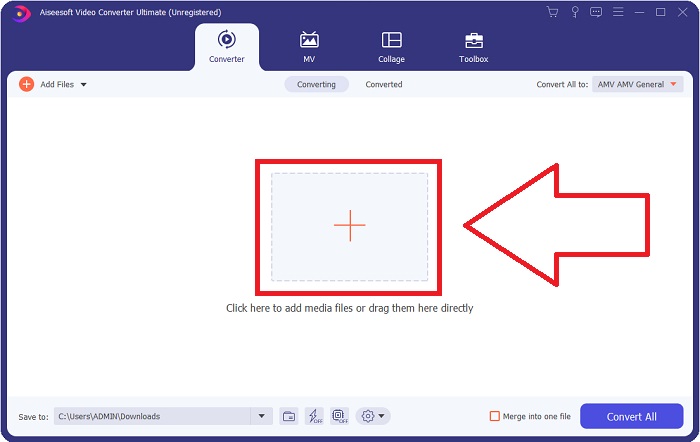
Paso 2. Cuando se inicie el software, aparecerá una interfaz. Desde ahí, haz clic en el botón + en el centro para empezar a importar el archivo de vídeo que quieres convertir o simplemente arrastra y suelta el archivo.
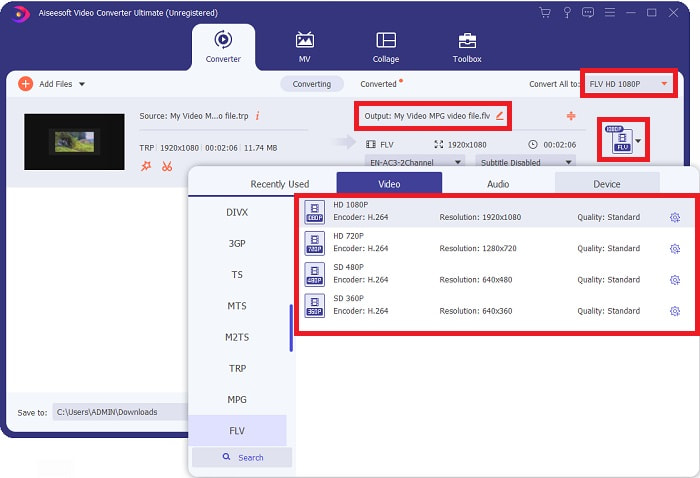
Paso 3: Verás el formato actual de tu vídeo en el lado derecho del archivo. Para elegir a qué formato se convertirá el vídeo, haz clic en él y aparecerán todos los formatos disponibles. Busca FLV o simplemente escríbelo en la barra de búsqueda. A la derecha también tendrás disponibles distintas calidades de vídeo.
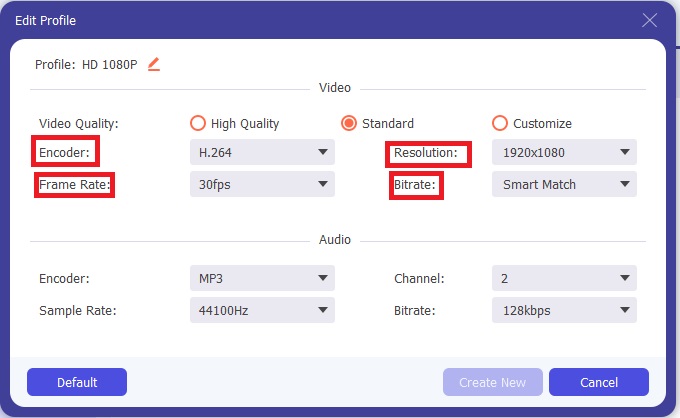
Paso 4: Para las funciones adicionales de las que hablamos, haz clic en el icono de engranaje a la derecha de la calidad de vídeo que hayas elegido y aparecerá otra interfaz. Desde ahí, puedes editar un montón de ajustes de vídeo y audio que se adapten a tus necesidades. Haz clic en el botón Crear nuevo para guardar los cambios.
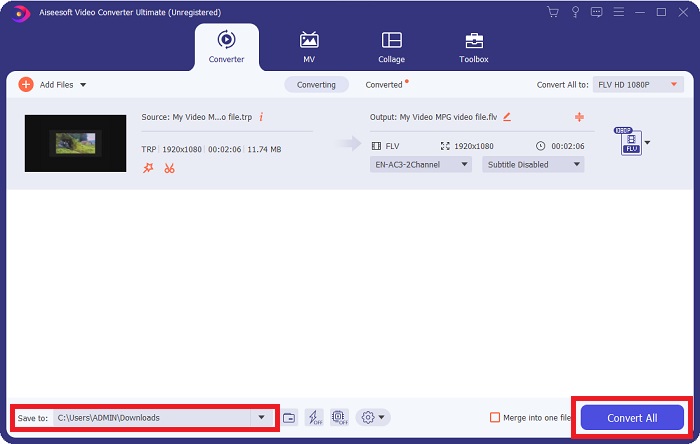
Paso 5: Cuando termines de ajustar todos los parámetros de edición, haz clic en el botón Convertir todo en la esquina inferior derecha de la interfaz para iniciar el proceso de conversión y espera a que finalice.
Parte 2. Método en línea para convertir TRP a FLV
Convertir archivos de vídeo es otra opción a considerar si quieres hacer el trabajo utilizando una herramienta web sin instalar el software completo. En este caso, también contamos con la versión en línea del software: FVC Free Video Converter Online. Sigue ofreciendo opciones adicionales similares a las del programa de escritorio, aunque no todas las funciones. No obstante, cumple su cometido en un tiempo razonable. Para usar esta herramienta web, sigue los pasos que se indican a continuación:
Paso 1: Accede al conversor directamente haciendo clic en este enlace. Desde ahí, puedes empezar descargando el lanzador que necesitas para importar tus archivos. Haz clic en el botón Añadir archivos para convertir en el centro de la página para iniciar el proceso.
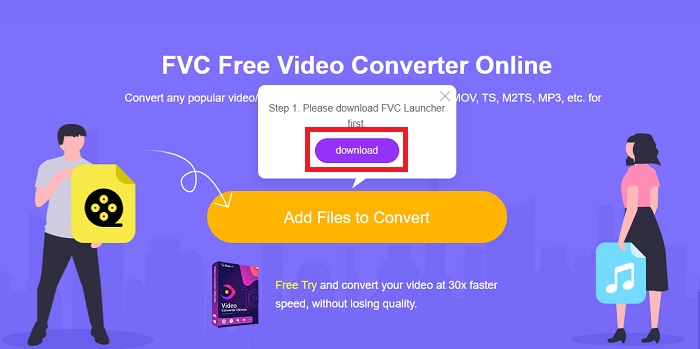
Paso 2: Haz clic de nuevo en el botón indicado y sube el archivo de vídeo que quieras convertir. Después de importar un archivo, aparecerá una nueva interfaz que muestra todos los formatos disponibles entre los que puedes elegir. En este caso, selecciona FLV.
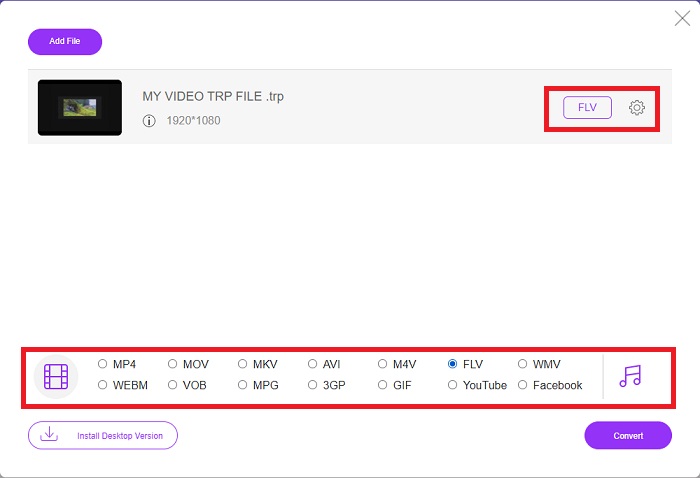
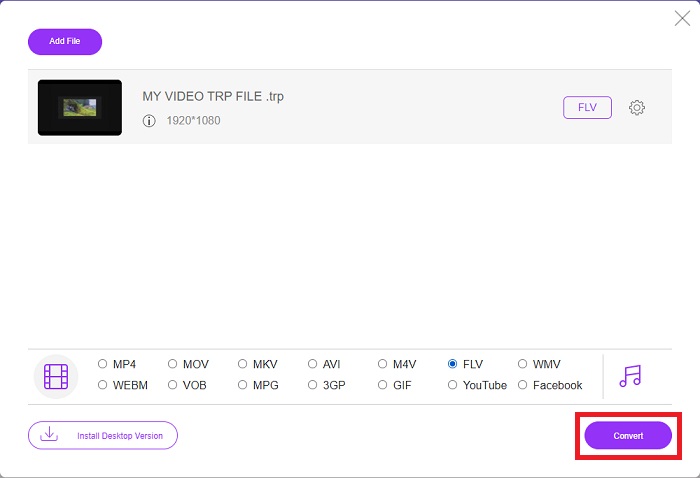
Paso 3: Para las opciones adicionales, igual que en el propio software, haz clic en el icono de engranaje de la derecha. Aparecerán los ajustes de vídeo y audio para que puedas editar aún más tu vídeo en cuanto a resolución, frecuencia de imagen y muchos otros parámetros. Cuando termines, haz clic en OK para guardar los cambios. Por último, inicia el proceso de conversión haciendo clic en el botón Convertir en la esquina inferior derecha.
Relacionado:
Parte 3. Conocimiento ampliado de TRP y FLV
Para saber más sobre los dos formatos mencionados, le proporcionamos una breve información así como una comparación de los dos.
Los archivos TRP generalmente están asociados con el VLC de VideoLAN. La extensión de nombre de archivo TRP se puede recopilar con MPEG-2 Parte 1 que contiene películas de alta definición. Los archivos TRP pueden contener y almacenar paquetes de datos enviados como video y audio digital a través de redes de transmisión de video digital, frecuencias de radio o dispositivos de grabación lineal como grabadoras de video. En un archivo TRP se incluyen múltiples transmisiones de audio y video, así como código de corrección de errores. Los usuarios también pueden incluir metadatos como la hora de captura, la identificación de la cámara y la fuente en el contenido del archivo.
Por otro lado, un archivo con la extensión .flv significa Flash Video. La extensión de archivo FLV se refiere a un archivo de video o audio enviado a través de Internet mediante Adobe Flash Player o Adobe Air. Flash Video ha sido durante mucho tiempo el formato de video principal para casi todos los videos incrustados en Internet, incluidos los videos en YouTube, Hulu y varios otros sitios. Los proveedores de transmisión y los desarrolladores de software, por otro lado, han abandonado Flash en favor de HTML5 y otros formatos desde la suspensión formal de Adobe.
| TRP | FLV | |
| Extensión de archivo | .trp | .flv |
| Desarrollador | Equipo de proyecto VideoLAN | sistemas de Adobe incorporados |
| Programas de apoyo | ◆ SMPlayer ◆ VLC Media Player ◆ Apple QuickTime Player | ◆ RealPlayer ◆ Apple QuickTime Player ◆ Mplayer ◆ VLC Media Player |
Parte 4. Preguntas frecuentes sobre la conversión de TRP a FLV
¿Cómo abrir el formato de video TRP usando VLC?
Una vez que se haya instalado VLC Media Player en su computadora, ubique el archivo de video TRP en su disco duro y selecciónelo con el botón derecho del mouse. Seleccione 'VLC media player' en el menú desplegable 'Abrir con'. El sistema abrirá el archivo de video que se reproducirá desde este programa tan pronto como se inicie.
¿Cómo convierto un archivo FLV a Windows Media Player?
Primero debe seleccionar el archivo FLV que desea convertir. Puede elegir WMV como el formato al que desea convertir su archivo FLV. Para convertir su archivo FLV, seleccione 'Convertir' en el menú desplegable.
¿Puedo jugar a TRP en cualquier lugar?
Convertir TRP a MP4, AVI, MOV, MKV, FLV, WMV y otros formatos ampliamente conocidos es una opción sugerida si desea reproducir archivos TRP en cualquier lugar y en cualquier dispositivo o reproductor multimedia.
Conclusión
En general, Video Converter Ultimate y su contraparte de herramientas en línea es lo que está buscando para realizar todo el proceso de conversión al tiempo que proporciona todas las funciones necesarias que necesita. No causa inconvenientes, además está disponible en cualquier momento del día si tienes el software instalado en tu escritorio. Nunca sabrá cuándo necesitará un convertidor como este, por lo que le recomendamos que utilice este software para su comodidad.
-
 La guía más sencilla sobre cómo convertir TRP a AVI en Windows y Mac
 Tal vez no esté familiarizado con el formato de video TRP y se pregunte cómo va a convertir TRP a AVI. Lea además este artículo para conocer los detalles relacionados con el tema.
-
 3 soluciones para convertir MTS a FLV gratis y en línea
 ¿Quiere convertir MTS a FLV? Aquí hay 3 programas de conversión de MTS a FLV gratuitos que puede probar para convertir MTS a FLV en Mac OS X y Windows 10/8/7.
-
 Mejores formas de convertir VOB a FLV [Gratis y en línea incluido]
 ¿Quiere convertir un archivo VOB en un archivo FLV? Puede completar fácilmente la tarea con convertidores de escritorio o en línea. Lea esta guía y aprenda cómo transformar VOB a FLV de forma fácil y rápida.
