


 Video Converter Ultimate
 Grabador de pantalla
 Reparación de vídeo
5 formas rápidas y sin esfuerzo de convertir MKV a FLV gratis [en línea y fuera de línea]
¿No puedes compartir tus archivos MKV por internet porque el tamaño del archivo es demasiado grande? ¿Por qué no los conviertes en lugar de comprimirlos para evitar la pérdida de calidad? Este problema se resuelve si lees los detalles que encontrarás a continuación antes de enviarlos. No hace falta que pases una hora leyendo este artículo, así que, sin más preámbulos, vamos a descubrir los seis conversores que puedes usar para convertir MKV a FLV.

Parte 1. El mejor convertidor de MKV a FLV para descargar
FVC Video Converter Ultimate puede ayudarte a cambiar MKV a FLV fácil y eficazmente, sin el menor esfuerzo. Este extraordinario conversor es muy distinto a los conversores de esta lista o a otros que ya uses o no. Es el codificador y decodificador de primera categoría que puedes descargar en tu PC o Mac, y funciona a la perfección sin conexión aunque no tengas un equipo de sobremesa de alta gama.

FVC Video Converter Ultimate
4,987,355+ Descargas- Convierta MKV a FLV, AVI, MP4, MOV o en más de 200 formatos disponibles en Windows y Mac.
- Haga que su formato MKV sea compatible con todos los escritorios y dispositivos.
- Puede realizar conversiones por lotes para sus formatos MKV u otros formatos.
- Convertidor infalible para usar por cualquier persona.
- Admite salida de alta definición e incluso una calidad de video de hasta 4k.
Descarga gratuitaPara Windows 7 o posteriorDescarga segura
Descarga gratuitaPara macOS 10.7 o posteriorDescarga segura
Pasos para convertir MKV a FLV con FVC Video Converter Ultimate
Paso 1. Descarga la aplicación en tu unidad y, a continuación, sigue el proceso de instalación.
Descarga gratuitaPara Windows 7 o posteriorDescarga segura
Descarga gratuitaPara macOS 10.7 o posteriorDescarga segura
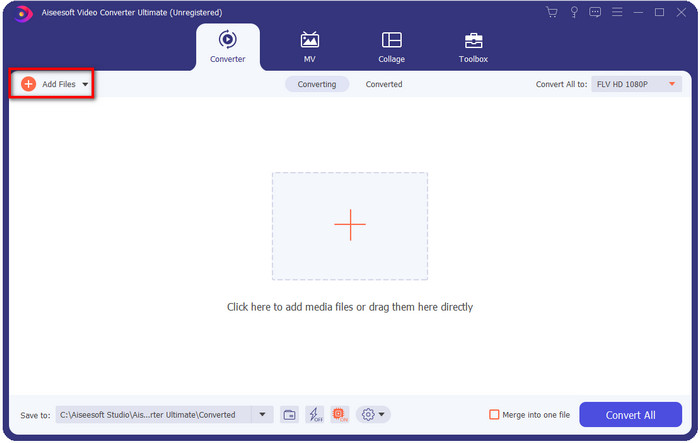
Paso 2. Después de la instalación, abre la aplicación para añadir los archivos MKV; puedes arrastrar y soltar el archivo en la interfaz o hacer clic en el botón Add Files.
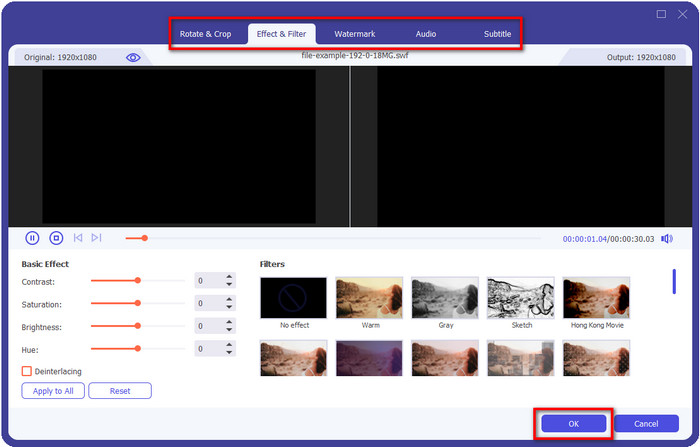
Si quieres editar tus archivos MKV antes de convertirlos, puedes hacer clic en el botón de la varita para añadir magia a tu resultado, como aplicar efectos, recortar, añadir subtítulos y mucho más. Para guardar la magia que has añadido a tu vídeo, haz clic en OK.
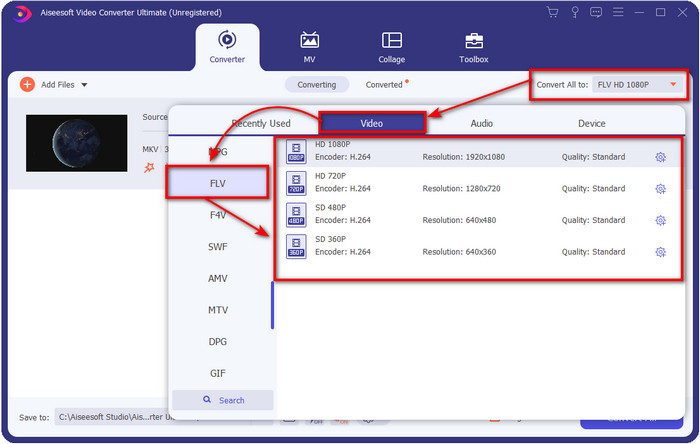
Paso 3. Haz clic en el botón desplegable y elige el formato FLV en la lista de ajustes.
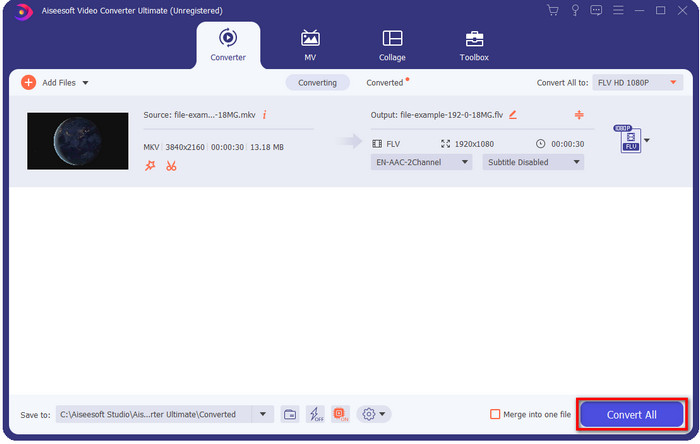
Paso 4. Haz clic en el botón Convert All para empezar a cambiar MKV a FLV gratis. Al finalizar el proceso, aparecerá una carpeta con el nuevo archivo FLV.
Parte 2. Los 4 mejores convertidores de MKV a FLV basados en la web
1. Convertidor de video gratuito FVC en línea
FVC Free Video Converter Online ofrece un sencillo pero impresionante convertidor de MKV a FLV gratis online disponible en todos los navegadores. También admite una gama media de formatos entre los que puedes elegir y subir. Aunque la herramienta depende de internet, aquí es más fácil y rápido convertir y subir el archivo. ¿Quieres saber cómo usarla? Entonces sigue los pasos que aparecen a continuación.
Pros
- Está disponible para ser utilizado por cualquier persona con Internet.
- Interfaz amigable y fácil de entender.
- No hay limitación para el tamaño del archivo.
- Configuraciones avanzadas para video y audio.
Contras
- Formato de mediana escala.
Paso 1. Para abrir el conversor online, haz clic en este enlace.
Paso 2. Pulsa el botón Add Files to Convert para añadir el archivo desde la carpeta de tu ordenador y, después, haz clic en Open.
Descarga la versión de escritorio para convertir archivos por lotes.
Aunque aquí no puedes editar vídeos, sí puedes cambiar los ajustes de vídeo y audio haciendo clic en el botón del engranaje.
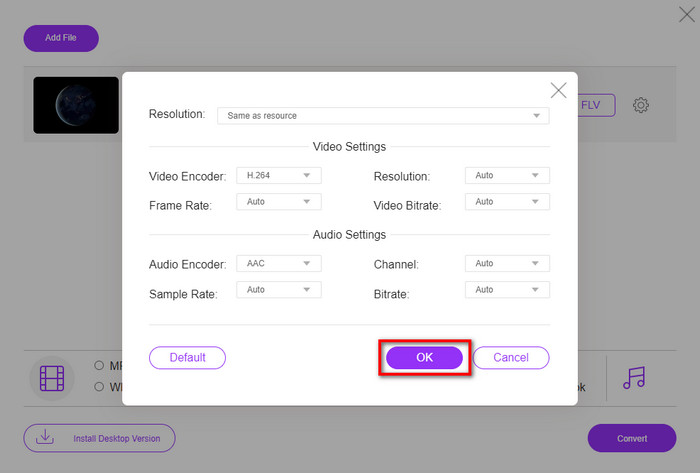
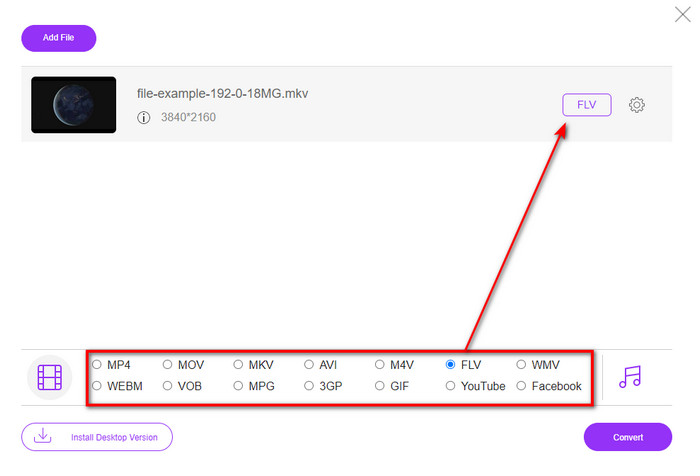
Paso 3. Selecciona el formato FLV en la lista de ajustes.
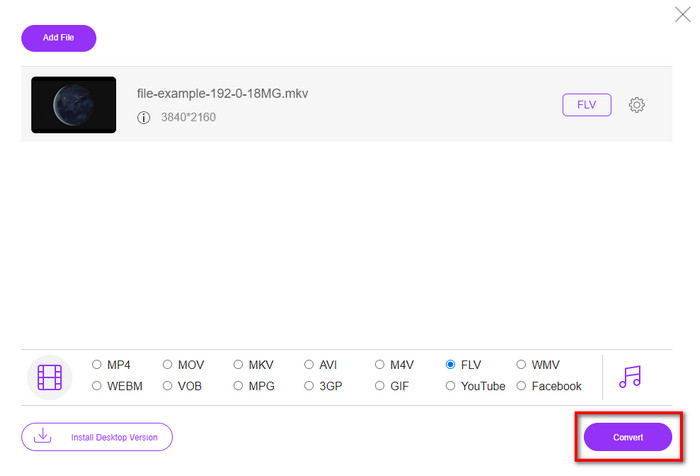
Paso 4. Haz clic en Convert para iniciar el proceso de conversión.
2. Mconvertidor
Uno de los conversores de MKV a FLV online más seguros que puedes usar es Mconverter. Además de convertir formatos de vídeo y audio, también puedes convertir aquí tus imágenes, archivos comprimidos, documentos y muchos otros formatos multimedia. Aunque este conversor es gratuito, hay un límite para cada archivo que puedes insertar.
Pros
- Convierta videos, audio, documentos y más en línea.
- Soporta múltiples conversiones.
- Fácil de usar.
Contras
- El tamaño del archivo no debe exceder los 200 MB.
- Algunos anuncios al convertir el archivo.
Paso 1. Abre Mconverter en tu navegador, arrastra el archivo .mkv y suéltalo en el recuadro.
Paso 2. Haz clic en el formato FLV y el proceso comenzará automáticamente.
Paso 3. Una vez terminado, se descargará automáticamente en tu unidad.
3. Freeconvert.com
Freeconvert.com te ayudará a convertir MKV a FLV online de forma gratuita. Este conversor web cuenta con una interfaz fácil de entender que cualquiera puede utilizar. Sin embargo, este conversor online admite formatos de escala reducida entre los que puedes elegir, y hay muchos anuncios en la interfaz web.
Paso 1. Busca Freeconvert.com en tu motor de búsqueda.
Paso 2. Haz clic en Choose File para subir el archivo .mkv desde la carpeta de tu ordenador, pulsa el botón desplegable y elige el formato FLV.
Paso 3. Haz clic en Convert FLV para empezar a convertir y, para descargarlo, haz clic en Download FLV.
Pros
- Un convertidor en línea gratuito que puede usar.
- Conversor web simple y seguro.
- Admite un archivo de 1GB para convertir.
Contras
- Admite un formato de pequeña escala.
- El proceso de conversión y descarga le llevará mucho tiempo.
4. Convertidor de vídeo en línea de Movavi
Movavi Online Video Converter es uno de los conversores recomendados que deberías usar para convertir MKV a FLV online. Es la versión web gratuita de Movavi Video Converter, utilizada por muchos usuarios en toda la red debido a la eficacia que ofrece esta herramienta y a su aspecto profesional.
Paso 1. Abre tu navegador favorito y busca la página web de Movavi.
Paso 2. Pulsa +Add Your Media para añadir el archivo que quieres convertir. Haz clic en el botón desplegable y pulsa Video; busca el formato FLV y haz clic en él.
Paso 3. Pulsa Convert para iniciar el proceso de conversión.
Pros
- Sin interfaz web de anuncios.
- Convertidor directo que cualquiera puede usar.
- Admite un formato de mediana escala.
Contras
- El proceso de conversión de formato lleva más tiempo.
- Dependiente de Internet como los otros convertidores web.
Parte 3. Cuadro comparativo
| Características | FVC Video Converter Ultimate | Convertidor de video gratuito FVC en línea | Mconvertidor | Freeconvert.com | Convertidor de vídeo en línea de Movavi |
| Capacidades de formato de conversión |  | | | | |
| dependiente de Internet |  | | | | |
| Conversión por lotes | | | | | |
| Funciones de edición avanzadas | | | | | |
| Plataformas disponibles | Herramienta basada en escritorio | Herramienta basada en web | Herramienta basada en web | Herramienta basada en web | Herramienta basada en web |
MKV frente a FLV
El formato de contenedor multimedia Matroska, lanzado en 2002, es un formato de código abierto que puede incluir varias pistas de video, audio, imágenes y subtítulos. Por lo tanto, puede usarlo para almacenar clips de video cortos, programas de TV y películas fácilmente. Es bastante popular para los fanáticos del anime.
Adobe Flash Player usó FLV para entregar contenido de video como películas y programas de televisión. En la actualidad, Adobe ya no desarrolla el reproductor y recomienda a los usuarios que lo desinstalen por motivos de seguridad. Sin embargo, aún puede usar el formato FLV en muchos programas que no son de Adobe/Macromedia.
Parte 4. Preguntas frecuentes sobre la conversión de MKV a FLV
¿Por qué los archivos MKV son demasiado grandes?
Hay dos razones principales por las que los archivos MKV son demasiado grandes. La primera es que este formato admite contenidos y elementos ilimitados de vídeo, audio y metadatos en un solo archivo. La segunda es que, si tu vídeo es largo, entonces es de esperar que el tamaño de este archivo aumente. Sin embargo, puedes comprimir el archivo MKV con la ayuda de este compresor MKV que puedes usar. Pero si quieres una forma más sencilla, deberías plantearte convertir los archivos MKV a MP4, AVI, MOV, FLV, etc.
¿Es MKV mejor que AVI?
MKV y AVI son formatos casi idénticos, ya que pueden contener vídeo en alta definición y archivos de gran tamaño. No obstante, estos contenedores tienen fines y estructuras diferentes que los hacen únicos. Por ejemplo, el formato AVI es un formato sin comprimir que puede contener contenido de vídeo en bruto, ideal para la reproducción. Además, es la base del desarrollo del archivo MKV. Aunque los archivos MKV cuentan con compresor, su contenido y sus elementos son mucho más de lo que AVI puede soportar. Así que, si quieres conservar la alta calidad de tus vídeos, elige el formato MKV. Pero si lo que quieres es compatibilidad, entonces AVI es la opción. Si quieres saber cómo convertir MKV a AVI, haz clic en este enlace.
¿Maneja Handbrake la conversión de MKV a FLV?
Handbrake puede manejar este trabajo, pero este convertidor no es compatible con programas de macOS y Windows que no sean 10 anteriores.
Conclusión
Para terminar, ahora ya sabes cómo convertir MKV a FLV online y offline. Estas herramientas mencionadas arriba no se han seleccionado al azar, sino que las hemos elegido según las preferencias de los usuarios. Durante nuestra búsqueda e investigación, descubrimos que estas seis herramientas ofrecen el mejor rendimiento en su labor como conversores. Pero FVC Video Converter Ultimate supera incluso lo que esperábamos de un conversor. ¿Quieres conocer otras aptitudes de este extraordinario conversor? Entonces, ¿a qué estás esperando? Debes descargarlo ahora.
-
 MKV a MOV - Cómo convertir MKV a MOV
 ¿Cómo convierto MKV a MOV en Mac? ¿Puede iMovie leer MKV? ¿Qué significa el formato MOV? Esta publicación cuenta 2 formas sencillas de ayudarlo a convertir MKV a MOV con convertidores de video profesionales y en línea gratuitos.
-
 Cómo convertir videos MKV a GIF animados sin Photoshop / FFmpeg
 Después de descargar y ver películas MKV en su computadora, es posible que desee compartir algunos momentos maravillosos con amigos o en Internet como GIF. En este artículo, puede aprender sobre las 2 formas más fáciles de convertir MKV a GIF.
-
 Consejos y trucos para convertir archivos MKV a MP3 [2025]
 ¿Tiene problemas para elegir el convertidor adecuado para MKV a MP3? Luego continúe leyendo esta publicación, ya que presentamos diferentes soluciones para un problema.

