


 Video Converter Ultimate
 Grabador de pantalla
 Reparación de vídeo


2 formas fáciles de convertir M4V a WMV sin esfuerzo y sin pérdidas
Algunas empresas tienen formatos de compresión de video. Apple y Microsoft han desarrollado archivos de video exclusivos para sus reproductores multimedia. Por lo tanto, cuando uno descargó o compró archivos M4V de Apple iTunes Store y quería compartirlos con amigos o familiares con PC, convertir M4V a WMV podría ser lo mejor antes de hacerlo. Por lo tanto, le proporcionamos el convertidor único en su tipo que hace este trabajo de manera rápida, eficiente y excepcionalmente sin complicaciones.

Parte 1. Cómo convertir M4V a WMV fácilmente en Mac y Windows
Free Video Converter Ultimate es un conversor de vídeo sencillo pero eficaz de FVC Studio. Te permite convertir archivos de vídeo y audio en tu ordenador Windows o Mac. Además, los formatos de vídeo que admite este conversor son muy variados e incluyen los más utilizados: es compatible con MP4, FLV, M4V, WMV, TS, M2TS, archivos para iPhone/Android, entre otros. Este software utiliza tecnología HEVC, por lo que no tendrás que preocuparte por la calidad en conversiones de alta calidad. Y hablando de calidad, también admite 4K UHD. Para usarlo, estos son los sencillos pasos que debes seguir:
Paso 1: Descarga el archivo .exe haciendo clic en el botón Descarga gratuita de abajo según tu sistema operativo, para Windows o Mac. Una vez que finalice la descarga, ábrelo y comienza a instalar el software. Después de eso, ejecuta el programa.
Descarga gratuitaPara Windows 7 o posteriorDescarga segura
Descarga gratuitaPara macOS 10.7 o posteriorDescarga segura
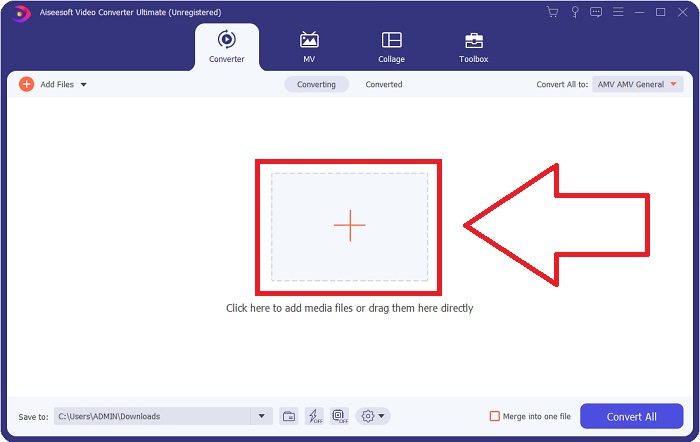
Paso 2: Se abrirá una ventana con una interfaz que tiene un botón + en el centro. Tienes que hacer clic en él para importar el archivo de vídeo que deseas convertir. O bien, puedes arrastrar y soltar el archivo fácilmente.
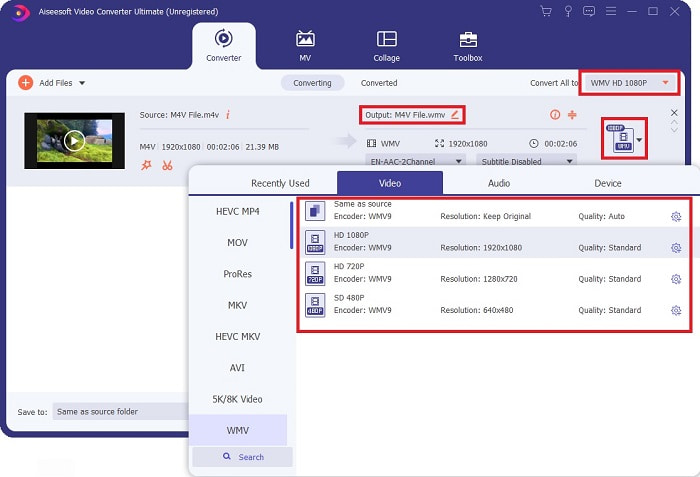
Paso 3: Verás el archivo que has importado en la interfaz. A su derecha se muestra el formato actual del vídeo. Haz clic sobre él y aparecerán todos los formatos disponibles entre los que puedes elegir. En este caso, desplázate hacia abajo y busca WMV o simplemente escríbelo en la barra de búsqueda para un acceso más rápido. Además, todas las calidades de vídeo están disponibles para elegir en el lado derecho de la pestaña. Puedes seleccionar la que prefieras.
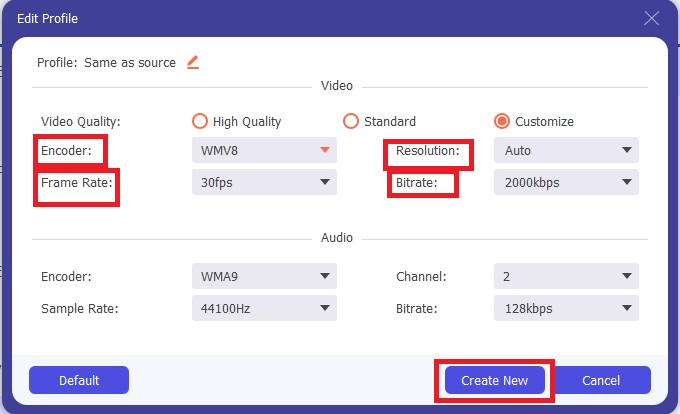
Paso 4: Además de la selección de calidad mencionada, puedes editar aún más el resultado de tu vídeo haciendo clic en el icono de engranaje situado a la derecha de la calidad de vídeo que has elegido. Se mostrarán todos los posibles ajustes, incluidos la tasa de fotogramas, la resolución, el bitrate, la frecuencia de muestreo, el códec y muchos más. Solo tienes que hacer clic en el botón Crear nuevo para guardar los cambios realizados.
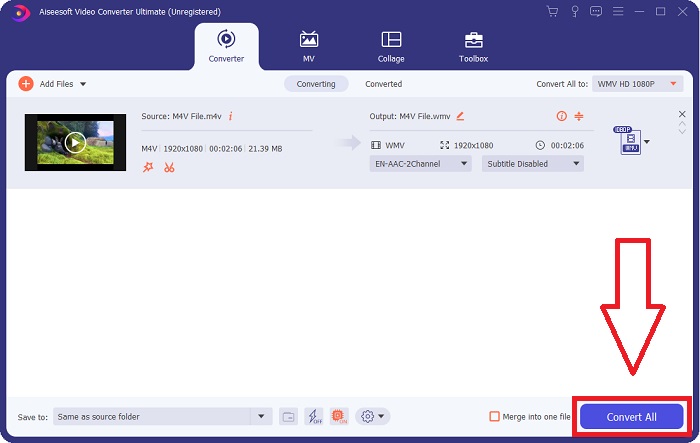
Paso 5: Para finalizar el proceso de conversión, haz clic en el botón Convertir todo situado en la esquina inferior derecha de la pestaña, espera a que termine y obtendrás tu archivo convertido.
Parte 2. Cómo convertir M4V a WMV usando Handbrake
Handbrake es un popular programa de conversión gratuito que se ejecuta en plataformas Windows, Mac y Linux. Los usuarios pueden cargar videos en cualquier formato desde fuentes de DVD y Blu-ray a este transcodificador de código abierto para convertirlos a WMV. El procedimiento de conversión es rápido y fácil, gracias a una interfaz fácil de usar. Siga estas sencillas instrucciones para convertir M4V a WMV usando un freno de mano.
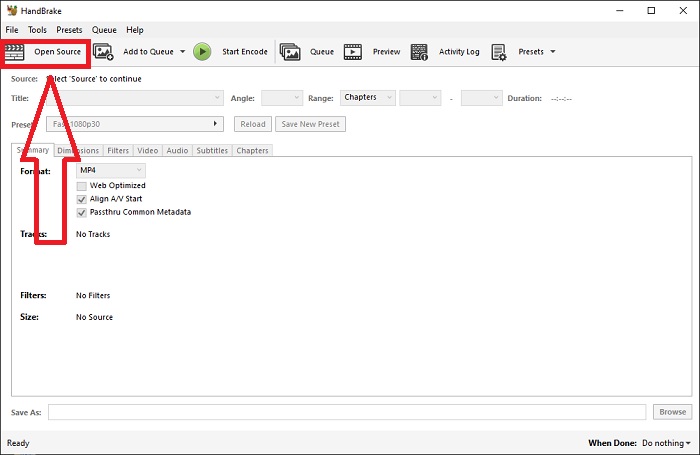
Paso 1: Inicia la aplicación Handbrake en tu ordenador. Haz clic en el botón Open Source en la pantalla principal para buscar y añadir los archivos WMV convertidos. También puedes simplemente arrastrar y soltar los vídeos en la interfaz.
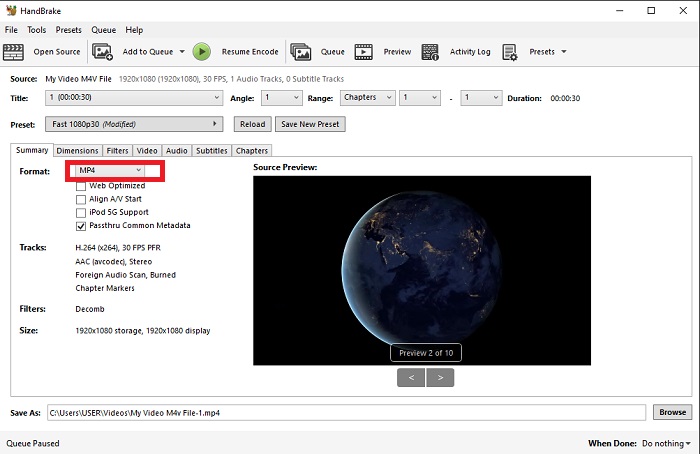
Paso 2: El archivo recién insertado aparecerá en el área Source. Luego, elige WMV como formato de salida deseado en la opción desplegable Format de la pestaña Summary. Los filtros, códecs de vídeo y otras propiedades del archivo pueden ajustarse si es necesario.
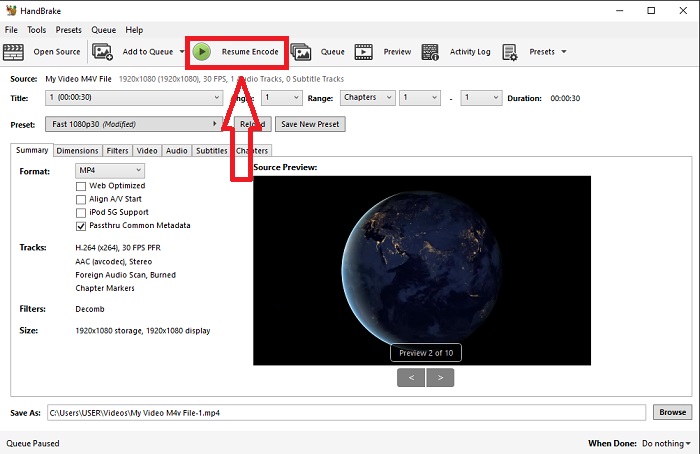
Paso 3: Elige el nombre del archivo de salida y la ubicación en tu PC en la sección Destination. Por último, haz clic en el botón Start Encode para convertir el archivo M4V a WMV.
Parte 3. Otra herramienta útil para convertir M4V a WMV en línea
Como herramienta gratuita de Internet, FVC Free Video Converter es útil. MP4, MOV, MKV, AVI, M4V, FLV, WMV, WEBM, VOB, MPG, 3GP, GIF y formatos de video aprobados por YouTube y Facebook se encuentran entre los tipos que admite. Además, este convertidor de video en línea gratuito también puede convertir archivos de audio, lo que le permite convertir su video o música a MP3, AAC, AC3, WMA, WAF, FLAC y otros formatos. FVC Free Video Converter también le permite especificar archivos antes de comenzar a convertir. Puede cambiar la resolución, la velocidad de fotogramas y la tasa de bits del video, así como el canal, la frecuencia de muestreo y la tasa de bits del audio.
Paso 1: Haz clic en este enlace para ir a la herramienta en línea. Primero, tienes que descargar rápidamente un lanzador. Puedes hacerlo haciendo clic en el botón Añadir archivos para convertir que se encuentra en el centro de la página. Este paso te permitirá importar tus archivos.
Paso 2: Haz clic de nuevo en dicho botón para cargar por fin el vídeo. Sabrás que la carga se ha realizado correctamente cuando todos los formatos disponibles aparezcan en la interfaz. Desde ahí, selecciona WMV entre los demás.
Paso 3: Encontrarás un icono de engranaje a la derecha para las opciones adicionales del software. Haz clic en él y podrás realizar cambios en los ajustes de vídeo y audio en cuanto a resolución, tasa de fotogramas y otros similares. Cuando termines, haz clic en OK y luego en el botón Convertir para finalizar el proceso de conversión.
Relacionado:
Parte 4. Conocimiento extendido sobre M4V y WMV
Para obtener información adicional que pueda desear sobre los dos formatos, puede leer lo que proporcionamos a continuación:
M4V es un formato de archivo creado por Apple. Es extremadamente similar al formato de archivo MP4, excepto que los archivos M4V pueden tener la protección DRM Fairplay de Apple. El formato M4V lo puedes encontrar en material de video adquirido de la tienda de iTunes. Si el archivo M4V tiene DRM habilitado, la cuenta de iTunes utilizada para comprar el archivo debe estar autorizada en la máquina que lo reproduce.
Por otro lado, los archivos WMV son archivos de video creados por Microsoft que generalmente incluyen audio. En las plataformas Mac y PC, los usuarios pueden reproducir estos archivos con varios reproductores de video. La protección de administración de derechos digitales (DRM) puede incluirse en ciertos archivos WMV, lo que evita que los usuarios hagan copias ilegales de archivos comprados a minoristas en línea.
| M4V | WMV | |
| Extensión de archivo | .m4v | .wmv |
| Desarrollador | Apple Inc. | Microsoft |
| Programas de apoyo | ◆ Reproductor multimedia clásico ◆ VLC Media Player ◆ KMPlayer ◆ Reproductor Zoom | ◆ VLC Media Player ◆ MPplayer ◆ Reproductor multimedia clásico ◆ Reproductor de Windows Media |
Parte 5. Preguntas frecuentes sobre la conversión de M4V y WMV
¿Es M4V de mayor calidad que MP4?
Ahora sabemos que no hay una diferencia fundamental entre MP4 y M4V después de hacer una comparación de M4V MP4 lado a lado. Después de eliminar la protección DRM del archivo de video M4V, los archivos de video MP4 y M4V son idénticos.
¿Handbrake elimina DRM?
Es una biblioteca para ver DVD cifrados con Content Scramble System (CSS), un método ampliamente utilizado por el software de reproducción gratuito para descifrar discos protegidos. Es compatible con Windows, macOS, Linux y varios sistemas operativos. HandBrake es capaz de eliminar efectivamente el DRM de los DVD y copiarlos.
¿Cuál es el mejor uso de WMV?
Microsoft creó el formato de video WMV ampliamente utilizado en los reproductores multimedia de Windows. Los archivos WMV son más pequeños y están más comprimidos que los archivos MP4. Es por eso que es popular para la transmisión de video por Internet.
Conclusión
Sin lugar a dudas, hay muchas formas de convertir M4V a WMV, pero solo unas pocas pueden hacerlo mientras se realizan ajustes adicionales en algunas especificaciones. Es por eso que recomendamos Video Converter Ultimate, ya que estará a tu lado cada vez que necesites un convertidor. Si el tiempo no permite instalar el software, su contraparte en línea siempre está disponible para su uso. Entonces, ayúdenos a ayudarlo a brindar la mejor experiencia de edición de video usando FVC Video Converter Ultimate.
-
 Gratis | 3 mejores métodos para convertir MP4 a WMV sin perder calidad
 Esta publicación comparte cómo convertir videos MP4 a formato WMV en Mac o Windows. También le ofreceremos varias opciones, que incluyen tanto software de escritorio como convertidores en línea basados en la web. ¿Listo para conocer las mejores herramientas de conversión de MP4 a WMV?
-
 Las 3 formas principales de convertir FLV a WMV en Windows y Mac
 ¿Está buscando la mejor manera de convertir FLV a WMV sin perder calidad en PC o Mac? Tienes suerte ya que aquí te compartimos tres métodos para hacer el trabajo fácilmente.
-
 Una guía simple sobre cómo convertir su GIF a WMV en Windows / Mac
 ¿Quieres saber cómo convertir GIF a formato WMV? Luego, siga este artículo, ya que muestra diferentes soluciones entre las que puede elegir.

