


 Video Converter Ultimate
 Grabador de pantalla
 Reparación de vídeo
Cómo quitar la marca de agua de los videos rápidamente
¿Necesitas eliminar una marca de agua de un vídeo de forma sencilla? Entonces necesitas usar la herramienta perfecta. Por ejemplo, los usuarios quieren eliminar ese texto o logotipo de marca de agua para poder ver un vídeo con una experiencia completa. Sin embargo, esta tarea resulta complicada para algunos editores, porque no todos incluyen un eliminador de marcas de agua eficaz en su conjunto de herramientas. En teoría, tendrías que comprar un editor caro para esta tarea y, aun así, no todos ofrecen buenos resultados. Pero hoy te presentaremos la mejor solución a tu problema, tanto si usas un ordenador como un dispositivo iOS. Además, todo el software que te ofrecemos ha sido cuidadosamente seleccionado. Así que, sin más preámbulos, vamos a adentrarnos en este artículo para saber cómo eliminar la marca de agua de cualquier vídeo.

Parte 1. Solución definitiva para eliminar la marca de agua de cualquier video en Windows y Mac
Aprender a eliminar una marca de agua de un vídeo es una tarea sencilla con el mejor editor de vídeo, Video Converter Ultimate. No necesitas tener una gran experiencia en edición, ya que esta herramienta ofrece una interfaz interactiva y fácil de entender. Además, también proporciona numerosas funciones avanzadas que puedes usar, como unir, recortar, corrección de color, reversor, potenciador y más.
A día de hoy, muchos usuarios ya han descargado esta herramienta y todos están satisfechos porque lo han hecho. ¿Impresionante verdad? ¿Quieres probar a usar esta herramienta? En ese caso, revisemos los pasos a continuación y veamos si esta herramienta es la mejor solución a nuestro problema con la marca de agua.

FVC Video Converter Ultimate
5,689,200+ Descargas- Es la mejor opción para todos los que quieran eliminar su marca de agua en cualquier video.
- Esta última herramienta es la única que funciona como convertidor, recortador, fusionador, cortador.
- Disponible en todas las plataformas de escritorio para descargas, como Windows y Mac.
- Es fácil de usar, pero es el más elegido con respecto al problema en su video.
Descarga gratuitaPara Windows 7 o posteriorDescarga segura
Descarga gratuitaPara macOS 10.7 o posteriorDescarga segura
Paso 1. Descarga la herramienta definitiva en tu ordenador y elige si utilizas Windows o Mac. Tras el proceso de descarga, sigue el asistente de instalación y haz clic en Start Now para ejecutar la herramienta en tu sistema.
Descarga gratuitaPara Windows 7 o posteriorDescarga segura
Descarga gratuitaPara macOS 10.7 o posteriorDescarga segura
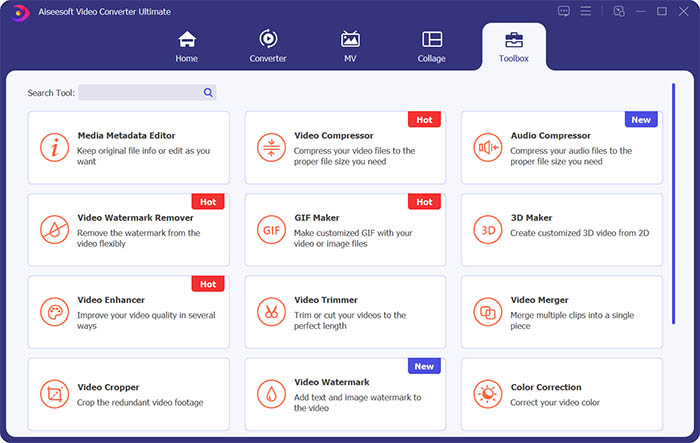
Paso 2. Ve a la sección Toolbox y haz clic en Video Watermark Remover para borrar la marca de agua del vídeo.
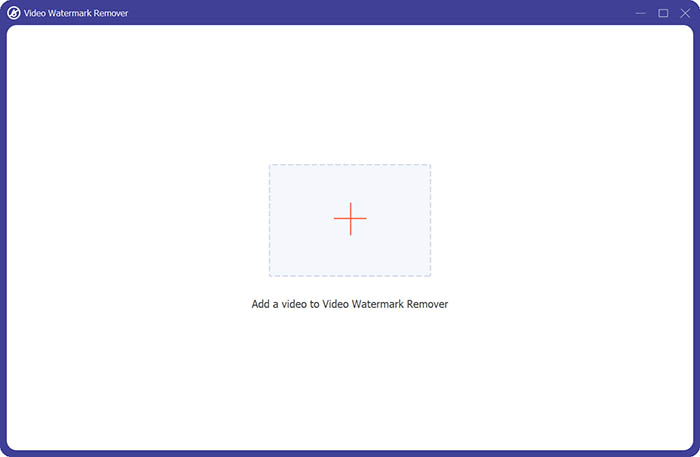
Paso 3. A continuación, tienes que hacer clic en el signo más central para importar el vídeo al que quieres eliminar la marca de agua.
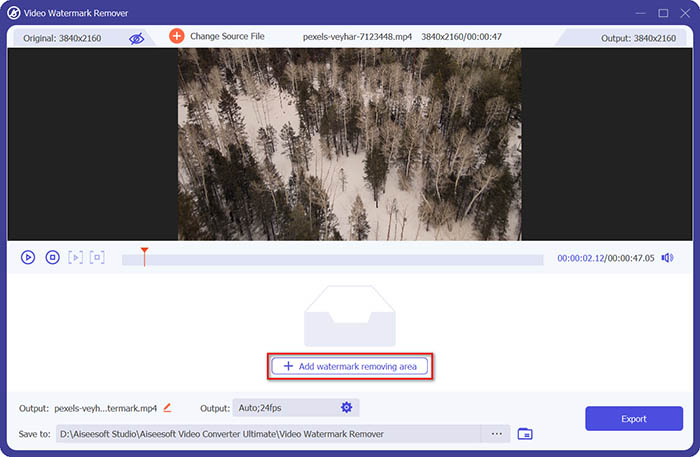
Paso 4. Después de añadir el vídeo al eliminador de marcas de agua, debes hacer clic en el botón Add watermark removing area para seleccionar el área de la marca de agua.
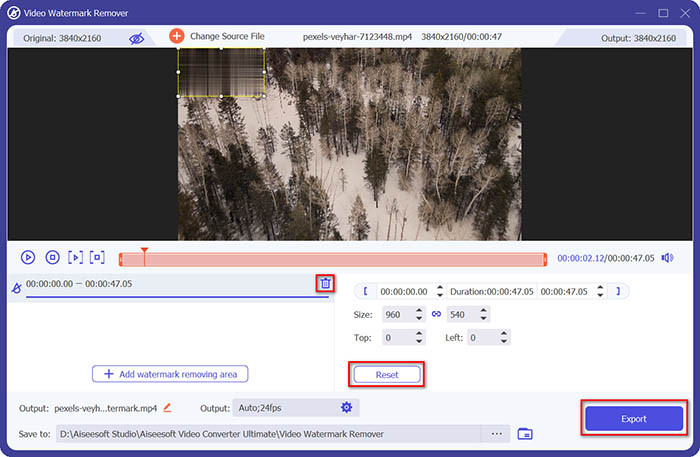
Paso 5. Por último, puedes hacer clic en el botón Export para obtener el vídeo sin la marca de agua.
Parte 2. Cómo quitar la marca de agua de cualquier video en iPhone
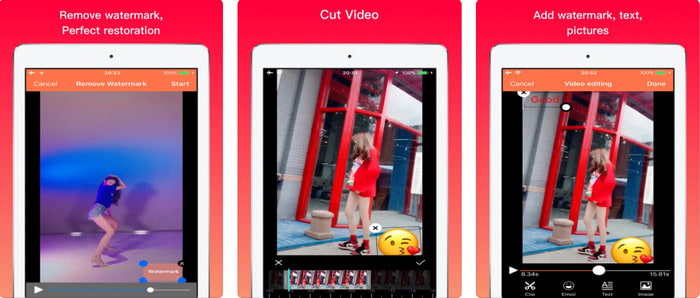
Video Eraser - Remove Logo 4+ ya ha ayudado a muchos usuarios de iOS con sus problemas relacionados con las marcas de agua. Esta app es gratuita en cualquier App Store, pero también ofrece compras dentro de la aplicación para adquirir la versión Pro. Aunque la herramienta proporciona una forma eficaz de eliminar la marca de agua, sigue presentando algunos inconvenientes, como que la calidad del vídeo no será la misma después de exportarlo aquí. La marca de agua queda difuminada en lugar de eliminada. Además, subir el archivo se convierte en un problema porque tarda mucho tiempo aunque el vídeo dure menos de 30 segundos. Pero si quieres aprender cómo quitar la marca de agua de un vídeo en iPhone, sigue los pasos que aparecen a continuación.
Paso 1. Descarga la herramienta desde la App Store, ábrela y pulsa + para importar el vídeo con marca de agua.
Paso 2. Haz clic en el botón de información y pulsa Remove Watermark, toca la marca de agua y después pulsa Start.
Paso 3. Tras el proceso, la marca de agua se elimina del vídeo.
Parte 3. Cómo deshacerse de la marca de agua en cualquier video en la web
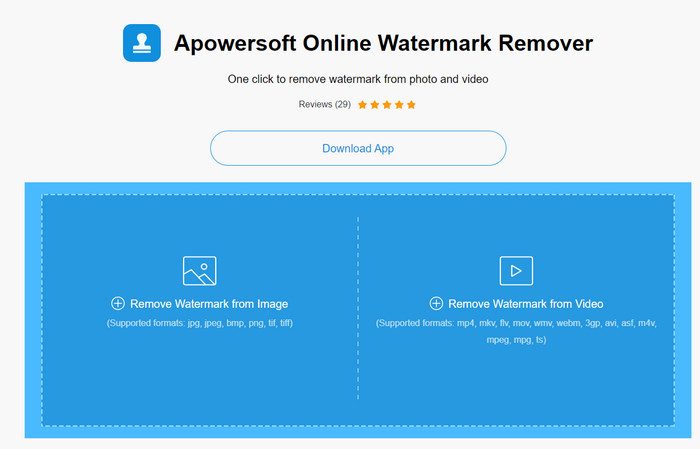
Apowersoft Online Watermark Remover es una herramienta web gratuita y accesible que puedes usar para eliminar marcas de agua. Esta herramienta online ofrece una forma eficaz de quitar la marca de agua sin necesidad de descargar nada, ya que funciona en el navegador. Aunque es un eliminador de marcas de agua eficaz, necesitarás tener una conexión a Internet estable para completar el proceso; de lo contrario, tendrás que repetirlo. Así que, si tienes un presupuesto ajustado y quieres aprender cómo eliminar la marca de agua de un vídeo online, esta es la herramienta para ti.
Paso 1. Busca Apowersoft Online Watermark Remover en tu navegador web favorito y ábrelo.
Paso 2. Pulsa Remove Watermark from Video para subir el archivo con marca de agua. Espera a que se complete el proceso de carga.
Paso 3. En el vídeo, mantén pulsado el clic izquierdo del ratón y arrástralo sobre la marca de agua; una vez que quede dentro de la línea discontinua, puedes soltarlo. Pulsa Erase para iniciar el proceso de eliminación y haz clic en Download para guardarlo en tu ordenador.
Parte 4. Preguntas frecuentes sobre la eliminación de marcas de agua de los videos
¿Por qué necesito deshacerme de la marca de agua en el video?
Necesitamos eliminar la molesta marca de agua para disfrutar el video como una experiencia completa. Solo es aplicable para uso personal, pero podría haber una consecuencia si lo usa para aprovechar si lo publica en línea y se beneficia del trabajo del otro.
¿Cuáles son las otras formas de eliminar las marcas de agua?
Puede cubrir la marca de agua o reemplazarla con su marca de agua si lo desea. Este proceso se superpone; solo funciona mejor si la marca de agua es pequeña o está al costado del video. O puede cortar el video con una marca de agua y luego fusionarlo con el otro video. Este proceso de corte solo funciona mejor si la marca de agua es emergente. Hay dos formas diferentes de eliminar las marcas de agua: difuminar y recortar el video. Estos dos funcionan con las herramientas que presentamos anteriormente.
¿Cómo agregar una marca de agua en Photoshop?
Si quieres añadir una marca de agua en Photoshop, haz clic en este enlace y léelo detenidamente para comprender bien el procedimiento.
Conclusión
Con las herramientas presentadas en este artículo, puedes eliminar fácilmente la marca de agua de un vídeo de forma gratuita, o también puedes usar la herramienta definitiva y comprarla. Aunque los eliminadores de marcas de agua disponibles en este artículo son fáciles de usar, seguimos pensando que Video Converter Ultimate ofrece la interfaz más sencilla y, a la vez, la más eficaz. Así que, si quieres tenerla, puedes hacer clic en el botón de descarga de arriba para probarla y ver si se adapta bien a tus necesidades.
-
 Las 2 mejores formas de convertir DivX a formato MKV [resuelto]
 ¿Por qué necesito convertir DivX a MKV? ¿Cuáles son los convertidores que puedo usar? ¿Tienes el mismo pensamiento? Entonces, este artículo te ayudará a saber más sobre DivX y MKV.
-
 2 Ultimate MPG Converters para convertir MPG a WMV gratis
 ¿Quieres convertir MPG a WMV gratis? En ese caso, tiene suerte porque descubrimos que hay dos herramientas que puede usar para convertir sus archivos MPG.
-
 Cómo cambiar iTunes M4V a MKV en Mac y Windows [Forma más rápida]
 Si necesita convertir M4V a MKV en Mac, debe leer este artículo. A medida que proporcionamos datos sobre los convertidores que lo ayudarán con su proceso de conversión.
