


 Video Converter Ultimate
 Grabador de pantalla
 Reparación de vídeo
Cómo convertir rápidamente MTS a MKV gratis
En resumen, para el sistema de transporte MPEG, el archivo MTS es un formato de archivo estándar que admite vídeos 720p y 1080i. Sin embargo, el tamaño del archivo de salida de este formato puede ser enorme. Por lo tanto, debes convertirlo a un formato de archivo ampliamente compatible y de menor tamaño, como el formato MKV. Y en este artículo, presentamos las mejores maneras de convertir MTS a MKV gratis.

Parte 1. Las 2 mejores herramientas gratuitas en línea que convierten MTS a MKV
Convertidor de video gratuito FVC en línea
Hoy en día, la gente prefiere usar un convertidor online en lugar de instalar un convertidor de software. FVC Free Online Video Converter es un convertidor online que te permite convertir archivos como MTS a MKV, MP4, WMV, AVI, FLV y más. A pesar de ser un convertidor online gratuito, no compromete la calidad de tu archivo durante la conversión. Además, tiene funciones que permiten editar la resolución y la tasa de bits de vídeo o audio.
Estos son los pasos para convertir su archivo MTS a MKV utilizando esta herramienta gratuita en línea:
Paso 1. Para usar este convertidor, haz clic en este enlace para ir a su página web.
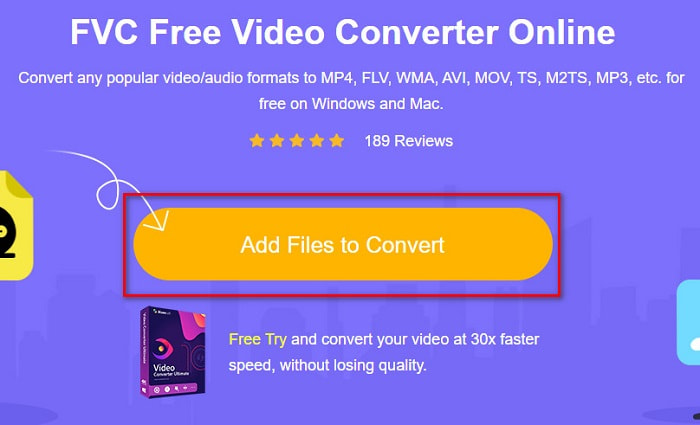
Paso 2. El siguiente paso es hacer clic en el botón Add Files to Convert para descargar el launcher. Después de que se descargue el launcher, se abrirán los archivos de tu ordenador; a continuación, elige tu archivo MTS para subirlo.
Paso 3. Después de elegir tu archivo MTS, haz clic en el archivo MKV que aparece debajo de la interfaz del software.
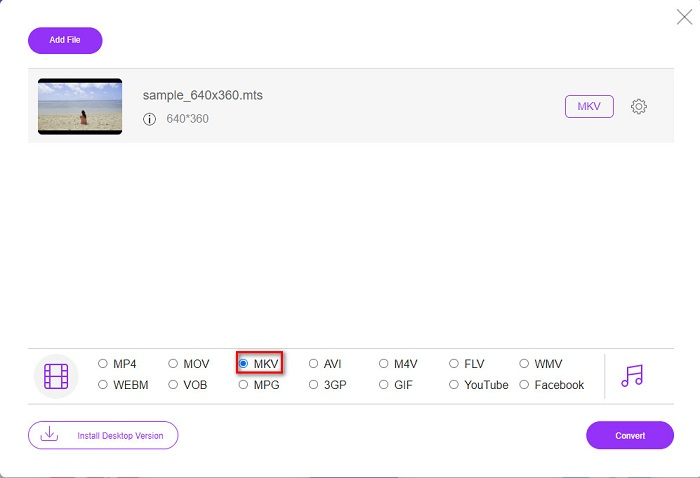
Paso 4. Por último, haz clic en el botón Convert para convertir tu archivo MTS a un archivo MKV. Luego espera a que se complete la conversión.
Siguiendo estos sencillos pasos, puede convertir MTS a MKV de forma gratuita y en línea.
AnyConv
Otro convertidor online que puedes usar para convertir archivos sin perder calidad es AnyConv File Converter. Este convertidor también transforma numerosos formatos de archivo, incluidos MTS a MKV, AVI, MP4, MOV, MPEG, etc. Sin embargo, solo tiene funciones limitadas. No puedes editar ni cambiar la resolución de tu archivo. Además, es una herramienta web; por lo tanto, puedes experimentar una conversión lenta. Aun así, muchas personas lo utilizan por su comodidad.
Pasos sobre cómo usar AnyConv File Converter:
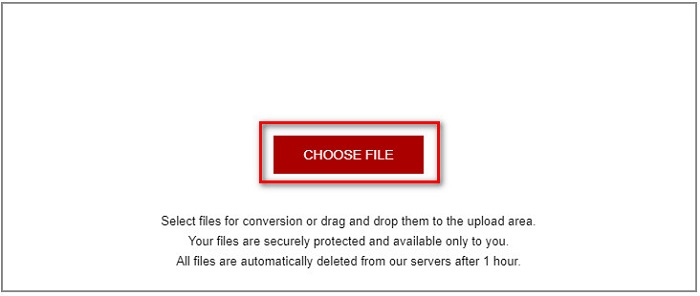
Paso 1. Busca AnyConv File Converter en tu navegador. Después de acceder a su sitio web, haz clic en el botón Choose Files para seleccionar tu archivo MTS en los archivos de tu ordenador.
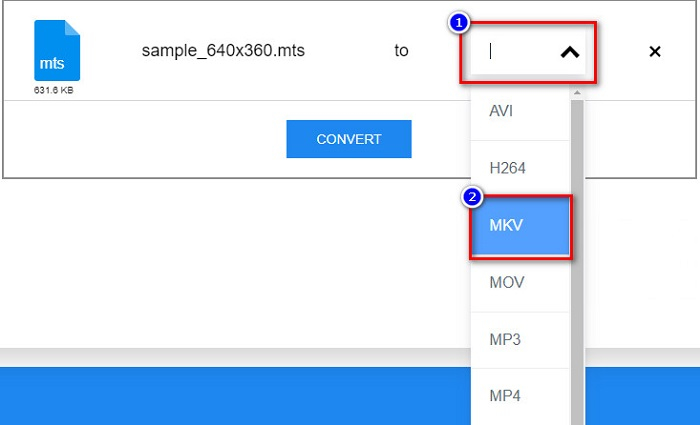
Paso 2. Después de seleccionar tu archivo MTS, haz clic en el botón desplegable y elige el formato de archivo MKV.
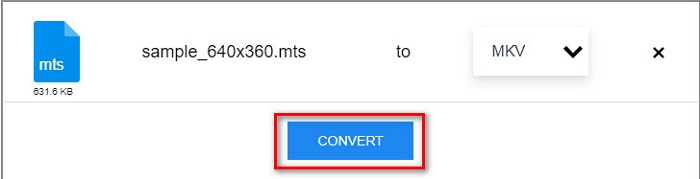
Paso 3. Por último, haz clic en el botón Convert para iniciar la conversión de tu archivo MTS a MKV.
Parte 2. Convierta MTS a MKV en Windows 10/11 sin pérdidas
Si está buscando un convertidor para su Windows 10/11, FVC Video Converter Ultimate es la mejor herramienta para usted. Admite varios formatos de archivo y puede convertir MTS a MKV, MP4, WebM, VOB, MPG, AVI y muchos más. Además, este convertidor tiene una función en la que puede crear archivos GIF e incluso crear un video en 3D. También puede convertir MTS a MKV de forma rápida y sin esfuerzo sin perder la calidad de su archivo.

FVC Video Converter Ultimate
5,689,200+ Descargas- Puede convertir por lotes sus archivos con este convertidor.
- Le permite convertir varios formatos de archivo como MTS, MKV, MP4, WMV, etc.
- Tiene una función que te permite tener una conversión ultrarrápida.
Descarga gratuitaPara Windows 7 o posteriorDescarga segura
Descarga gratuitaPara macOS 10.7 o posteriorDescarga segura
Así es como puede usar FVC Video Converter Ultimate con estos simples pasos:
Paso 1. Primero, descarga la aplicación haciendo clic en el botón Download de abajo para Windows. Luego ejecuta la aplicación de software para continuar con el siguiente paso.
Descarga gratuitaPara Windows 7 o posteriorDescarga segura
Descarga gratuitaPara macOS 10.7 o posteriorDescarga segura
Paso 2. Después de abrir el convertidor, haz clic en el botón Add Files, o bien puedes arrastrar y soltar tu archivo sobre el botón con el signo + para subir tu archivo MTS. Entonces tu archivo se añadirá a la lista.
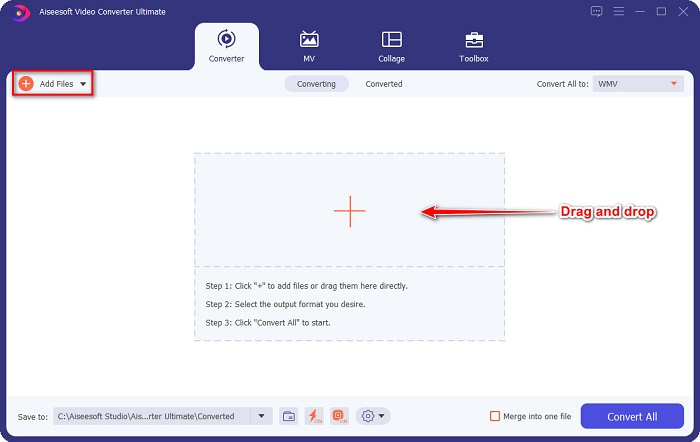
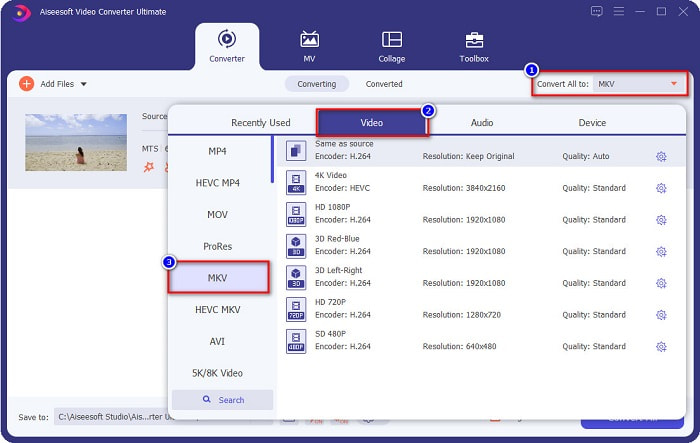
Paso 3. Para elegir el formato de archivo al que quieres convertir tu archivo MTS, haz clic en el botón Convert All to y selecciona el archivo MKV.
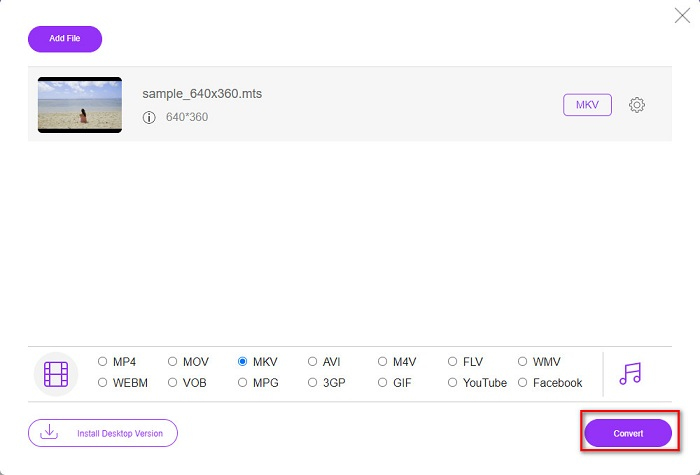
Paso 4. Para terminar, haz clic en el botón Convert All para empezar a convertir tu archivo MTS a un archivo MKV. Y ¡voilà! En solo unos segundos, tu archivo convertido estará listo.
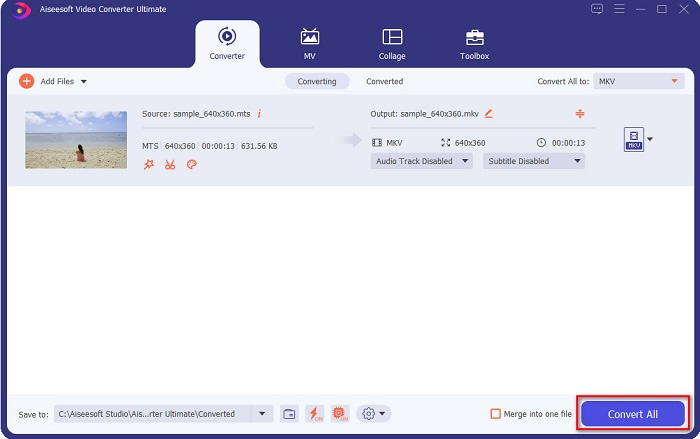
¡Siguiendo estos simples pasos, puede convertir MTS a MKV tan rápido como 1-2-3!
Parte 3. ¿Por qué convertir archivos MTS a formato de archivo MKV?
El archivo MTS, abreviatura de MPEG Transport System, es un formato de archivo estándar utilizado principalmente por las videocámaras HD de SONY y Panasonic. Es un archivo que usa compresión de video MPEG4/H.264. Además, admite videos de 720p y 1080i, que otros formatos de archivo no admiten. Dado que Panasonic y Sony desarrollaron este archivo, utiliza un archivo de codificación de audio avanzado relacionado con el formato de archivo AVCHD. Por otro lado, el archivo MKV o Matroska es un formato de archivo estándar que admite muchos códecs de audio y video. Por lo general, se usa para almacenar clips de video cortos y películas.
Además, también admite pistas de subtítulos. Es por eso que numerosas personas que suscriben a los fanáticos usan este formato de archivo. Entonces, ¿por qué convertir MTS a MKV? Simplemente porque el tamaño de archivo de MKV es más pequeño que el que contiene el formato de archivo MTS.
Parte 4. Cuadro comparativo sobre los convertidores en línea y fuera de línea
| CARACTERÍSTICAS | Convertidor en línea gratuito de FVC | Convertidor de archivos AnyConv | FVC Video Converter Ultimate |
| Velocidad de conversión | Normal | Normal | Muy rapido |
| Formatos de archivo para convertir | MKV, MP4, MTS, MPG, MOV, AVI, WMV, FLV y otros formatos de archivo | MTS, MKV, AVI, MOV, MP4, MPEG y otros formatos | Admite más de 1000 formatos de archivo |
| Funciones de edición | – | – |  |
| Conversión por lotes | – | – | |
| Conexión a Internet | Necesario | Necesario | Innecesario |
Parte 5. Preguntas frecuentes sobre la conversión de MTS a MKV
¿Se puede reducir el tamaño de archivo de un archivo MTS?
Sí. Puedes comprimir el tamaño de un archivo MTS utilizando una herramienta de compresión disponible tanto online como offline, como Free Video Compressor.
¿Dónde puedes reproducir formatos de archivo MKV?
Puedes reproducir archivos MKV en Windows Media Player, VLC Media Player, DivX Player, MX Player y otros. También puedes usar códecs multimedia para codificar y decodificar archivos multimedia. O puedes convertir tu archivo MKV al formato MP4, que es un formato muy utilizado.
¿Puedes convertir MTS a MKV en Handbrake?
Sí. Este convertidor también le permite convertir su archivo MTS a formato de archivo MKV. Sin embargo, no admite varios archivos y no puede combinarlos en uno solo.
Conclusión
Hoy en día hay muchos convertidores online y de escritorio disponibles en el mercado. Y los convertidores que hemos enumerado arriba son algunos de los que más se usan y han demostrado ser fantásticos. Además, estos convertidores tienen diferentes funciones y capacidades para convertir MTS a MKV gratis y online. Pero si buscas un convertidor práctico y eficiente, recomendamos usar FVC Video Converter Ultimate. Este convertidor de velocidad relámpago no defraudará tus expectativas. Así que, si estás listo para convertir archivos, ¡descárgalo ahora!
-
 [Gratis y en línea] 6 formas de convertir MTS a MP4 en alta calidad
 ¿No sabe cómo convertir un archivo MTS a MP4? En esta guía, encontrará 6 formas fáciles y gratuitas de cambiar el formato MTS a MP4 en Windows o Mac sin pérdida de calidad.
-
 Cómo convertir MTS a WMV sin perder la calidad
 ¿Tiene dificultades para ver su programa favorito porque su reproductor multimedia no es compatible con el formato de video MTS? Intente convertirlo a WMV con estos nuevos y mejores convertidores presentes en este artículo.
-
 Cómo convertir MTS a MP3 sin pérdida de calidad (AVCHD a MP3)
 ¿Necesita extraer audio MP3 de un archivo MTS pero no sabe cómo? ¿Cuál es el mejor conversor de MTS a MP3? Esta publicación comparte 2 maneras fáciles de ayudarlo a convertir MTS / M2TS a MP3 con alta calidad de audio.
