


 Video Converter Ultimate
 Grabador de pantalla
 Reparación de vídeo
 Descarga segura
Pauta para eliminar la marca de agua VSDC en videos de manera fácil y efectiva
No puedes equivocarte al elegir VSDC Video Editor para la edición básica de vídeo en Windows. Este editor no lineal puede ofrecerte todo lo que necesitas en un editor de vídeo. Trae consigo un conjunto de funciones de edición que puedes usar para producir un resultado excelente. Con el auge de esta herramienta, muchos usuarios se han hecho preguntas sobre ella, y una de las más comentadas ahora mismo es: ¿el editor de vídeo gratuito VSDC tiene marca de agua? ¿Tienes la misma duda que otros usuarios en la web? Para responder a las preguntas que muchos se han planteado, vamos a darte la respuesta que necesitas; sigue leyendo para conocerla mejor.

Parte 1. ¿VSDC Free Video Editor tiene una marca de agua?
Aunque está utilizando la versión gratuita de VSDC para editar los videos o películas que tiene, no se incluyen marcas de agua de VSDC una vez que los exporta. Para que pueda disfrutar del video que edita aquí sin la marca de agua de forma gratuita. Para usar las otras funciones de edición de video que tiene, es mejor que compre la herramienta para desbloquearlas. Aunque es un editor gratuito, la herramienta no puede eliminar la marca de agua que agregó al video. Es un problema para algunos, y otros usan su función de división y corte para eliminar la marca de agua, aunque es bueno si está en los lados. Pero si la marca de agua está en el medio, ¿querrías usar un cortador de video? ¡Por supuesto que no! Las herramientas a continuación pueden ayudarlo a eliminar fácilmente la marca de agua VSDC que se encuentra en su video.
Parte 2. Cómo eliminar la marca de agua de un video en VSDC con las 2 formas disponibles
FVC Video Converter Ultimate - Ultimate Watermark Remover en Windows y Mac
FVC Video Converter Ultimate es el software más avanzado y con tecnología de IA que puedes usar para eliminar la marca de agua de VSDC. Esta herramienta te permite anular manualmente la función de eliminación de marcas de agua que ofrece, algo que muchos otros programas no permiten. Elimina la marca de agua de los vídeos con precisión, sin dejar rastro de la zona de la que procedía la marca de agua.
Además, esta herramienta también tiene características y funciones sólidas que no puede encontrar en el otro software. Aunque esta herramienta es compatible con la tecnología AI, no necesita preocuparse por las especificaciones de su computadora porque la herramienta funciona en Windows y macOS de gama baja. En cuanto al rendimiento, es superior, usa especificaciones bajas en computadoras, funciona tanto en Windows como en Mac, y tiene un rendimiento elevado en la importación y exportación. No queda nada más que buscar que no sea el tutorial paso a paso sobre cómo eliminar la marca de agua del video en VSDC con la ayuda a continuación.
Paso 1. Descarga ahora el software en tu ordenador haciendo clic en el botón de descarga de abajo. Después, sigue el proceso de instalación y configuración que se solicita y haz clic en Start Now para abrir la herramienta en tu escritorio.
Descarga gratuitaPara Windows 7 o posteriorDescarga segura
Descarga gratuitaPara macOS 10.7 o posteriorDescarga segura
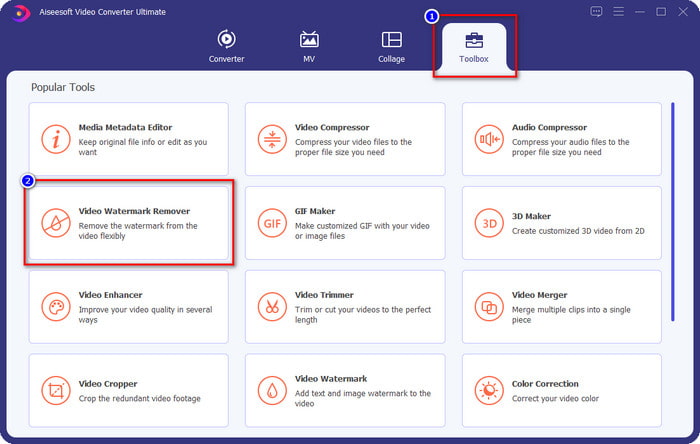
Paso 2. Después de iniciar el software, ve a la sección Toolbox y selecciona Video Watermark Remover para usar el eliminador de marcas de agua definitivo de este programa.
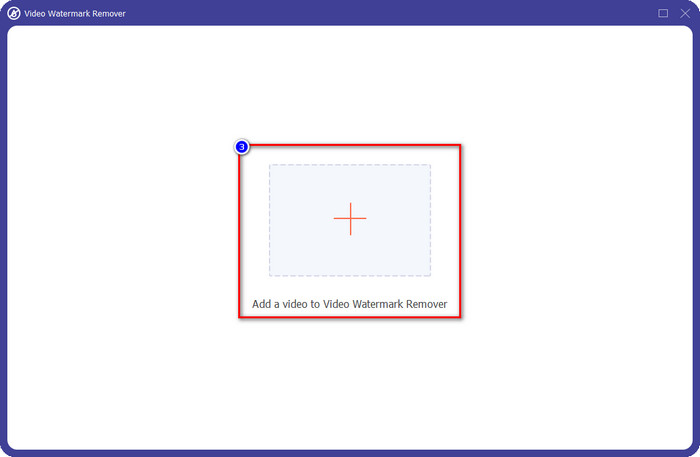
Paso 3. En la ventana que aparecerá en tu pantalla, haz clic en el icono + para subir el vídeo con marca de agua.
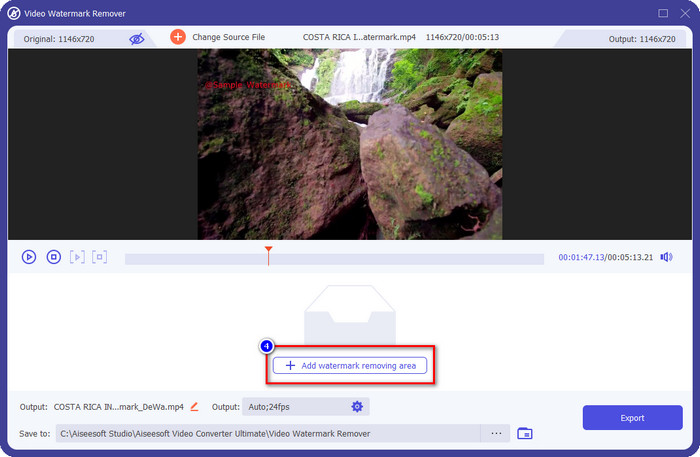
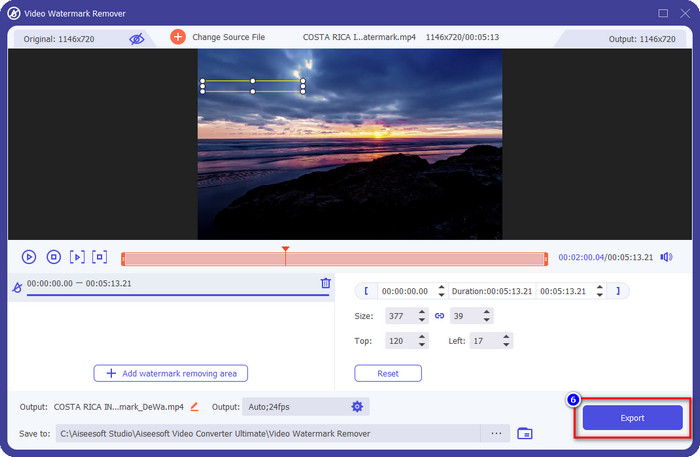
Paso 4. Para usar el eliminador de marca de agua, haz clic en Add Watermark Removing Area.
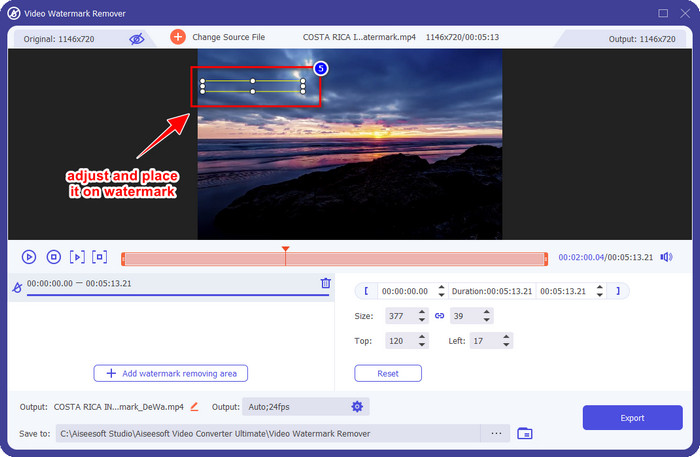
Paso 5. Coloca el cuadro de selección en la zona donde está la marca de agua y asegúrate de cubrirla por completo para que, cuando exportes el vídeo, no veas la marca de agua y puedas disfrutar viéndolo.
Paso 6. Ahora que la marca de agua está cubierta, haz clic en el botón Export para guardar el vídeo sin la marca de agua.
Kapwing

Una de las mejores formas de eliminar la marca de agua del editor de vídeo gratuito VSDC es usando Kapwing.com. Este editor de marcas de agua te permite eliminar rápidamente la marca de agua existente en el vídeo para que se vea increíble. Aunque no seas un profesional realizando esta tarea, no tienes de qué preocuparte si eliges esta herramienta gracias a su interfaz intuitiva y completa. Aprender a usarla es muy rápido. Es una de las mejores opciones, pero tiene algunos inconvenientes; por ejemplo, la versión gratuita no puede exportar vídeos de más de 60 minutos, es limitada y necesitas iniciar sesión para eliminar la marca de agua de Kapwing cuando exportas.
Paso 1. Abre la herramienta web y sube el archivo arrastrándolo y soltándolo aquí.
Paso 2. Después de subir el archivo, ve a elementos y haz clic en la forma que quieras de las que están disponibles aquí.
Paso 3. Mantén pulsada y coloca la forma sobre la marca de agua. Recuerda que este método no funciona bien si el vídeo tiene muchos colores; solo funciona si la zona del vídeo utiliza una paleta de un solo color.
Paso 4. Haz clic en Export Video y luego en Export MP4 para guardar el resultado final.
Relacionado:
Cómo eliminar las marcas de agua de Photobucket
Cómo eliminar la marca de agua en un GIF
Parte 3. Preguntas frecuentes sobre ¿VSDC Free Video Editor tiene una marca de agua?
¿Puedo exportar un vídeo 4K en VSDC?
Sí, esta herramienta puede exportar videos en resolución 4k si lo desea. Sin embargo, el proceso lleva más tiempo que las otras resoluciones de video, como 1080 y 720. Aunque la renderización llevará tanto tiempo, la herramienta aún puede producir una calidad de video de ultra alta definición como 4k si es necesario.
¿Cómo eliminar la marca de agua en VSDC?
Descargue la herramienta, ejecútela para continuar, haga clic en Agregar objeto y, debajo, haga clic en Video. Abra el filtro de video; luego se mostrarán las opciones; haga clic en Filtros; haga clic en Quitar logotipo. Con DeLogo, ahora puede cubrir la marca de agua del video en VSDC. Solo funciona con una única versión recién actualizada de la herramienta; si no puede encontrarlo, debe actualizar lo que está usando descargando la última versión.
¿Es VSDC el mejor editor de vídeo para usar?
No es la mejor, pero podemos considerarla una herramienta que debes probar, ya que proporciona funciones de edición básicas que podrías necesitar para hacer un video impresionante. Aunque aprender a usarlo es complicado, otros usuarios tienden a dedicar tiempo a aprender este software en lugar de editarlo. Incluso si no está entre los 10 mejores editores de video, todavía se considera una gran herramienta para su propósito de edición.
Conclusión
Para eliminar la marca de agua de VSDC, necesitarás un eliminador de marcas de agua fiable, como los dos programas mencionados en este artículo. Con los pasos indicados para cada uno, puedes elegir cuál crees que se ajusta mejor a tus necesidades y que te será más útil para quitar la marca de agua del vídeo que tengas. Pero si quieres un software multipropósito que puedas usar para eliminar y añadir marcas de agua, editar vídeo, convertir y hacer mucho más, debes elegir FVC Video Converter Ultimate. ¿Por qué? Porque es, sencillamente, el mejor software todo en uno que necesitarás en tu ordenador. ¿Te ha resultado útil la lectura de este artículo? Si es así, puedes darnos cinco estrellas abajo si estás satisfecho con este contenido.
-
 Guía sobre qué es una marca de agua en una foto [Actualizado 2022]
 ¿Qué es una marca de agua en una foto? ¿Necesitamos agregar uno? ¿Cómo podemos eliminarlo? Todo lo que necesitará está aquí, así que siga leyendo este blog.
-
 Cómo quitar la marca de agua de Wondershare DVD Creator fácilmente
 Este artículo cubre información sobre cómo eliminar la marca de agua de Wondershare DVD Creator. Para obtener toda la información que necesita, es imprescindible leer esto.
-
 Elimine fácilmente la marca de agua de PDF con pasos simples
 Elimine Watermark de PDF siguiendo estos sencillos pasos. Aprenda a eliminar fácilmente las marcas de agua de su archivo PDF con estas increíbles herramientas.
