


 Video Converter Ultimate
 Grabador de pantalla
 Reparación de vídeo
 Descarga segura
Cómo despixelar rápidamente una imagen con las 3 mejores soluciones para usar
Despixelar una imagen es la solución que necesitas para darle un lavado de cara a una imagen que ha resultado pixelada o si tu imagen aparece como un mapa de bits con pequeños cuadrados. Muchos usuarios piensan que es un engorro modificar, ajustar, cambiar y mejorar la imagen; siendo sinceros, lo es, pero eso quedó en el pasado. Con la tecnología avanzada a la que tenemos acceso, esta tarea se resuelve fácilmente cuando utilizas la herramienta adecuada.
¿No tiene la herramienta adecuada para eliminar la pixelación de su foto? Afortunadamente, este artículo le brindará los tres mejores programas que encontramos que podrían ayudarlo a editar la pixelación de la foto y un tutorial sobre cada uno para resolver el problema.

Parte 1. Cómo despixelar una imagen en línea con el editor de fotos Best Choice [Recomendado]
FVC Free Image Upscaler es una herramienta online totalmente automatizada que puedes usar para despixelar imágenes gratis por Internet. Puedes abrirla en cualquier navegador web que tengas a mano: no hace falta descargar ningún lanzador para iniciarla, así que puedes usarla de inmediato en cuanto accedas. Aunque este software está disponible en la web, su potencia y rendimiento a la hora de eliminar la pixelación están a la altura de los editores de imágenes más profesionales, tanto online como de escritorio. Quizá pienses que tendrás problemas para utilizar esta herramienta, pero no será así. ¿Aún no estás convencido? En ese caso, puedes leer o seguir el siguiente tutorial para obtener una guía paso a paso sobre cómo usarla fácilmente.
Paso 1. Puedes acceder a esta herramienta web desde cualquier navegador que tengas en tu dispositivo buscando su nombre o haciendo clic en este enlace para abrir su página principal.
Paso 2. Una vez en la herramienta online, haz clic en Add Image para subir la imagen pixelada. Aparecerá una carpeta en tu pantalla; busca la imagen guardada en tu disco local y, a continuación, pulsa Open para cargarla.
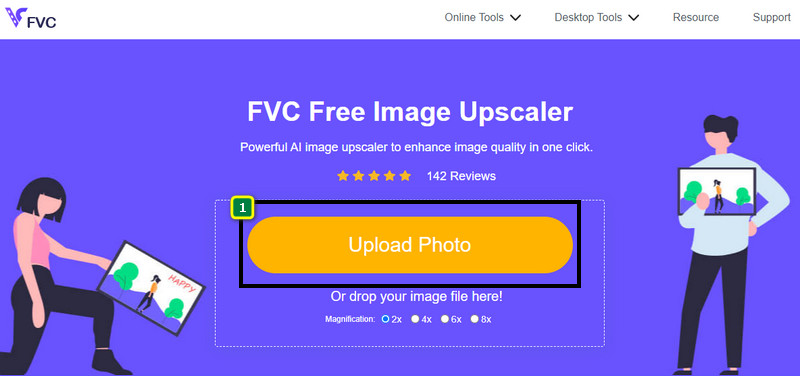
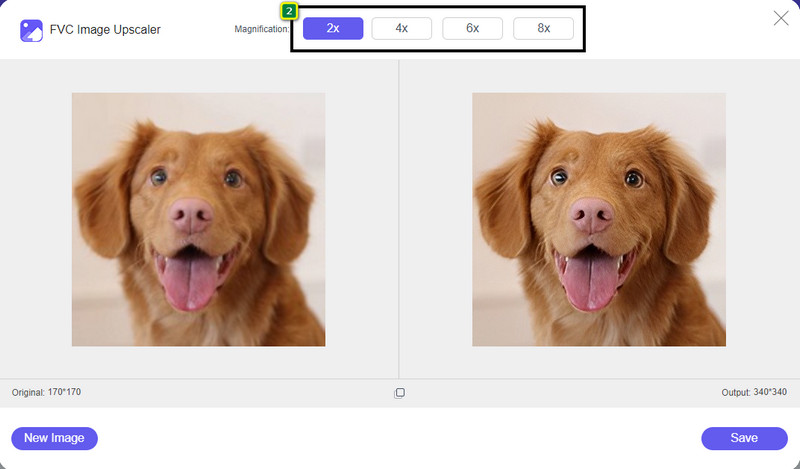
Paso 3. Después, elige la opción de aumento que quieras aplicar a tu imagen para suavizar su aspecto y que deje de verse como un mapa de bits lleno de pequeños cuadrados.
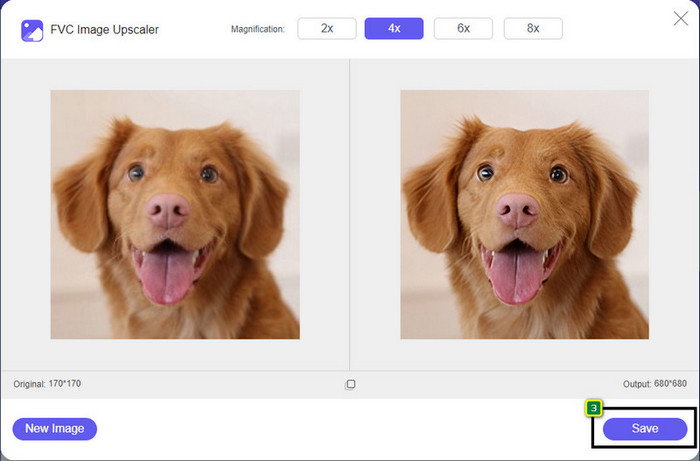
Paso 4. Así de fácil: haz clic en Save para descargar en tu disco local la versión sin pixelar.
Parte 2. Cómo despixelar una imagen sin conexión usando 2 formas en Windows y Mac [Fácil]
Pixbim - Despixelar fotos en Windows
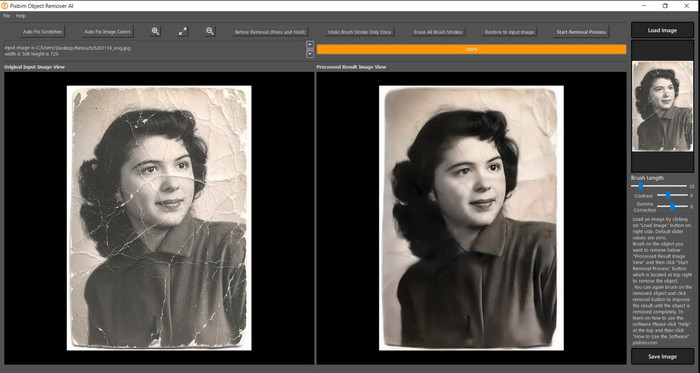
Pixbim es uno de los despixeladores de imágenes más potentes con soporte de IA que puedes descargar en tu ordenador con Windows para solucionar este problema. Este editor merece ser mencionado en este artículo porque corrige imágenes pixeladas de forma rápida y eficaz. Gracias a él, la IA ajusta los parámetros por ti para que no tengas complicaciones al usar el software. Debido a sus funciones y características, debes comprar una clave de licencia para seguir utilizándolo después de la prueba gratuita. Puede resultar caro para muchos usuarios que lo quieren en su PC.
Paso 1. Una vez que hayas descargado el software, tienes que iniciarlo para poder continuar con el siguiente paso.
Paso 2. Pulsa Load Image para añadir aquí la imagen pixelada que quieres mejorar.
Paso 3. Después de eso, ajusta los parámetros arrastrando los sliders según el valor que quieras conseguir.
Paso 4. Cuando termines de ajustar la imagen, guarda el resultado para exportarlo.
Editor de fotos Movavi [Windows y Mac]
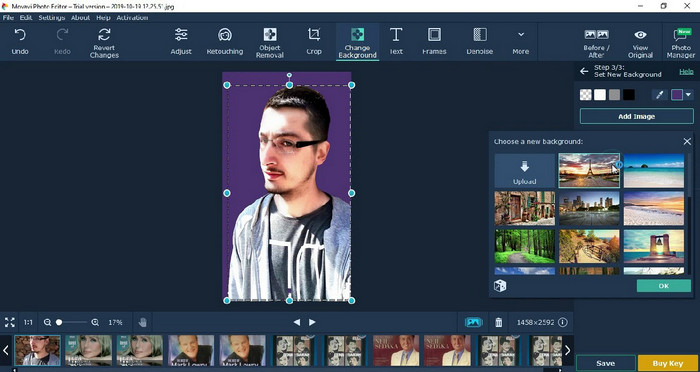
Muchos usuarios ya han probado Movavi Photo Editor por su versatilidad a la hora de editar imágenes. Al igual que Pixbim, puede restaurar los píxeles perdidos de la imagen gracias a las redes neuronales de su IA. Con este editor a tu disposición, puedes realizar ediciones básicas y avanzadas del aspecto, como recortar, girar, añadir filtros, corregir píxeles y mucho más. Sin embargo, no podrás disfrutar de todas estas funciones si no compras la versión Premium para tu ordenador.
Tiene un precio casi similar al Pixbim, que es bastante caro para muchos. Pero si tiene un presupuesto para comprar un editor, este podría ser el que necesita. Aprende a despixelar imágenes con esta aplicación siguiendo los pasos.
Paso 1. Descarga la aplicación en tu ordenador con Windows o macOS.
Paso 2. Inicia el software y luego sube aquí la foto que quieres despixelar.
Paso 3. Ahora que has subido la imagen, haz clic en Magic Enhance para que la IA la modifique automáticamente.
Paso 4. Exporta la imagen y disfruta del resultado.
Parte 3. Preguntas frecuentes sobre cómo upixelar una imagen
¿Por qué hay una marca de agua en la imagen sin pixelar exportada?
Cuando está utilizando una versión de prueba gratuita de la aplicación, existe la posibilidad de que deje una marca de agua cuando se exporte. Por lo tanto, si desea exportar una imagen sin la marca de agua, puede comprar la licencia de la aplicación o usar el Free Image Upscaler de FVC, ya que no dejará una marca de agua en la imagen exportada.
¿Cuál es la diferencia entre borroso y pixelado?
Muchos artículos han demostrado que el borroso y el pixelado no son lo mismo debido a algunos factores. Las imágenes borrosas son la razón por la que captura un movimiento de alta velocidad o toma una foto con una cámara temblorosa. Mientras está pixelada, cuando amplía una instantánea, comenzará una pixelación y verá un mapa de bits con un pequeño cuadrado.
¿Cuál es el factor que hace que la imagen se pixele?
Algunas razones convierten las imágenes en píxeles; una causa común es cuando amplía una imagen de trama. Los formatos de trama, como PNG, JPG, GIF y más, se componen de pequeños cuadrados que construyen la apariencia del objeto almacenado en estos contenedores. Por lo general, cuando amplía la imagen, verá que hay cuadrados, conocidos como píxeles, que contienen datos de color que se presentan visualmente. Puede ser un problema para muchos editores, especialmente cuando ocurre la pixelación.
¿Cómo puedo arreglar el ruido de la imagen?
Es otro problema habitual que puedes encontrarte en las fotos que haces, y la solución que podrías necesitar está en este artículo. Haz clic en este enlace para leer fácilmente, resolver y aprender cómo eliminar el ruido de una imagen.
Conclusión
Así de sencillo, ahora puedes despixelar una imagen con la ayuda de los mejores editores de fotos que puedes descargar o usar en la web. ¡Caso resuelto! Así que, si alguna vez te enfrentas a un problema de pixelación, puedes recurrir a este artículo para ayudarte. Aquí tienes la mejor herramienta que podrías necesitar y está lista para ayudarte, como FVC Free Image Upscaler. Lo mejor es corregir la pixelación del aspecto de la imagen para que no resulte tan evidente a la vista. Di adiós a la pixelación cuando uses este editor de imágenes online.
-
 7 Image Upscaler que puede usar para realzar y mejorar cada imagen [2022]
 ¿Necesita el escalador de imágenes? Afortunadamente, este artículo cubre el mejor software al que puede acceder y descargar en su escritorio.
-
 5 potenciadores de resolución de imagen que debe usar este 2022 [Últimas selecciones]
 ¿No sabe qué potenciador de resolución de imagen debe usar? Lea este artículo mientras revisamos cinco herramientas para usar y mejorar la resolución de las imágenes.
-
 4 aplicaciones para aumentar la resolución de imagen en sus dispositivos móviles [La mejor opción]
 Necesitará aplicaciones para aumentar la resolución de su foto si desea lograr 1080p, 4k o similar. ¡Con la lista a continuación puedes hacerlo fácilmente!
