


 Video Converter Ultimate
 Grabador de pantalla
 Reparación de vídeo
 Descarga segura
Una revisión completa de Waifu2x y las mejores alternativas que debe usar hoy
Cuando necesitas una herramienta para reducir el ruido de las imágenes y redimensionar a la vez, es posible que te hayas encontrado con Waifu2x. Con ella puedes solucionar los problemas más habituales que sueles tener en tus imágenes sin que aparezcan píxeles marcados ni desenfoques. Sin embargo, existen varias herramientas que ofrecen las mismas funciones que encuentras en Waifu2x. Quizá te preguntes si deberías usarla para cambiar el tamaño y reducir el ruido de las imágenes. En esta publicación vamos a analizar la aplicación por ti y también la alternativa de la que hablamos, capaz de ofrecerte lo mismo que Waifu2x.

Parte 1. Revisión de Waifu2x que necesita saber y aprender a usarla
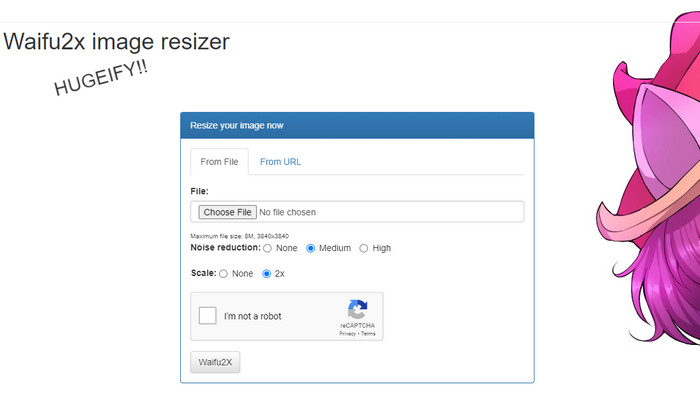
Waifu2x es una solución online para fotos a la que puedes acceder desde la web para redimensionar y reducir el ruido de las imágenes. Con esta herramienta puedes aumentar el tamaño de cada imagen que subas aquí hasta el doble de su resolución. Aunque por su nombre pueda no parecer un programa para aumentar la resolución y reducir el ruido, está listo para ayudarte en esa tarea. Cuando busques su nombre verás numerosos resultados, pero todos hacen lo mismo, ya sea en línea u offline.
“Curiosidad: El nombre proviene del término japonés waifu, que significa esposa. Normalmente se ve o se usa como comentario cuando una mujer es atractiva; la llaman waifu”.
Pros
- Puede experimentar la funcionalidad completa de esta herramienta web de forma gratuita una vez que acceda a ella en su navegador web.
- No es necesario descargar o instalar el software antes de poder usarlo.
- Admite formatos populares como PNG y JPG.
- Puede ampliar las imágenes hasta 2x.
- Puede reducir el ruido en su imagen configurándolo como medio o alto.
Contras
- No es compatible con una amplia variedad de formatos de carga.
- Hay un reCAPTCHA en cada proceso.
- Selección y características limitadas.
Pasos sobre cómo usar el Waifu2x:
Después de elegir qué sitio web debemos usar para los pasos, aquí está la versión que hemos seleccionado para usar waifu2x.booru como ejemplo. Entonces, si desea comenzar a usar el redimensionador de imágenes Waifu2x, puede seguir el tutorial que agregamos a continuación para conocerlo mejor.
Paso 1. Con tu navegador web, copia el enlace que añadimos para acceder a la herramienta online.
Paso 2. Pulsa en Choose File para subir el PNG o JPG cuyo tamaño quieras modificar o al que quieras reducir el ruido.
Paso 3. Puedes elegir entre tres opciones de reducción de ruido: Ninguno, Medio o Alto.
Después de seleccionarla, puedes empezar a escalar la imagen al mismo tiempo haciendo clic en 2x. Marca la casilla del captcha y pasa al último paso.
Paso 4. Pulsa en Waifu2x para mejorar la imagen según los ajustes que hayas activado antes.
Parte 2. La mejor alternativa de Waifu2x que puede usar de forma gratuita [Servicio web]
Nuestra elección como alternativa a Waifu2x no es otra que FVC Free Image Upscaler, porque tiene la misma funcionalidad que la herramienta que hemos analizado; sin embargo, esta permite ampliar la imagen hasta 8 veces más que la primera. Esta herramienta online es muy popular porque resulta muy eficiente a la hora de ampliar la imagen en función del algoritmo que detecta la IA. Aunque no dispone de una opción específica para activar la eliminación de ruido, esta se aplica automáticamente cuando procesas la imagen.
Además de eso, esta herramienta admite más formatos que Waifu2x; puede cargar PNG, JPG, GIF, BMP, SVG y más aquí, todo al mismo tiempo para mejorarlos. Además, tiene un sitio web de colores más vibrantes que el primero, lo que atrae a los usuarios. Así que, si quieres probar a usar este escalador, puedes seguir el tutorial paso a paso que incluimos a continuación.
Paso 1. Puedes hacer clic en este enlace para abrir la página oficial de este reescalador de imágenes, una conocida alternativa a la primera herramienta mencionada.
Paso 2. Haz clic en el botón Upload para añadir la imagen que quieres ampliar, redimensionar, reducirle el ruido y dejar que la IA edite.
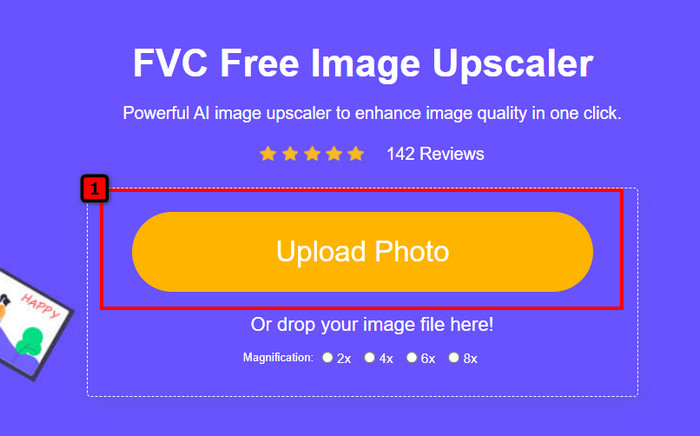
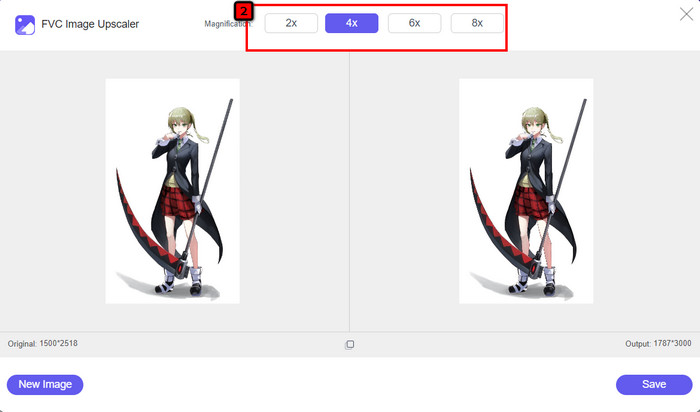
Paso 3. Después de subir la foto, pulsa sobre el nivel de Aumento que quieras aplicar a la imagen que has añadido. Puedes probarlos todos para ver cuál se adapta mejor a tu imagen.
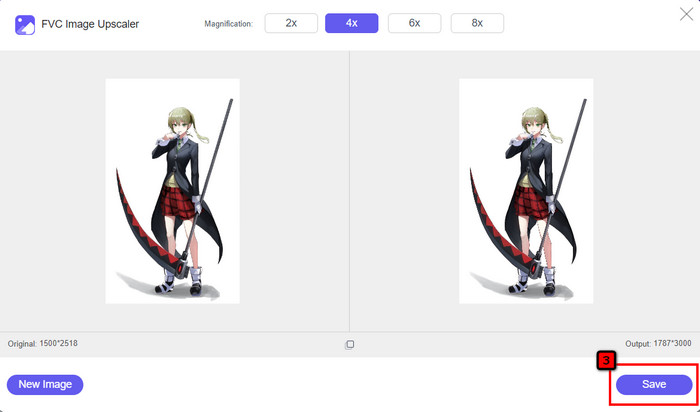
Paso 4. Por último, cuando hayas seleccionado la imagen que quieres editar, pulsa en Save y la descarga comenzará automáticamente.
Como cualquier otro editor de imágenes basado en la web, puedes utilizarlo en línea y se beneficia de la tecnología de IA. Esta herramienta de mejora de píxeles también puede corregir los píxeles que faltan en la imagen, de modo que los detalles queden aún más definidos de lo habitual. Es fácil afirmar que se trata de la alternativa perfecta a Waifu2x, ya que ofrece resultados de alta calidad en cuestión de segundos.
Parte 3. Preguntas frecuentes sobre la revisión de Waifu2x
¿Es seguro acceder a Waifu2x?
El sitio web que revisamos anteriormente, waifu2x.booru, es de acceso seguro y no tiene anuncios en la interfaz web. Podemos asegurarle que tendrá un proceso fluido de mejora o reducción del ruido con este editor. Sin embargo, hay otros sitios web, waifu2x, con diferentes extensiones, algunos no son de acceso seguro, por lo que es mejor que no los uses para evitar problemas.
¿Puedo convertir la foto en una obra de arte en Waifu2x?
Sí, Waifu2x es capaz de convertir fácilmente la fotografía en una obra de arte. Sin embargo, su sitio web que puede convertir fotografías en obras de arte no es seguro para acceder. Por lo tanto, le recomendamos que no procese ningún archivo de imagen aquí porque la mayoría de las imágenes contienen metadatos que el sitio web podría robarle. Pero si quieres intentar usarlo, es mejor que lo uses bajo tu propio riesgo.
¿Puedo descargar Waifu2x en mi PC?
Waifu2x tiene una versión sin conexión que puedes descargar en tu PC si eres usuario de Windows, pero si no, es triste que no ofrezca otra versión. Si desea usar este editor de imágenes en su dispositivo, intente usar la versión en línea, ya que es accesible en diferentes navegadores web.
Conclusión
Es hora de mejorar y reducir el ruido de la imagen; entonces, no puede equivocarse al elegir Waifu2x, ya que es la mejor solución. De la información que incluimos, podemos decir que este software es confiable y digno de la confianza de diferentes usuarios que desean hacer una edición rápida en su imagen. Sin embargo, la mejora es solo 2x; ¿Qué pasa si quieres ir más alto? Entonces, ¿qué debes hacer? En ese caso, es mejor que seleccione la alternativa que agregamos a esta aplicación para hacer la mayor mejora que pueda obtener de forma gratuita.
Sigue el tutorial que añadimos al lado para que puedas mejorar tu imagen de manera fácil y más efectiva que cualquier editor de imágenes que puedas usar.
-
 Cómo hacer más nítida la imagen en línea y sin conexión con 4 formas sencillas
 Hay muchos métodos que puede utilizar si desea mejorar la nitidez de una imagen. Discutiremos a continuación las mejores y más fáciles formas de mejorar la nitidez de las imágenes en línea y fuera de línea.
-
 Cómo cambiar el tamaño de la imagen: Adobe Resize Image [en línea y sin conexión]
 Si está buscando una imagen de cambio de tamaño de Adobe, entonces tenemos la solución para usted. Vea esta publicación a fondo para aprender cómo cambiar el tamaño de las imágenes usando Adobe en su PC.
-
 Cómo cambiar el tamaño de una foto para Facebook [Pasos rápidos y sencillos]
 Si tiene problemas para cargar una imagen de gran tamaño en Facebook, tenemos una solución para usted. Termina este artículo para aprender cómo cambiar el tamaño de las fotos para Facebook.
